Apothic Attributes Categories
- By
Adds a customizable category panel with scrollbar and icon support to the Apothic Attributes GUI.
Description
Apothic Attributes Categories
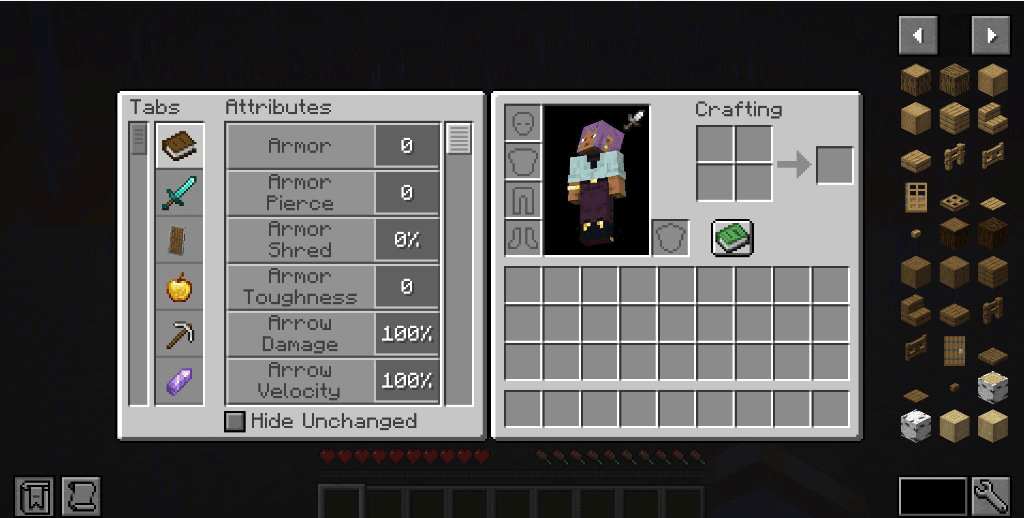
A client-side addon for Apothic Attributes that extends the Attributes GUI with a seamlessly integrated category sidebar, native-style scrollbar, custom category definitions, and full compatibility with Apothic Attributes Whitelist.
Features
- Integrated Category Panel: Extends the left side of the Apothic Attributes GUI seamlessly with a matching Minecraft panel frame, title header, and 6-slot icon list.
- Scrollbar & Mouse Wheel Support: Includes a native-style draggable scrollbar (plus track click and mouse wheel scrolling) when more than 6 categories are visible.
- Built-in Default Categories: Comes preconfigured with 7 categories — All, Combat, Defense, Survival, Mobility & Mining, Magic & Elements, and Other — covering vanilla, Apothic Attributes, and popular magic/RPG mods.
- Hot-Reloadable Custom Categories: Add, remove, or reorder categories with custom icons (item IDs, resource pack textures, or local PNG files) without restarting the game.
- Zero-Conflict Compatibility: Designed to run smoothly alongside Apothic Attributes Whitelist — whitelist/blacklist filters apply first and category counts/lists update automatically.
Configuration Guide
1. Custom Categories (config/apothic_attributes_categories.json)
Generated automatically the first time you open the Attributes GUI. Changes reload automatically the next time you open the panel — no restart required.
{
  "categories": [
    {
      "id": "elemental",
      "name": "Elemental Damage",
      "icon": "minecraft:blaze_powder",
      "iconTexture": "minecraft:textures/mob_effect/fire_resistance.png",
      "attributes": [
        "apothic_attributes:fire_damage",
        "apothic_attributes:cold_damage"
      ],
      "namespaces": [
        "irons_spellbooks"
      ],
      "keywords": [
        "elemental",
        "spell"
      ]
    }
  ]
}id: Unique category identifier (lowercase). Reserved IDs:all(All attributes) andother(fallback for unmatched attributes).name: Display title. Use plain text (e.g."Elemental Damage") or"lang:<translation_key>"for localized names.icon: Item ID used as the tab icon (e.g."minecraft:diamond_sword"). Also acts as the fallback ificonTextureis empty or missing.iconTexture(optional, takes priority overicon): Custom 16×16 texture path:- Resource/mod texture path: e.g.
"minecraft:textures/mob_effect/strength.png"or"kubejs:textures/gui/my_icon.png". - Local PNG file: place your PNG in
config/apothic_attributes_categories_icons/and reference it as"file:my_icon.png".
- Resource/mod texture path: e.g.
attributes/namespaces/keywords: Matching priority is exactattributes→ modnamespaces→ attribute pathkeywords→other.
2. Client Options (config/apothic_attributes_categories-client.toml)
enabled(defaulttrue): Toggle the left-side category panel.hideEmptyCategories(defaulttrue): Hide categories that currently have no visible attributes (allis always shown).rememberSelectedCategory(defaulttrue): Remember the last selected category when reopening the panel.showCountInTooltip(defaulttrue): Display the visible attribute count in each category tooltip.
License & Source
- License: All Rights Reserved
- Source Code: https://github.com/hp3081925122/Apothic-Attributes-Categories
Apothic Attributes Categories(神化属性分类)
一款面向 Apothic Attributes(神化属性) 的客户端附属模组,在原版属性界面左侧无缝延展出一套原生风格的分类面板,内置滑块与滚轮支持、支持高度自定义分类与图标路径,并与 Apothic Attributes Whitelist 零冲突兼容。
功能特点
- 一体式向左延展面板:与神化属性原界面无缝衔接,配备一致的边框质感、左上角「分类」标题以及 6 格内凹图标列表,属性说明框正常显示在界面最上层不被遮挡。
- 原生滑块与滚轮支持:左侧提供与右侧风格一致的滚动条轨道与横纹滑块;当可见分类超过 6 个时自动激活,支持拖拽滑块、点击轨道跳转与鼠标滚轮滚动。
- 开箱即用的 7 个默认分类:内置「全部、攻击、防御、生命与生存、移动与采集、魔法与元素、其他」,自动适配原版、神化属性及主流魔法/RPG 模组属性。
- 支持自定义分类、贴图路径与热重载:无需重启游戏,改完配置重新打开属性界面即刻生效。
- 完美兼容 Apothic Attributes Whitelist:不覆盖原方法、不冲突注入点,白名单/黑名单过滤结果会自动同步到各分类数量与属性列表中。
配置文件写法
1. 自定义分类规则(config/apothic_attributes_categories.json)
首次打开属性面板时会自动生成,已包含全部 7 个默认分类。修改并保存后,重新打开属性面板即可自动热重载,无需重启游戏:
{
  "categories": [
    {
      "id": "elemental",
      "name": "元素伤害",
      "icon": "minecraft:blaze_powder",
      "iconTexture": "minecraft:textures/mob_effect/fire_resistance.png",
      "attributes": [
        "apothic_attributes:fire_damage",
        "apothic_attributes:cold_damage"
      ],
      "namespaces": [
        "irons_spellbooks"
      ],
      "keywords": [
        "elemental",
        "spell"
      ]
    }
  ]
}id:分类唯一 ID(小写英文/数字/下划线)。内置保留 ID:all(全部)与other(未匹配属性的兜底分类)。name:分类显示名称,可直接写中文/英文文本(如"元素伤害"),也可写"lang:翻译键"实现多语言切换。icon:物品 ID(如"minecraft:diamond_sword"),作为未配置iconTexture时的图标或兜底图标。iconTexture(可选,优先于icon):自定义 16×16 贴图路径,支持两种写法:- 资源包/模组贴图路径:例如
"minecraft:textures/mob_effect/strength.png"、"kubejs:textures/gui/my_icon.png"。 - 本地 PNG 图片路径:把 PNG 放进
config/apothic_attributes_categories_icons/目录,填"file:my_icon.png"即可直接加载(无需制作资源包)。
- 资源包/模组贴图路径:例如
attributes/namespaces/keywords:归类匹配优先级为 精确属性 ID(attributes)→ 模组命名空间(namespaces)→ 属性路径关键词(keywords)→other兜底。
2. 客户端开关配置(config/apothic_attributes_categories-client.toml)
enabled(默认true):是否启用左侧分类面板。hideEmptyCategories(默认true):是否隐藏当前没有可见属性的分类(「全部」始终显示)。rememberSelectedCategory(默认true):重新打开属性面板时是否记住上次选中的分类。showCountInTooltip(默认true):悬停分类图标时是否在提示中显示可见属性数量。
许可与源码
- 许可协议:All Rights Reserved
- 源码仓库:https://github.com/hp3081925122/Apothic-Attributes-Categories
Apothic Attributes Categories Team

Owner