Any Skins
(Fabric)
Wear any skin from a folder on your computer, with no account changes and no
uploading to websites. Friends with the mod see your skin too.
----------------------------------------------------------------
FEATURES
----------------------------------------------------------------
Pick a skin
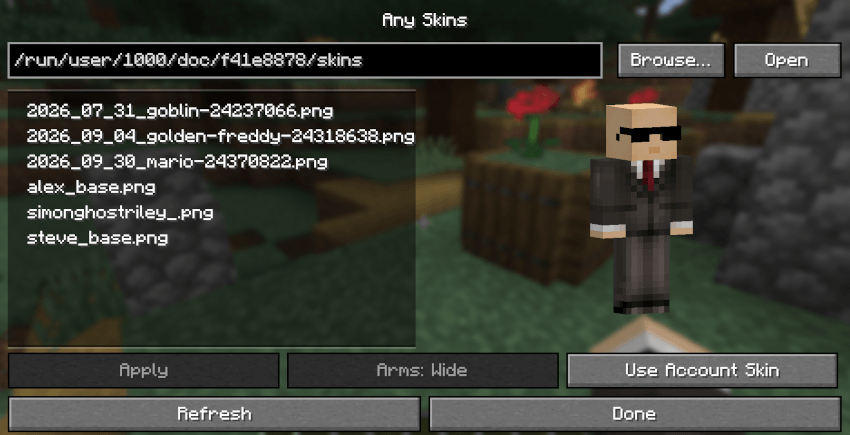
- Press K (rebindable under Controls > Any Skins) or type /anyskins.
- Drop .png skins into the skins folder (default: .minecraft/anyskins/).
- Open shows the folder in your file manager.
- Browse... picks another folder.
- Or type or paste a folder path.
- Click a skin to see it in 3D (drag to rotate). Double-click it or press
Apply to wear it.
- Arms switches between Wide (Steve) and Slim (Alex). It's guessed
automatically for each skin.
- Use Account Skin goes back to your normal skin.
Skin formats
- 64x64 skins, HD skins (128x128 and up) and old 64x32 skins (converted
automatically).
Sharing
- Players who also have Any Skins see each other's custom skins.
- Players without the mod see your normal account skin.
- Other players' skins are only kept in memory, never saved to disk, and
dropped when they leave.
----------------------------------------------------------------
COMMANDS
----------------------------------------------------------------
/anyskins Open the skin screen (same as the K key).
----------------------------------------------------------------
SETTINGS
----------------------------------------------------------------
Saved in config/anyskins.json: your skins folder, chosen skin and the arm style
of each skin.
All set from the skin screen.
----------------------------------------------------------------
HQ COMPATIBILITY
----------------------------------------------------------------
With HQ installed, an "Any Skins" button in the HQ list opens /anyskins.
Without HQ the mod works exactly the same.
----------------------------------------------------------------
COMPATIBILITY & NOTES
----------------------------------------------------------------
- Dedicated servers: put the jar in the server's mods folder so players can
see each other's skins.
----------------------------------------------------------------
CHANGELOG
----------------------------------------------------------------
1.0.1
- HQ support: an Any Skins button in the HQ list.
- Use Account Skin now clears the selection in the list, so it's clear no
custom skin is chosen.
- Removed the file name under the preview (it could overlap the Done button).
- Fixed the top of the Use Account Skin button not responding on small
screens (the 3D preview now fits above the buttons).
- Removed the "Applied" / "Using your account skin" messages: seeing the
skin change is enough. Problems (like a file that isn't a skin) still show.
1.0.0
- First release.
Any Skins Team