Anvil Insight
- By
See exactly what your anvil is doing with detailed cost, enchantment, repair, and prior-work breakdowns.
Description
Anvil Insight
Anvil Insight makes Minecraft's anvil system easier to understand by showing exactly what is happening behind the scenes.
Ever wondered why an anvil operation suddenly costs so many levels? Why combining two enchanted items costs more than expected? Or why Minecraft simply tells you "Too Expensive!" without explaining why?
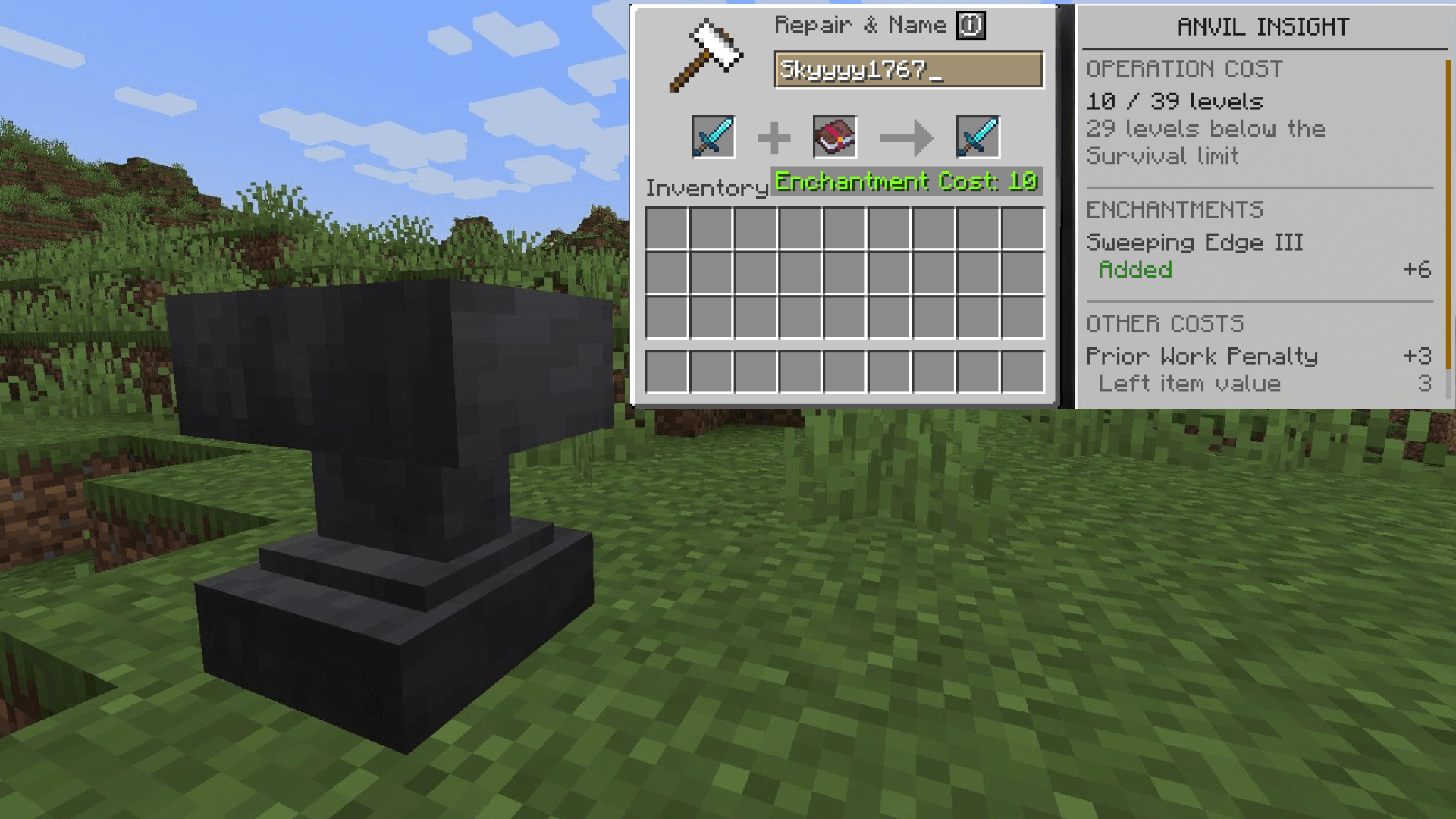
Anvil Insight adds a small information button directly to the vanilla Anvil screen that breaks down the current operation without changing how anvils actually work.
🔍 Understand Your Anvil Operation
Click the information button beside Repair & Name to open the Anvil Insight panel.
The panel analyzes the operation currently in the anvil and explains where its XP cost is coming from.
You can see:
- Exact XP level cost
- Enchantments being added or upgraded
- Individual enchantment costs
- Prior-work penalties
- Material and durability repairs
- Incompatible enchantments
- Input-specific cost contributions
- How close the operation is to the vanilla anvil cost limit
Instead of only seeing a final number, you can see why that number exists.
✨ Enchantment Costs
When combining enchanted items or books, Anvil Insight shows which enchantments are actually affecting the operation.
See:
- Enchantments being added
- Enchantments being upgraded
- Individual enchantment cost contributions
- Incompatible enchantments
- Enchantment conflicts
This makes it much easier to understand why some combinations are considerably more expensive than others.
🔨 Prior-Work Penalties
Minecraft keeps track of how many times an item has previously been worked in an anvil.
That hidden history can dramatically increase the cost of future operations.
Anvil Insight exposes these prior-work penalties and shows how much each input is contributing to the operation.
No more wondering why two seemingly similar items have completely different anvil costs.
🛠️ Repairs and Durability
Anvil Insight also explains operations involving item repair.
When materials or another item are being used to restore durability, the panel can show how that repair contributes to the current operation.
This helps separate repair costs from enchantment costs and other penalties.
⚠️ Understand "Too Expensive!"
Minecraft normally gives you very little information when an anvil operation reaches its cost limit.
Anvil Insight provides additional context for Too Expensive! operations so you can understand what pushed the operation over the limit.
You can also see how close valid operations are to reaching the vanilla anvil cost limit.
Creative mode and other vanilla exceptions are handled appropriately.
🎨 Built Into the Vanilla Anvil
Anvil Insight doesn't replace the Anvil screen with an entirely separate interface.
Instead, it integrates directly with Minecraft's existing anvil screen through a small information button beside Repair & Name.
Open the panel when you want more information and continue using the anvil normally when you don't.
The goal is for Anvil Insight to feel like information that could have been part of the vanilla Anvil interface all along.
⚙️ Vanilla Mechanics Stay Vanilla
Anvil Insight is an informational utility.
It does not:
- Change XP costs
- Remove or increase the anvil cost limit
- Modify enchantments
- Change enchantment compatibility
- Alter repair behavior
- Remove prior-work penalties
- Change Creative mode behavior
- Modify the result of an anvil operation
Anvil Insight simply exposes and explains information Minecraft already calculates behind the scenes.
🖥️ Completely Client-Side
Anvil Insight is entirely client-side.
You can use it on multiplayer servers without the server having Anvil Insight installed.
No server-side installation or configuration is required.
💡 Why Anvil Insight?
Minecraft's anvil system contains several mechanics that aren't clearly explained to the player.
Enchantment costs, prior-work penalties, repair costs, incompatibilities, and the Too Expensive! limit can all affect an operation, while the vanilla interface generally shows you only the final level cost.
Anvil Insight turns those hidden calculations into useful information while leaving the underlying vanilla mechanics completely untouched.
📦 Requirements
- Minecraft 26.2
- Fabric Loader 0.19.5+
- Fabric API 0.159.0+26.2
- Java 25+
🔗 Compatibility
Anvil Insight should work alongside most other Fabric mods.
Compatibility is not guaranteed with mods that completely replace or substantially restructure the vanilla Anvil screen.
The Anvil Insight Team