AegisArmory
- By
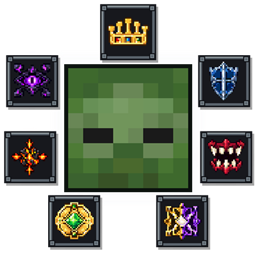
Aegis Armory adds 17 highly detailed armor sets, each featuring a distinct combat style, passive effects, and a unique active ability.

AEGIS ARMORY / 2.8.0
17 sets. Choose your kind of power.
Deploy a minigun. Command a royal retinue. Wield a massive hammer. Build Aura and turn a gesture into a strike. Every set brings a distinct model, combat role, signature ability, animations, effects, sounds, and HUD.
Minecraft Java 1.21.1 · NeoForge 21.1.235+
Survival progression · Single-player & multiplayer · English / Russian
QUICK START
Craft and equip all four matching pieces, check your resource meter, then press or hold G as instructed. Some abilities need a full charge. The key can be rebound in Controls.
Choose your armor
Browse by combat style. Open a set to see its model, controls, stats, and gameplay GIF. Close it again to keep the catalog compact.
Numbers identify each set in the collection. PRIME and the reworked Juggernaut appear first. Stats use the default 2.8.0 balance; 2 damage points equal 1 heart.
NEW & REBUILT
Start with the 2.8.0 spotlight.
PRIME / NEW
Aura charge, killstreaks & radiant strikes
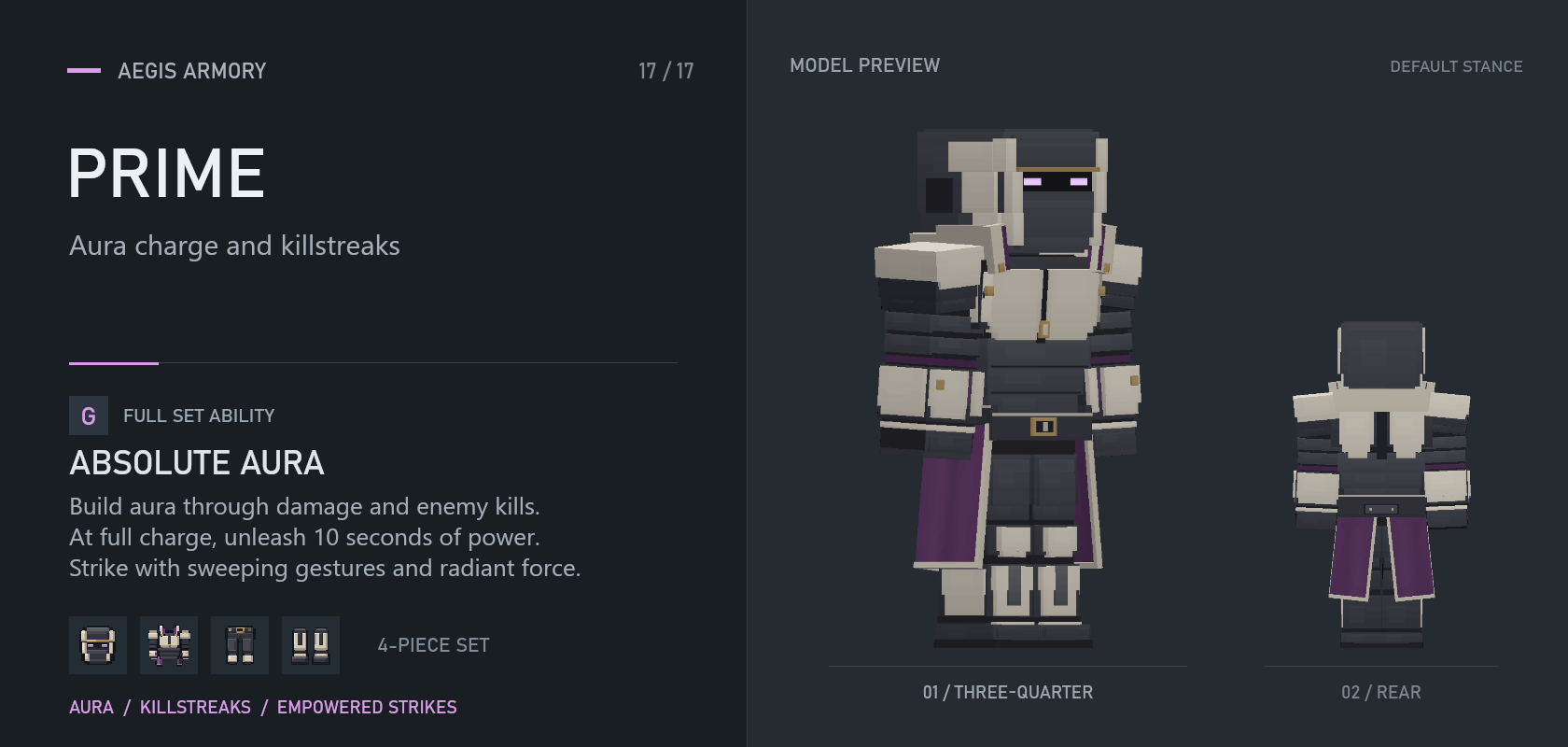
Farm aura. Make an entrance. Let the gesture do the talking.
Build power while fighting in the full set. Each confirmed kill adds to your streak, with layered skull badges, a sharp kill sound, and increasingly emphatic announcer calls. When the meter turns rainbow, your moment has arrived.
| AURA CAPACITY | ABSOLUTE AURA | STRIKE REACH |
|---|---|---|
| 100% | 10 seconds | 5 blocks |
Absolute Aura
- Build charge: gain 0.25% Aura per health point actually removed from an eligible enemy, plus 8% per credited kill. Overkill does not count. Animals, allies, owned creatures, and players do not provide Aura.
- Keep the streak: defeat another eligible enemy within 5 seconds to continue the chain. Skull badges and voice calls celebrate the streak without multiplying damage or charge gain.
- Activate: press
Gat 100% Aura to consume the meter and enter Absolute Aura for 10 seconds. The character gains a rainbow outline and dedicated combat effects. - Strike: use
LMBfor a sequence of three hand gestures with 5-block reach. A hit deals 24 base damage to the main target and 7.2 to up to three nearby eligible enemies. Strikes are spaced 0.8 seconds apart; walls block contact. - Recover: Aura does not refill during the active ability. Press
Gagain to end it early. Removing any piece of the set or dying clears accumulated charge. - Effortless presence: after 20 seconds idle, PRIME rises into a relaxed floating pose and draws in rainbow particles. Once settled, it gains 1% Aura every 3 seconds. Looking around preserves the pose; this is a visual idle animation, not free flight.
Crafting identity: upgrade matching Netherite pieces using an AEGIS Core and Ascendant Prism. PRIME includes its own armor icons, equip sound, and five advancements covering crafting, assembly, full charge, activation, and a triple kill.
In action — Idle presence and aura combat

JUGGERNAUT / REBUILT
Minigun fire & stabilization
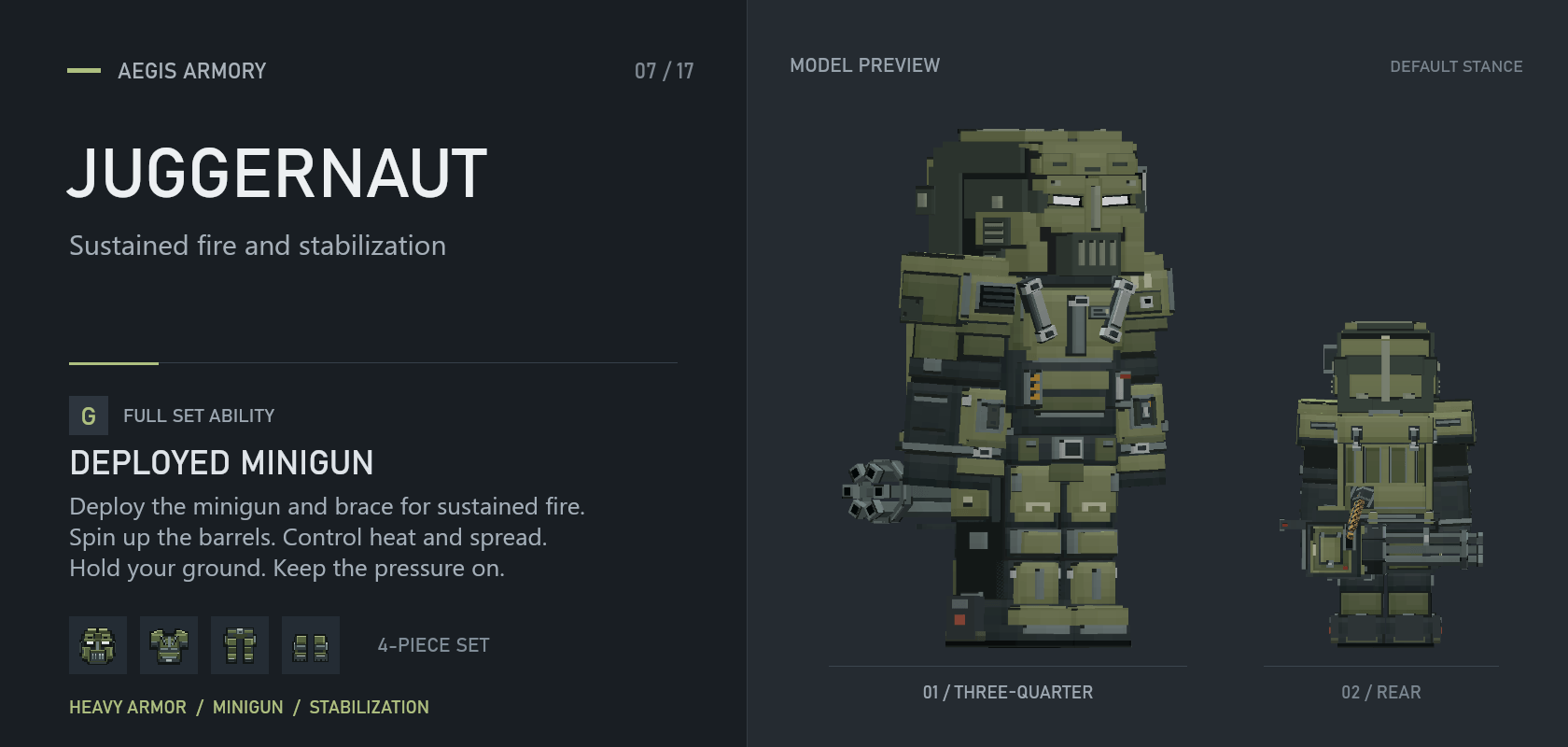
Trade mobility for a stable wall of fire.
Deploy the integrated minigun, brace on the ground, and manage Heat. Holding your position improves accuracy and frontal protection, but overheating leaves a long opening.
Rebuilt for 2.8.0: a new armor silhouette, mask, backpack, minigun, and ammunition belt, with revised handling animations, mechanical deployment sounds, and casing impacts.
| WEAPON RANGE | FIRING RATE | SPIN-UP |
|---|---|---|
| 48 blocks | 10 shots / second | 3 seconds |
Deployed Minigun
- Controls:
Gdeploys or retracts. HoldLMBto spool and fire; holdRMBto pre-spool without firing. - Minigun: 3-second spin-up, 10 shots per second, 3 damage per shot, and 48-block range—up to 30 raw DPS after spin-up if shots connect.
- Stabilization: remain still on the ground while spooling or firing for 0.8 seconds to reduce spread and gain frontal protection.
- Heat: a cold weapon overheats after 15 seconds of continuous fire. Normal cooling begins 8 seconds after the last shot; overheating causes a 40-second lockout. Retraction has a 2-second redeploy cooldown.
In action — Sustained minigun fire

CLOSE COMBAT
Heavy blows, momentum, and fights up close.
MONOLITH
Summoned hammer & stone ridge

Call the hammer. Make the ground answer.
Dark steel, teal accents, broad shoulders, and tall horns frame a heavy two-handed fighting style. The hammer manifests at a distance, flies into your hands, and settles into a weighted grip. Custom movement, airborne poses, swings, impacts, and camera feedback carry its weight through both perspectives.
| NORMAL CUT | STONE RIDGE TRAVEL | RIDGE RECOVERY |
|---|---|---|
| 36 primary / 12 additional | Up to 8 blocks | 6 seconds |
Summoned Hammer
- Summon or dismiss: press
Gwith all four pieces equipped. The hammer is part of the ability and needs no inventory weapon. It remains wielded until dismissed or interrupted; it has no short timed combat window. - Cross-cuts:
LMBalternates broad two-handed swings. Each attack cycle takes 1.2 seconds, dealing 36 damage to the first successfully damaged target and 12 to additional targets crossed by the attack—about 30 / 10 raw DPS while chaining connected normal cuts. Hits follow the swing and respect visibility. - Stone ridge:
RMBdelivers a distinct heavy ground strike, raising an advancing line of irregular stone fragments for up to 8 blocks from the impact. The first successfully damaged target takes 54 damage, additional targets 27. The hammer and all fragments share one hit allowance per target for that attack. - Terrain matters: the ridge can follow supported ground one block higher or lower, stops at blocking walls and unsupported gaps, and cannot be projected across empty air. The raised fragments are temporary visual geometry; they do not destroy or replace real blocks.
- Recovery and control: ridge recovery lasts 6 seconds, starting when its windup commits. Normal cuts remain available between ground attacks. A recent input near the end of an action can queue the next attack; dismissing during a committed swing waits for its safe finish.
- Two hands, one weapon: ordinary item use is suspended while wielding the hammer. The HUD shows summoning, attack recovery, queued input, and ridge readiness. Dedicated swing, contact, and terrain sounds distinguish a hit from a miss.
FORGING MONOLITH
Craft Oathstone, then upgrade each matching Netherite armor piece at a smithing table with an AEGIS Core and an Oathstone. The hammer is summoned by the complete set; it is not a separate craftable inventory item. Component, assembly, and combat advancements guide the progression.
In action — Summoned Hammer

TITAN
Powered chassis, grabs & slams

Become the heavy chassis. Put every impact to work.
The ordinary armor and its three-block powered form share a new mechanical design and yellow eyes. Deployment reveals a darker, heavier chassis with deliberate footfalls, articulated combat movements, and a dedicated action HUD.
| DEPLOYED HEIGHT | POWERED WINDOW | FULL-CYCLE RECOVERY |
|---|---|---|
| 3 blocks | 20 seconds | 20 seconds |
Powered Chassis
- Deploy: press
Gwith the complete set and enough clear space. The powered form remains available for up to 20 seconds; pressGagain to retract early. - Three-hit combo: use
LMBfor a left hook, a right hammer strike, and a two-fist finisher. Default primary damage is 24 / 27.6 / 34.08; eligible additional targets take 8 / 8 / 9.44. The second primary hit briefly slows the target. Strikes check their forward contact area and visibility rather than damaging everything around you. - Grab: use
RMBon a suitable enemy within 4.5 blocks. Ordinary mobs can be held for up to 3 seconds, players for 1.25 seconds. A released target receives 3 seconds of grab immunity. Bosses and oversized targets receive a 16-damage power shove instead of being lifted. - Throw: while holding a target,
LMBthrows it along your aim. The victim takes 8 damage on release, then up to 12 more on its first valid collision. Up to three other enemies struck along the flight can each take 8 damage; repeated contacts do not repeatedly damage the same victim. - Ground slam: while holding a target,
RMBdrives it into a reachable surface for 26 damage. A confirmed hit briefly slows the victim and staggers nearby eligible enemies within 3 blocks. The surrounding effect is control, not a second full-damage blast. No valid floor means no invented ground impact. - Powered defense and movement: 25% reduced movement speed, a thruster-assisted jump of up to 4 blocks, 20% combat damage reduction, 50% less fall damage, and 90% knockback resistance with the complete deployed set.
- Recovery: 8–20 seconds after early retraction, scaling with time used; 20 seconds after a full cycle. Your usual held-item attacks are suspended during powered combat.
FIELD NOTES
The HUD distinguishes the next combo strike, queued action, and held-target controls. First-person visibility is covered with an obstruction warning when the large chassis's viewpoint enters solid terrain, preventing a view through blocks.
In action — redesigned TITAN

LIVING FORGE
Empowered melee & a heavy finisher
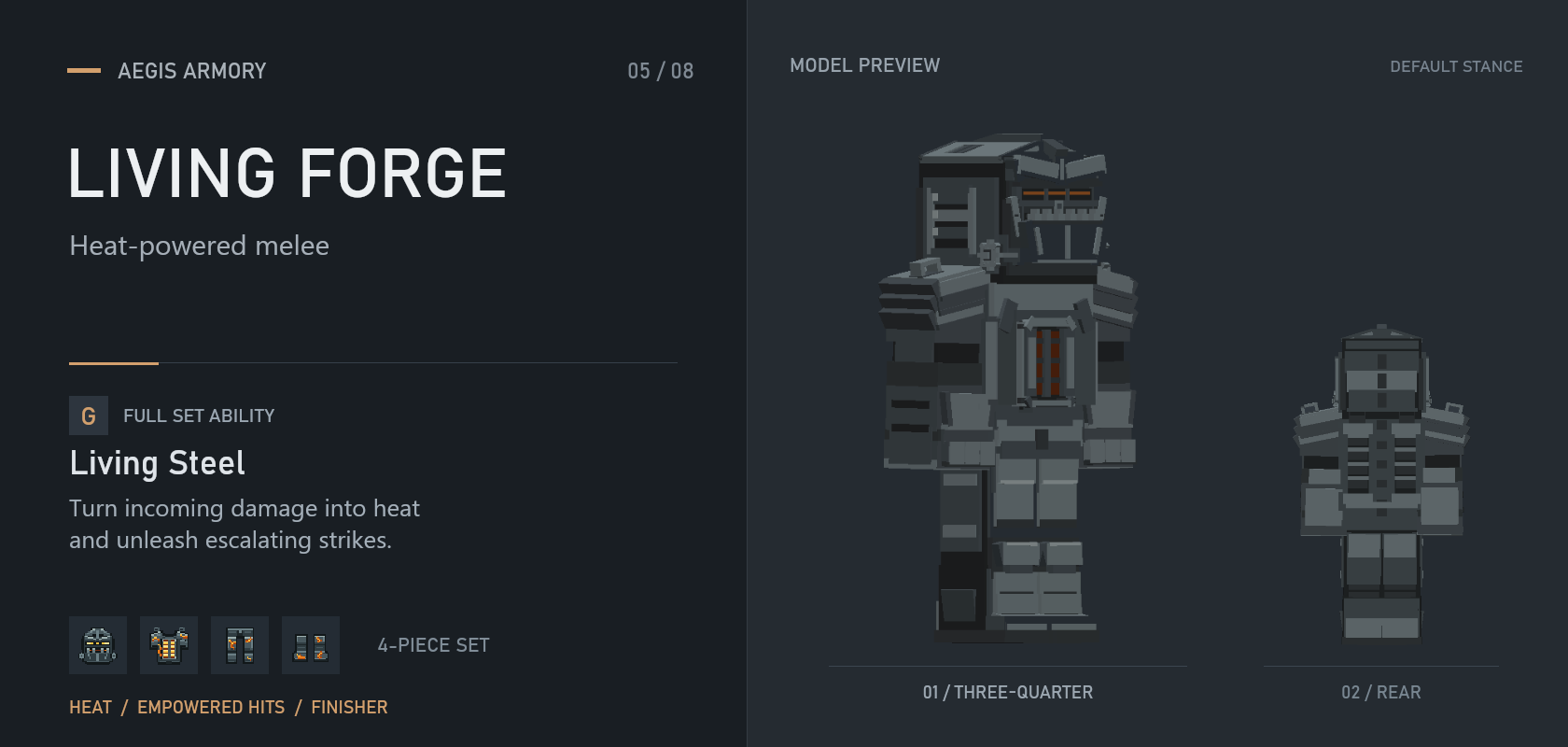
Turn punishment into a finishing sequence.
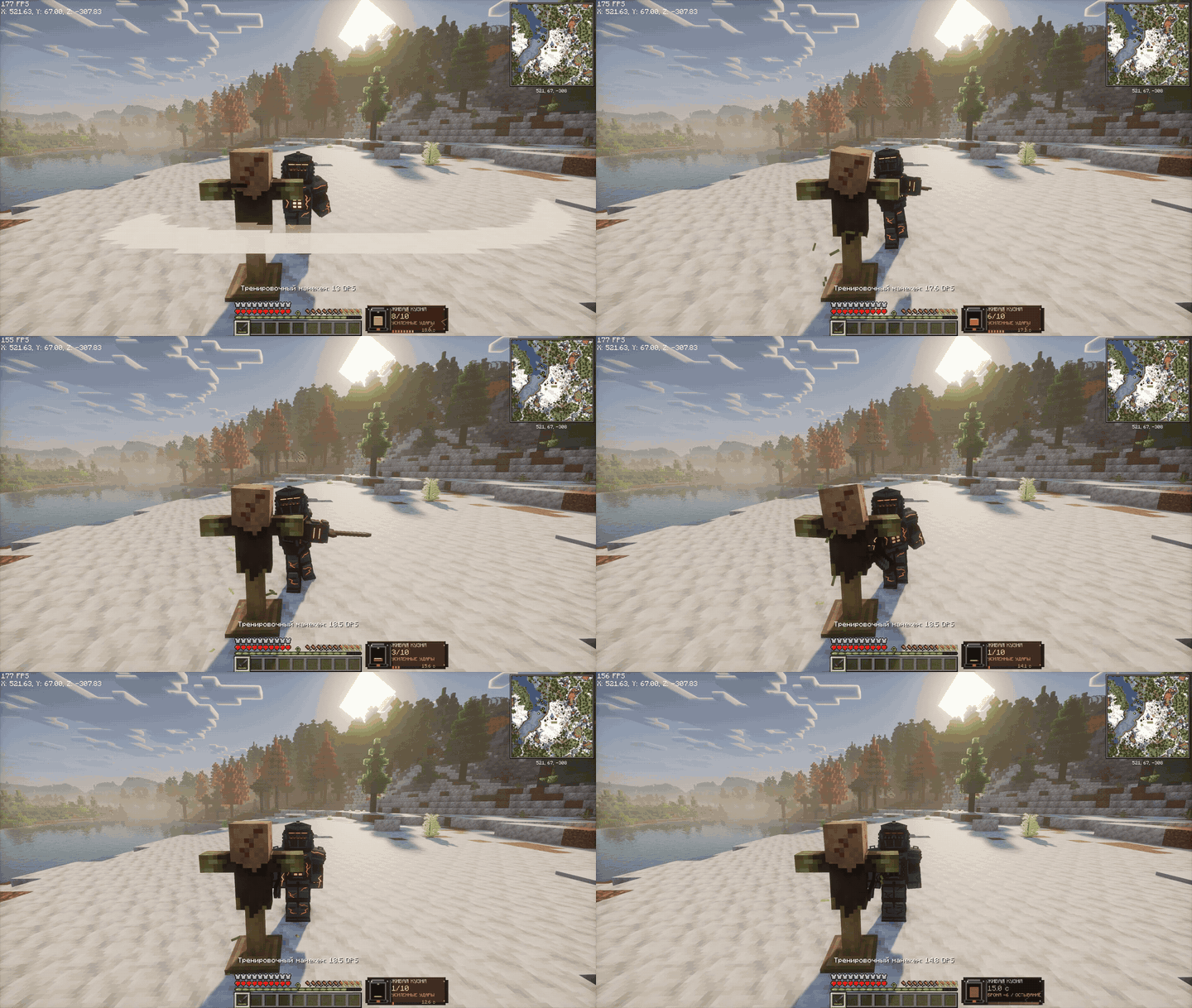
Incoming damage builds Heat. At maximum Heat, awaken the living steel and commit to ten increasingly powerful melee strikes with your weapon.
| EMPOWERED STRIKES | TIME TO SPEND THEM | RECOVERY |
|---|---|---|
| 10 hits | 20 seconds | 16 seconds |
Living Steel
- Living Steel: press
Gat full Heat; land up to 10 empowered hits within 20 seconds. - Escalation: bonus damage rises through +30% → +40% → +50% → +100%. The tenth hit adds a shockwave around its target.
- While empowered: gain 20% attack speed and 25 percentage points of knockback resistance.
- Recovery: the sequence ends with 16 seconds of recovery and 6 fewer armor points. Choose your opening carefully.
In action — Living Steel
PREDATORY SYMBIOTE
Living armor & autonomous tendrils
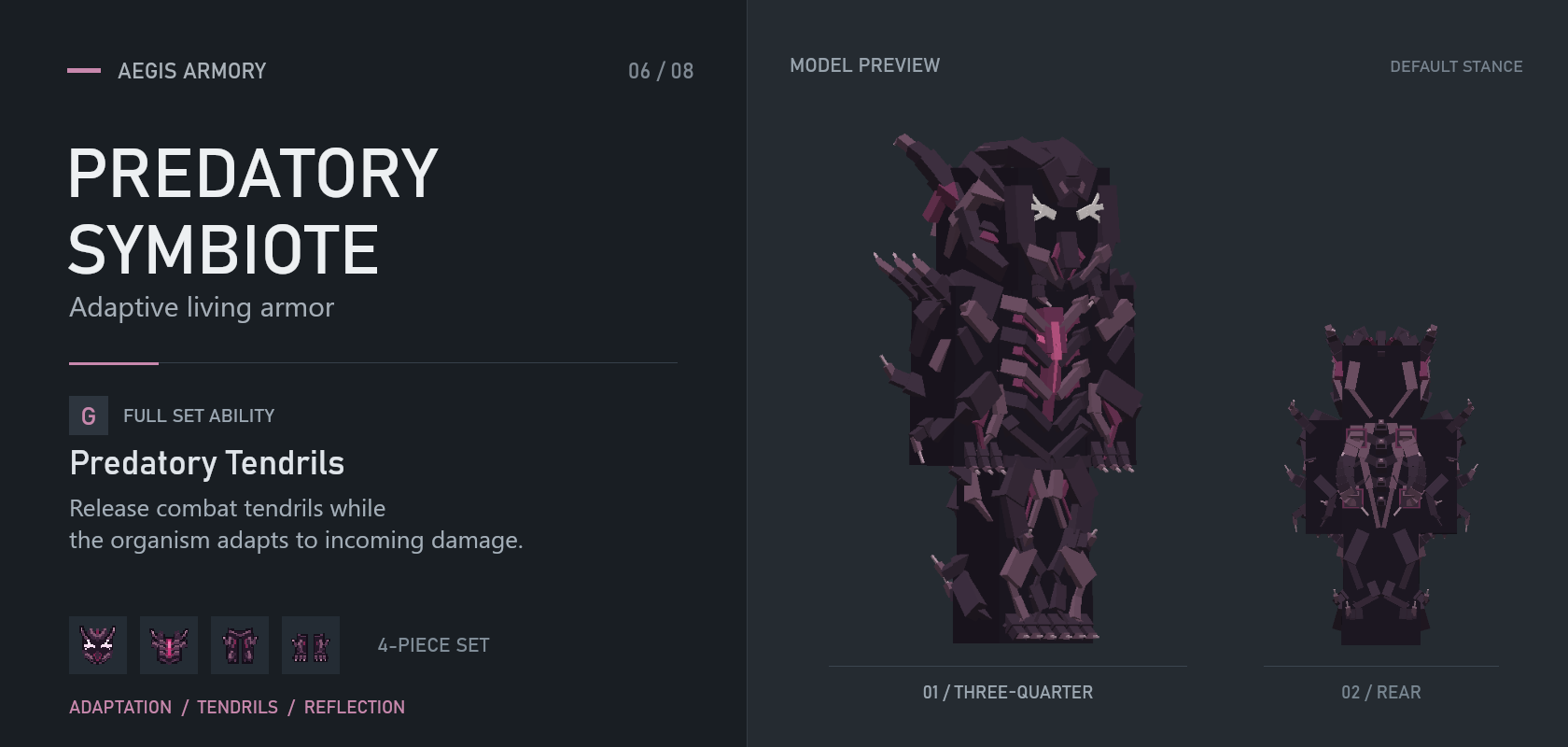
Adapt to the threat. Let the tendrils hunt.
Living armor remembers incoming damage and attacks with independent tendrils while you continue using your own weapon.
| TARGET RANGE | TENDRIL ASSAULT | ABILITY COOLDOWN |
|---|---|---|
| 14 blocks | 8 strikes | 20 seconds |
Predatory Tendrils
- Adaptation: repeated hits of the remembered damage type deal 15% less damage.
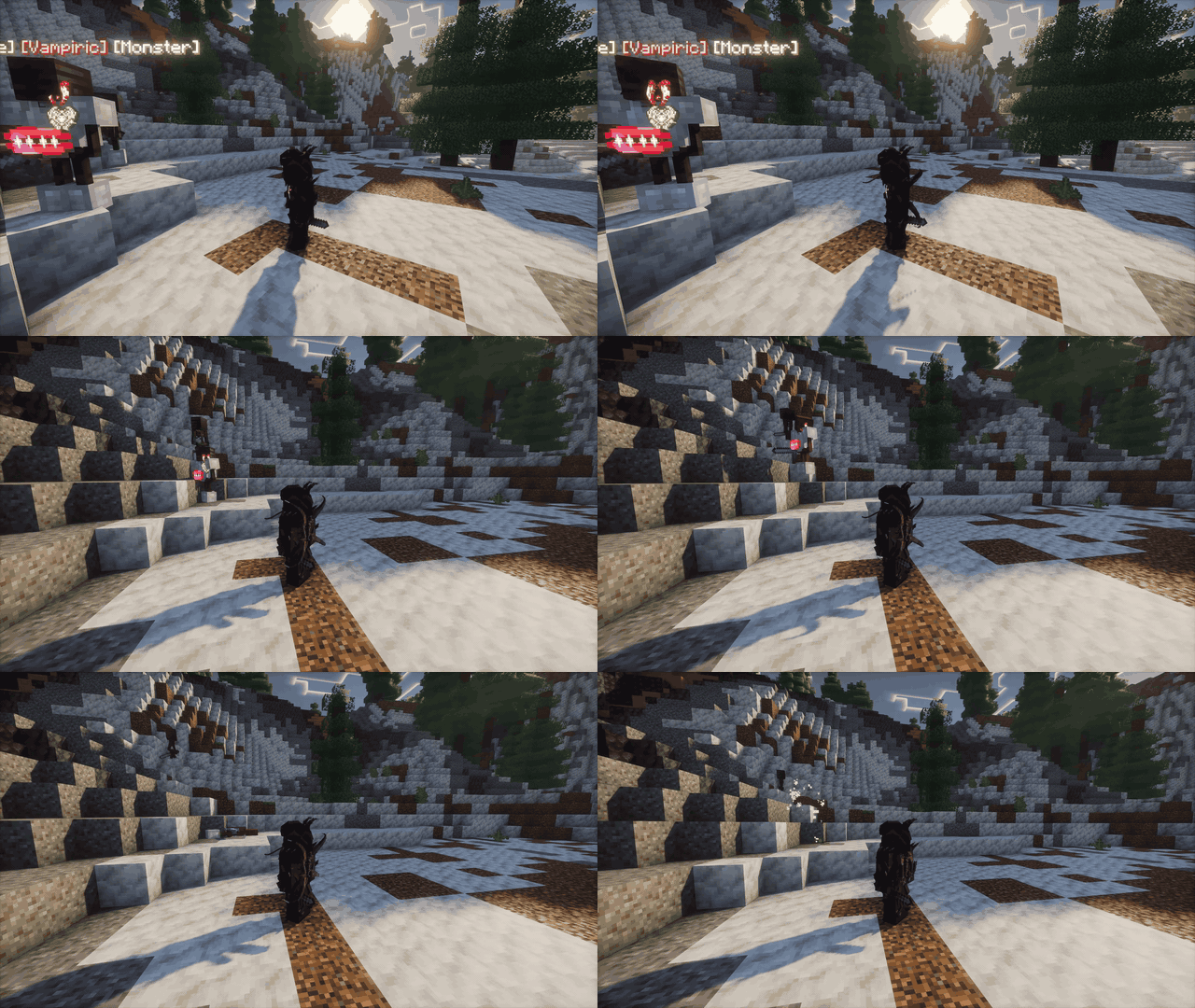
- Predatory Tendrils: press
Gtoward a target within 14 blocks for 8 autonomous strikes, with base damage rising from 6 to 8. Their damage supplements your weapon rather than replacing it. - Emergency guard: at 30% health or lower, a ready emergency defense can reflect an incoming directed hit.
- Cooldowns: 20 seconds for tendrils; 14 seconds for the emergency guard.
In action — Predatory Tendrils
TARAN
Impact charges & momentum
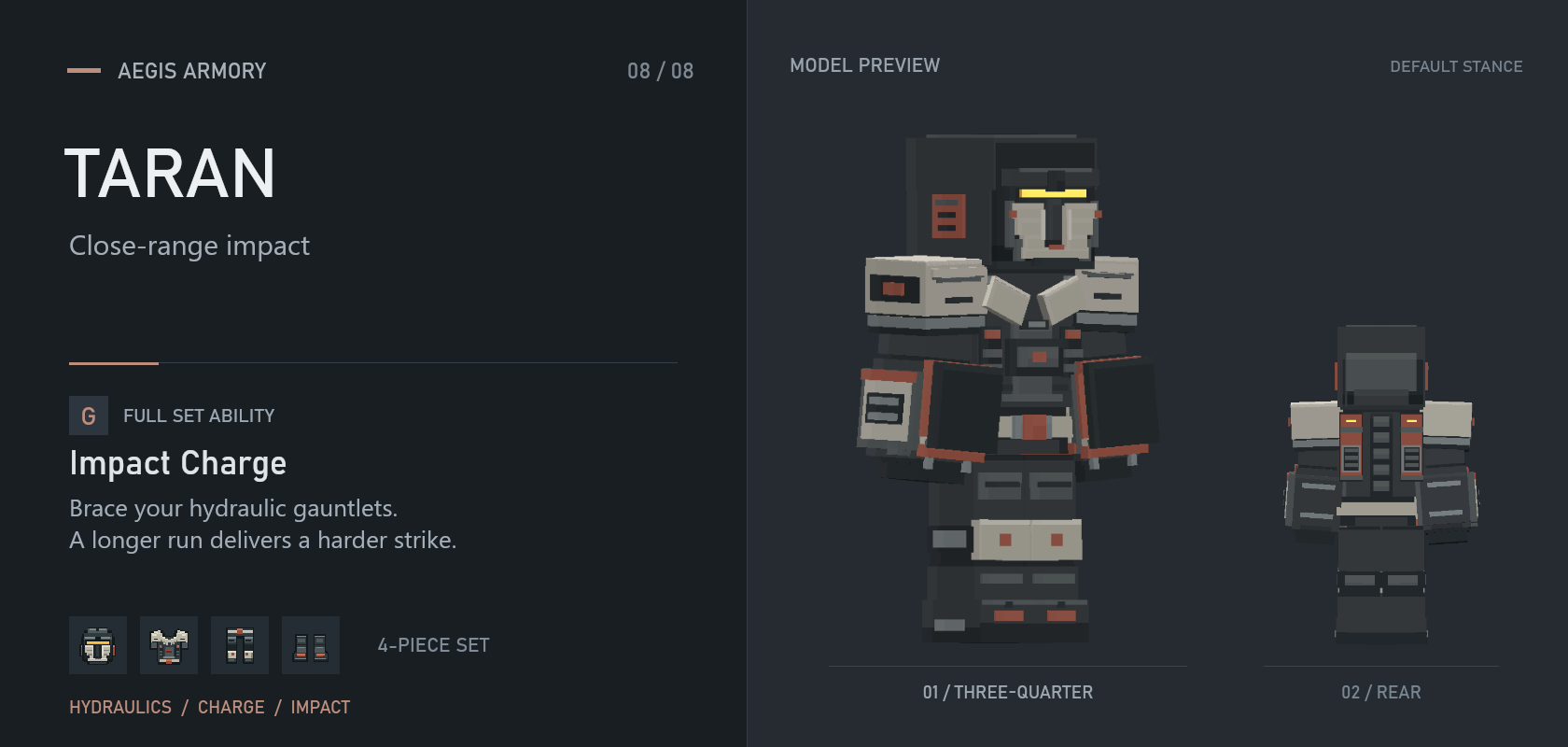
Brace the rams. Build momentum. Break the line.
Hydraulic gauntlets turn a grounded charge into a heavy impact. Give yourself a run-up to reach full power, then drive into enemies ahead.
| MAXIMUM CHARGE | PRIMARY IMPACT | COOLDOWN |
|---|---|---|
| 13 blocks | 20–40 damage | 8 seconds |
Impact Charge
- Impact Charge: press
Gwhile grounded for a brief brace followed by a charge of up to 13 blocks. - Momentum: the main impact deals 20–40 damage, reaching full power after 7 blocks of travel. Nearby enemies in front take 6–8 damage and knockback.
- Braced defense: 25% damage reduction during preparation and 35% during the charge, with knockback immunity during the braced action.
- Cooldown: 8 seconds from activation.
In action — Impact Charge
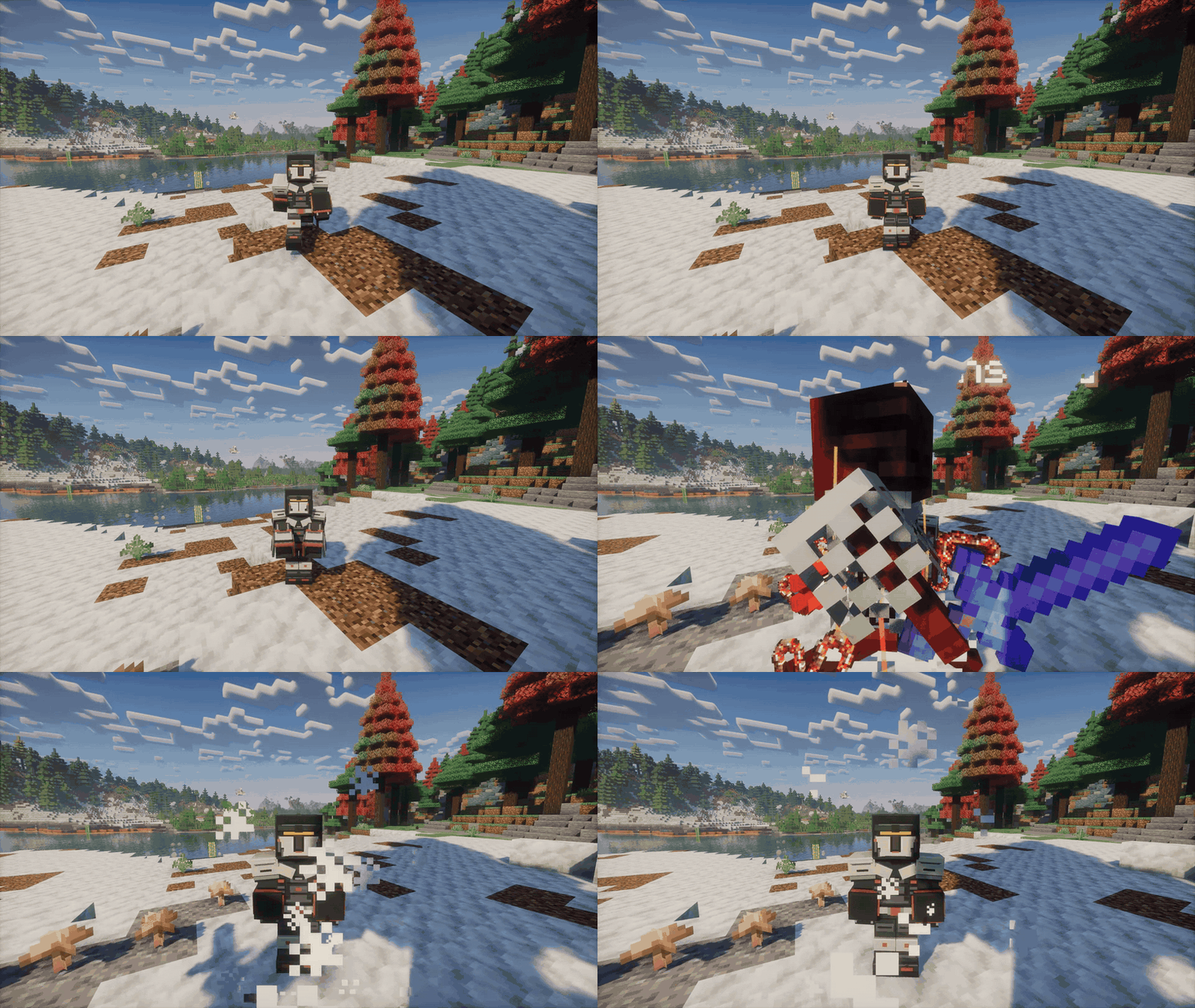
BRAWLER
Brawling & thrown bottles

One drink. One throw. Three chances to start trouble.
Barrel-inspired armor carries three bottles into battle. Drink for speed, keep the bottle ready, and choose when to throw.
| BOTTLE RESERVE | DIRECT IMPACT | COOLDOWN FROM G |
|---|---|---|
| 3 bottles | 38 damage | 20 seconds |
Liquid Courage
- Drink and throw: press
Gto draw and drink the first bottle, thenLMBto throw. The next bottle is prepared automatically, but each throw still waits for your input. - Speed: each drink adds 5% movement speed and 6 seconds of boost duration, stacking to 15% and 18 seconds.
- Impact: 38 direct damage; shattered glass deals 10 damage to other nearby targets within 2.75 blocks. The directly hit target does not also take the shard hit.
- Timing: use the three bottles within 20 seconds. The 20-second cooldown starts on the initial G press. Press
Gagain to end early without resetting it.
FIELD NOTES
The bottles are an ability resource, not consumable inventory items. They disappear from the belt as used and refill after the cooldown.
In action — Liquid Courage

BERSERKER
Two-handed greatsword strikes

Release the clamps. Make every swing count.
Heavy steel, pale ceramic, copper restraints, and a single violet eye flame frame a massive back-mounted greatsword. Drawing it replaces ordinary item attacks with a two-handed moveset, shoulder carry, and custom walking and running animations.
| COMBAT WINDOW | CUT / HEAVY CLEAVE | RECOVERY |
|---|---|---|
| 12 seconds | 25 / 35 damage | 20 seconds |
Unshackled Greatsword
- Draw: press
G. Once drawn, the sword remains available for 12 seconds of combat. - Cuts and cleave:
LMBdelivers alternating sweeping strikes for 25 base damage.RMBcommits to a heavier overhead cleave for 35 base damage. - Multiple targets: additional enemies actually crossed by the blade take 50% damage. Blade contact and line-of-sight checks prevent attacks through walls.
- Commitment and recovery: sword mode controls both hands and uses its own damage, independent of your inventory weapon. Press
Gto sheathe after the committed swing finishes. Ending or interrupting the mode starts a 20-second cooldown.
FIELD NOTES
Blade trails, sparks, impact effects, and separate swing and contact sounds reinforce each hit. The greatsword belongs to the ability; it is not a separate craftable weapon, and your inventory items are not consumed.
In action — Unshackled Greatsword

CONTROL & DEFENSE
Shape the fight, protect yourself, or command support.
GRAVITON ARMOR
Gravity fields & repositioning
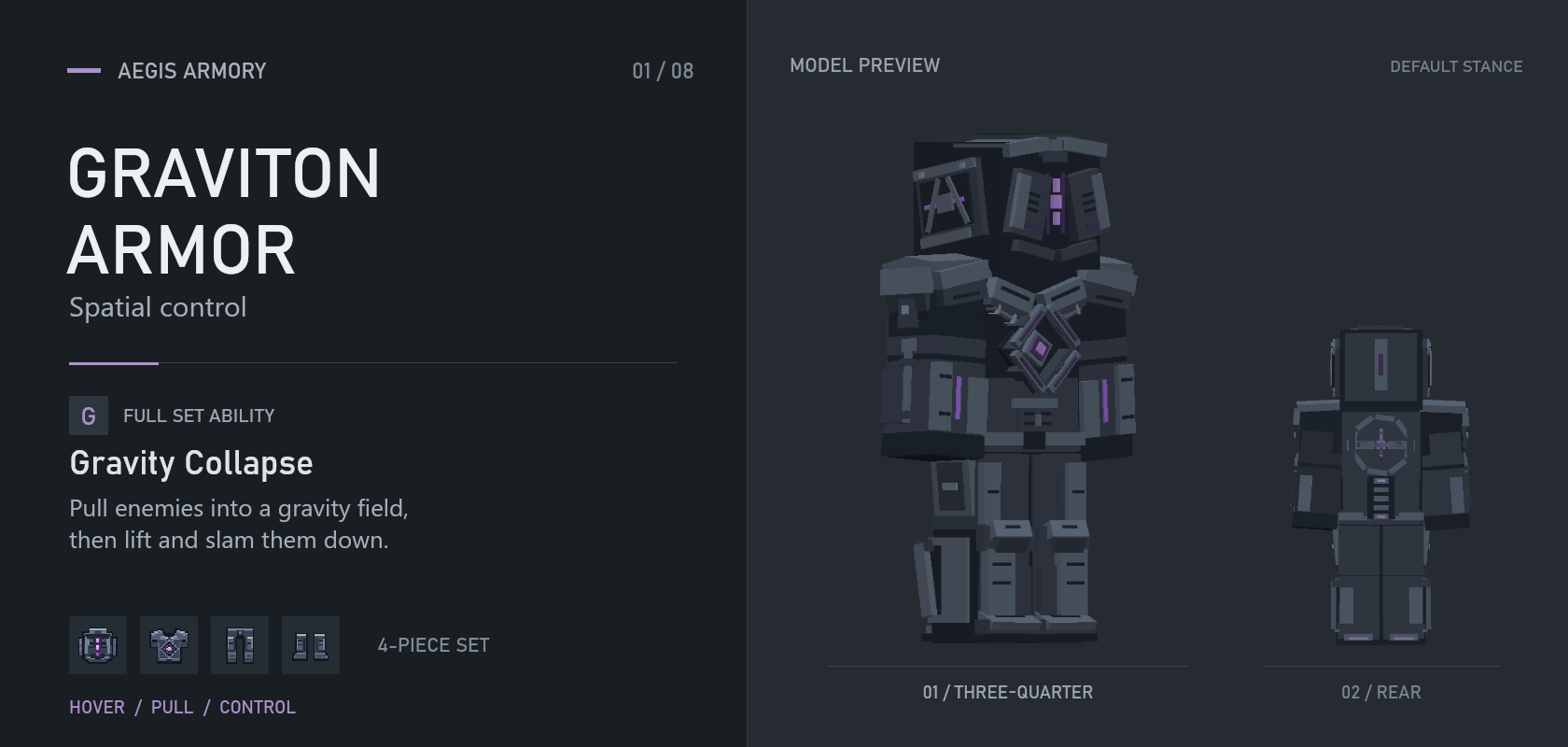
Decide where the fight happens.
Build gravitational charge, collapse space at your aim point, and pull enemies into a shared fate. Low-altitude hovering gives you room to reposition.
| TARGETING | FIELD RADIUS | CORE REFILL |
|---|---|---|
| 32 blocks | 9 blocks | 40 seconds |
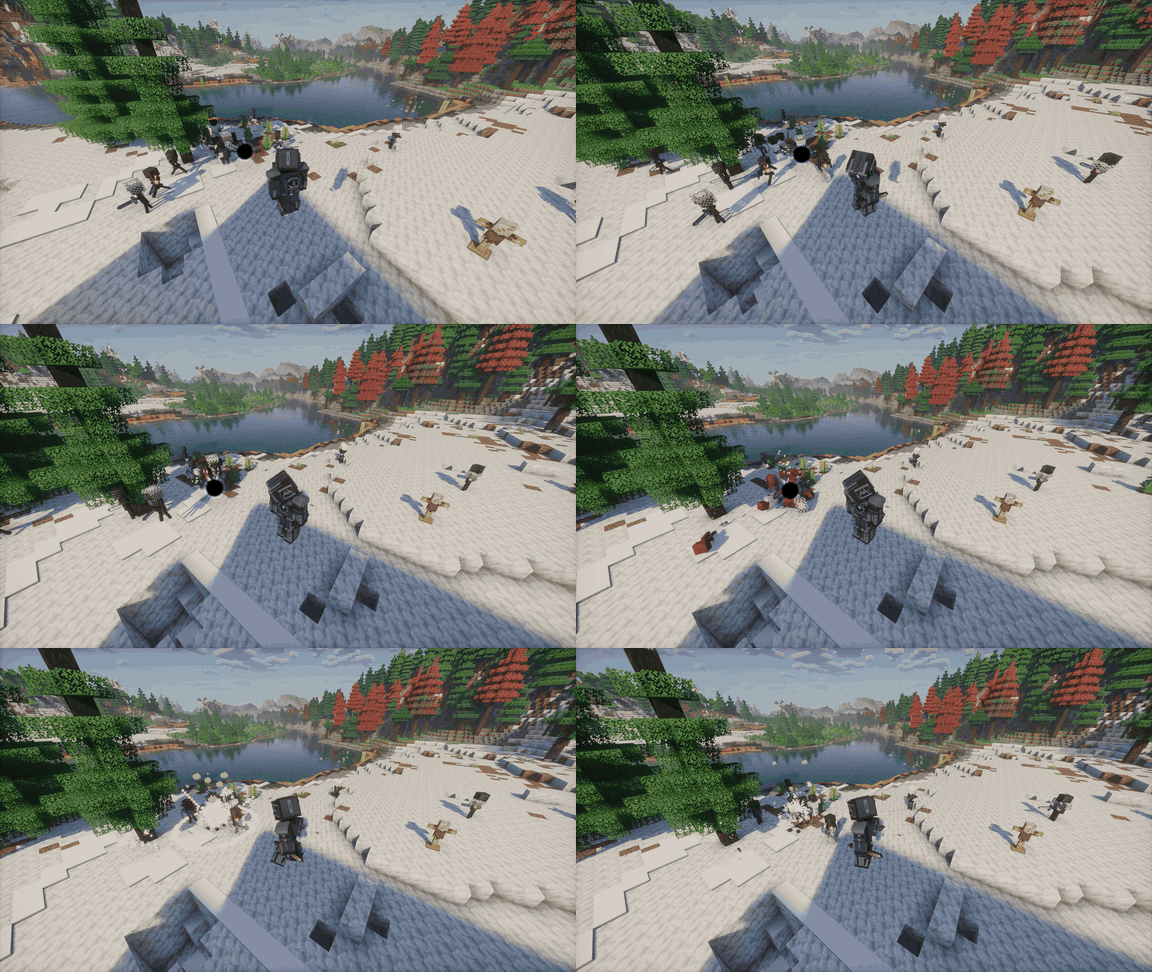
Gravity Collapse
- Gravity Collapse: press
Gwhen charged. Target up to 32 blocks away; the field covers a 9-block radius and deals 12–22 damage to ordinary affected targets. - Hover: hold jump for 1.2 seconds to engage, with +10% movement speed while hovering.
- Full-set protection: 55% less knockback and 28% less fall damage.
- Recovery: an empty core passively refills in 40 seconds. Activation also starts a 15-second cooldown.
In action — Gravity Collapse
HIGH KING
Royal guards & commanded support

Keep your guard—or send it forward.
A jeweled crown, closed silver mask, and fur-trimmed burgundy cape mark the ruler of a personal retinue. Two armored guards follow you, intercept eligible attacks, and pursue enemies on command. Your own weapon remains available.
| PERSONAL RETINUE | ACTIVE WINDOW | AUTHORITY REFILL |
|---|---|---|
| 2 guards | 30 seconds | 60 seconds |
Royal Retinue
- Summon: press
Gat full Authority to call two guards for up to 30 seconds. - Protect: a ready guard can absorb up to 10 damage from an eligible melee attack or projectile in your forward 120° sector. Both guards share a 1-second interception cooldown; this is not all-direction invulnerability.
- Command: aim at a visible eligible enemy within 8 blocks and press
G. Guards keep pursuing and attacking until recalled, the target is lost or defeated, or the retinue ends. Each confirmed sword hit deals 8 base damage. An attack order starts a 4-second order cooldown and suspends guard protection. - Recall or dismiss: press
Gduring an attack order to call them back. UseSneak+Gto dismiss the retinue early. Neither action refunds spent Authority or resets the order cooldown. - Recover: Authority refills in 60 seconds after the retinue ends. Stand idle on the ground for 15 seconds without an active retinue to take your throne; seated rest restores health and nourishment and recharges Authority three times faster. Moving or acting ends the rest.
FIELD NOTES
Guards adjust their visibility in cramped spaces to keep your view clear. Swimming, crawling, riding, and flight suspend their actions without pausing the retinue timer. Route recovery and formation placement help them handle detours and shorelines.
In action — Royal Retinue

ROADWARDEN
Shield timing, parries & counters
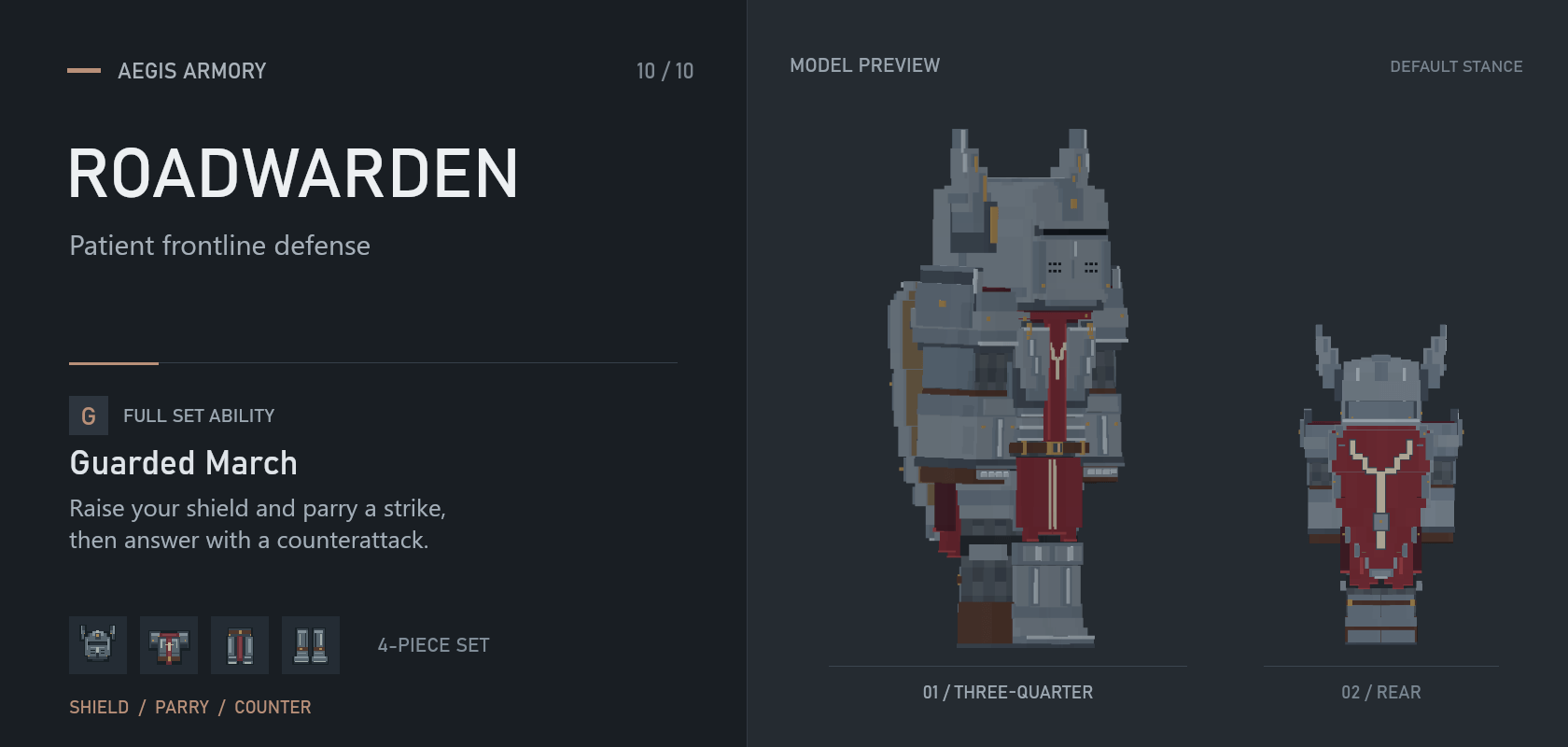
Parry the crucial hit. Answer with your weapon.
A travelling knight built around deliberate shield timing. Between fights, rest beside a visual campfire before setting out again.
| GUARD WINDOW | PARRY TIMING | RECOVERY |
|---|---|---|
| 10 seconds | 0.6 seconds | 12 seconds |
Guarded March
- Guarded March: press
Gto raise the shield for up to 10 seconds. Eligible frontal attacks deal up to 75% less damage, but drain your 100-point Resolve meter. Movement slows and sprinting is disabled. - Parry: catch a frontal attack within 0.6 seconds of drawing the shield to block it completely, stagger the attacker, and restore 15 Resolve.
- Counter or bash: use LMB within 2 seconds of a parry for an empowered weapon counterattack.
RMBwhile guarding performs a 7-damage shield bash costing 25 Resolve. - Recovery and rest: lowering the shield or exhausting Resolve starts 12 seconds of recovery. After 20 seconds idle, campfire rest can restore up to 5 hearts while sufficiently fed and build a temporary damage bonus.
FIELD NOTES
The Roadwarden Shield is also a separate craftable item. It blocks normally outside Guarded March and can be repaired with iron ingots.
In action — Guarded March

FACELESS BROADCASTER
Focused control & support

Hold their attention. Create your opening.
Two side monitors extend from the helmet. Focus the broadcast on enemies in front of you while continuing to fight with your usual weapon. The signal creates opportunities; it is not a permanent stun aura.
| BROADCAST WINDOW | SIMULTANEOUS TARGETS | COOLDOWN |
|---|---|---|
| 10 seconds | Up to 3 | 25 seconds |
Broadcast
- Broadcast: press
Gfor up to 10 seconds. Activation releases a single bass pulse that pushes eligible non-boss enemies within 3 blocks. PressGagain to stop early. - Focused signal: keep visible enemies in your forward gaze for 0.5 seconds, within 12 blocks. At most 3 targets can be controlled at once; walls block acquisition.
- Different targets, different effects: ordinary mobs freeze for up to 2 seconds, ending immediately when damaged. Players instead receive 20% slowdown for 1.5 seconds. Recognized bosses deal 20% less damage for 4 seconds, without being frozen or pushed by the opening pulse.
- Limits: affected targets resist further signals for 5 seconds after the effect ends, including signals from other Broadcasters. The set enters a 25-second cooldown when broadcasting ends, is canceled, or the full set is broken.
FIELD NOTES
The signal ignores allies and owned pets rather than indiscriminately disabling everything nearby. Server PvP rules still apply.
In action — Broadcast

FIREPOWER & MOBILITY
Beams, flames, extended reach, and faster movement.
JUDGE
Eye beams & focused fire

Keep your hands behind your back. Let your gaze deliver the verdict.
The former Pale Judge returns with a new design and a deliberate combat walk. Hold your twin eye beams on one enemy to build focus; sweeping across a crowd sacrifices their growing power.
| BEAM RANGE | FOCUSED OUTPUT | ENERGY RESERVE |
|---|---|---|
| 56 blocks | 24 → 28 → 32 DPS | 15 seconds |
Judgment Beams
- Judgment Beams: hold
Gto fire at targets up to 56 blocks away; release to stop. - Focused damage: 24 → 28 → 32 raw DPS, advancing after 1 and 3 seconds on the same target. Maximum output against recognized bosses is 30 DPS. The two beams share this output; it is not damage per eye.
- Precision matters: switching targets resets focus. Losing sight gradually weakens it, and walls block the beams.
- Controlled movement: firing reduces movement speed by 60%, prevents sprinting, and temporarily takes over held-item use. The character adopts the hands-behind-the-back pose.
- Energy and defense: up to 15 seconds of continuous fire; an empty reserve refills in approximately 45 seconds after a 2-second delay. The grounded full set also grants 10% damage reduction and knockback immunity.

STEAMPUNK
Overdrive & pressure management

Build pressure. Keep the boost—or spend it on a blast.
Movement and combat charge the suit. Overdrive turns that pressure into mobility and protection; venting early trades the remaining boost for space around you.
| OVERDRIVE | MOVEMENT BONUS | COOLING |
|---|---|---|
| 16 seconds | +30% | 18 seconds |
Overdrive
- Overdrive: press
Gat 100% Pressure for up to 16 seconds of +30% movement speed, +10% attack speed, and 20% damage reduction. - Steam release: press
Gagain to end Overdrive with a blast reaching 3.5 blocks. Base damage ranges from 2–8, depending on remaining Overdrive time, and falls off toward the edge. Walls block it. - Cooling: 18 seconds after expiration or release, with 15% reduced movement speed for the first 3 seconds. Pressure cannot build during Overdrive or cooling.
- Steam braking: the complete set automatically slows qualifying falls with downward steam jets.
FIELD NOTES
Letting Overdrive expire does not trigger a damaging blast. Venting is your decision.
In action — Overdrive

PARALLAX
Rift defense & extended reach

Let space take the hit. Send the attack back.
Open rifts around your armor to intercept attacks and extend your weapon's reach. A returning rift beside the attacker represents their weapon or projectile striking back through space.
| RIFT ACTIVITY | DEFENSIVE RESERVE | WEAPON REACH |
|---|---|---|
| 12 seconds | 4 interceptions | 9 blocks |
Fracture State
- Fracture State: press
Gfor 12 seconds of rift activity and up to 4 melee or projectile interceptions. - Reflection: eligible attacks from ordinary mobs return their intercepted damage. In PvP, reflected damage respects the attacker's defenses. Recognized boss attacks are absorbed, not reflected; environmental damage is not covered.
- Extended reach: use
LMBwith your held weapon against a visible target up to 9 blocks away. Distant strikes require a charged attack and cannot bypass walls. - Recovery: 20 seconds after the rifts close, including early closure with
G. Rift attacks remain available during Fracture State even after all four interceptions are spent.
In action — Fracture State

INCINERATOR
Flame jet & frontal shield

Raise the shield. Bring the heat.
Twin tanks feed a heavy right-arm flame projector. As you fire, the left arm raises a protective shield, fire fills the visor, and soft orange light spreads along the edges of the first-person view without covering the center.
| JET REACH | ACTUAL FIRING RESERVE | FRONTAL REDUCTION |
|---|---|---|
| 6.4 blocks | 8 seconds | 50% |
Flame Jet & Shield
- Deploy and fire: press
Gto deploy, then holdLMBfor the flame jet. Release to stop firing; pressGagain to retract the equipment. - Direct damage: up to 6.4 blocks of reach. At the default 0.5-second hit interval, one primary target takes 15 damage and additional targets take 4.5 damage—30 / 9 raw DPS, excluding extra burning. The stream does not grant full primary damage to every enemy in a crowd.
- Fire-resistant enemies: direct jet damage can still hurt fire-immune mobs and targets with Fire Resistance. Their immunity prevents extra burning; armor, damage resistance, and genuine invulnerability still matter.
- Frontal shield: once raised, it reduces eligible frontal melee and projectile damage by 50%. It does not cover attacks from behind, explosions, or shield-bypassing damage. Firing reduces movement speed by 50%.
- Fuel and recovery: a full reserve supplies 8 seconds of actual firing, usable within a 30-second deployment window. Ending the ability starts a 30-second cooldown. Fuel is an ability resource, not an inventory consumable.

Start playing
THE UPGRADE PATH
AEGIS Core + matching Netherite armor + set-specific component
Combine them at a smithing table. Use the recipe book and advancement tree to follow your set’s progression.
Crafting & progression
Built for the endgame
Start with a full Netherite set, craft the shared foundations, and choose the unique component for your armor family.
| Foundation | Role in progression |
|---|---|
| AEGIS Core | Consumed in the smithing table's first slot for each armor upgrade |
| Reinforced Netherite Plate | Netherite-bearing material for specialized components |
| Tempered Frame | Structural base for heavy components |
| Power Latch | Mechanical fastener used in specialized recipes |
Not every unique component needs all four foundations. The final upgrade follows one shared pattern:
AT THE SMITHING TABLE
AEGIS Core + matching Netherite armor piece + set-specific component
↓
Your upgraded armor piece
| BASE NETHERITE ARMOR | CORES & UNIQUE COMPONENTS | FULL-SET TOTAL |
|---|---|---|
| 4 Netherite Ingots | 8 more Netherite Ingots | 12 Netherite Ingots |
Other ingredients and the vanilla upgrades needed to obtain Netherite armor are additional requirements.
Use the recipe book and advancement tree to follow each crafting path. Armor and components are also available in the mod's creative tab.
Controls, HUD & ability help
| Input | Use |
|---|---|
G |
Default full-set ability key; rebind it in Minecraft's controls |
LMB |
Attack control; used by dedicated weapons and offensive actions |
RMB |
Use control; used by alternate attacks, defensive actions, and grapples |
Sneak + G |
Dismiss the High King's retinue early |
Follow your rebound attack and use controls if you have changed them. The HUD shows your current action, resource, and recovery.
YOUR INVENTORY STAYS YOURS
Abilities that take over your hands temporarily replace ordinary attacks or item use without deleting your equipment.
Ability not starting? Check these first:
- All four armor pieces belong to the same set.
- The required resource is charged and the cooldown has ended.
- Your ability key has no conflicting binding.
Installation & optional compatibility
| Requirement | Details |
|---|---|
| Minecraft | Java Edition 1.21.1 |
| Loader | NeoForge 21.1.235+ for Minecraft 1.21.1 |
| Java | 21 |
| Required libraries | None — GeckoLib is not required |
| Multiplayer | The same mod version on the server and every client |
| Languages | English and Russian |
- Install the matching NeoForge version for Minecraft 1.21.1.
- Place
aegisarmory-2.8.0.jarin your instance'smodsfolder. - Remove the previous Aegis Armory JAR; keep only one version installed.
- For multiplayer, install the same version on the server and each client.
NEOFORGE ONLY · This release is not for Fabric, Forge, or Bedrock Edition.
TARAN is included; do not install the standalone TARAN mod alongside it.
Optional compatibility
No additional mods are required. Targeted handling is included for:
| Mod | Relevant integration |
|---|---|
| Better Combat | Hand control for abilities that replace ordinary attacks, and Parallax weapon interactions |
| Punchy | First-person arm rendering and ability-hand visibility |
| Presence Footsteps | Juggernaut's heavy footstep interactions |
| Better Third Person | Juggernaut's combat-camera handling |
Targeted integration is not a guarantee for every combination of animation, combat, camera, or shader mods.
Server settings & upgrading an older world
Make it fit your server
| Configuration | Controls |
|---|---|
aegisarmory-server.toml |
Exposed gameplay settings; the server controls these values in multiplayer |
aegisarmory-client.toml |
Client options |
Not every parameter is configurable. Steampunk, Faceless Broadcaster, and Incinerator use fixed ability tuning in this release.
KEEPING YOUR PREVIOUS BALANCE
The update migrates unchanged previous defaults once while retaining other customized values. To intentionally retain all previous balance values, back up your configuration and set
balanceDefaultsRevision = 1before the first launch that applies this migration. The migration does not run again once marked complete.
Before you update
BACK UP YOUR WORLD AND CONFIGURATION.
Moving from 2.2.0 or earlier also changes crafting progression: retired ingredients may disappear, while armor item IDs are retained. Existing Mechanical Exoskeleton armor keeps its IDs and becomes Steampunk.
What changed in 2.8.0
✧ PRIME · NEW SET
Ivory armor, a dark undersuit, and deep violet cloth conceal a very unserious source of power: aura. Deal damage, finish enemies, and keep the killstreak going as skull badges and announcer calls celebrate your performance.
At 100% Aura, press G to enter Absolute Aura: ten seconds of sweeping hand strikes, vivid rainbow effects, and a glowing outline. Stand idle long enough and PRIME relaxes into a floating pose, drawing in rainbow particles and slowly rebuilding its charge.
Included: custom armor and item models · aura HUD · killstreak icons and voice calls · first- and third-person animations · ability sounds and effects · idle levitation · crafting · advancements
◇ JUGGERNAUT · REBUILT
The walking gun platform returns with a rebuilt military silhouette, a more detailed mask, a redesigned backpack, and a larger, reworked minigun connected by an articulated ammunition belt.
Handling and presentation: revised deployment and retraction · improved grips and aiming poses · aligned muzzle effects and tracers · new mechanical handling sounds · audible casing impacts
Its sustained-fire identity remains: spin up, brace, and manage heat while holding the frontline.
NEED HELP?
Leave a comment with your mod and NeoForge versions, relevant mods, reproduction steps, and a log or crash report. A screenshot or short clip helps with animation and camera issues.
AEGIS ARMORY · 2.8.0 · Actively developed.
Older gameplay clips illustrate the abilities; the text reflects this release’s default balance.
All Rights Reserved.
AegisArmory Team