AE2 Desktop Notifications
- By
Forwards Applied Energistics 2 crafting-completion toasts to desktop notifications.
Description
AE2 Desktop Notifications
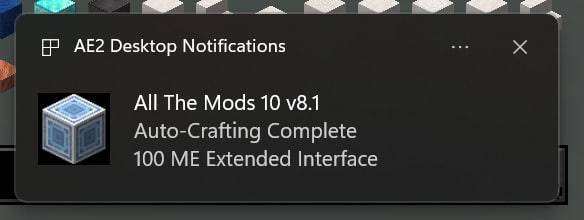
AE2 Desktop Notifications forwards Applied Energistics 2 crafting-completion toasts to your operating system while leaving the original in-game toasts unchanged.
Looking for vanilla advancement, recipe, tutorial, and system notifications? Install Desktop Notifications:
https://www.curseforge.com/minecraft/mc-mods/desktop-notifications
The two mods are completely independent and may be installed separately or together.
Why use it?
Large AE2 crafting jobs can finish while Minecraft is minimized, covered by another application, or running on a second monitor. This mod helps you notice the completion immediately without repeatedly switching back to the game.
Source: https://github.com/cTux/mc-ae2-desktop-notifications
Issues: https://github.com/cTux/mc-ae2-desktop-notifications/issues
AE2 Desktop Notifications Team