Adjustability
- By
Fortune and Silk Touch on one pickaxe, all four Protections on one chestplate. Keep every conflicting enchantment on the item and switch which one is active, right from your inventory.
Put Fortune and Silk Touch on the same pickaxe, and switch between them whenever you want. Adjustability lets items hold mutually exclusive enchantments without allowing conflicting effects to work at the same time.



One item. Multiple enchantments. Your choice.
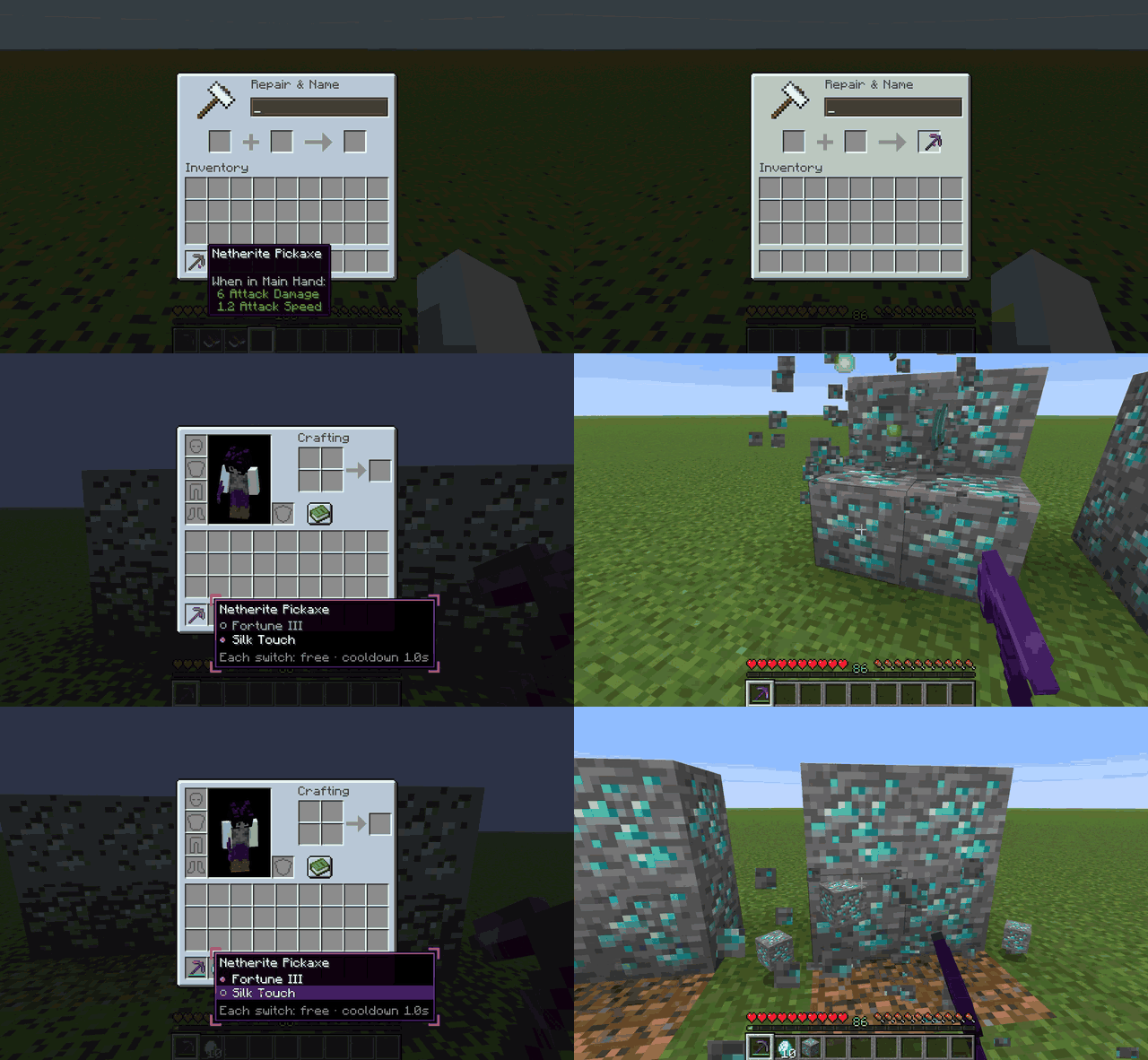
Keep Fortune and Silk Touch on one pickaxe, all four Protection enchantments on one chestplate, or Riptide and Loyalty on one trident.
Conflicting enchantments are stored on the item, but only one side of each conflict can be active at a time. The others remain dormant, visible in the tooltip and ready to be switched on.
No simultaneous conflicting effects. No extra inventory slots. Just more flexibility.
How it works
- Combine — Use an anvil to combine conflicting enchantments from books or other items. The existing enchantment stays active, while the conflicting one becomes dormant. You can even combine conflicting enchanted books.
- Switch — Hover over an item in your inventory, press Left Alt, and click the enchantment you want to activate.
- Cycle — Bind the optional Cycle key to switch your held item's enchantments without opening your inventory. Sneak + Cycle selects the conflict group.
That's it. Your enchantments stay on the item until you decide to change them.
More than just switching
- Individual toggles — Switch individual enchantments off and back on.
- Customizable panel — Choose a visual profile or customize colors, marks, spacing, and key behavior.
- Vanilla integration — Grindstones remove dormant enchantments too, returning their experience.
- Advancements and statistics — Unlock dedicated advancements and track your switches.
- Audio feedback — Hear a sound when switching enchantments.
- Modded enchantments — Compatible with modded enchantments without additional setup.
- Safe to uninstall — Dormant enchantments are stored in vanilla item data. Items remain usable without the mod, and
/adjustability flattencan permanently remove dormant enchantments.
Screenshots
Click an image to view the full screenshot.
| Switch conflicting enchantments | Switch an enchantment off |
|---|---|
 |
 |
| Hover an item and press Left Alt, then click an enchantment to activate it. | Toggle individual enchantments on or off whenever you want. |
| First-time guidance | Make the panel your own |
|---|---|
 |
 |
| In-game guidance introduces the Adjust panel and Cycle key. | Choose a panel profile, or customize its appearance yourself. |
Installation
Download the version of Adjustability matching your Minecraft version and mod loader, then install the required dependencies below.
For multiplayer, install Adjustability on both the client and server. Optional integrations are client-side only.
Requirements
| Loader | Minecraft 1.21.1 | Minecraft 26.3 |
|---|---|---|
| Fabric | Fabric Loader 0.16.0+, Fabric API 0.102.0+, Forge Config API Port 21.1.0+ | Fabric Loader 0.19.5+, Fabric API, Forge Config API Port 26.3.1+ |
| NeoForge | NeoForge 21.1.1+ | NeoForge 26.3.0.95+ |
Optional integrations:
- Just Enough Items (JEI) — Information pages for anvils and grindstones.
- YetAnotherConfigLib (YACL) — An improved settings screen. Requires 3.8.2+ on 1.21.1 or 3.9.7+ on 26.3.
Controls
All controls can be rebound under Options → Controls → Adjustability, or accessed using /adjustability keybinds.
| Action | Default |
|---|---|
| Open the Adjust panel | Left Alt while hovering an inventory item |
| Cycle held item's enchantments | Unbound — configure under Controls |
| Select Cycle group | Sneak + Cycle |
The Adjust panel key can be configured to work as either a hold or toggle.
For servers and modpacks
Adjustability is designed to be configurable, whether you want a convenient quality-of-life feature or a more carefully balanced progression system.
Customize enchantment rules
- Define additional mutually exclusive enchantment groups.
- Remove specific conflicts or disable vanilla conflict rules.
- Control which items and enchantments participate.
- Protect curses and other enchantments from becoming dormant.
- Allow groups where no enchantment is active.
Control the cost of switching
- Free switching, experience levels, or experience points.
- Item and durability costs.
- Different costs for different enchantment groups.
- Cooldowns, anvil costs, and configurable limits.
Datapack and integration support
- Custom enchantment tags and vanilla
exclusive_setdefinitions. - An advancement trigger for custom datapack advancements.
- Configuration synchronized from the server.
- Reload supported datapack changes with
/reload.
See the configuration documentation for details.
Compatibility
Adjustability is tested against several popular mods, including:
| Mod | Compatibility |
|---|---|
| Easy Anvils | Compatible |
| Just Enough Items | Compatible; Adjust panel renders above JEI |
| Mouse Tweaks | Compatible |
| Enchantment Descriptions | Compatible |
| AppleSkin | Compatible |
| Enchantment Switch | Compatible; default keybindings do not conflict |
| YetAnotherConfigLib | Compatible |
These integrations were verified on Minecraft 26.3 using the automated test suite. Compatibility with other mods on Minecraft 1.21.1 has not yet been tested.
For tested versions, loaders, and technical details, see the compatibility guide.
Found an incompatibility? Report it on GitHub.
Commands
| Command | Permission | Description |
|---|---|---|
/adjustability help |
Everyone | List available commands |
/adjustability config |
Everyone | Open the settings screen |
/adjustability keybinds |
Everyone | Open the keybinding settings |
/adjustability panel |
Everyone | View or customize the Adjust panel |
/adjustability toggle <enchantment> |
Everyone | Activate an enchantment on the held item |
/adjustability inspect |
Operator | Inspect active and dormant enchantments |
/adjustability add <enchantment> [level] |
Operator | Add an enchantment to the held item |
/adjustability flatten [<targets>] |
Operator | Permanently remove dormant enchantments |
Configuration
Adjustability separates gameplay settings from personal preferences.
config/adjustability-server.toml— Gameplay rules, costs, cooldowns, and limits. Synchronized from the server.config/adjustability-client.toml— Personal preferences, tooltip hints, and sounds. Editable in-game.- Datapacks — Custom enchantment tags and vanilla exclusivity definitions.
For advanced configuration, see the documentation.
For mod developers
Adjustability provides an experimental Java API for interacting with its enchantment system.
The API supports reading and modifying active or dormant enchantments, switching enchantments programmatically, and registering listeners that can reject switches or anvil results.
An API JAR is available with every GitHub release.
For implementation details, design decisions, and the roadmap, see ADJUSTABILITY.md.
Open source & support
Adjustability is free and open source under the MIT License.
Beta release: Adjustability is still in its early stages. Bug reports, compatibility feedback, and feature suggestions are welcome.
The legacy Forge 1.20.6 prototype is preserved under the legacy-1.20.6-forge tag.
Adjustability Team