Minecraft Java Datapack for Minecraft 26.3+
Main: Mobile_Enderchest_by_Xenton
Optional: Mobile_Enderchest_Quick_Action_by_Xenton ( On Github, Example: Adventure Mode)
------------------------------------------------------------------------------
Attention: Beta Status !!!
All elements are implented.
It is possible, not all works correctly
------------------------------------------------------------------------------
Little Manual (Main and Optional):
Installation from here:
- After download, copy the zip file Mobile_Enderchest_Beta_0_x.zip in your datapacks folder from your world.
- The optional Datapack for the Quick Action menu, can you Download from my Github, then follow the installation from Github.
Installation from Github:
- After download, unpack the zip file
- In the Mobile_Enderchest-Beta_0.X, are two folders. Copy the folder Mobile_Enderchest_by_Xenton in your datapacks folder from your world.
- When you will have the quick action, than copy also the folder Mobile_Enderchest_Quick_Action_by_Xenton in your datapacks folder from your world.
After installation:
- No inizialization needed, data pack have an auto inizialization
- World is to load new, not with /restart, reason: Some JSONs load only when the world is fresh loaded
Give item for set ender chest:
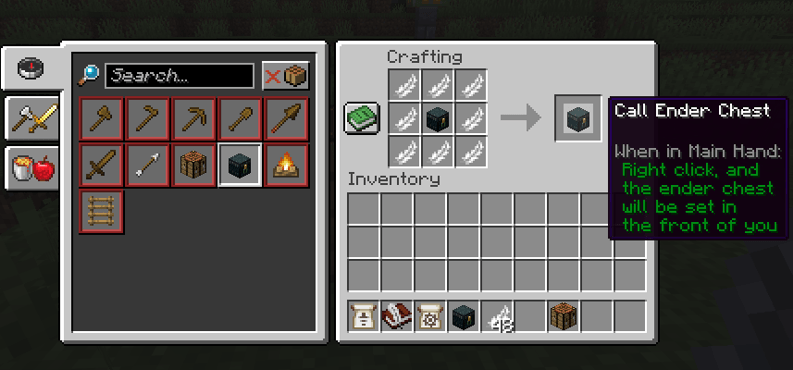
- Main: Crafting recipe: 8 feathers, 1 ender chest. Place the ender chest in the center and the feathers around
- Main: /function x_me_moblile_enderchest:give_item
- Optional: Over Quick action and then button: give item
How to use the Item:
- Rightclick with this item in weapon mainhand and when at the setpoint is air, then the ender chest will be set.
- On move, the ender chest will be remove
Pictures:
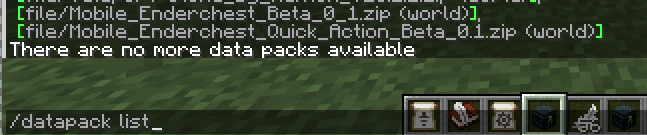
Correct installed:
Crafting recipe: