Note: This page is no longer maintained. Please download the most recent versions from the following page: InfiniteBundle Datapack on CurseForge.
.
.
.
Infinite Storage Bundle
Welcome to the Infinite Storage Bundle, a revolutionary solution for storing your Minecraft items in a compact and efficient manner.
Overview
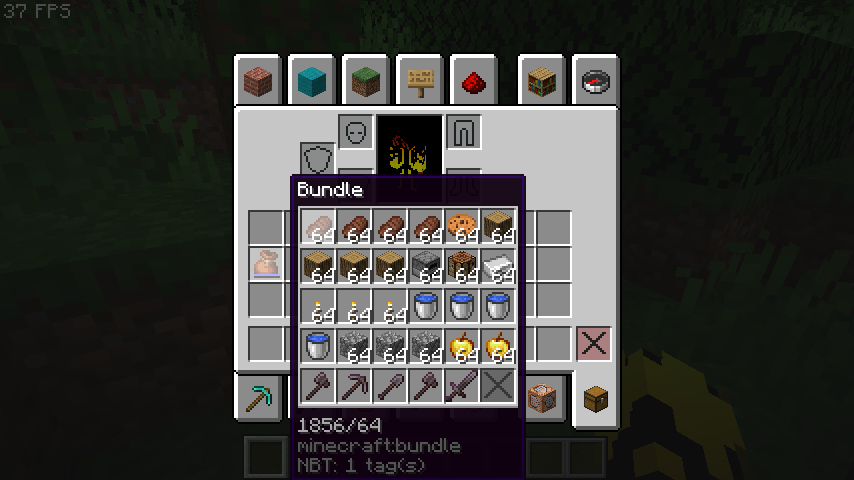
The Infinite Storage Bundle offers a unique approach to item storage, allowing players to consolidate their inventory into a single bundle. Say goodbye to cluttered chests and cumbersome storage systems - with the Infinite Storage Bundle, you can streamline your inventory management and free up valuable space in your world.
Features
- Single Bundle Storage: Craft a bundle using the default Minecraft recipe and store an unlimited number of items within it.
- Effortless Usage: To use the Infinite Storage Bundle, simply throw the bundle on the ground and then throw any item you want to store inside the bundle.
- Compact Design: Save space and reduce clutter by condensing your inventory into a single, portable bundle.
- Customizable Options: Tailor the storage capacity to suit your needs, allowing for flexible storage solutions in any Minecraft environment.
- Seamless Integration: Compatible with both single-player and multiplayer worlds, the Infinite Storage Bundle seamlessly integrates into your Minecraft experience without disrupting gameplay.
Installation
For the Mod Version:
- Download: Obtain the Infinite Storage Bundle mod from CurseForge or Modrinth.
- Install a Mod Loader:
- Forge:
- Download the Forge installer from the official Forge website.
- Run the installer and follow the instructions to install Forge.
- NeoForge:
- Download the NeoForge installer from the official NeoForge website.
- Run the installer and follow the instructions to install NeoForge.
- Fabric:
- Download the Fabric installer from the official Fabric website.
- Run the installer and follow the instructions to install Fabric.
- Install Fabric API:
- Download the Fabric API from CurseForge or Modrinth.
- Place the downloaded
fabric-api.jar file into the mods folder within your Minecraft directory.
- Install the Mod:
- Locate your Minecraft directory. This is usually found at
%APPDATA%\.minecraft on Windows or ~/Library/Application Support/minecraft on macOS.
- Place the downloaded Infinite Storage Bundle mod
.jar file into the mods folder within your Minecraft directory.
- Launch Minecraft:
- Open the Minecraft Launcher.
- Ensure the profile for the installed mod loader (Forge, NeoForge, Fabric, or Quilt) is selected.
- Start the game and enjoy the Infinite Storage Bundle mod.
For the Datapack Version:
- Download: Obtain the Infinite Storage Bundle datapack from CurseForge or Modrinth.
- Prepare the Datapack:
- If you downloaded the mod version, rename the
.jar file to .zip.
- Extract the contents of the
.zip file to get the datapack folder.
- If you downloaded the datapack version, simply ensure you have the
.zip file or extracted folder ready.
- Add the Datapack to a Minecraft World:
- Open your Minecraft directory. This is usually found at
%APPDATA%\.minecraft on Windows or ~/Library/Application Support/minecraft on macOS.
- Navigate to the
saves folder and find the folder for the world where you want to add the datapack.
- Inside your world's folder, open the
datapacks folder.
- Place the downloaded or extracted Infinite Storage Bundle datapack folder into the
datapacks folder.
- Launch Minecraft:
- Open the Minecraft Launcher.
- Start the game and enter the world where you added the datapack.
- Enjoy using the Infinite Storage Bundle datapack.
Feedback and Support
Have feedback or need assistance? Feel free to reach out to us on CurseForge. We're here to help and welcome any suggestions for improving the Infinite Storage Bundle.
Get Started
Upgrade your storage capabilities and experience the convenience of the Infinite Storage Bundle today. Download now and embark on a clutter-free journey in Minecraft!