promotional bannermobile promotional banner

Welcome Warp Signs

Simple, easy warp signs - one per player
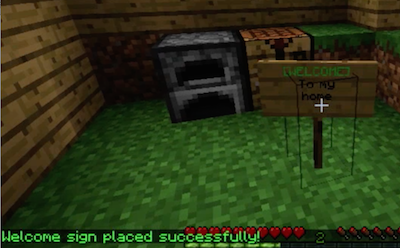
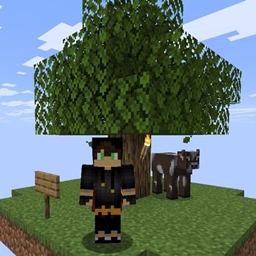
<p>A screenshot of a Welcome Warp Sign</p>

A screenshot of a Welcome Warp Sign

Description

Welcome Warp Signs

Welcome Warp Signs are an easy way for players to make warps!

  1. Each player can have up to one warp active at a time
  2. Players create a warp by placing a sign that has [WELCOME] as the first line
  3. If the warp creation is successful, [WELCOME] will become green. Previous warp signs will be automatically deactivated.
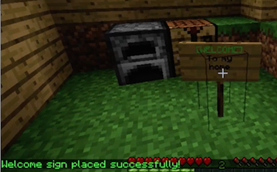
Welcome Warp Sign Screenshot

Warps are show in a GUI via the /wwarps command. Players can warp by clicking the warp or typing /wwarp <name of player>.

To destroy or remove a warp, the player just breaks the sign. If signs get destroyed by the environment or an admin player, the warp is also removed.

The other lines on the sign can say anything and are displayed in the GUI. This enables players to advertise their warps.

The safety of a warp is checked before a player warps and if unsafe, the warp is not allowed.

Explanation video

See an review / demo here.

Features

  • Easy to create and remove warps
  • Warps are kept to one per player
  • Warps are checked for safety
  • Admin commands to manage warp signs

Set Up and Installation

Required Plugins

  • No other plugins are required.

Installation and Configuration

  1. Download the plugin (wwarps.jar)
  2. Place into your plugins folder
  3. Start your server
  4. The plugin will make a folder called WelcomeWarpSigns. Open the folder.
  5. Check config.yml and adjust how you like. Set up worlds where you want Welcome Warp Signs to operate.
  6. Restart the server or type /reload.
  7. Done!

Problems

Please file a ticket if you find a problem, or have an idea for improvement.

Commands & Permissions

  • /wwarp or /wwarps to list warps
  • /wwarp <name> to warp or use the GUI
  • /wwadmin or /wadmin reload - reloads config file

Permissions

  welcomewarpsigns.add:
     description: Permission to add warp signs
     default: true
  welcomewarpsigns.use:
     description: Permission to use welcome warp signs
     default: true
  welcomewarpsigns.admin:
     description: Permission to run the admin command or destroy warp signs
     default: op

Source

Source can be found here.

Stats Disclosure

This plugin utilizes a plugin metrics system, which means that the following information is collected and sent to mcstats.org:

  • A unique identifier
  • The server's version of Java
  • Whether the server is in offline or online mode
  • The plugin's version
  • The server's version
  • The OS version/name and architecture
  • The core count for the CPU
  • The number of players online
  • The Metrics version

Visit mcstats.org if you would like to learn more about the stats collected. Go into /plugins/PluginMetrics/config.yml to disable stat collecting if you wish.


The Welcome Warp Signs Team

profile avatar
  • 4
    Followers
  • 26
    Projects
  • 819.0K
    Downloads

More from tastybentoView all

  • Inventory Switcher project image

    Inventory Switcher

    • 16
    • Bukkit Plugins

    Separate inventories per game mode world and per island if players have more than one. Players keep different items, XP, advancements, and gear for each BentoBox game.

    • 16
    • May 10, 2026
    • Bukkit Plugins
    • +1
  • OneBlock (AOneBlock) project image

    OneBlock (AOneBlock)

    • 7.0K
    • Bukkit Plugins

    The multiplayer OneBlock experience. One magical block, infinite adventure. Over 12,000 unique block placements across themed phases!

    • 7.0K
    • May 7, 2026
    • Bukkit Plugins
    • +1
  • Island Level & Leaderboards project image

    Island Level & Leaderboards

    • 14
    • Bukkit Plugins

    Island level calculator and server leaderboards. Track progression and compete across all BentoBox game modes.

    • 14
    • May 7, 2026
    • Bukkit Plugins
    • +2
  • Island Biomes project image

    Island Biomes

    • 8
    • Bukkit Plugins

    Let players change their island biome. Turn a plains island into a jungle, desert, mushroom fields, or any biome you configure.

    • 8
    • May 7, 2026
    • Bukkit Plugins
  • Inventory Switcher project image

    Inventory Switcher

    • 16
    • Bukkit Plugins

    Separate inventories per game mode world and per island if players have more than one. Players keep different items, XP, advancements, and gear for each BentoBox game.

    • 16
    • May 10, 2026
    • Bukkit Plugins
    • +1
  • OneBlock (AOneBlock) project image

    OneBlock (AOneBlock)

    • 7.0K
    • Bukkit Plugins

    The multiplayer OneBlock experience. One magical block, infinite adventure. Over 12,000 unique block placements across themed phases!

    • 7.0K
    • May 7, 2026
    • Bukkit Plugins
    • +1
  • Island Level & Leaderboards project image

    Island Level & Leaderboards

    • 14
    • Bukkit Plugins

    Island level calculator and server leaderboards. Track progression and compete across all BentoBox game modes.

    • 14
    • May 7, 2026
    • Bukkit Plugins
    • +2
  • Island Biomes project image

    Island Biomes

    • 8
    • Bukkit Plugins

    Let players change their island biome. Turn a plains island into a jungle, desert, mushroom fields, or any biome you configure.

    • 8
    • May 7, 2026
    • Bukkit Plugins