Overview
UltClearLagg is a complete server optimization plugin built for modern Minecraft servers running Paper/Purpur 1.21+.
Unlike basic clear lag plugins that only remove ground items, UltClearLagg provides a modular optimization system that includes:
- Automatic item cleanup
- Projectile cleanup
- Mob culling systems
- Mob stacking
- TPS and MSPT monitoring
- Chunk unloading
- Physics optimization
- Anti-redstone-lag detection
- Illegal/crash item protection
- Bedrock GUI compatibility
- ActionBar + BossBar notifications
- Performance dashboards
- AI freezing during low TPS situations
- Configurable world filtering
- Advanced MiniMessage formatting support
The plugin protects important entities such as:
- Named mobs
- Villagers
- Tamed pets
- Valuable items
- Important worlds
Features
Smart Automatic Cleanup
Automatically clears:
- Ground items
- Stuck projectiles
- Excess mobs
- Idle entities
Supports scheduled warnings before cleanup using:
- Chat messages
- ActionBars
- BossBars
Warnings are fully customizable inside messages.yml.
TPS & MSPT Monitoring
Real-time performance monitoring system.
Displays:
- 1m TPS
- 5m TPS
- 15m TPS
- MSPT
- RAM usage
- Max memory
Useful for detecting:
- Lag spikes
- Entity overload
- Memory pressure
- Redstone abuse
- Chunk problems
Entity Management System
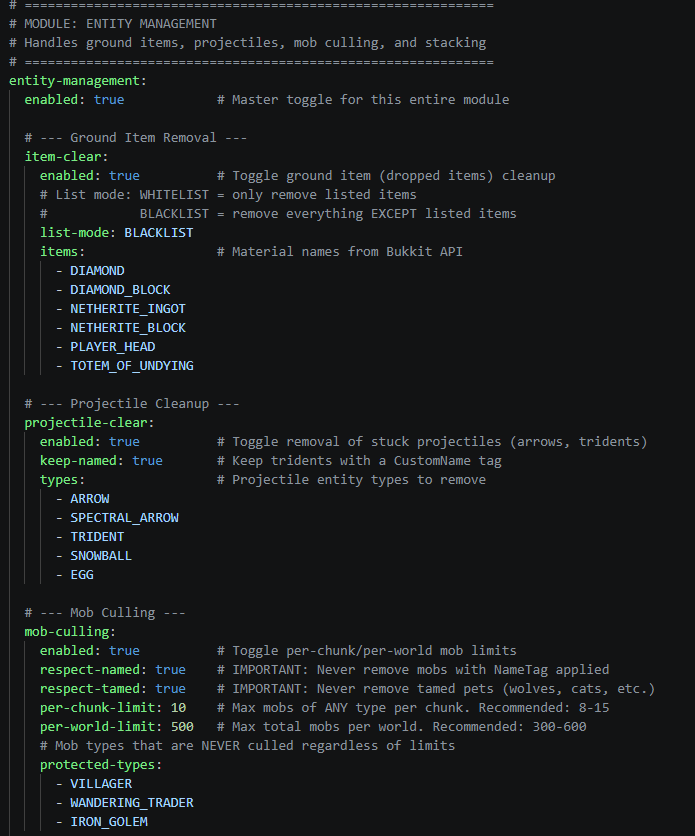
Ground Item Cleanup
Supports:
- Whitelist mode
- Blacklist mode
- Valuable item protection
- Permission bypasses
Example protected items:
- Diamonds
- Netherite
- Totems
- Player heads
Projectile Cleanup
Removes lag-causing projectiles such as:
- Arrows
- Tridents
- Snowballs
- Eggs
- Spectral arrows
Supports preserving named tridents.
Mob Culling
Prevents mob overload by enforcing:
- Per-chunk limits
- Per-world limits
Can protect:
- Named mobs
- Tamed pets
- Villagers
- Iron golems
- Traders
Mob Stacking
Combines nearby mobs into optimized stacks.
Benefits:
- Lower entity count
- Better TPS
- Reduced CPU load
- Cleaner farms
Fully configurable stack radius and stack sizes.
Physics Optimization
Includes systems to reduce:
- Falling block lag
- Physics spam
- Excessive updates
- Redstone lag machines
Useful for:
- SMP servers
- Survival servers
- Factions
- Skyblock
- Large public servers
Anti-Lag Module
Advanced lag protection systems.
Includes:
- AI freezing during low TPS
- Garbage collection hints
- Chunk unloading
- Redstone clock detection
- Crash item protection
Bedrock Edition GUI Support
Integrated Floodgate compatibility.
Bedrock players can interact with menus and dashboards through forms.
Optional dependencies:
MiniMessage Support
All plugin messages support MiniMessage formatting.
Examples:
<gradient:#FF6B35:#FFD700>UltClearLagg</gradient>
<click:run_command:'/ucl tps'>Check TPS</click>
<hover:show_text:'Server TPS'>TPS</hover>
Supports:
- RGB colors
- Gradients
- Hover text
- Click events
- Formatting
- Animations
Commands
Main Command
/ucl
Aliases:
/clearlagg
/cl
Available Subcommands
TPS Monitor
/ucl tps
Displays:
- TPS
- MSPT
- RAM usage
- Performance statistics
Manual Cleanup
/ucl clear
Forces an immediate cleanup cycle.
Reload Configuration
/ucl reload
Reloads:
Without restarting the server.
Kill Mobs
/ucl killmobs
Kills excessive mobs instantly.
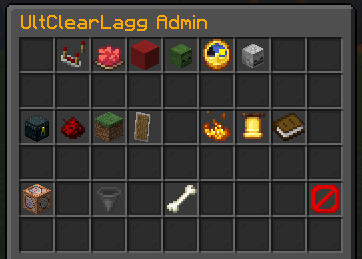
Admin Dashboard
/ucl admin
Opens the administrative optimization dashboard.
Permissions
| Permission |
Description |
Default |
ultclearlagg.use |
Basic plugin usage |
true |
ultclearlagg.admin |
Full admin access |
op |
ultclearlagg.notify |
Receive cleanup warnings |
true |
ultclearlagg.bypass.items |
Prevent dropped items from being cleared |
false |
ultclearlagg.bypass.mobs |
Protect player tamed mobs |
false |
Installation
Requirements
- Java 21+
- Paper 1.21+
- Purpur 1.21+
Recommended:
Setup Steps
- Download
UltClearLagg.jar
- Place it inside your server
plugins/ folder
- Start the server
- Configure files inside:
/plugins/UltClearLagg/
- Restart or reload using:
/ucl reload
Configuration
World Filter
world-filter:
  mode: BLACKLIST
  worlds:
    - creative_world
    - minigames
Modes:
BLACKLIST = plugin works everywhere except listed worldsWHITELIST = plugin only works in listed worlds
Cleanup Schedule
cleanup-schedule:
  enabled: true
  interval: 300
  warnings:
    - 60
    - 30
    - 10
    - 5
This example:
- Runs cleanup every 5 minutes
- Warns players before cleanup
Item Protection
item-clear:
  list-mode: BLACKLIST
  items:
    - DIAMOND
    - NETHERITE_INGOT
BLACKLIST mode:
- Keeps listed items
- Removes everything else
WHITELIST mode:
- Removes only listed items
Mob Culling
mob-culling:
  per-chunk-limit: 10
  per-world-limit: 500
Prevents entity overload automatically.
Mob Stacking
mob-stacking:
  enabled: true
  stack-radius: 5
  max-stack-size: 50
Combines nearby identical mobs.
Messages Configuration
All plugin messages are stored inside:
messages.yml
Features:
- MiniMessage support
- RGB colors
- Gradients
- Hover events
- Click events
- Placeholder support
Example:
warning: "<yellow>⚠ Cleanup in <red>{0}</red> seconds!"
Performance Recommendations
Small Servers (1-20 players)
cleanup-schedule:
  interval: 600
mob-culling:
  per-world-limit: 300
Medium Servers (20-80 players)
cleanup-schedule:
  interval: 300
mob-culling:
  per-world-limit: 500
Large Servers (80+ players)
cleanup-schedule:
  interval: 180
mob-culling:
  per-world-limit: 800
Enable:
- Mob stacking
- AI freezing
- Chunk unloading
- Projectile cleanup
Included Systems
Core Systems
- CleanupTask
- TPSMonitor
- ModuleManager
- NotificationManager
- ConfigManager
- GUIManager
Modules
EntityModule
Handles:
- Item cleanup
- Projectile cleanup
- Mob culling
- Mob stacking
PhysicsModule
Handles:
- Physics lag reduction
- Falling block control
- Redstone optimization
WorldModule
Handles:
- Chunk management
- World cleanup
- Entity scans
AntiLagModule
Handles:
- AI freezing
- Emergency optimization
- Lag spike response
Safety Notes
Some settings can be aggressive.
Be careful when modifying:
- Hopper tick systems
- Mob limits
- Physics controls
- AI freezing
- Chunk unloading
Always:
- Backup your worlds
- Test on a local server first
- Increase limits slowly
- Monitor TPS after changes
Compatibility
Fully Supported
Soft Dependencies
| Plugin |
Purpose |
| Floodgate |
Bedrock GUI support |
| ProtocolLib |
Packet optimization features |
Technical Information
Built With
- Java
- Paper API
- Adventure API
- MiniMessage
API Version
api-version: '1.21'
Example Use Cases
Survival SMP
- Reduce farm lag
- Clear projectiles
- Prevent mob overflow
- Monitor TPS
Factions
- Stop cannon lag
- Reduce redstone abuse
- Clear entity spam
- Improve combat performance
Skyblock
- Limit mob grinders
- Stack entities
- Reduce hopper lag
- Control chunk overload
Minigames
- Fast cleanup cycles
- Projectile removal
- Better arena performance
Troubleshooting
Plugin Not Working
Check:
- Server version is 1.21+
- Java version is correct
- Plugin loaded successfully
- Config syntax is valid
TPS Still Low
Possible causes:
- Too many plugins
- Massive redstone systems
- Large mob farms
- World corruption
- Insufficient RAM
Try:
- Lowering entity limits
- Enabling mob stacking
- Reducing view distance
- Using Paper/Purpur
Bedrock GUI Not Opening
Install:
Then restart the server.
Developer Information
Main Package
com.ultclearlagg
Important Classes
| Class |
Purpose |
UltClearLagg |
Main plugin bootstrap |
CleanupTask |
Cleanup scheduler |
TPSMonitor |
Performance monitor |
CommandHandler |
Command system |
NotificationManager |
Warning notifications |
GUIManager |
Inventory GUIs |
AdminDashboard |
Admin GUI |
BedrockFormHandler |
Bedrock forms |
Credits
Created by:
geturplugins
Discord:
https://discord.gg/xctckUQukB
Support
Need help?
Join the Discord server for:
- Bug reports
- Support
- Suggestions
- Updates
- Feature requests
Discord:
https://discord.gg/xctckUQukB
Final Notes
UltClearLagg is designed for server owners who want a modern, configurable, and aggressive optimization solution without sacrificing important gameplay systems.
Whether you're running:
- SMPs
- Factions
- Skyblock
- Lifesteal
- Minigames
- Public networks
UltClearLagg provides the tools needed to keep your server smooth and stable under heavy load.