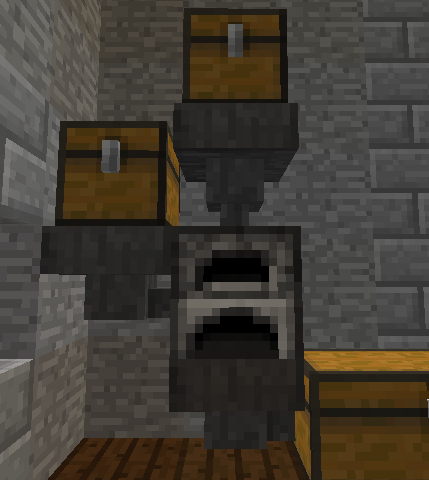
SuperSmelter with Hoppers and Chests
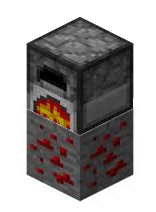
Furnace on Redstone Ore
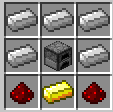
SS_Craft_T2
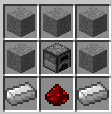
SS_Craft_T1

Minecraft Furnace

Super Star Furnace

Banner
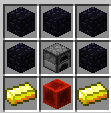
SS_Craft_T3
Description
Super charge your furnaces to produce more ingots, use less fuel, and more!

Smelt Ingots and other items more efficiently so you double your output!

SuperSmelter allows for up to three different smelters, below are the default recipes (2.1 will allow the recipes to be changed) to craft them, and their default use. All smelters can have their name's and settings changed to whatever you want.
Production Furnace

This burns fuel twice as fast, which isn't good for most items, but in trade it doubles the output of stone, iron and gold Ingots.
Charcoal Oven

This smelter burns fuel slower, making all fuel last twice as long, perfect for converting logs to charcoal, or general furnace use.
Power Furnace

This smelter burns fuel at the normal speed, but doubles the output of iron and gold ingots.
Settings in the config.yml
The names of the smelters, displayed as the description of a smelter, under the name SuperSmelter.
Name:
  SMELTER1: Production Furnace
  SMELTER2: Charcoal Oven
  SMELTER3: Power Furnace
The amount of extra fuel burned (wood, coal, charcoal, etc.) is called the Fuel Multiplier, so if it is set to 2, then the item being used will burn twice as fast, meaning it only lasts half as long as normal. Set it to .5 and the fuel will burn at 1/2 the burn speed, this works well if you just want to create more efficient furnaces.
Fuel:
  MULTIPLIER1: 2.0
  MULTIPLIER2: 0.5
  MULTIPLIER3: 1.0
If you want the SuperSmelter to double your output of smelted items from your Smelt List then set the Output Double Setting to true.
Output:
  DOUBLE1: true
  DOUBLE2: false
  DOUBLE3: true
The items you want to be smelted are listed in the Smelt List, the defaults are IRON_INGOT, GOLD_INGOT, and STONE. Any item that can be cooked in a furnace will be cooked in a SuperSmelter but If you place an item that can be smelted in a SuperSmelter and it's not in the Smelt List, it will not produce extra items even if the output double is set, but it will burn the fuel as set in the Fuel Multiplier. In the future this will work with other settings to restrict and control smelters even more than the current version.
Smelt1: IRON_INGOT GOLD_INGOT STONE
Smelt2: CHARCOAL
Smelt3: IRON_INGOT GOLD_INGOT
The optional economy allows for frame shops. Here are the default prices for each smelter type, so change them if you will be using frame shops. For more information about frame shops and economy support please read the section below called "Optional Economy"
Price:
  SMELTER1: 1
  SMELTER2: 1
  SMELTER3: 1
Installing SuperSmelter
1) Add SuperSmelter to your plugins folder, start your server or /reload your plugins
2) Edit the config.yml file in the SuperSmelter Folder.
3) Reload or restart again for your changes to take effect.
Commands
SuperSmelter currently has one command, the Give Command.
Usage: /ss give {player} {type #}
Example: /ss give AxelDios 2
This would give AxelDios a Type 2 (Charcoal Oven) SuperSmelter.
Permissions
  supersmelter.1.craft:
    description: Craft Type I SuperSmelters
    default: op
  supersmelter.1.place:
    description: Place Type I SuperSmelters
    default: false
  supersmelter.1.use:
    description: Use Type I SuperSmelters
    default: false
  supersmelter.1.buy:
    description: Buy Type I SuperSmelters
    default: false
  supersmelter.2.craft:
    description: Craft Type II SuperSmelters
    default: op
  supersmelter.2.place:
    description: Place Type II SuperSmelters
    default: false
  supersmelter.2.use:
    description: Use Type II SuperSmelters
    default: false
  supersmelter.2.buy:
    description: Buy Type II SuperSmelters
    default: false
  supersmelter.3.craft:
    description: Craft Type III SuperSmelters
    default: op
  supersmelter.3.place:
    description: Place Type III SuperSmelters
    default: false
  supersmelter.3.use:
    description: Use Type III SuperSmelters
    default: false
  supersmelter.3.buy:
    description: Buy Type III SuperSmelters
    default: false
  supersmelter.give:
    description: Give Command
    default: op
  supersmelter.sell:
    description: Ability to setup frame shops
    default: op
Optional Economy
SuperSmelter can work with Vault and a supported economy plugin.
Visit the Vault Webpage to see the current list of supported economy plugins
To create a SuperSmelter Frame Shop all you need is the supersmelter.sell permission, a frame, and the smelter you want to sell.
1) Place a frame
2) Right Click the frame with the smelter you want to sell.
All shops are admin type shops, money is deducted from the players but isn't deposited else where.
To buy from a shop all a player needs to do is right click on the Frame Shop and have the buy permission for the type of smelter being sold and the money to buy it.
All types are set to a default price of one dollar, so configure the prices in the config.yml.
Configuration
No configuration is necessary but you may change all the settings listed above in the config.yml section.
Old Documentation
For information for 1.x versions of SuperSmelter please go here.

SuperSmelter Team


Owner