WHAT IS IT?
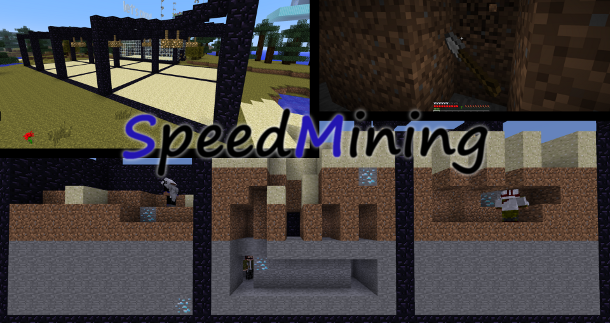
SpeedMining is a minigame for minecraft which allows you to promote digging competitions.
You can set up a game like that:
You can see the sandfields. Each field is for one player. The goal is to dig down in this field and find some blocks (defined by you).
The fields can have multiple levels of materials. You can add an infinite number of fields.
Test it out and enjoy! :D
FEATURES:
Support for multiworld servers
Create as much fields as you want (may lag when too much)
Custom layers
Unlimitet size
Customizable language file
Random generated Blocks
You can have some fun with this
INSTALLATION:
Simply put the SpeedMining.jar into your plugins folder and restart the server.
CREATE A GAME: Create arena
Build something that looks like a useful SpeedMining arena. (Like an arena with six 10x7x12 fields in it.)
Type /sm create <gamename> <id[:damage]> <amount>
gameName - the name of the game
id - the id of the block you have to find
damage - the damage of the block you have to find
amount - how many of those blocks you have to find
Select fields
You need to select fields because the plugin will not select them itself.
Take a wooden shovel (269).
Select two opposite corners on the top layer of a field.
leftclick - set corner 1
rightclick - set corner 2
Type /sm addfield to save the selected field.
Now do the same again with all fields.
NOTICE:
At the moment you can't remove fields ingame, so be careful.
Create the layer-pillar
Build a pillar with any blocks you want.
This pillar is like a vertically core drill through a field.
The height of the pillar will automatically set the height of the fields
You can edit the pillar when ever you want; The new blocks will be used by the next game start.
Take the wooden shovel again.
Select the top and the bottom block of the pillar.
Type /sm setlayers to save the location of the layer-pillar.
NOTICE:
Do not destroy the layer-pillar; this will cause the plugin to generates empy fields.
Set the spawnpoint
Search a place where players should be teleported to when they join a game.
Do /sm setspawn
Set the inventory
Put all the things you want players to have in their inventory when playing the arena in your inventory.
Do /sm setinv to save the inventory.
PLAY: join and start
You and at least one other player have to type /sm join <gamename>
Now you're in the lobby (spawn)
A certain percentage (defined in the config.yml) of the players should now do /sm vote to start the game.
Now you're in the game. Play :D
how to win
Search all wanted blocks and destroy them, but remember, there are other players who could get them before you :O
COMMANDS AND PERMISSIONS:
Permission
Command
Description
sm.play
/sm join
Join a game.
sm.play
/sm leave
Leave a game.
sm.play
/sm vote
Vote to start a game.
sm.list
/sm list
Get a list of all arenas.
sm.create
/sm create
Create a new arena.
sm.create
/sm select
Select an arena.
sm.create
/sm addfield
Add a field to an arena.
sm.create
/sm setspawn
Set the lobbyspawn for an arena.
sm.create
/sm setinv
Save your inventory as equipment for an arena.
sm.create
/sm setlayers
Save the layer-pillar.
sm.create
/sm todo
Get a list of things you have to do to make an arena playable.
sm.create
/sm remove
Delete an arena.
sm.reload
/sm reload
Reload the game files.
sm.lang
/sm lang
Change the language.
CHANGE LANGUAGE:
SpeedMining is available in two languages (German and English).
If you want to change the language do /sm lang <DE|EN|custom>
DE
German
Deutsch
EN
English
English
custom
loads the text from the language.yml
BUGS:
If you find a bug please send me a PM or write a comment.