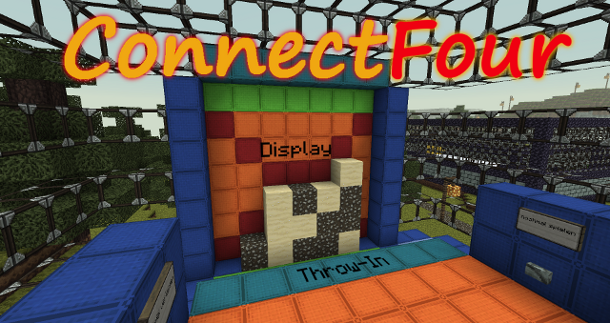
Most of you know "Connect Four" or "Four In A Line". This is the Minecraft version of it.
FEATURES
play Connect Four in Minecraft
get statistics about played games
play multiple ConnectFour-games at the same time
customizable language file
create signs to join a game without commands
very easy setup
use any blocks you want instead of sand and gravel
much settings in the config
items as rewards
vault economy support
economy reward
betting against your opponent
have fun
INSTALLATION
Simply put the ConnectFour.jar into your plugins folder and restart the server.
CREATE A GAME
Build the Display
First of all you have to build the display. This must be at least 7 x 7 blocks.
Now the game needs a throw-in bar. This should be a 7 blocks wide line.
Select those Things
Type /cfour create <gameName> <gameName> = The name of the game you're creating.
Now select the Throw-in:
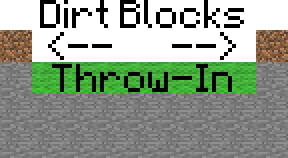
Put two dirtblocks at the corners of the throw-in bar so there are 7 blocks (air) between them. (see image)
And the Display:
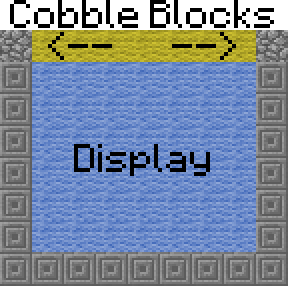
Put two cobblestoneblocks at the top corners of the display so there are 7 blocks (air) between them. (see image)
When the selection's done, save it with /cfour save
Set the Spawn
The last thing you have to do is to set the spawn. For doing that type /cfour setspawn
Create a spawn-sign
You can create spawn-signs, so you don't have to execute a command to join a game.
Create a spawn-sign:
LINE1
[cfour]
LINE2
<gameName>
LINE3
empty
LINE4
empty
Set rewards (optional)
You can do that if you want to give the winners some items.
Set the rewards for a game: /cfour setrewards <gameName> <id:amount[:damage]> <...>
For example: /cfour setrewards game1 1:10 17:20:1 will set the rewards of "game1" to 10 cleanstone and 20 birchwood
When you've set some rewards but now you've changed your mind, do /cfour removerewards <gameName> for remove the rewards.
Set economy rewards (optional, needs vault)
You can do that if you want to give some money to the winners.
Set the economy rewards for a game: /cfour setEcoReward <gameName> <amount>
Set a betting stake (optional, needs vault)
Use this, if you want your players to bet against each other.
When a player joins the game, he'll have to pay <amount> of money to play. The winner will receive the whole amount.
Set a betting stake for a game: /cfour setBetMoney <gameName> <amount>
Change the block IDs (optional)
If you don't want to play with sand and gravel, you can set other IDs.
To do that do: /cfour setblocks <gameName> <ID1> <ID2>
Congratulations! Your ConnectFour game is now playable :D
To remove a game type /cfour remove <gameName>
PLAY
How to play
The players who want play ConnectFour have to type /cfour join <gameName>
Now they're ingame. The distribution of sand and gravel and who has to begin is absolutley random.
The player who's turn it is has to put he's block (sand or gravel) on the throw-in bar. Now the block will automaticaly be teleporter to the top of the display and fall down.
How to win
The target is to put the sand/gravel in a row of 4 blocks. This works horizontally, vertically and diagonally.
Be first or you will lose!
NOTICE:
If you destroy the blocks whith WorldEdit or anything other, this will only have a visual effect. The real block positions will not be changed (but you can't play very good if you don't see where your block realy is).
CHANGE LANGUAGE
ConnectFour is available in two languages (German and English).
If you want to change the language type in /cfour lang <DE|EN|custom>
DE
German
EN
English
custom
loads the texts from the languagefile
VIDEOS
by Dragon252525
by VariationVault
CONFIG
#the language (DE|EN|custom)language:de#en-/disable "it's your turn" messagesenable-*itsYourTurn*-spam:true#should the players be teleported to their previous position when the game is over?teleportOnGameEnd:true#should the display automaticaly be cleared when the game is over? (normaly it'll be cleared as soon as a new game beginns)clearTheDisplayOnGameEnd:false#should you be able to user join-signsenableJoinSigns:true#must the player be in the same world as the game to join?sameWorldToJoin:false#must the player be within a certain radius to join?checkMaxDistaceToGameSpawnOnJoin:false#radiusmaxDistanceToGameSpawn:20#some MySql settings for online statisticsuse_MySql:falsemysql_host:localhostmysql_port:'3306'mysql_database:databasemysql_username:usernamemysql_password:'12345'
COMMANDS AND PERMISSIONS
Permission
Command
Description
cfour.user.*
none
All user permissions.
cfour.user.play
/cfour join
Join a game.
cfour.user.play
/cfour leave
Leave a game.
cfour.user.play
/cfour info
Shows a short Tutorial
cfour.user.tp
/cfour tp
Teleport to a game.
cfour.user.help
/cfour help
Shows the help page.
cfour.user.list
/cfour list
List all games.
cfour.user.stats
/cfour stats
Show the statistics.
cfour.admin.*
none
All admin and user permissions.
cfour.admin.reload
/cfour reload
Reload the config.
cfour.admin.lang
/cfour setlang <lang>
Change the language.
cfour.admin.clean
/cfour clear
Clear the display.
cfour.admin.create
/cfour create
Create a game.
cfour.admin.create
/cfour setspawn
Set the spawn of a game.
cfour.admin.create
/cfour remove
Remove a game.
cfour.admin.create
/cfour setrewards
Set the rewards for a game.
cfour.admin.create
/cfour removerewards
Remove the rewards from a game.
cfour.admin.create
/cfour setEcoReward
Set the economy reward for a game.
cfour.admin.create
/cfour removeEcoReward
Remove the economy reward from a game.
cfour.admin.create
/cfour setBetMoney
Set the stake for a game.
cfour.admin.create
/cfour removeBetMoney
Remove the stake from a game.
cfour.admin.create
/cfour setblocks
Change the blocks of a game (instead of sand and gravel).
cfour.admin.stop
/cfour stop
Stop a game.
cfour.admin.disable
/cfour disable
Disable a game to edit it.
cfour.admin.disable
/cfour enable
Enable a game.
STATISTICS
INGAME
To see the statistics do /cfour stats
ONLINE
If you have a website, you can include this script to get some statistics about played games and players. Example here
Setup the Webstats script
Open plugins/ConnectFour/config.yml , enter your MySql data and set use_MySql to true.
If your webspace isn't on the same server as your gameserver, make sure that you have enabled external access to the database.