Ahoy there ! Download Festival instead of this, link below !
People, don't try this plugin, it's not very working and full of bugs. BUT if you want, you can try
THIS an improved version made by Gunrec and me.
Download Festival instead of this, link above !
RandWorks is a plugin which allows you to fire random fireworks using signs and redstone. You can customize fire interval, height and type of the fireworks. As this plugin fires TRUE 1.4.6 FIREWORKS, you will need a 1.4.6 build of CraftBukkit.
Usage of the RandWorks signs
RandWorks is really
simple to use. Just
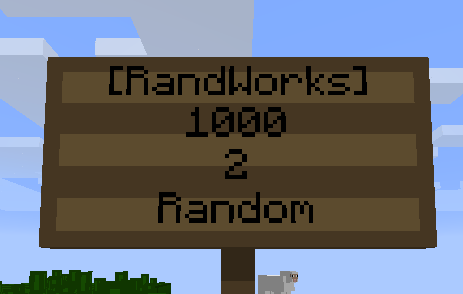
create a sign, like this :

- The first line is mandatory ; you must put [RandWorks], otherwise the plugin will not know it's a fireworks sign.
- The second line is the time elapsing between each firework ; it's in milliseconds. You can put 0 but it's really not recommended.
- The third line is the height of each firework. It can be 1, 2 or 3 (small, medium or high ; one, two or three gunpowders). You can also put more or less than 1 or 3, but you will not see your firework.
- The last line is the type of each firework. It can be Random (random type for each rocket), Ball, Ball_Large, Star, Creeper or Burst.
Once the sign created, you just have to
power it (or its block) with some
redstone and enjoy the show ! The fireworks will fire
until the redstone is powered off or the
sign is removed.
Fun facts:
- Only the first line is mandatory. If you leave one of the others lines empty, RandWorks will automatically fill the blanks with the default parameters, like in the picture above.
- The parameters aren't case-sensitive.
- All the fireworks are fired within a range of three blocks around the sign :

The yellow point is the sign, and the fireworks are fired randomly on each red point.
- Don't try to put decimal numbers, it will not work.
- Because the Bukkit Scheduler is done like this, you'll have to wait before the fireworks are fired. For example, if you put an interval of 10sec, you will have to wait 10sec and then the first firework will be launched.
Permissions
This plugin uses the
standard Bukkit permission system, so it'll work with
most of the permissions plugins.
- randworks.create : Allow someone to create a RandWorks sign.
- randworks.remove : Allow someone to remove a RandWorks sign
- randworks.* : With this, you can do everything you want with RandWorks.
Usage of the SingleWorks signs
If you don't want to fire several fireworks, you can create
SingleWorks signs. They are like RandWorks signs but they will fire
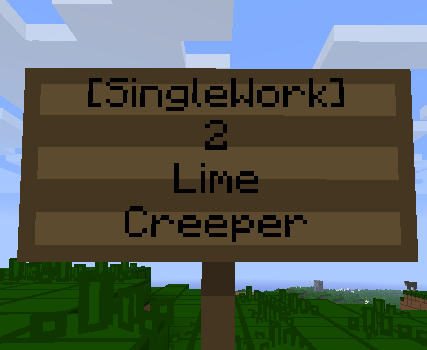
one firework per redstone activation (button, lever, clock...). Here are how they work :

- The first line is, here too, mandatory. Just put it.
- The second line is the height of the fireworks, it can be 1, 2, or 3.
- The third line is the color of the firework (main color and fade). There is 17 colors : Aqua, Black, Blue, Fuschia, Gray, Green, Lime, Maroon, Navy, Olive, Orange, Purple, Red, Silver, Teal, White, Yellow ; you can also put Random for random colors.
- The Fourth line is the type of the fireworks ; Ball, Ball_Large, Star, Burst, Creeper or Random.
The sign will now fire
one firework when it's powered. You can use it with buttons or clocks.
Fun facts
- Like with the RandWorks signs, the three last parameters will be automaticaly filled if they are empty or wrong.
- Don't put decimals numbers in the height.
- They can be activated with several redstone sources, but they can fire only one firework per 50 milliseconds.
Permissions
Hey, it's the same permissions system as before. And, actually, almost the same permissions. Copy/paste !
- singlework.create : Allow someone to create a SingleWork sign.
- singlework.remove : Allow someone to remove a SingleWork sign
- singlework.* : With this, you can do everything you want with SingleWork.
Video
Here is a video made by IngrownPenguin which shows how to use the plugin :
Watch video on YouTube. I can't embed the player in the page because I took the wrong markup *facepalm*
Changelog
RandWorks 1.1
- Fixed a lot of bugs like the multiple-signs problem (with a memory leak, yay!) or the non-integer interval problem.
- Added the SingleWorks panels and their permissions.
RandWorks 1.0