Commands and Permissions: [] = Needed {} = Optional
The permission pixelvip.cmd.player is given by default for players, and other perms only for OPs.
Player commands:
Command: /usekey [key] Aliases: /usarkey Permission: pixelvip.cmd.player Description: To use a generated key to activate a vip;
Command: /viptime Aliases: /tempovip Permission: pixelvip.cmd.player Description: If the player is vip, use to see the days left to end your vip;
Command: /setactive [group] {player} Aliases: /changevip, /trocarvip Permission: pixelvip.cmd.player (pixelvip.setactive for use with {player}) Description: To change to other vip, if the player has activated more than one key;
Admin commands:
Command: /newkey [group] [days] {uses} Aliases: /gerarkey Permission: pixelvip.cmd.newkey Description: To generate a new key based on configuration lentgh and existing Vip groups, and optional amount of uses of same key;
Command: /newitemkey [cmd1, cmd2, ...] Aliases: /newikey, /gerarikey Permission: pixelvip.cmd.newitemkey Description: To generate a new ITEM key to give itens based on commands on use the key;
Command: /additemkey [key] [cmd1, cmd2, ...] Aliases: /addikey Permission: pixelvip.cmd.additemkey Description:To add items(commands) to existing VIPs keys and ITEM keys;
Command: /delkey [key]
Aliases: none Permission: pixelvip.cmd.delkey Description:To remove any type of generated key;
Command: /listkeys Permission: pixelvip.cmd.listkeys Description: To list all available Keys;
Command: /removevip [player vip] {group} Aliases: /delvip Permission: pixelvip.cmd.removevip Description: To remove a vip of a player, or remove all vips of player (if more than one key activated and if {group} is not specified), and put the player back on previous group;
Command: /addvip [player] [group] [days] Aliases: /givevip, /darvip Permission: pixelvip.cmd.addvip Description: To add a vip for player without key, giving the itens on activation. If used in an existing vip plan, the days will be added;
Command: /setvip [player] [group] [days] Permission: pixelvip.cmd.setvip Description: To add a vip for player without key and without send activation itens. This command is like a silent activation. If used in an existing vip plan, the days will be added;
Command: /pixelvip reload Permission: pixelvip.cmd.pixelvip Description: To reload the configuration from file;
To-Do:
Add mysql system;
Suggestions?
Bungee Syncronization(beta): PixelVip is ready(beta) to work in bungeecoord, to sync all Vip plans between all your Bungee servers.
How to install:
Download the PixelVipBungeeBrige and put in your BungeeCoord plug-ins folder;
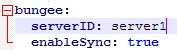
Download the latest version of plugin (version 1.0.2+) and on your Spigot servers, go to /plugin/PixelVip and change this options on config.yml:
On serverID put the name of your server like you used on BungeeCooord config.yml. You need to give the same ID to do not make the sync loop on every command/syncronization;
You need to add the same groups on all servers in your permissions plugin;
Use /pixelvip reload after finish the changes;
How this sync works:
When someone use a PixelVip command in one of the server with sync enabled, the argumments will be sent to all other server with bungee sync enabled.
The sync DONT use schedulers! This sync will only send argumments when a player:
Activate a key;
Generate a key;
Change the vip to other (if more than one is activated);
On vip finish;
On Vip removed;
Notes about BungeeCoord: BungeeCoord need at least one player online on Bungee server to receive the argumments. Then if theres no player online in one of the Sync servers, the action will be pendente until a player join on server.
This feature is not 100% tested (but is 90%) waiting to be tested on more ambients and situations i can test on my server and on my off-line server.
PagSeguro API: Portuguese: Agora o PixelVip já funciona com a API do pagseguro. Veja como configurar e baixe a API jar do pagseguro na WIKI: https://github.com/FabioZumbi12/PixelVip/wiki