Build a Waystone by placing a Lodestone on Smooth Stone, give it a name, and customize its appearance through an intuitive in-game GUI.
No client mods or resource packs required.
Features
- Customizable Waystones — Create named teleportation points using a simple Lodestone structure.
- Teleportation Network — Travel between available Waystones through an organized inventory GUI.
- Public & Private Waystones — Share Waystones with everyone or keep them private.
- My Waystones / All Waystones — Switch between your personally owned Waystones and the server's public network.
- Automatic Public Access — Public Waystones appear in the network automatically without requiring discovery.
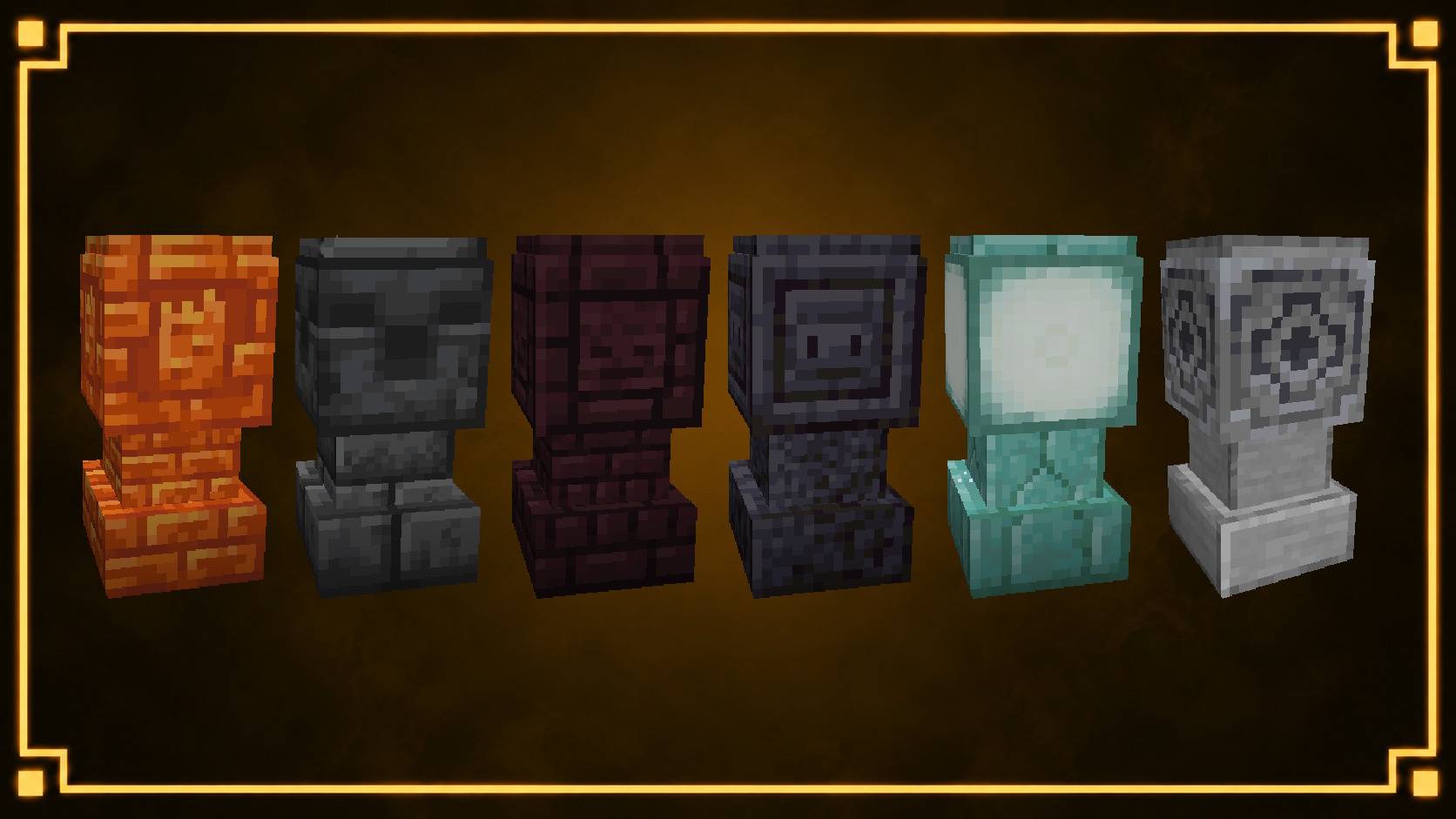
- Custom Block Skins — Choose from built-in designs or customize Waystones using supported full-block textures.
- Mix & Match Skins — Combine two different block textures to create personalized designs.
- Transparent Block Support — Use glass and other supported transparent materials with simplified geometry and invisible collision bases.
- Custom Menu Icons — Personalize each Waystone's inventory icon.
- Hologram Customization — Display Waystone names with adjustable colors and optional creator heads.
- Admin Waystones — Convert existing Waystones into server-managed locations with miniature command-block markers.
- Safe Teleportation — Configurable countdowns, cooldowns, destination preloading, and safe landing detection.
- Waystone Management — Rename, reskin, configure, or dismantle Waystones directly from their location.
- Admin Sorting — Organize the network's Waystone icons using a dedicated sorting GUI.
- Configurable Limits — Set ownership limits globally or through permissions.
- Optional Crafting Recipe — Customize the Lodestone recipe through the configuration.
Commands
- /waystones — Opens the main teleportation menu.
- /waystone menu — Opens the Waystone network.
- /waystone admin — Toggles the targeted Waystone between player and Admin ownership.
- /waystone sort — Opens the admin Waystone sorting GUI.
- /waystone reload — Reloads the configuration.
- /waystone testgrid — Generates a Waystone appearance test grid.
- /waystone remove-all — Removes all registered Waystones after confirmation.
Permissions
Basic Waystone functionality is available to players by default.
Administrators can control access using:
mgg.waystones.use — Open the Waystone network.mgg.waystones.create — Create Waystones.mgg.waystones.teleport — Use Waystone teleportation.mgg.waystones.teleport.interworld — Teleport between worlds.mgg.waystones.admin — Access administrative features.mgg.waystones.removeall — Remove all registered Waystones.mgg.waystones.limit.<number> — Assign custom ownership limits.
Installation
- Place MGG-Waystones-1.0.0.jar inside your Minecraft server's
plugins folder.
- Start or restart the server.
- The plugin automatically generates its configuration under
plugins/MGG Waystones/.
- Place a Lodestone directly on Smooth Stone to create your first Waystone.
Compatibility
- Minecraft Java Edition — Paper 26.2
- Server-side plugin
- No client installation required
- No resource pack required
Important Notes
- Public Waystones are automatically available to all players through the network.
- Private Waystones remain accessible through their owner's personal Waystone list.
- Management requires being physically near the Waystone; remote management is disabled.
- Transparent custom skins use invisible collision blocks to preserve physical interaction.
- Teleportation settings, ownership limits, effects, and hologram visibility can be adjusted through the configuration.
- Deconstructing a Waystone returns its original activation materials at the Waystone's location.
Support & Usage
If you encounter visual issues, teleportation problems, or conflicts with another plugin, please report your Minecraft/Paper version and include the relevant server log.
💚 Consider following MrGreenGames if you enjoy this plugin!
🟢 Feel free to use this plugin on your servers, in modpacks, and in videos!
If you feature the plugin in a video or showcase, linking back to the original plugin page is greatly appreciated, but not required.
🔴 Please do not redistribute or repurpose the plugin.
You may not reupload the plugin to other websites, launchers, or platforms, nor reuse its assets or code in separate projects without permission.
Do not place the plugin behind ad-based redirect services or include it in paid modpacks or server packages.
💚 This plugin is intended to remain free and accessible to everyone.


![[MGG] Waystones logo](https://media.forgecdn.net/avatars/thumbnails/2083/575/64/64/639264474669150244.png)

![[MGG] Glowing Berries project image](https://media.forgecdn.net/avatars/thumbnails/2079/734/256/256/639262992776156055.png)
![[MGG] Mob Pens project image](https://media.forgecdn.net/avatars/thumbnails/2089/226/256/256/639266429334454689.png)
![[MGG] Biome Compass project image](https://media.forgecdn.net/avatars/thumbnails/2086/614/256/256/639265586759829457.png)
![[MGG] Magnetic project image](https://media.forgecdn.net/avatars/thumbnails/2085/963/256/256/639265387913303203.png)