[MGG] Biome Compass

Locate any Minecraft biome with a custom compass! Features safe teleportation, surface and cave detection, ocean support, duplicate location prevention, configurable search limits, world border protection, and cooldowns. No client mods required.
item image

Description

Find any biome using /biome <biome> to receive a compass that points toward its location, with optional teleportation and automatic safe destination detection.

No client mods or resource packs required.


Features

  • Biome Finder — Locate specific Minecraft biomes using the /biome command.
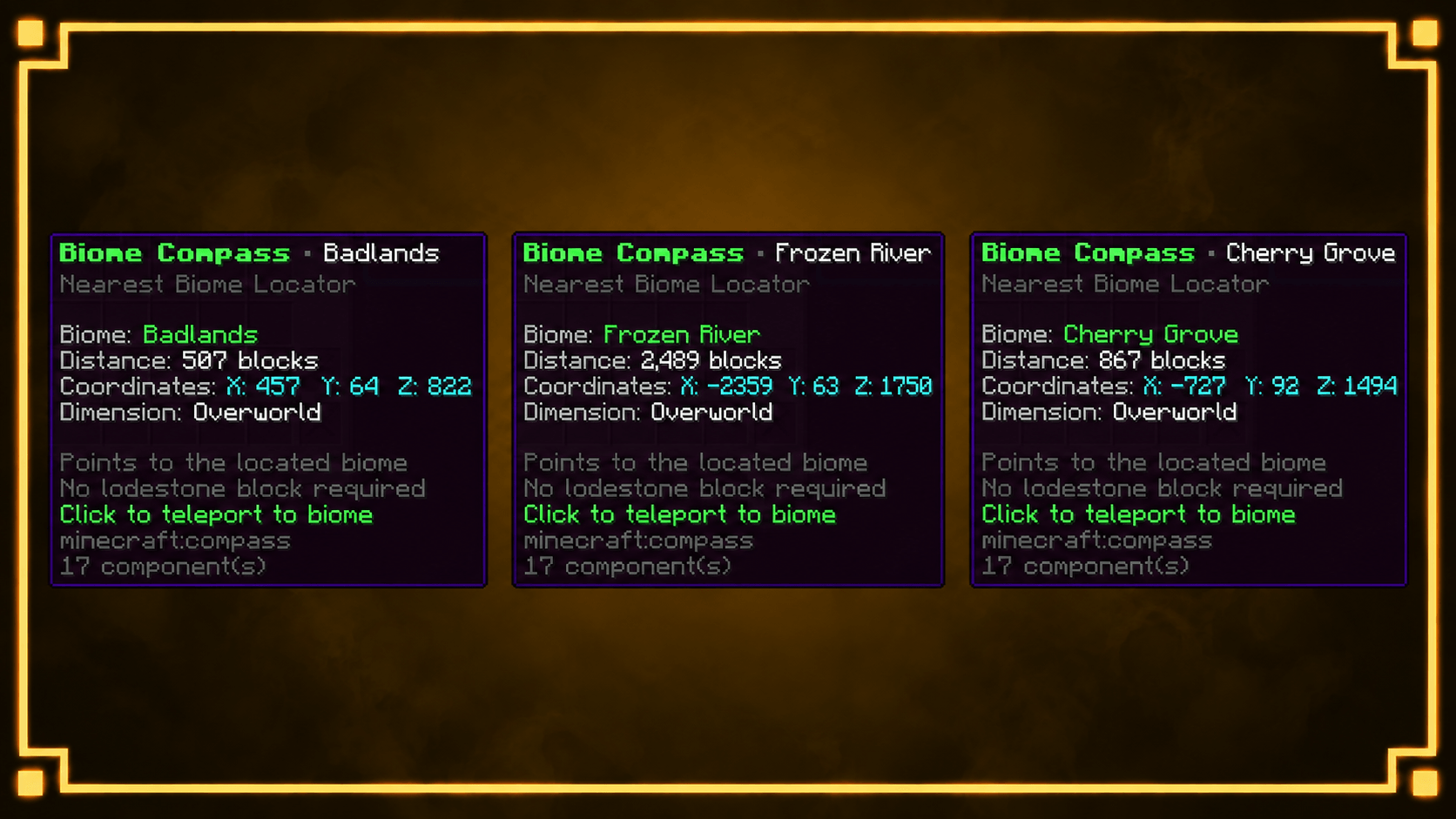
  • Custom Biome Compasses — Receive a compass displaying the target biome, distance, and coordinates.
  • Biome Autocomplete — Quickly select available biomes using command suggestions.
  • Optional Teleportation — Right-click your compass to travel directly to its destination when enabled.
  • Safe Surface Teleportation — Automatically locate suitable surface landing positions.
  • Underground Biome Support — Search for safe locations inside Deep Dark, Lush Caves, Dripstone Caves, Sulfur Caves, and other supported cave biomes.
  • Ocean & River Support — Target sea level (Y=63) with a safe ocean-floor fallback.
  • Duplicate Location Prevention — Avoid destinations near matching Biome Compasses already carried in your inventory.
  • Configurable Search Range — Limit biome searches to a radius centered on world spawn.
  • World Border Protection — Prevent destinations outside the configured search area or Minecraft's world border.
  • Ignore Range — Skip nearby biome matches using a configurable distance.
  • Teleport Cooldown — Configurable cooldown with a vanilla-style hotbar overlay.
  • Natural Block Interaction — Interact with containers, doors, buttons, and item frames without accidentally teleporting.
  • Configuration Reload — Apply configuration changes without restarting the server.

Commands

  • /biome <biome> — Locates a matching biome and gives the player a compass pointing toward it.
  • /biomecompass reload — Reloads the plugin configuration.

Permissions

Basic Biome Compass functionality is available to players by default.

Administrators can control access using:

  • mgg.biomecompass.use — Use the biome finder command and receive compasses.
  • mgg.biomecompass.teleport — Teleport using Biome Compasses when enabled.
  • mgg.biomecompass.reload — Reload the configuration (operators by default).

Installation

  1. Place MGG-Biome-Compass-1.0.0.jar inside your Minecraft server's plugins folder.
  2. Start or restart the server.
  3. The plugin automatically generates its configuration under plugins/MGG Biome Compass/.
  4. Run /biome <biome> to locate your first biome.

Compatibility

  • Minecraft Java Edition — Paper 26.2
  • Server-side plugin
  • No client installation required
  • No resource pack required

Important Notes

  • The default search radius is 10,000 blocks from world spawn.
  • The default ignore range is 500 blocks from the player.
  • Matching compass destinations already carried by the player are excluded within 500 blocks.
  • Click-to-teleport is optional and disabled by default.
  • The default teleport cooldown is 3 seconds when teleportation is enabled.
  • Ocean and river destinations prioritize Y=63, with a safe seafloor fallback.
  • The plugin respects the existing Minecraft world border but does not create or resize it.
  • Search distances, teleportation, cooldowns, and safe-location settings can be adjusted through the configuration.

Support & Usage

If you encounter biome detection issues, teleportation problems, or conflicts with another plugin, please report your Minecraft/Paper version and include the relevant server log.


💚 Consider following MrGreenGames if you enjoy this plugin!

🟢 Feel free to use this plugin on your servers, in modpacks, and in videos!

If you feature the plugin in a video or showcase, linking back to the original plugin page is greatly appreciated, but not required.

🔴 Please do not redistribute or repurpose the plugin.

You may not reupload the plugin to other websites, launchers, or platforms, nor reuse its assets or code in separate projects without permission.

Do not place the plugin behind ad-based redirect services or include it in paid modpacks or server packages.

💚 This plugin is intended to remain free and accessible to everyone.

[MGG] Biome Compass Team

profile avatar
  • 5
    Followers
  • 29
    Projects
  • 7.2K
    Downloads

Hi, I'm Mr. Green! I make simple and helpful QOL mods for Hytale and Minecraft. Check out my content and if you enjoy my work consider following my projects to stay updated. 💚😁

More from MrGreenGamesView all

  • [MGG] Glowing Berries project image

    [MGG] Glowing Berries

    Glowing Berries adds a simple area effect to Glow Berries. When you eat one, nearby entities are illuminated with the Glowing effect, making them visible through walls and in dark areas.

    • 12
    • October 4, 2026
  • [MGG] Mob Pens project image

    [MGG] Mob Pens

    Create Mob Pens using Lodestones! Assign and protect animals, automate breeding, summon residents with bells, customize skins and holograms, display fenced boundaries, and collect passive drops into adjacent chests. No client mods required.

    • 4
    • October 3, 2026
  • [MGG] Magnetic project image

    [MGG] Magnetic

    MGG Magnetic adds Magnetic and Sneaky Magnetic enchantments that automatically collect nearby drops and XP. Customize pickup behavior, inventory alerts, and enchanted book availability through an easy-to-use configuration.

    • 8
    • October 2, 2026
  • [MGG] Waystones project image

    [MGG] Waystones

    Create, customize, and teleport between Waystones! Features public/private networks, custom block skins, holograms, safe teleportation, admin controls, and configurable limits. Fully server-side with no client mods required.

    • 14
    • October 1, 2026
  • [MGG] Glowing Berries project image

    [MGG] Glowing Berries

    Glowing Berries adds a simple area effect to Glow Berries. When you eat one, nearby entities are illuminated with the Glowing effect, making them visible through walls and in dark areas.

    • 12
    • October 4, 2026
  • [MGG] Mob Pens project image

    [MGG] Mob Pens

    Create Mob Pens using Lodestones! Assign and protect animals, automate breeding, summon residents with bells, customize skins and holograms, display fenced boundaries, and collect passive drops into adjacent chests. No client mods required.

    • 4
    • October 3, 2026
  • [MGG] Magnetic project image

    [MGG] Magnetic

    MGG Magnetic adds Magnetic and Sneaky Magnetic enchantments that automatically collect nearby drops and XP. Customize pickup behavior, inventory alerts, and enchanted book availability through an easy-to-use configuration.

    • 8
    • October 2, 2026
  • [MGG] Waystones project image

    [MGG] Waystones

    Create, customize, and teleport between Waystones! Features public/private networks, custom block skins, holograms, safe teleportation, admin controls, and configurable limits. Fully server-side with no client mods required.

    • 14
    • October 1, 2026