| Command: | Description: | Permission: | Default: | Console: |
| /art | /art [image:URL] [orientation] [dither] [invert]
The dither and invert fields are optional. | llamaart.art | OPs | No |
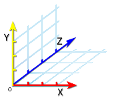
| Legend: N:North, S:South, E:East, W:West, F:Flat, D:Diagonal
Orientations
Upright: N, E, S, W, NE, NW, SE, SW.
Flat: NEF, NWF, SEF, SWF.
Diagonal: NDE, NDW, EDN, EDS, SDE, SDW, WDN, WDS. | | | |
| /art status
List the status of the configuration. | | | |
| /art throttle #
Throttles block placement '# blocks-per-tick' (minimum of 1). | | 20 | |
| /art RAM #
Utilization threshold that will limit to '1 blocks-per-tick' when RAM falls below RAM #. It will increase back to set throttle once % of RAM is available (between 2 and 100). | | 30 | |
| /art TPS #
Utilization threshold that will limit to '1 blocks-per-tick' when Ticks Per Second falls below TPS #. It will increase back to set throttle once Ticks Per Second is available (between 2 and 19). | | 17 | |
| /art list
List the image files in the plugin directory. | | | |
| /art toggle check
Toggles checking for pixel conflicts. A pixel conflict is a pixel that cannot be matched to a color in the palette. | | off | |
| /art toggle palette
Toggles if the color palette should be applied to the image. Turn palette off if you want to apply it yourself. This can sometimes produce a better image quality.
Click here for a tutorial on applying the palette manually. | | on | |
| /art toggle transparent
Toggles removing of existing blocks in the transparent areas of the pixel art. | | on | |
| /art undo
UN-does the last import. | | | |
| /art reload
Reload the configuration file. | | | |
| /art log
Logs a list of pixel conflicts detected in the last loaded image to PixelConflicts.html in the plugins\llamaArt folder. | | | |
/art myimage.png n
Builds myimage.png upright and to the North. | |
/art myimage.jpg s dither
Builds myimage.jpg upright and to the South with dithering. |
/art throttle 2
Sets the maximum blocks that can be placed per tick to 2. |
/art ram 95
If RAM falls below 95%, throttle block placement until RAM is above 95%. |
/art tps 15
If Ticks Per Second falls below 15, throttle block placement until TPS is above 15. |
/art http://oooorgle.com/images/FreeDomainRadio.png wdn dither
Builds the FreeDomainRadio icon to the West and diagonally up to the North, with dithering. |
/art myimage.bmp nw invert dither
Builds myimage.bmp to the North-West, inverted with dithering. |
/art myimage.png ndw dither
Builds myimage.bmp to the North and diagonally up to the West, with dithering. |
/art http://www.stsci.edu/~lbradley/seminar/images/sierpinski.gif se invert
Builds Waclaw Sierpinski's fractal to the South-East and inverted. |
llamaArt is currently maintained by one individual in his free time. The amount of time he spends improving on this project is down to personal motivation, he doesn't get paid to keep this updated. If you find this plugin is a valued part of your server, please consider making a donation.