Survival Admin Menu (Achievements Friendly)
- By
Built as a Behavior Pack using the Script API, it works in single-player worlds, multiplayer servers, and Minecraft Realms.
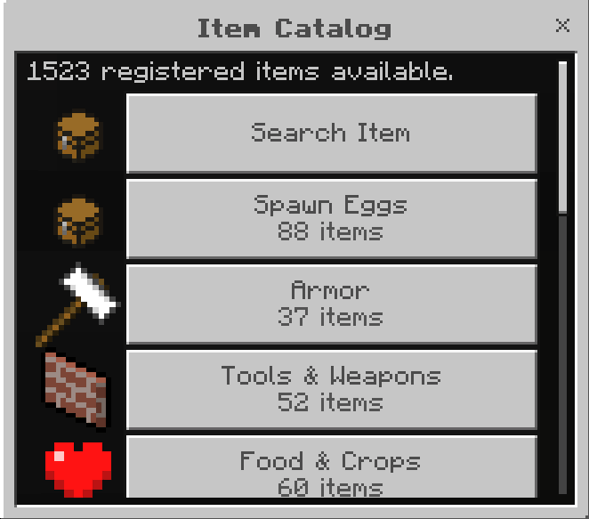
You can choose and search for any item, block, etc... that you want in your inventory.
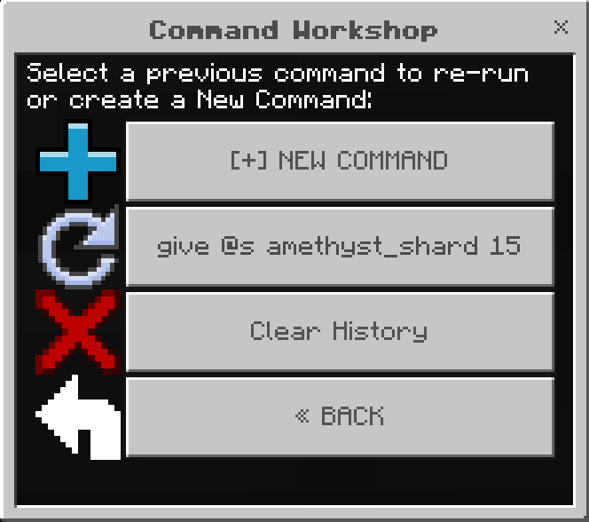
You can execute any command you want from survival without affecting world achievements.
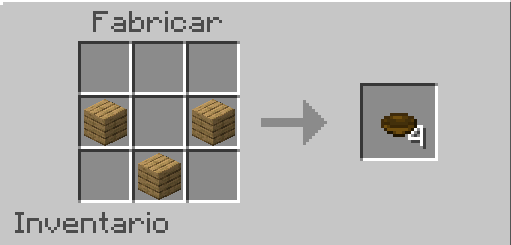
The way you craft the default item to start using the menu
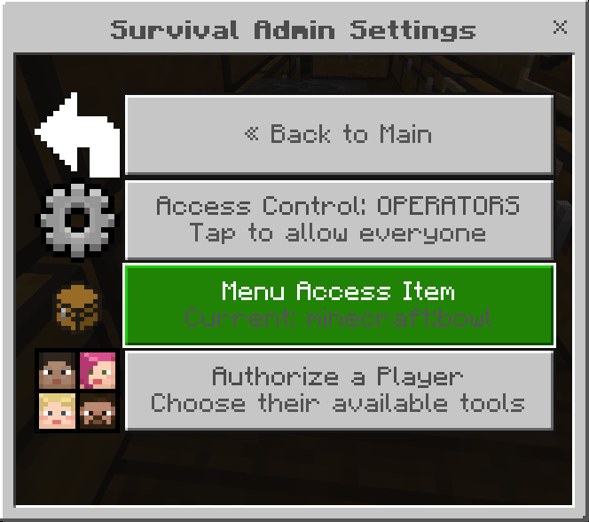
By choosing this option you can change the default item used to open the menu (bowl) to any item you wish.
Description
Survival Admin Menu for Minecraft Bedrock
Survival Admin Menu is a comprehensive administration and quality-of-life add-on for Minecraft Bedrock Edition. It provides a wide range of advanced tools through an intuitive in-game interface, eliminating the need to constantly use chat commands or memorize command syntax.
Built as a Behavior Pack using the Script API, it works in single-player worlds, multiplayer servers, and Minecraft Realms. It is especially useful for world owners, administrators, moderators, map creators, and players who want to manage their worlds more efficiently.
How It Works
The menu is opened using a regular bowl—no renaming required. Simply hold the bowl and interact to open the interface.
From the Admin section, you can change the menu access item by entering any valid Minecraft item identifier, such as minecraft:clock or minecraft:oak_log. Once confirmed, the menu will no longer open with the bowl and will instead require the selected item.
The add-on also includes a complete permission system. World owners can choose whether only operators have access or grant permissions to specific players, selecting exactly which features each player is allowed to use.
Main Features
-
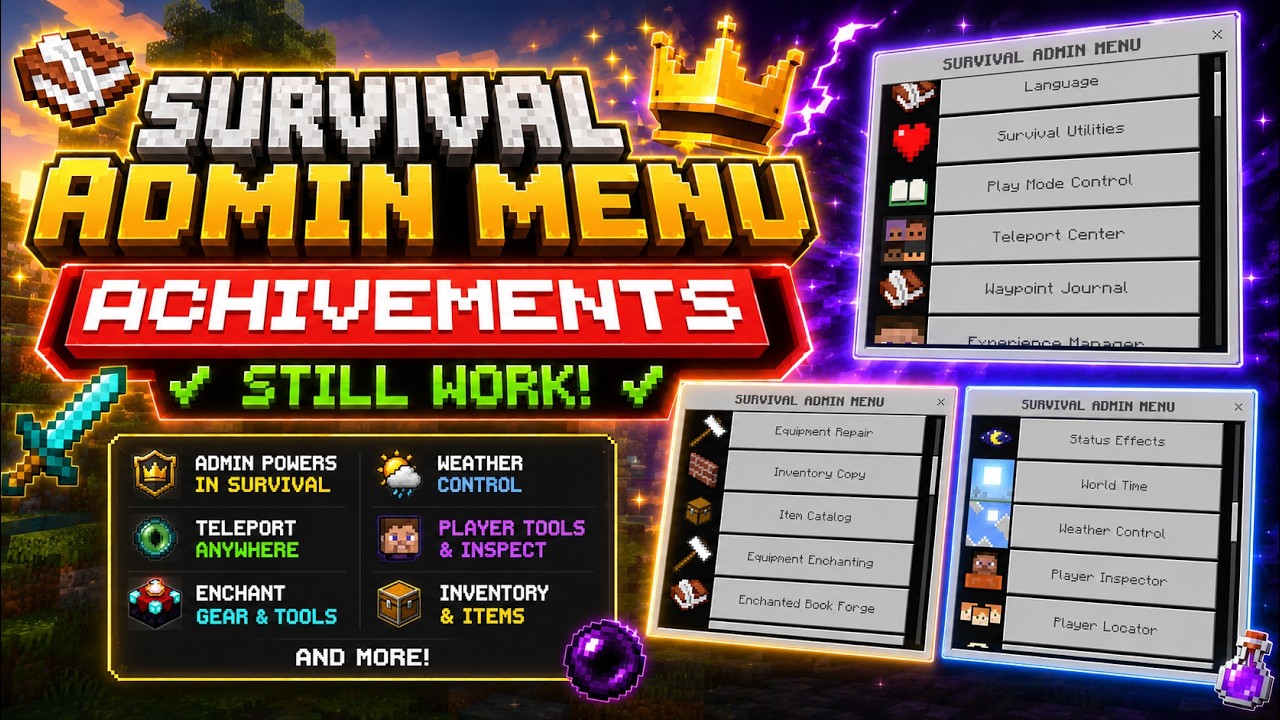
Administration: Configure access permissions, authorize players, and assign individual feature permissions.
-
Languages: English, Spanish, Japanese, Chinese, Portuguese, and Thai.
-
Game Mode Manager: Change and manage player game modes.
-
Survival Utilities: Instantly restore health and hunger, enable night vision, clear inventory, and perform other quick actions.
-
Experience Manager: Add or remove experience points and levels.
-
Teleportation: Teleport to players, coordinates, or saved locations.
-
Waypoints: Save important locations and return to them whenever needed.
-
Death History: Keep track of the locations where players died.
-
Coordinate Journal: Store and organize important world locations.
-
World Clock: View information about the world's current time and day/night cycle.
-
Time & Weather Control: Change the time of day and control weather conditions.
-
World Rules: Easily manage Minecraft gamerules through an organized interface.
-
Player Inspector: View player information, location, health, and inventory.
-
Player Locator: Display the position and distance of nearby players.
-
Proximity Alerts: Receive notifications when players enter a configurable detection range.
-
Entity & Block Scanner: Locate specific entities or blocks within loaded chunks.
-
Storage Scanner: Search nearby chests and other storage containers.
-
Structure Locator: Find villages, strongholds, mineshafts, ocean monuments, Nether fortresses, and woodland mansions. Availability depends on the world's or Realm's command support.
-
Item Magnet: Automatically attract nearby dropped items.
-
Ore Vision: Detect nearby ores and display information about them.
-
Vein Miner: Mine entire connected ore veins instantly.
-
Tree Feller: Chop down connected tree logs automatically.
-
Crop Assistant: Harvest fully grown crops and automatically replant them.
-
Equipment Repair: Repair individual items or your entire inventory while preserving enchantments.
-
Inventory Duplication: Create an exact copy of an item stack, including its quantity and properties.
-
Enchantments: Apply and manage enchantments for tools, weapons, and armor.
-
Enchanted Books: Generate enchanted books with the selected enchantment and level.
-
Effects: Add, remove, and manage status effects.
-
Item Catalog: Obtain any item registered in Minecraft.
-
Multilingual Item Search: Find items using names in multiple languages, such as diamond or diamante, log or tronco.
-
Item Categories: Browse armor, tools, spawn eggs, food, potions, ores, redstone, transportation, building blocks, and decorative blocks.
-
Custom Quantity: Enter any amount of items to receive, with automatic distribution into valid stack sizes.
-
Command Workshop & Advanced Console: Access additional tools designed for advanced administrators.
-
Personal Notes: Save useful notes directly within the menu.
Minecraft Realms Compatibility
Survival Admin Menu is fully compatible with Minecraft Realms for Bedrock Edition. When the add-on is enabled in a Realm, players automatically download it when joining.
All processing takes place within the Realm itself, allowing authorized players to use its features from Windows, Android, iOS, Xbox, PlayStation, and Nintendo Switch, as long as their Minecraft version supports the add-on.
Using It in Someone Else's Realm
You cannot install a Behavior Pack directly into another person's Realm. The Realm owner must install and enable the add-on.
-
Send the
.mcpackfile to the Realm owner. -
The owner imports it into Minecraft.
-
Open Realms → Settings → Edit World.
-
Enable Survival Admin Menu under Behavior Packs.
-
Minecraft uploads the updated world to the Realm.
-
The owner joins the Realm and opens the menu using a bowl.
-
From the Admin section, the owner authorizes your player and grants the desired permissions.
-
When you join the Realm, Minecraft automatically downloads the active add-on.
Without the owner's installation and permission approval, the add-on cannot manage another person's Realm.
Achievements & Survival Mode
Survival Admin Menu is designed to work in Survival Mode and does not require experimental features. Its manifest is not intended to deliberately disable achievements, and during development testing, achievements remained available after enabling the add-on.
However, achievement availability cannot be guaranteed for every Minecraft version or world configuration. Certain actions—such as switching to Creative Mode, enabling cheats, activating specific experimental features, or using particular content—may disable achievements.
For safety, it is recommended to create a backup of your world before installing the add-on and verify that achievements remain enabled before using features such as Creative Mode or advanced commands.
Technical Information
-
Edition: Minecraft Bedrock Edition
-
Type: Behavior Pack (JavaScript + Script API)
-
Current Version: 1.4.1
-
Format:
.mcpack -
Multiplayer: Supported
-
Minecraft Realms: Supported (when installed by the Realm owner)
-
Default Access Item: Bowl
-
Configurable Permissions: By operator, player, and feature
-
Recommendation: Keep Minecraft updated and avoid combining multiple add-ons that modify the same gameplay systems.
Survival Admin Menu (Achievements Friendly) Team

Owner