Real Speedrun Timer (RST) | IGT & RTA Tracker Addon
- By
A plug-and-play speedrun timer addon for Minecraft Bedrock with a live IGT/RTA tracker, automatic dimension splits, run validation, and detailed run logging.
⏱️ Real Speedrun Timer (RST) ⏱️
The IGT & RTA Tracker Addon for Minecraft Bedrock Edition.
Real Speedrun Timer (RST) is a script-based utility addon that brings Java-style IGT and RTA tracking to Bedrock Edition. Inspired by Java Edition mechanics, it is a plug-and-play tool designed to give you the authentic sensation of Java speedrunning right in your Bedrock world.
⚠️ DISCLAIMER: BEDROCK IGT & RTA TRACKER
This addon cannot be used for official speedrun.com submissions. RST is created to bring the Java speedrunning experience to MCPE/Bedrock. We use Java-style timing (the timer starts the exact millisecond you spawn) to give you that authentic feel. Enjoy the thrill and push your limits!
🔥 Key Features
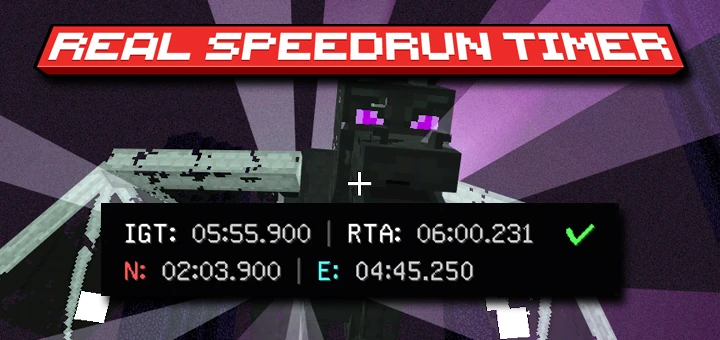
🖥️ 1. Live Dual-Timer HUD Display
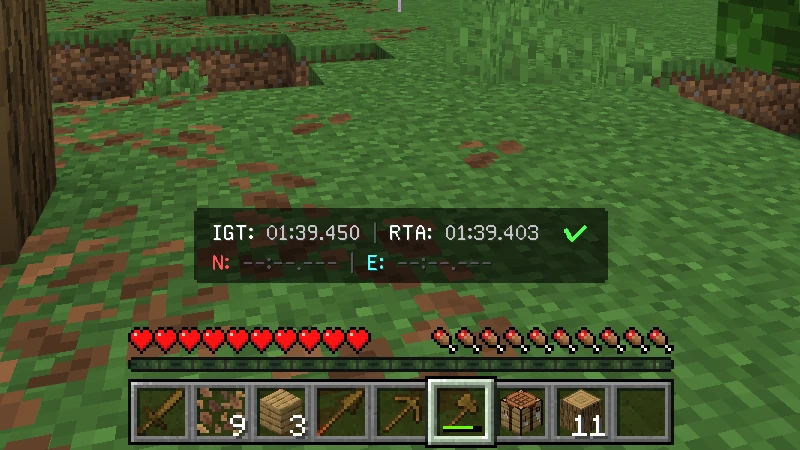
Keep track of your progress in real-time on your Action Bar.
- Dual-Timer: Displays both IGT (In-Game Time) and RTA (Real-Time Attack).
- Run Status: A quick visual check next to the clock (
✔Valid /✖Invalid). - Live Splits: Shows your exact Nether (
N) and End (E) entry times.
💬 2. Automated Chat Alerts
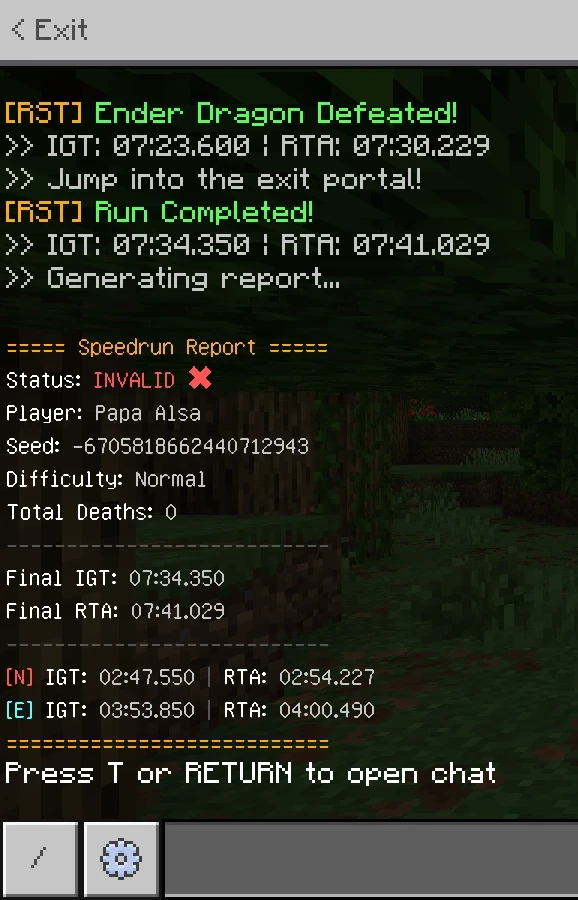
Real-time chat alerts for every major milestone (includes exact IGT & RTA stamps):
- Run Started: Confirms when the timer begins.
- Dimension Splits: Instant alerts when entering the Nether or The End.
- Ender Dragon Defeated: Exact timing for the boss kill.
- Run Completed: Triggers the moment you jump into the Exit Portal.
- Run Invalidated: Immediate alert if your run becomes invalid.
- Final Report: Generates a complete, easy-to-screenshot summary at the end of the run.
🛡️ 3. Run Validation System
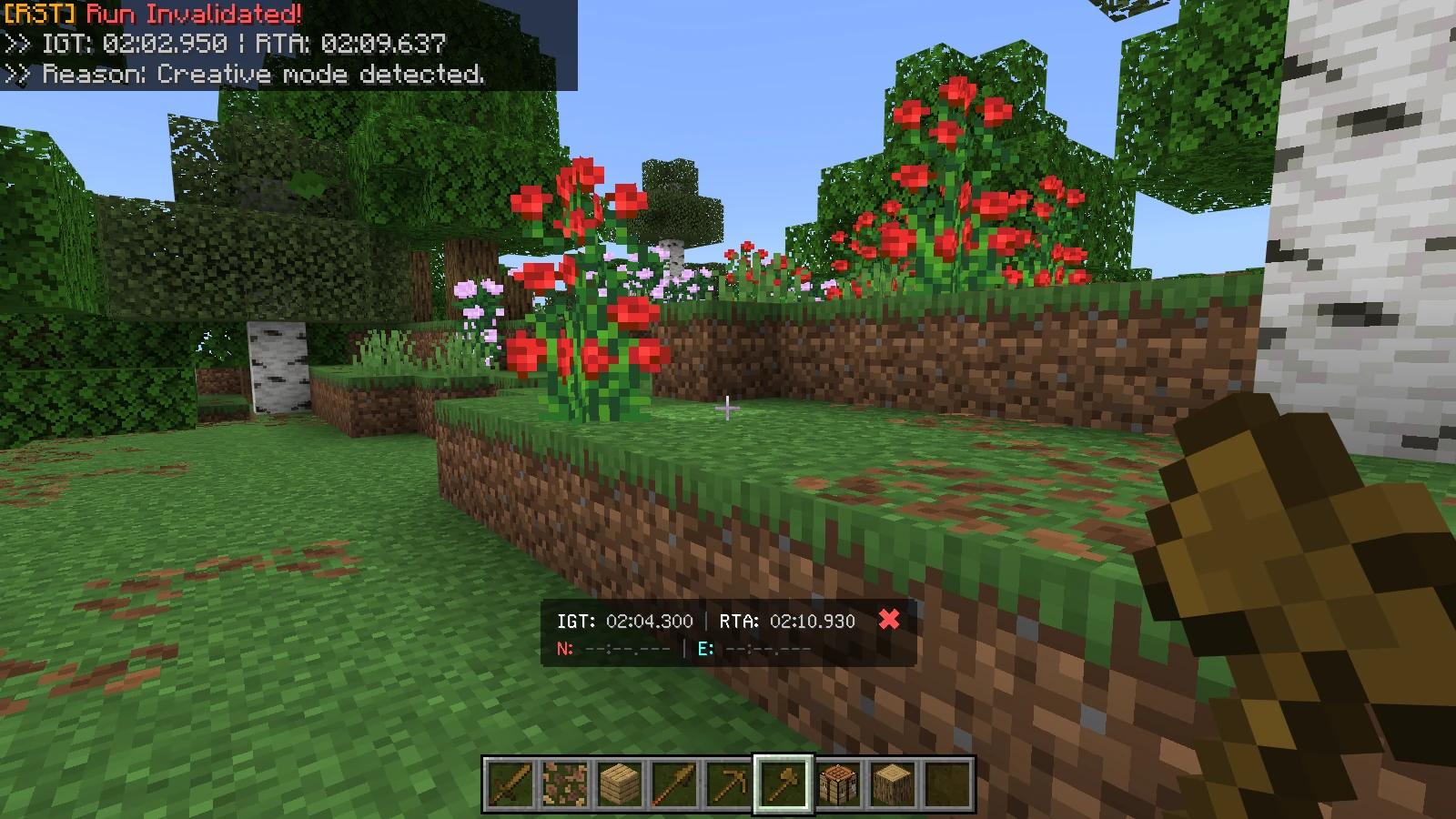
RST monitors your world to ensure basic fair play. A run will instantly become INVALID (✖) if the system detects:
- Game Mode Changed: A player switches to Creative or Spectator mode.
- Difficulty Changed: A player alters the world difficulty after the run starts.
- Run Abandonment: The last remaining player leaves the world before completion.
📊 Detailed Run Logging
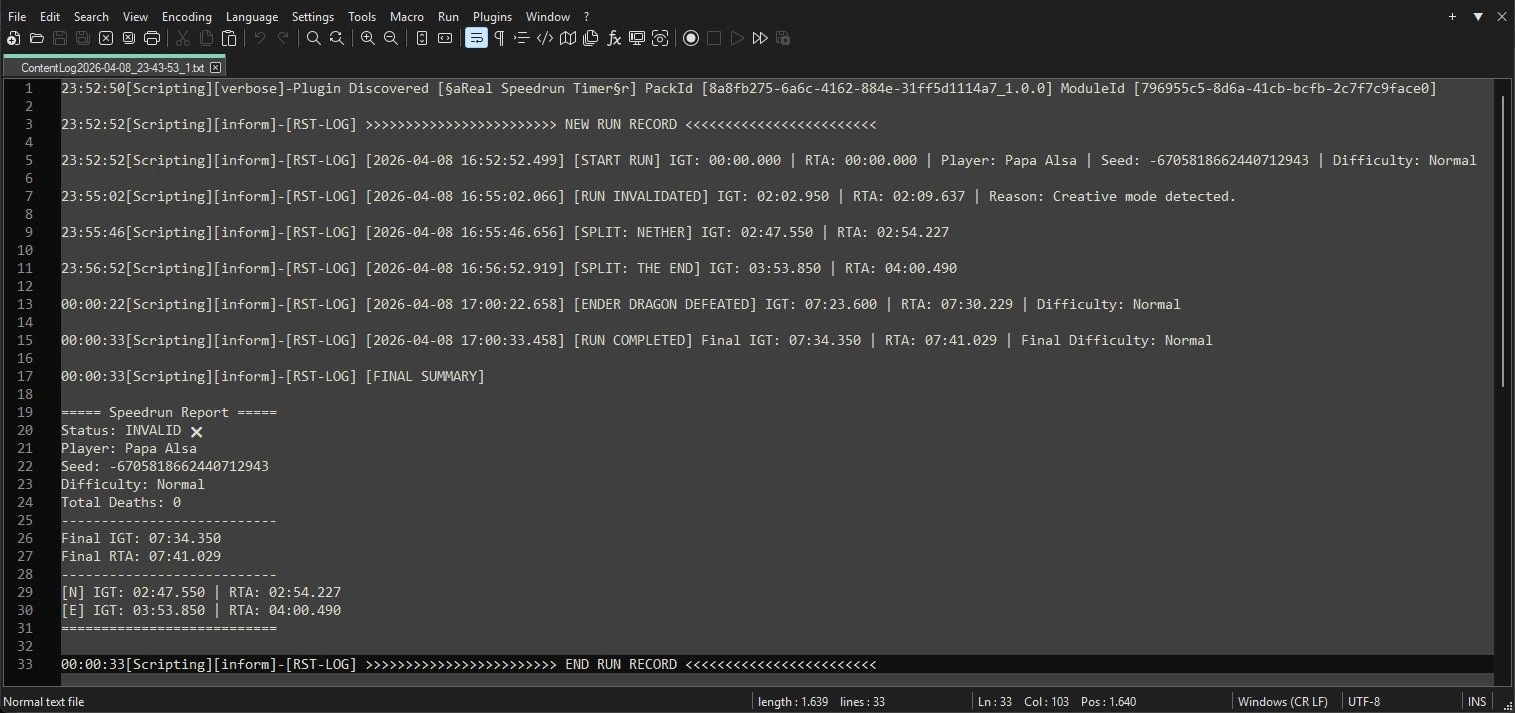
RST writes a detailed text log to the ContentLog.txt file for you to review and analyze your performance.
Tracked Events:
- [START RUN]: Includes World Seed & Difficulty.
- [PLAYER JOINED/LEFT]: Records exactly when players join or leave.
- [PLAYER DEATH]: Tracks who died and total team deaths.
- [SPLIT: NETHER/THE END]: Dimension entry times, precise to the millisecond.
- [ENDER DRAGON DEFEATED]: Exact timing for the boss kill.
- [RUN COMPLETED]: Precise timestamp when you enter the Exit Portal.
- [RUN INVALIDATED]: Logs the exact reason for invalidation.
- [FINAL SUMMARY]: The complete final speedrun report.
🛠️ How to Access the Log
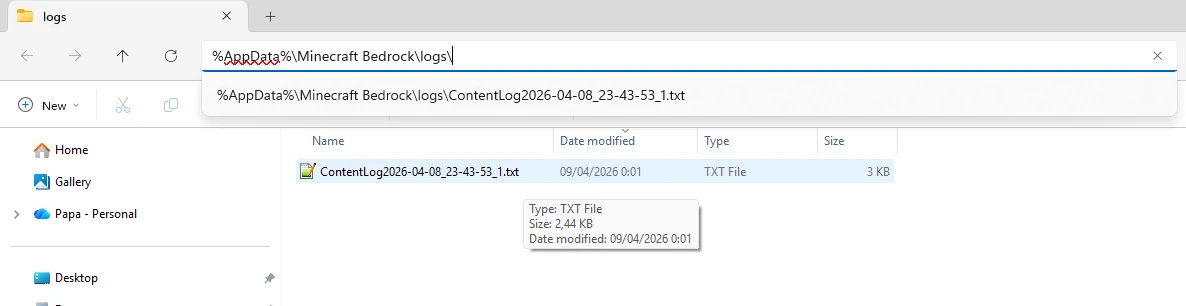
- IMPORTANT: You must close Minecraft completely for the game to save the text file properly.
- Open your device's file manager and locate the
ContentLog.txtfile.
Log File Locations:
- PC:
%AppData%\Minecraft Bedrock\logs\ - Mobile:
Android/data/com.mojang.minecraftpe/files/games/com.mojang/logs/
🛠️ Technical Details
- IGT (In-Game Time): Based on internal engine ticks. The timer automatically pauses during world loading or game pauses (Single-Player)—if the engine isn't ticking, the IGT won't advance. This ensures a fair playing field for every device, regardless of loading speeds.
- RTA (Real-Time Attack): Calculated via the system clock (milliseconds). It never stops, even when the game is paused or loading, capturing the true "wall-clock" duration of your entire session.
- Performance: Highly optimized. Uses the latest
@minecraft/serverAPI. - Plug & Play: No "Experimental Toggles" required!
- Multiplayer Ready: Supports Co-op runs with smart "Player Leave" logic.
📥 Getting Started
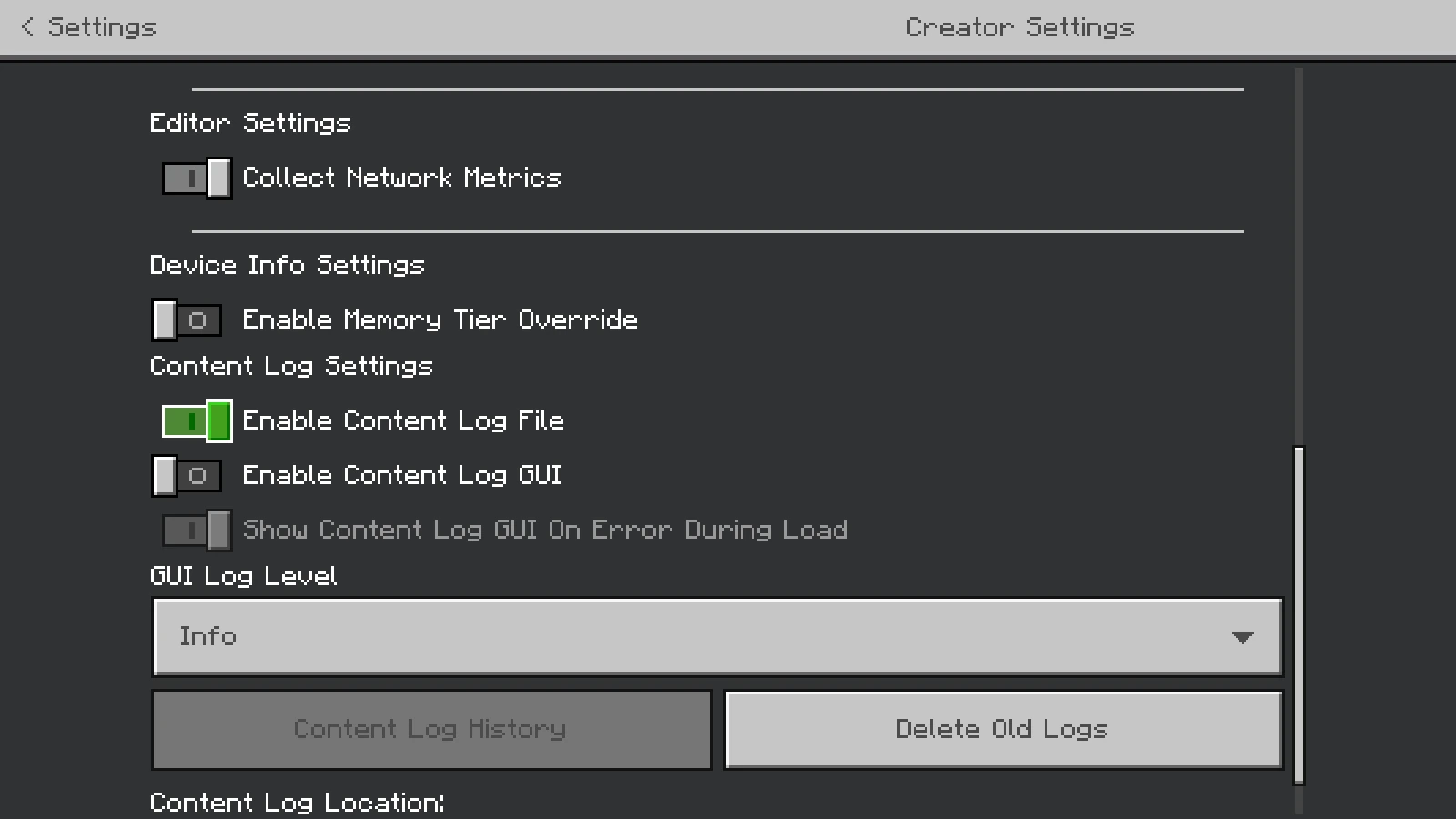
- [CRITICAL] Enable Logs: Go to Settings > Creator and turn on Enable Content Log File (Set GUI Load Level to Info) BEFORE you play.
- Download the .mcpack and apply it as a Behavior Pack to your world.
- Start the world. The timer begins the moment you spawn.
- Defeat the Dragon, jump in the Exit Portal, and beat your personal best!
📜 License & Credits
Creator: Papa Alsa | YouTube: @alsahonggo
Licensed under CC BY-NC-ND 4.0.
⚠️ Permission: Modifications, commercial use (including monetized link shorteners), and reuploads on other websites are strictly prohibited. Don't be that guy who steals other people's work.
"Play fair. Track precisely. Beat your best!"
Real Speedrun Timer (RST) | IGT & RTA Tracker Addon Team


Owner