Extended Commands Suite
- By
Adds more commands to Minecraft, including motion, right click detection, dynamic lore, and more!
Introduction
Note: This add-on is not actively maintained by me. Luckily, it's a stable add-on, and is unlikely to break for years down the line (As per Minecraft's official documentation). That being said, don't expect any updates to it. Feel free to ask any questions about how the add-on is structured if you want to make changes yourself.
If you're looking for right click detection, scroll down to auc2.
This is a stable addon, it shouldn't require an update to remain compatible with new Minecraft versions. This means it also doesn't require any experimental toggles.
I make it a priority to not break commands if it's not necessary. You can find the list of breaking changes here.
Do you find yourself wishing Bedrock could do with more commands?
Well then you've come to the right place!
This pack adds a bunch of commands to Bedrock, ranging from playing music for only one player to completely seamless right-click detection (works with controllers and touch controls too!)
Examples
To show you what is possible with this pack, I have some premade examples.
With the pack installed, do any of the following commands:
/function extendedcommands/examples/countdown
/function extendedcommands/examples/wind_push
/function extendedcommands/examples/horror
Do not use any of these example commands on your world/server as a substitute for your own. They can be changed/deleted without notice.
Auxillary Features
ECS also tracks a few things via scoreboard:
- Entity Health
- Player Deaths
- Player Kills
The full list is as follows:
ecs:health
ecs:deaths
ecs:max_render_distance
ecs:blocks_broken
ecs:blocks_placed
ecs:combined_total_kills
ecs:pvp_total_kills
ecs:pve_total_kills
ecs:combined_melee_kills
ecs:pvp_melee_kills
ecs:pve_melee_kills
ecs:combined_ranged_kills
ecs:pvp_ranged_kills
ecs:pve_ranged_kills
ecs:combined_magic_kills
ecs:pve_magic_kills
ecs:pvp_magic_kills
ecs:pvp_deaths
Player information is also tracked via tags:
ecs:is_sneaking
ecs:is_jumping
ecs:device_pc
ecs:device_console
ecs:device_mobile
ecs:input_keyboard
ecs:input_gamepad
ecs:input_motion_controller
ecs:input_touch
List of all Commands
Not everything is possible with this addon. See here for an incomplete list of things it cannot do.
Make use of the /execute as command to do these commands on other players. The commands here do not have selectors themselves.
All the commands here must be called via /scriptevent, each will have an unique identifier and a namespace, which is ecs / cmd.
For commands that accept commands themselves, do not put the slash in front of the command inside.
playmusic
This command has the exact same syntax as /music, but the difference being it only affects the music of one player.
Syntax: /scriptevent ecs:playmusic <trackName: string> [volume: number] [fadeSeconds: number] [repeat: true|false]
Example: /scriptevent ecs:playmusic music.game.credits 1 2 true
This plays the credits track for the player that executed the command after fading for 2 seconds. It will play at volume 1 and repeat after it's done.
stopmusic
Stops the music track that is currently playing for the player that executes it.
It stops abruptly, so I recommend you use playmusic and fade to another track instead.
Syntax: /scriptevent ecs:stopmusic
scoreboardname
Only use this on scoreboard objectives that only have players, otherwise the score will be wiped.
This is because the command, in the background, deletes the scoreboard and replaces it with a new one.
Syntax: /scriptevent ecs:scoreboardname <scoreboardId: string> <newScoreboardName: string>
Example: /scriptevent ecs:scoreboardname ecs:combined_total_kills Highest Kills
This sets the display name of ecs:combined_total_kills to "Highest Kills".
Since this is a dangerous command, use it on a test scoreboard every Minecraft update before using it on your actual scoreboards.
scale
This command changes the size of some entities, most don't work. I've tested it with cats and rabbits.
Not all entities support this. You can edit the entity .json yourself, but I won't edit vanilla files in this pack as it will break compatibility.
I have made a supplementary pack that adds scale components to all entities, be warned it will very likely not be compatible with other addons.
Syntax: /scriptevent ecs:scale <scaleMultiplier: float>
Example: /scriptevent ecs:scale 1.5
shoot
This command let's you shoot projectiles.
Not all projectiles support this. You can use the same supplementary pack to allow projectiles such as the Ender Dragon's fireball to work with this command, again, be aware it will very likely not be compatible with other addons.
Syntax: /scriptevent ecs:shoot <projectileId: string> <strength: float>
Example: /scriptevent ecs:shoot minecraft:arrow 10
This shoots an arrow in the direction you're facing at a high speed!
An entity can run this command, but it may be difficult to get them to face the correct way.
lock
Locks an entity from player interaction. Mostly useful for armour stands.
Syntax: /scriptevent ecs:lock
Make sure you're facing the entity!
You can also give it the tag ecs:locked_entity (This is what the command does anyway)
unlock
Unlocks an entity from player interaction.
Syntax: /scriptevent ecs:unlock
Make sure you're facing the entity!
Again, you can just remove the tag ecs:locked_entity.
push / motion
Java doesn't have this one, at least not for players!
This command pushes a player (and some entities, not including items).
Syntax 1: /scriptevent ecs:push relative|rel|r [horizontalRotation: number|range] [horizontalStrength: number|range] [verticalStrength: number|range]
Example: /scriptevent ecs:push relative 90 3 5
This pushes the entity 90 degrees to the right with a strength of 3 on the horizontal plane, and a strength of 5 upwards.
Example: /scriptevent ecs:push relative -45:45 1:3 -5:5
This pushes an entity randomly between 45 degrees to the left and 45 degrees to the right with a horizontal strength between 1 and 3, and a vertical strength between -5 and 5. A negative vertical strength means it will push the entity down.
Syntax 2: /scriptevent ecs:push absolute|abs|a [xVector: float] [yVector: float] [zVector: float]
Example: /scriptevent ecs:push abs 5 5:10 0
This pushes an entity upwards and along the positive x direction.
You must use the : colon character to separate a number range. Any other character will not work.
pushgliding
This is a special version of push that only affects Players that are gliding with an elytra.
It has the same syntax, but called using /scriptevent ecs:pushgliding.
tpspawn
Syntax: /scriptevent ecs:tpspawn
Teleports a Player to their spawn point. If you've played Terraria, this is what the magic mirror does.
freeze
This freezes a Player by stopping their camera movements, it doesn't change their velocity (it won't stop anyone from falling).
If used on an entity, it will mostly freeze them (they move very slowly, and they will fall slowly as well).
Be careful when using this on entities, it is very performance intensive. Using this on players doesn't affect performance.
Syntax: /scriptevent ecs:freeze <timeTicks: int>
Example: /scriptevent ecs:freeze 600
This freezes the entity for 30 seconds. A second is 20 ticks.
chance
This executes a command sometimes.
Syntax: /scriptevent ecs:chance <percentageChance: int> <command: string>
Example: /scriptevent ecs:chance 10 say LUCKY!!!
This will make the source of the command say "LUCKY!!!" 10% of the time the command is run.
Note that if this is put into a command block, the source will be Script Engine, relative coordinates (~ or ^) will therefore not work.
drop
This makes an entity drop an item.
Syntax: /scriptevent ecs:drop <itemTypeId: string> <itemQuantity: int>
Example: /scriptevent ecs:drop minecraft:tnt 64
This makes the entity drop a stack of tnt.
You can combine this with a death command and chance to make custom drops.
schedule
This brings the functionality of Java edition's /schedule to Bedrock.
Syntax: /scriptevent ecs:schedule <timeTicks: int> <command: string>
Example: /scriptevent ecs:schedule 600 scriptevent cmd:push abs 0 10 0
This will launch the entity which executed this command into the air when 30 seconds passes.
This doesn't work with command blocks, use the built-in tick delay instead.
multicommand
Does multiple commands at once, separated by a pipe |. Don't use this if you don't have to, will likely be removed in the future.
Syntax: /scriptevent ecs:multicommand <command: string> | <another command: string>
There is no theoretical limit to how many commands you can include, but I've only tested up to 3 commands simultaneously.
I am not responsible if your game crashes from using hundreds of simultaneous commands.
Example: /scriptevent ecs:multicommand scriptevent cmd:push rel 0 5 5 | say I'm flying!
This will push the entity that executed it forwards and up, whilst also saying "I'm flying".
addusecommand2 / auc2
NOTE: The old command functionality still works, you can find the documentation here.
The one you've been waiting for: This command lets you put a use-command on any item. (Recently changed)
Syntax: /scriptevent ecs:auc2 <commandName: string> <enableFarmode: boolean> <command: string>
In farmode, you do not run the command, meaning commands like /effect will not work.
Let's say we put two use-commands on a totem of undying.
Example 1:
/scriptevent ecs:auc2 give_effect false effect @S levitation 30 0 true
/scriptevent ecs:auc2 discard_item false clear @S totem_of_undying 0 1
This will delete the item when a player uses it and give that player levitation for 30 seconds with no particles.
Example 2:
/scriptevent ecs:auc2 tnt true summon tntThis will summon tnt at the block you're looking at when you use the item.
You must put lore on the item first. This is how ECS handles item matching, if you change the lore, it will be recognised as a different item and any commands will stop working.
Dynamic lore has special tracking and will still work with this!
If you are using a target selector, you must use capital letters (@A, @S, @R, @E, @P) instead of lowercase ones. This is due to lowercase ones resolving immediately and not when you use the item.
removeusecommand2 / ruc2
This removes the use command from the item you're holding.
Syntax: /scriptevent ecs:ruc2 <commandName: optional string>
Example 1: /scriptevent ecs:ruc2 give_effect
This will remove the give_effect command put on the totem earlier.
Example 2: /scriptevent ecs:ruc2
This removes all commands on the item.
adddeathcommand / adc
This makes the entity run a command when it dies. (Recently changed)
Syntax: /scriptevent ecs:adddeathcommand <commandId: string> <command: string>
Example: /scriptevent ecs:adc death_sound say AAAAAA
This command will make the entity say "AAAAAA" in chat when it dies.
removedeathcommand / rdc
This removes a death command. If no command id is specified, it deletes all of them.
Syntax: /scriptevent ecs:removedeathcommand <commandId: string>
Example: /scriptevent ecs:rdc death_sound
This removes the death_sound command we put on entity earlier.
setlore
Sets the lore on the item you're currently holding. Use \n to indicate a new line, note that you will need to apply formatting codes again on each new line.
You are limited to having 20 lines of lore with a maximum length of 50 each. See here for why.
Syntax: /scriptevent ecs:setlore <lore: string>
Example 1: /scriptevent ecs:setlore §9I have a pen\n§cI have an apple\n§9I have a pen\n§eI have pineapple
Example 2: /scriptevent ecs:setlore §rHi, my durability is §b$DUR§r out of §4$MAX_DUR§r!\n§rI have §a$DUR§r HP!§r
In the second example, the variables $DUR and $MAX_DUR will be replaced with their actual values once you use the item. See dynamic lore further down for more information.
Dynamic lore only works on non-stackable items!
editlore
This is an interactive version of setlore.
Syntax: /scriptevent ecs:editlore
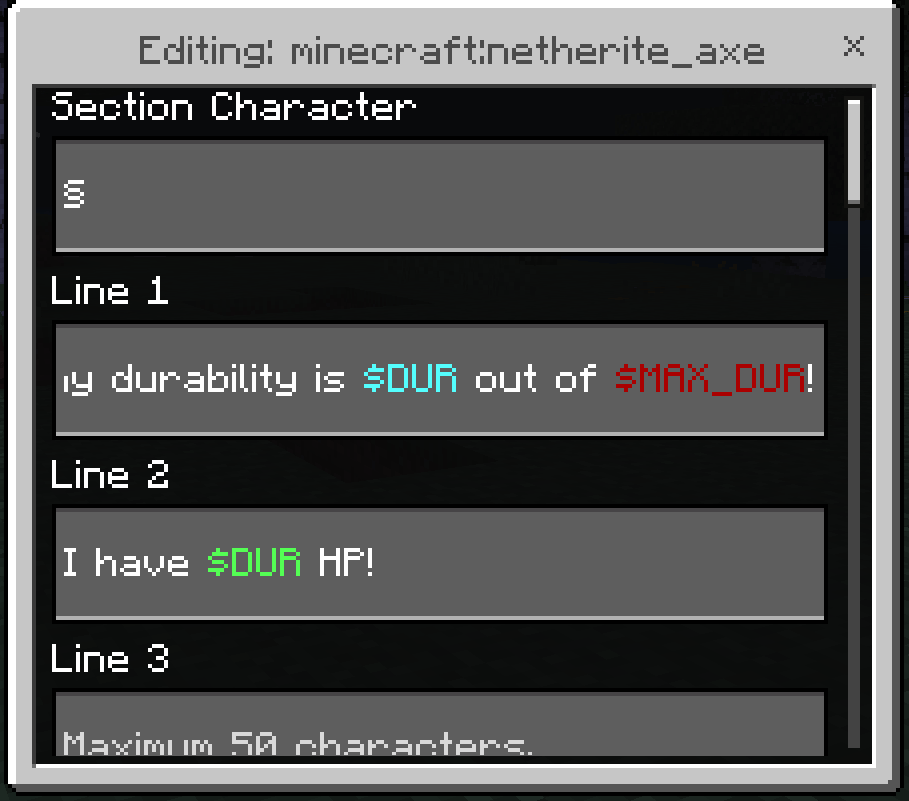
The section character is simply there for you to copy-paste to make adding colours easier, any inputs in that field will not change anything.
Dynamic Lore
Dynamic lore automatically updates on an item.
Item commands made with auc2 will still work!
There are several properties tracked for an item:
$DUR
$MAX_DUR
$TOTAL_KILLS
$PVP_KILLS
$PVE_KILLS
$BLOCKS_BROKEN
NOTE: These are only tracked once you have put a dynamic lore variable on your item!

You can get rid of Has Customised Properties by doing /gamerule showtags false.
Dynamic lore only works on non-stackable items!
Licence
This project is licenced under GPL-3.0, in short:
This means you can share, modify, and include it in your projects, as long as you give credit.
You, however, cannot distribute a proprietary (closed-source) version.
You must licence your project under GPL-3.0 and make the source code available if it includes a part of this pack.
For Server Owners
You don't need to ask for my permission to put it on your server, this is already given as part of the licence.
If your players ask where the commands are from though, I'd appreciate you providing a link to either MCPEDL, CurseForge, or the Github repository (This isn't required though).
For Addon Creators
This licence allows you to use part of this pack in your own, however you must also:
- Make your source code available
- Give a link to this pack (MCPEDL, CurseForge, or Github)
- Licence your addon under GPL-3.0
This means you cannot obfuscate your code if you include stuff from this pack in your addon.
Other Stuff
You can find the source code on Github, it contains older releases (and the latest one if not already updated here).
The Extended Commands Suite Team