Buildmatica Plus
- By
Buildmatica as an add-on: see any build as a hologram, then place it with Instant, Layers, Look or Walk.
This is Buildmatica, but as an add-on!
Buildmatica Plus is the same Buildmatica you know, made into an add-on with easy placing and a lot more features.
It shows any build or farm as a hologram in your world, and then places the blocks for you: all at once, layer by layer, or just by looking or walking around.
In Survival it uses your own blocks, so it's still fair.
Why did I make it an add-on?
A few people asked me for easy placing in Buildmatica. But a texture pack can't place blocks, that needs a behavior pack.
So I thought, why not make it a proper add-on and add more features too :)
Buildmatica or Buildmatica Plus?
Both are Buildmatica. The difference is what they are and what they can do.
Buildmatica is a texture pack. You turn it on in Global Resources and it works on servers and Realms, but you place every block yourself.
Buildmatica Plus is an add-on. You add it to your world, and you get easy placing (Instant, Layers, Look and Walk) plus many features Buildmatica can't have.
Plus already has everything from Buildmatica inside, so you don't need both.
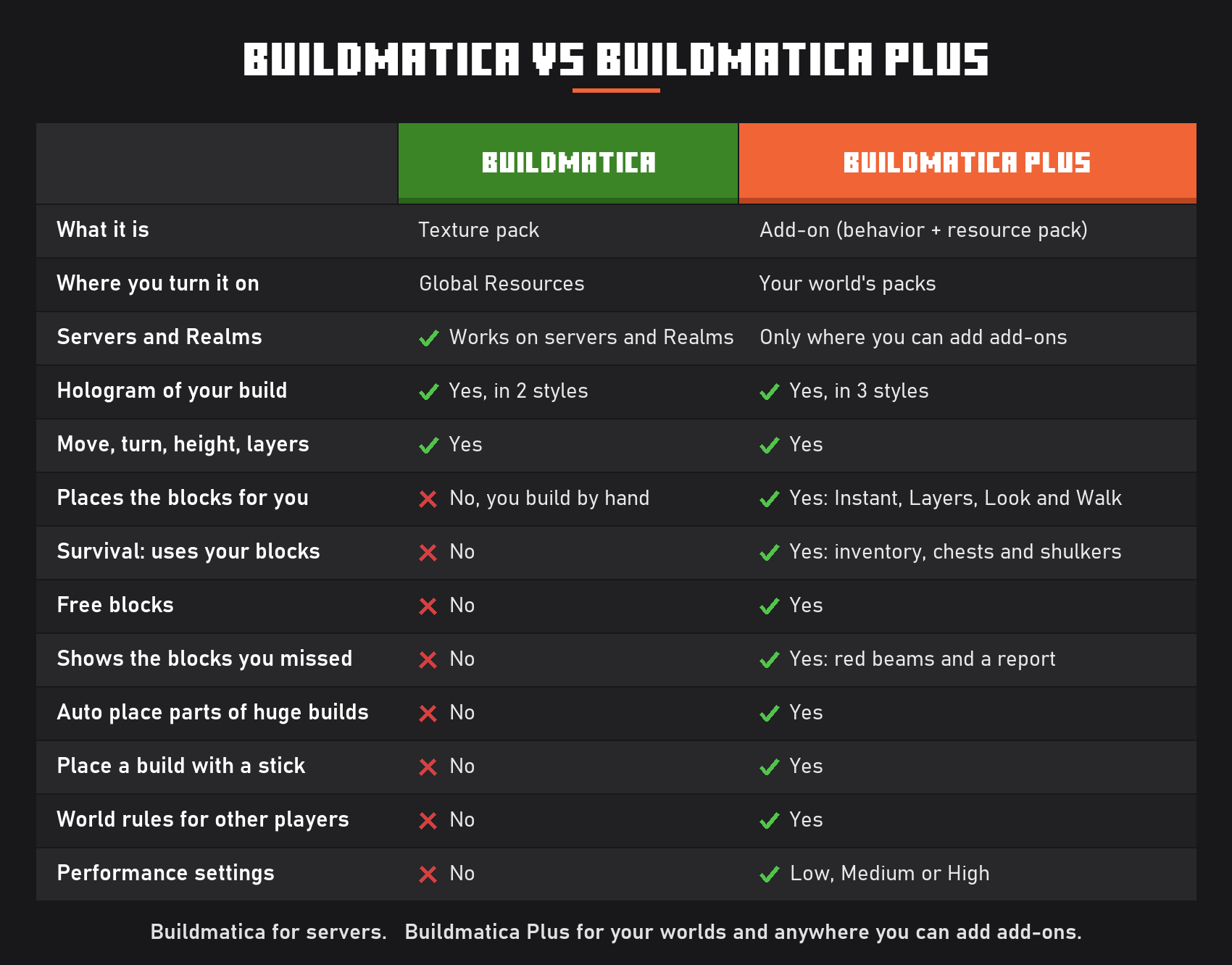
Buildmatica for servers.
Buildmatica Plus for your worlds and anywhere you can add add-ons.
Is it achievement friendly?
Yes, it is!
Buildmatica Plus doesn't need cheats or any experimental toggles, so you can still earn achievements while you use it.
How to start
Make your builds pack on the site: voxenmc.com/buildmatica-plus
Pick ready builds from Community builds, or drop in your own .litematic, .schem, .nbt or .mcstructure file. You get a .mcaddon file, just open it to add it to the game.
Open your world's settings and turn on 2 packs: Buildmatica Plus and your builds pack.
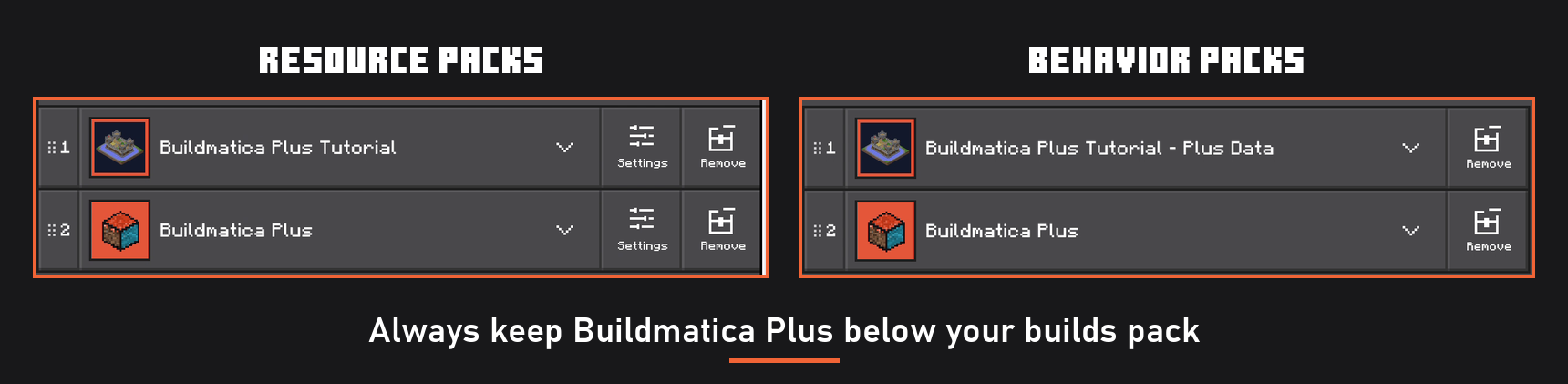
Put your builds pack above Buildmatica Plus, in both Resource packs and Behavior packs.
Always keep Buildmatica Plus below your builds pack.
Features
Hologram on an armor stand
Place an armor stand and give it your build's item. The hologram shows up.
The menu
Hold a stick and use it to open the menu.
On PC, right click. On mobile, press and hold the screen.
Move, turn and height
Line the build up from the Place tab before you build it.
Instant
Press Instant in the Mode tab and the whole build is placed in one go.
Layers
Press Layers and the build goes up by itself, one layer at a time.
Look
Pick Look in the Mode tab. Blocks get placed where you look, so you still feel like you're building it yourself.
Walk
Pick Walk and blocks get placed around you as you walk.
One layer at a time
Pick One in the Place tab to see only the layer you're on. Finish it and it moves to the next one by itself.
Survival and Free blocks
In Survival, Plus takes the blocks from your inventory. You can also let it take blocks from chests near your build or shulkers you carry.
Don't want to grind for blocks and just want the build done? Turn on Free blocks in Settings.
With it on, you don't need the blocks at all. They come to you by themselves.
Blocks you missed
Red beams point at the blocks that are still missing, so nothing gets left out.
All builds
Pick any build from your packs right from the menu.
Place with a stick
Get a stick for a build, and a box shows where it will go. Right click on PC, or press and hold on mobile, to place it there.
Huge builds
Huge builds come in parts. In Buildmatica, you had to place every part yourself, one by one.
Buildmatica Plus has a toggle for this: turn on Auto place parts in Settings, place one part, and it places all the other parts for you.
Settings
I added a few settings so you can make Plus work the way you like.
Turn features on or off to fit how you play.
Performance
Buildmatica Plus shouldn't lag. But if your game does lag, change the tier in Performance: Low, Medium or High.
A lower tier turns off some of the heavier features, so the game runs smoother.
World rules
Don't want players in your world to use the cheat features like Instant, Layers or Free blocks?
Turn them off in World rules, and they're off for every player in your world.
Which hologram style should I pick?
Buildmatica Plus has 3 hologram styles. You pick one on the site when you make your builds pack.
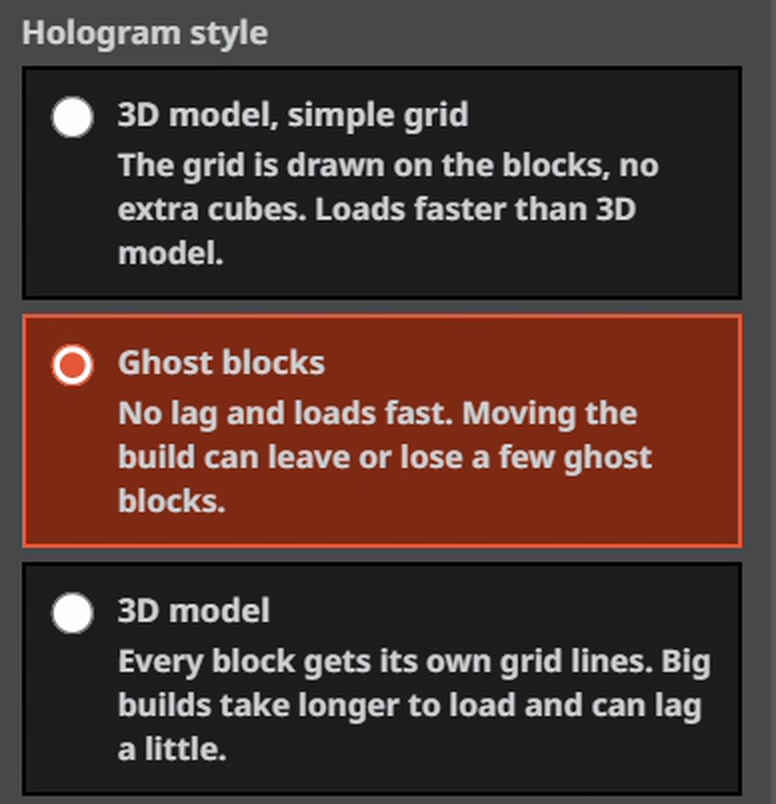
Buildmatica could get really heavy, because every build is one big 3D model. That made the game lag and take a long time to load.
To fix this, I added Ghost blocks. They look just like a blueprint, load fast and don't lag your game.
There's one catch with Ghost blocks: when you change the build from the menu, like turning it, moving it or changing the layer, there can be a small delay and a few glitches.
If you don't want that, the next best pick is 3D model, simple grid. It's still a 3D model, but a lot lighter than the full 3D model.
Make your builds pack
Make your builds pack here: voxenmc.com/buildmatica-plus
Pick ready builds from Community builds, or use your own .litematic, .schem, .nbt or .mcstructure file.
On Windows, you can export a build with a Structure Block. On mobile, the Export button doesn't work, so use this tool instead: voxenmc.com/structure-extractor
Just load the world your build is in, select the build and export it.
Found a bug or have an idea? Join my Discord server and let me know.

Buildmatica Plus Team

Owner