YGP! Ultimate FullBright + Night Vision v1.0.2
See more. Explore further. Control your own vision.
YGP! Ultimate FullBright + Night Vision adds 4 per-player vision modes to Minecraft Bedrock 26.00–26.xx.
Every player's mode is independent, so changing your vision does NOT change the vision mode of other players.
👀 See The Difference
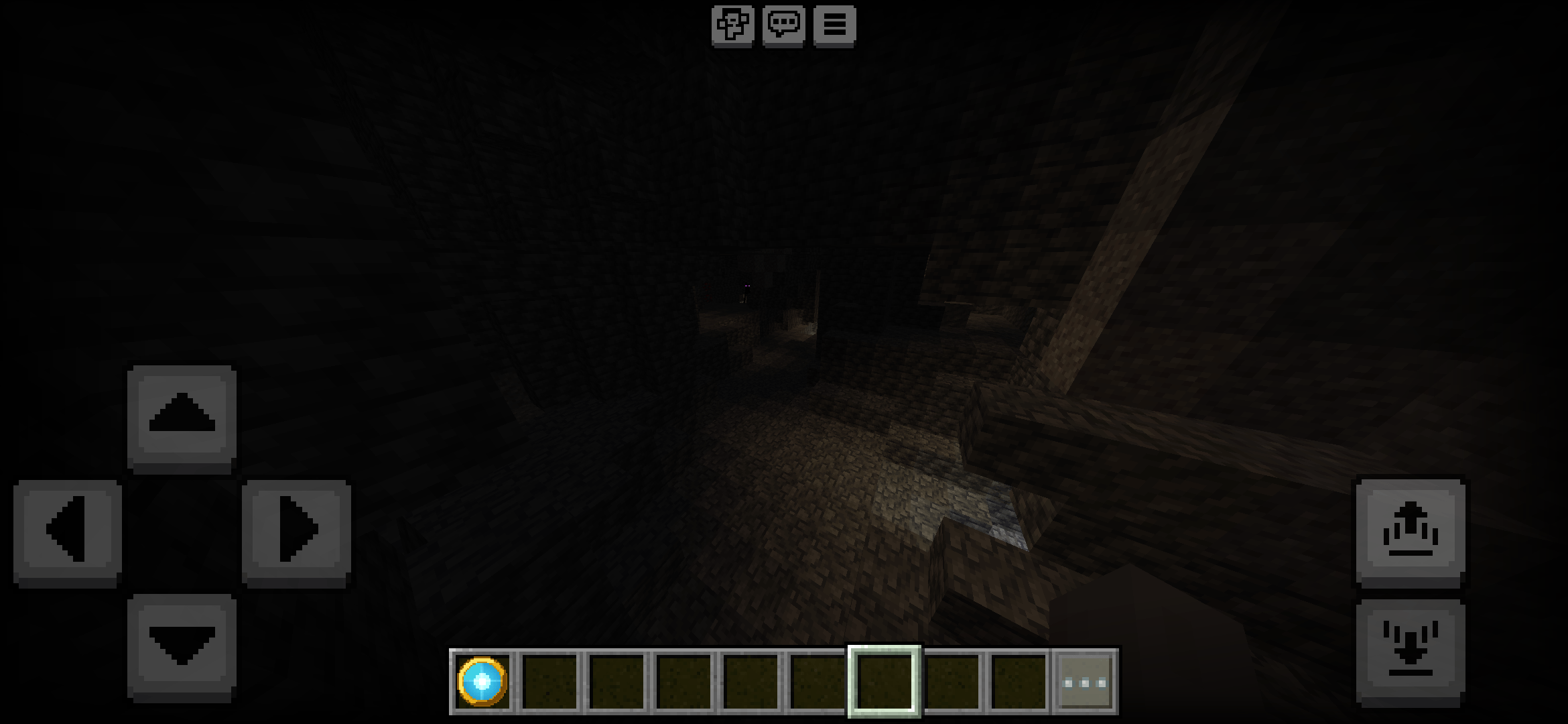
Start Area — Without Night Vision
This is how the same area looks with normal Minecraft lighting and the vision system turned OFF.
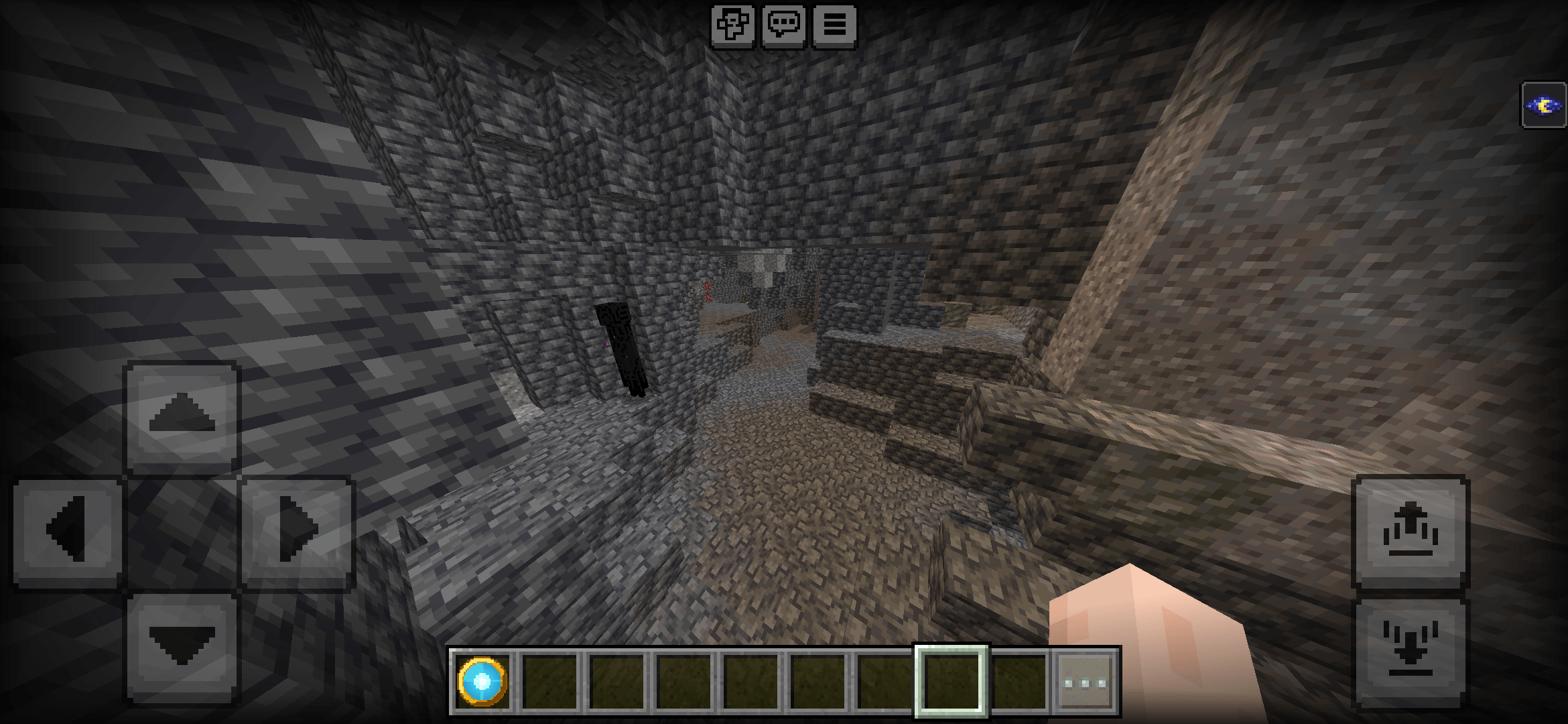
Start Area — With Night Vision
Enable Night Vision to make the same area significantly easier to see in dark environments.
***
✨ What's Included
YGP! Ultimate FullBright + Night Vision v1.0.2 includes:
- 4 vision modes
- YGP Vision Lens item
- Per-player mode saving
- Multiplayer-safe vision states
- First-join setup
- Action-bar mode indicator
- Chat mode information
- Optional
/ygp:vision command
- Death/respawn mode restoration
- Automatic mode restoration after effects are cleared
- Lightweight 10-second refresh system
🎮 The 4 Vision Modes
1/4 — OFF
Returns your vision to normal Minecraft behavior.
This removes the vision effects provided by the addon.
Normal Minecraft lighting.
2/4 — FullBright
Makes dark environments much easier to see.
Useful for:
- Caves
- Mining
- Underground bases
- Nighttime
- Nether exploration
- End exploration
- Dark structures
FullBright also clears the darkness effect, including the darkness effect associated with Warden/sculk gameplay.
3/4 — Night Vision
Classic Minecraft Night Vision.
This provides the normal Minecraft night-vision visual effect.
Important:
Warden/sculk darkness is left alone in this mode.
The green Night Vision appearance is normal Minecraft behavior.
4/4 — MAX
The strongest visibility mode.
MAX combines FullBright with:
- Water vision through Conduit Power
- A lighter personal fog stack
- Reduced distance haze
This is designed for players who want the maximum visibility provided by the addon.
🔄 How To Use
YGP Vision Lens
On first join, the addon gives you a:
YGP Vision Lens
Use the lens to cycle through the modes:
OFF
↓
FullBright
↓
Night Vision
↓
MAX
↓
OFF

Each time you change mode, the addon tells you your current mode in chat.


---

🥷 Sneak + Use

Sneak while using the YGP Vision Lens to immediately return to:

1/4 — OFF

This provides a quick way to return to normal Minecraft vision.


---

💻 Commands

The addon also provides the optional:

/ygp:vision

Available commands:

/ygp:vision off
/ygp:vision fullbright
/ygp:vision night_vision
/ygp:vision max
/ygp:vision lens
/ygp:vision status

off

Switches your vision to OFF.

fullbright

Switches your vision to FullBright.

night_vision

Switches your vision to Night Vision.

max

Switches your vision to MAX.

lens

Gives/handles the YGP Vision Lens functionality.

status

Shows your current vision mode.


---

📊 Mode Indicator

The action bar shows your current mode.

Examples:

1/4 — OFF
2/4 — FullBright
3/4 — Night Vision
4/4 — MAX

This makes it easy to know which mode you are currently using.


---

👥 Multiplayer

YGP! Ultimate FullBright + Night Vision is designed for multiplayer.

Every player's vision mode is independent.

For example:

Player A → FullBright

Player B → Night Vision

Player C → MAX

Player D → OFF

Changing Player A's mode does not change Player B, C or D.

This allows everyone to use their preferred vision mode in the same world.


---

💾 Your Mode Is Saved

Your selected mode is stored for that player in the world.

If you leave and rejoin the same world, the addon can restore your saved mode.


---

☠️ Death & Respawn

When you die:

Vision effects are cleared.

Your saved mode is retained.

Your selected mode is restored after respawning.


You don't need to manually configure your preferred mode every time you die.


---

🥛 Milk & Effect Removal

Milk and other gameplay situations can clear Minecraft effects.

If your vision effects are removed, the addon checks your saved mode and restores it within approximately 10 seconds.

The addon uses a lightweight refresh system rather than constantly checking every tick.


---

⚡ Performance

The addon is designed to avoid unnecessary every-tick processing.

The vision state is refreshed approximately every 10 seconds.

This keeps the system lightweight while still allowing the addon to restore vision effects when Minecraft removes them.


---

🌑 Where It Works

Use the addon while exploring:

Caves

See dark underground areas more easily while mining and exploring.

Night

Explore the Overworld at night without constantly placing additional light sources.

Underground

Useful for underground bases, tunnels and large mining areas.

Nether

Improve visibility while exploring dark Nether environments.

End

Improve visibility during End exploration.

Dark Structures

Useful when exploring areas with limited lighting.


---

📱 Installation

Step 1 — Download

Download:

YGP-Ultimate-FullBright-Night-Vision-v1.0.2.mcaddon

Step 2 — Import

Open the .mcaddon file with Minecraft Bedrock.

Minecraft should import the addon automatically.

Wait until the import finishes.


---

🌎 Adding It To Your World

Create a new world or edit an existing world.

Open:

World Settings → Behavior Packs

Find:

YGP! Ultimate FullBright + Night Vision

Activate the Behavior Pack.

Then open:

World Settings → Resource Packs

Find the corresponding YGP resource pack and activate it.

IMPORTANT

Both the Behavior Pack and Resource Pack must be enabled.

If only one pack is enabled, the addon may not work correctly.


---

🔄 Updating From Older Versions

If you previously installed:

v1.0.0

v1.0.1


remove the older copies before using v1.0.2.

Then:

1. Install v1.0.2.


2. Enable the Behavior Pack.


3. Enable the Resource Pack.


4. Enter your world.


5. Use the YGP Vision Lens.


---

⚠️ Important Information

Achievements

This addon is NOT achievement-friendly.

The addon uses a Behavior Pack and Script API, which disables achievements for the world.

Do not use this addon in a world where maintaining achievements is important to you.


---

Lighting

This addon does not modify the entire world's lighting for everyone.

The system is designed around per-player vision modes.

This is why one player can use FullBright while another player remains on OFF.


---

Night Vision Appearance

FullBright and Night Vision use Minecraft's vanilla Night Vision effect behavior.

Therefore, the familiar green Night Vision appearance can occur.

This is normal Minecraft behavior.


---

🧩 Compatibility

Minecraft Bedrock

26.00 – 26.xx

This release is designed for the Minecraft Bedrock 26.xx generation.

It is NOT intended as a Minecraft 1.21.x release.


---

📦 File

YGP-Ultimate-FullBright-Night-Vision-v1.0.2.mcaddon

Version:

v1.0.2


---

🏆 YGP Minecraft

Created by:

Yojitgamingpro

YGP Studio

Part of the YGP Minecraft project.

Official YGP Minecraft website:

https://ygpminecraft.pages.dev/


---

🛠️ Need Help?

When reporting a problem, include:

Minecraft Bedrock version

Device/platform

Vision mode being used

Other addons enabled

What happened

Steps to reproduce the problem

Screenshot/video if possible


This helps us reproduce and fix issues faster.


---

🚀 Explore More YGP Minecraft Mods

Discover more YGP Minecraft addons, updates and projects through the official YGP Minecraft website.

## CurseForge Categories

**Primary category:** Utility

Possible additional relevant categories, depending on the available CurseForge options:

- Gameplay
- Player
- Client-side/visual utility
- Optimization

Don't select a category that CurseForge doesn't actually provide.

## Tags
text FullBright Night Vision Minecraft Bedrock Bedrock 26.00 26.xx 26.50 Caves Mining Exploration Utility Lighting Vision Multiplayer YGP Minecraft YGP
Changelog — v1.0.2
YGP! Ultimate FullBright + Night Vision v1.0.2
Added
- Added official YGP promotional artwork.
- Added YGP Vision Lens (
ygp:vision_lens).
- Added 4 vision modes.
- Added per-player mode saving.
- Added first-join setup.
- Added mode information in chat.
- Added action-bar mode indicator.
- Added
/ygp:vision command support.
- Added multiplayer-safe player-specific states.
Vision Modes
1/4 — OFF
Normal Minecraft vision.
2/4 — FullBright
Improved visibility in dark areas and clears darkness effects.
3/4 — Night Vision
Classic Minecraft Night Vision.
4/4 — MAX
FullBright + water vision + lighter personal fog stack.
Gameplay
- Vision state is restored after respawn.
- Saved mode can be restored after leaving and rejoining the same world.
- Vision effects can be restored after Minecraft clears them.
- Added lightweight approximately 10-second refresh instead of every-tick processing.
Multiplayer
- Each player has an independent vision mode.
- One player's mode does not change another player's mode.
Compatibility
- Minecraft Bedrock 26.00–26.xx.