XP Storage
- By
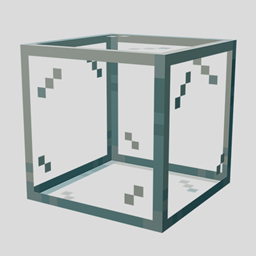
Store your experience levels safely inside a glass box and take them back whenever you want.
XP Storage adds a new glass box block that keeps your experience levels for you. Instead of losing your levels when you die or wasting them, you can put them inside the box and come back for them later.
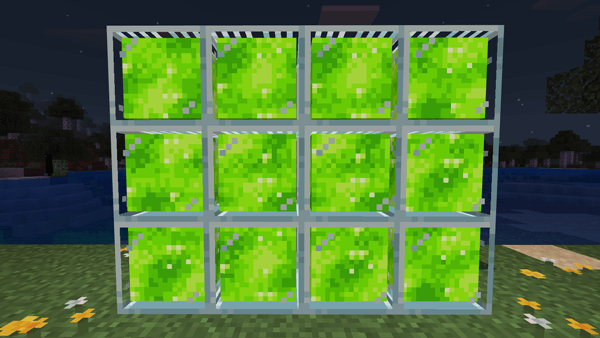

The box starts empty when you place it. Once you put levels inside, a glowing animated pool of experience appears and rises as the box fills up. Each box can hold up to 100 levels, and it fills in four stages, one for every 25 levels. The box also gives off more light as it fills.
Boxes are full blocks, so you can stack them on top of each other and build walls or towers of stored experience. If you break a box, all the levels stored inside go back to the player who broke it, so nothing is lost.
How to craft
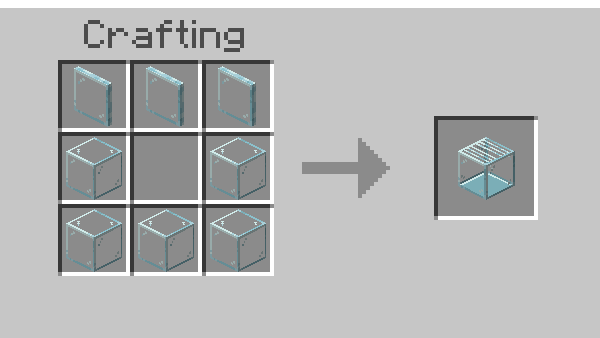
Use a crafting table and place three glass panes across the top row. In the middle row, put glass on the left and right and leave the center empty. Fill the bottom row with three glass blocks.
How to use
1. Craft the XP Storage box and place it anywhere.
2. Sneak and use the box to put all of your levels inside it.
3. Use the box without sneaking to take all of the stored levels back.
4. Break the box to get back any levels still stored inside.
The amount stored in the box is shown above your hotbar every time you use it.
How to activate
1. Open the file to import it into the game.
2. Create a new world or edit an existing one.
3. Go to Behavior Packs and activate XP Storage.
4. The resource pack is added automatically. If it is not, activate it under Resource Packs.
5. Enter the world and start storing your experience.
XP Storage Team

Owner