XP ATM
- By
XP ATM is a personal XP banking addon for Minecraft Bedrock Edition. Craft and place the XP ATM block to open a sleek, dark-themed banking terminal that works smoothly on both PC and mobile
XP ATM System (XP Banking Addon)
A personal XP Banking System for Minecraft Bedrock Edition featuring a custom XP ATM block, a dark banking terminal UI, and persistent per-player XP accounts powered by the Script API.
✨ Features
- Personal XP Accounts: Every player gets an independent, persistent XP bank account keyed by their unique player ID (safe across gamertag changes and world reloads).
- Exact XP Points (Not Levels): Deposits, withdrawals, and transfers use exact Minecraft XP points rather than XP levels, preventing level-rounding exploits or XP loss.
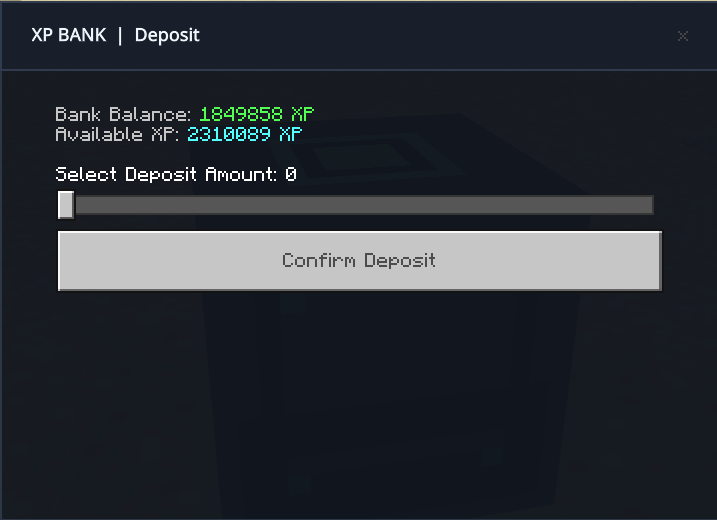
- Deposit & Withdraw: Move any amount of XP between your player XP bar and your bank account using dynamic sliders.
- Offline Player Transfers: Send XP to any registered player—even when they are offline. The recipient dropdown displays player names only and never exposes other players' balances.
- Transaction History: Tracks your 5 most recent transactions (
Deposit,Withdraw,Transfer In,Transfer Out) with signed amounts, counterparty names, and UTC timestamps. - Custom Dark Terminal UI: Clean, centered banking interface built with Custom JSON UI, responsive across both PC and Mobile screens.
- Server-Side Validation: Atomic balance updates with rollback protection and per-player transaction locks to prevent duplicate or partial transactions.
Ui
XP ATM


🧱 Crafting Recipe
Craft the XP ATM block on a Crafting Table:
| Row | Slot 1 | Slot 2 | Slot 3 |
|---|---|---|---|
| Top | Iron Ingot | Iron Ingot | Iron Ingot |
| Middle | Glass Pane | Emerald | Glass Pane |
| Bottom | Iron Ingot | Redstone Dust | Iron Ingot |

You can also obtain it from the Items tab in Creative mode or via /give @s xpatm:xp_atm.
🖥️ How to Use
- Place the XP ATM block anywhere in your world.
- Interact (Right-Click / Tap) with the block to open the XP BANK dashboard.
- Choose an action:
- Deposit: Select how many XP points to move from your XP bar into your bank account.
- Withdraw: Select how many XP points to withdraw from your bank account back to your XP bar.
- Transfer: Pick a registered player from the dropdown and choose the XP amount to send.
- History: View your last 5 transactions.
📦 Installation & Requirements
- Download the
.mcaddonfile and open it with Minecraft Bedrock Edition to import both the Behavior Pack and Resource Pack. - Edit your world settings and activate both packs:
- XP ATM System (BP) under Behavior Packs
- XP ATM System (RP) under Resource Packs
- Supported Versions: Minecraft Bedrock Edition 1.21.70+ (tested on 1.21.90+ ).
- Experimental Toggles: None required—uses stable Script API modules and custom block components.
🔒 Technical Notes
- Persistent Storage: Account balances and history are stored in world dynamic properties (
@minecraft/server), updating only the affected account(s) per transaction. - Compatibility: Custom JSON UI routes only XP ATM forms via hidden title tags, leaving all other vanilla and third-party addon forms untouched.
XP ATM Team

Owner