Weapon on Player!
- By
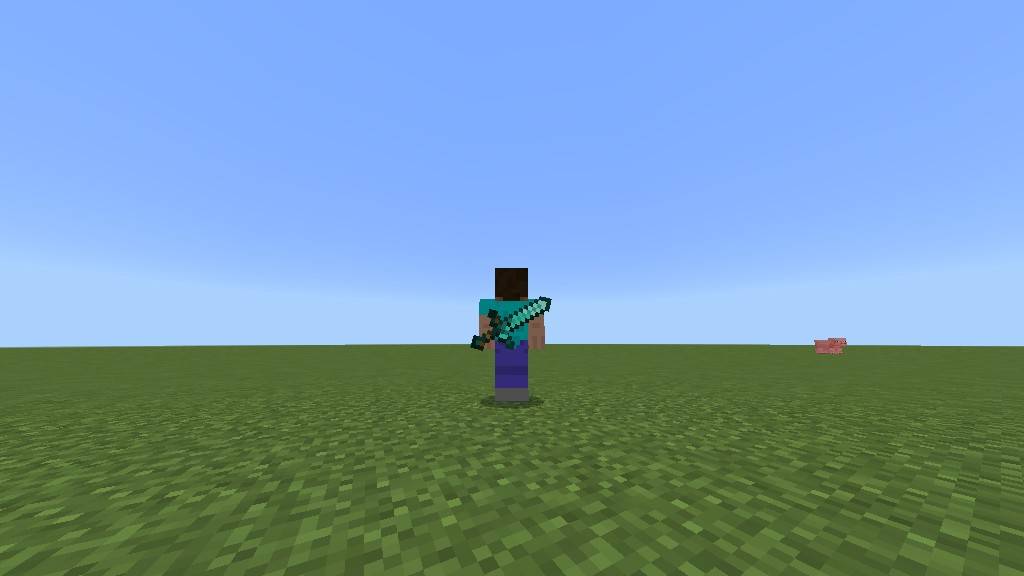
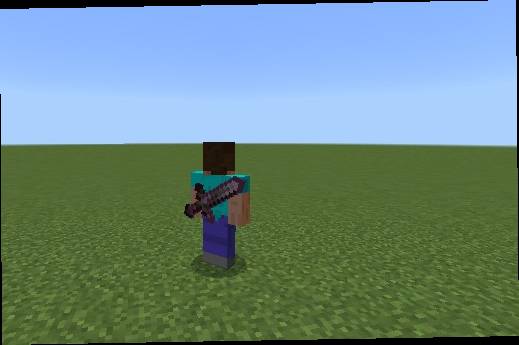
Displays swords on your back in 3D! Features smart chest armor offset !
Screenshot_2026-09-13_09-43-59.png
0ba65eb7-3240-4203-b0ee-2beaef149913.jpeg
a760e1ed-348b-445c-8879-aaa1f7267af6.jpeg
Description
🗡️ Weapon On Back Addon (v1.0.0)
Carry your blade with honor! Display equipped and carried swords dynamically on your player's back in Minecraft Bedrock!
Whether you are exploring uncharted caves, wandering through bustling multiplayer villages, or embarking on epic survival quests, Weapon On Back enhances your player appearance with high-definition 3D sheathed swords mounted diagonally across your back.
Designed from the ground up for seamless survival gameplay, this standalone addon works automatically without any commands, dummy items, or experimental toggles.
✨ Key Features
⚔️ Authentic 3D Weapon Models
- Dynamically renders your current sword on your back with accurate vanilla proportions, pommel, guard, and blade texturing.
- Supports all 6 vanilla sword tiers:
- 🌲 Wooden Sword
- 🪨 Stone Sword
- ⚙️ Iron Sword
- 🌟 Golden Sword
- 💎 Diamond Sword
- 🌌 Netherite Sword
🛡️ Smart Armor Fitting (+1.2 Offset)
- Wearing chest armor? No problem! The addon detects when you equip any chestplate and automatically moves the 3D sword back (+1.2 Z offset), preventing visual clipping and ensuring your weapon sits flush over your armor plate.
🪽 Elytra Auto-Hide
- Equipping an Elytra automatically stows your back sword, allowing your wings to spread and glide smoothly without awkward visual clashes.
🎒 Dedicated Sheath Slot System (8 Priority Slots)
- Unlike clunky addons that scan every inventory slot and show whatever random tool you pick up, Weapon On Back uses an intuitive Sheath Slot architecture:
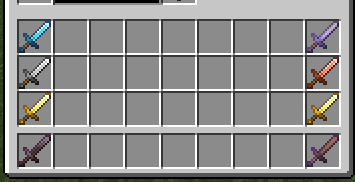
- Only the outer 2 columns (left & right edges of your inventory) act as your weapon sheaths.
- The inner 28 slots are reserved for normal storage. Swords stored in the center of your bag will never clutter your back!
- Want to hide your sword? Simply place it in any inner storage slot!
⚡ Ultra-Lightweight & Optimized
- Built on Minecraft Bedrock's modern
@minecraft/serverScript API (v1.11.0+) and client-synced entity properties. - Runs smoothly with zero lag or frame drops on mobile, console, and PC!
🧭 Inventory Slot & Priority Guide
The addon scans your inventory row-by-row from Top to Bottom. In each row, the Right Column takes precedence over the Left Column:
| Priority | Slot Number | Inventory Location | Role |
|---|---|---|---|
| #1 | Slot 17 | Top Row — Far Right | Primary Sheath (Highest Priority) |
| #2 | Slot 9 | Top Row — Far Left | Secondary Sheath |
| #3 | Slot 26 | Middle Row — Far Right | Third Sheath |
| #4 | Slot 18 | Middle Row — Far Left | Fourth Sheath |
| #5 | Slot 35 | Bottom Row — Far Right | Fifth Sheath |
| #6 | Slot 27 | Bottom Row — Far Left | Sixth Sheath |
| #7 | Slot 8 | Hotbar — Far Right (Slot 9 on HUD) | Hotbar Right Sheath |
| #8 | Slot 0 | Hotbar — Far Left (Slot 1 on HUD) | Hotbar Left Sheath (Lowest Priority) |
💡 PRO TIP: Put your main combat weapon (e.g. Netherite Sword) in Slot 17 (Top-Right) so it always takes precedence and stays proudly on your back!
🚫 How to Hide Your Sword
If you want to keep your back clean or hide your weapon during roleplay or stealth:
- Move your sword into any of the 28 inner storage slots (columns 2 through 8 in your main inventory or hotbar).
- The addon will immediately recognize that no sword is in a Sheath Slot and stow your back sword!
📥 Installation
- Download
Weapon_On_Back_v1.0.0.mcaddon. - Double-click or open the file with Minecraft Bedrock.
- Both the Behavior Pack (B) and Resource Pack (R) will import automatically.
- Activate both packs in your World Settings under Behavior Packs and Resource Packs.
- Ensure Beta APIs toggle is enabled under your World's Experiment Settings.
- Enter your world and equip a sword!
📜 Version 1.0.0 Changelog
- ✨ Initial standalone release with dedicated namespace (
wob:). - 🗡️ Added 3D back models for Wood, Stone, Iron, Gold, Diamond, and Netherite swords.
- 🛡️ Added dynamic chest armor offset (+1.2 Z) to eliminate clipping.
- 🪽 Added automatic Elytra detection and weapon hiding.
- 🎯 Implemented vertical 8-slot sheath scanning priority system.
- 🎨 Created custom distinct pack icons with B (Behavior) and R (Resource) corner badges.
Created with ❤️ by Max
The Weapon on Player! Team