ThirstSystem
- By
Add thirst management to Minecraft Bedrock! Sprinting, swimming, the Nether, fire, and nearby heat drain hydration faster. Drink water bottles, submerge to recover, and monitor thirst with a custom HUD.
Thirst System V1
Survival in Minecraft is no longer just about hunger and health. Thirst System V1 introduces a thirst management mechanic that challenges you to monitor your hydration while exploring, fighting, and gathering resources.
Sprinting, swimming, extreme heat, fire, and traveling through the Nether can drain your thirst faster. Drink water to restore hydration, take advantage of underwater recovery, and keep an eye on your custom thirst bar before dehydration starts affecting your survival.
Features
💧 Dynamic Thirst System
-
Start with a full thirst bar containing 20 points.
-
Thirst decreases gradually over time, even when you are not actively fighting or exploring.
-
Under normal baseline conditions, the thirst bar takes approximately 20 minutes to drain completely when idle.
-
Different activities and environmental conditions can significantly change your thirst drain rate.
-
Your thirst level is reset when you respawn.
🏃 Activity-Based Dehydration
Your actions influence how quickly you lose hydration.
-
Sprinting: Running at full speed increases thirst consumption.
-
Swimming: Moving through water increases thirst consumption.
-
The Nether: Thirst drains faster while you are in the Nether.
-
Burning: Being on fire increases thirst consumption.
Plan your journeys carefully and remember to replenish your water supply before undertaking long expeditions.
☀️ Environmental Temperature and Heat
The environment can affect your thirst drain rate.
-
Hot terrain: Ground such as sand and terracotta can indicate hot conditions and increase thirst consumption.
-
Cold terrain: Snow and ice-related blocks can indicate cold conditions and reduce the baseline thirst drain rate.
-
Nearby heat sources: Fire, campfires, lava, magma blocks, and lit furnaces can increase thirst consumption.
-
Heat warnings: When using the text-based action-bar display, contextual labels can indicate nearby heat or hot and cold conditions.
The system estimates environmental conditions from nearby ground blocks in the Overworld rather than relying on exact real-world temperature measurements.
🍶 Drink Water to Restore Thirst
Water is essential for managing dehydration.
-
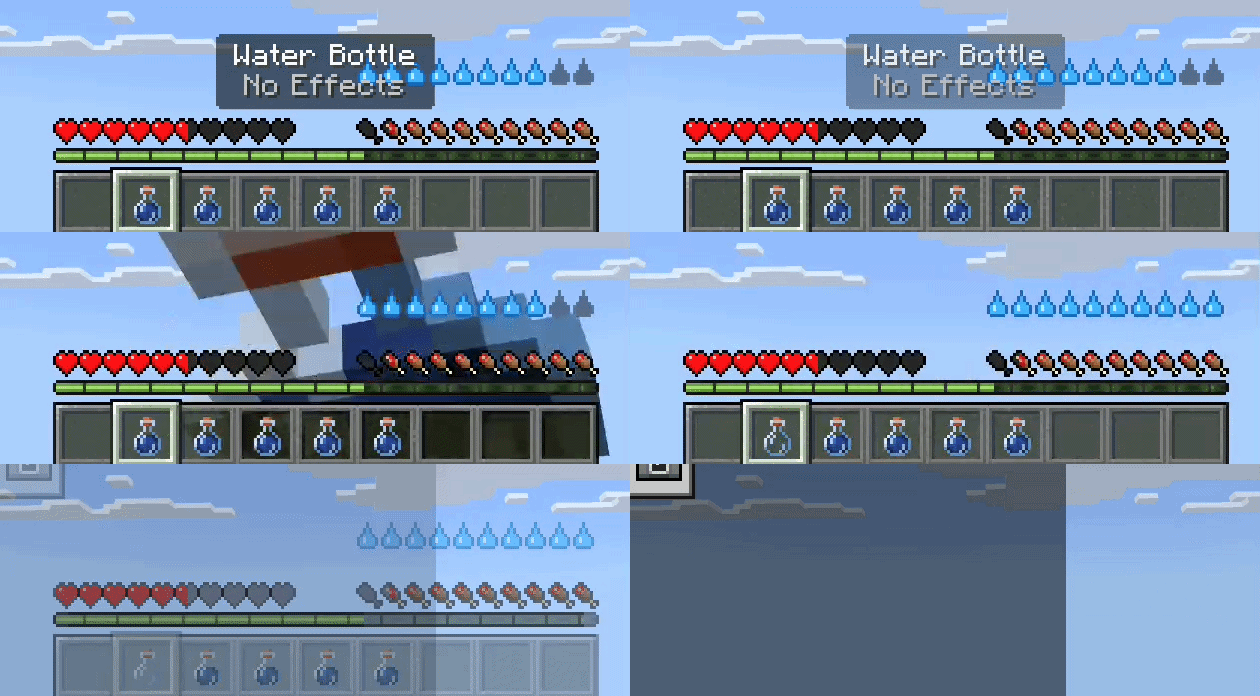
Drinking a regular Water Bottle restores 6 thirst points out of the maximum 20.
-
Keep water bottles available when traveling through hot areas or exploring the Nether.
-
Plan ahead so you do not reach critical thirst levels far from a water supply.
Only a regular Water Bottle is intended to restore thirst through the drinking mechanic.
🌊 Recover Hydration Underwater
Water can also help restore your thirst directly.
-
When your character's head is submerged in water, thirst gradually recovers.
-
Underwater recovery restores approximately 0.5 thirst points per second.
-
Thirst does not drain while this underwater recovery is active.
Finding a suitable water source can be a useful way to recover hydration when your thirst is running low.
⚠️ Dehydration Penalties
Ignoring your thirst can make survival increasingly difficult.
-
Low thirst: Weakness is applied.
-
Critical thirst: Weakness and Slowness make combat and movement more challenging.
-
Empty thirst bar: Stronger Weakness, Slowness, and Mining Fatigue are applied.
-
Dehydration damage: When the thirst bar remains empty, periodic damage can occur.
Dehydration damage cannot directly reduce your health below one heart, but it can still leave you vulnerable to hostile mobs, falls, and other environmental dangers.
Drink water before your thirst reaches critical levels to avoid these penalties.
Installation
-
Download and import the add-on into Minecraft Bedrock Edition.
-
Open the settings for the world where you want to use Thirst System V1.
-
Activate both the Thirst System Behavior Pack and the matching Thirst System Resource Pack.
-
Enter the world in Survival mode.
-
Monitor your thirst bar and drink Water Bottles regularly to maintain hydration.
Make sure both packs are installed and enabled for the complete experience, including the custom HUD.
Compatibility
-
Game: Minecraft Bedrock Edition
-
Minimum version specified in the manifest: 1.21.100
-
Required Script API:
@minecraft/server2.0.0 -
Required components: Behavior Pack and Resource Pack
-
Gameplay mode: The thirst system operates in Survival mode. Thirst drain and the HUD are disabled in Creative, Adventure, and Spectator modes.
Ensure your Minecraft version supports the required Script API and that both packs are enabled in your world.
Credits
Pack credit: PigManPluss.
ThirstSystem Team