BodyTemperature
- By
Survive changing climates with dynamic body temperature! Biomes, day and night, nearby heat, water, armor, and food affect your temperature. Craft a thermometer to track it and manage your HUD.
Body Temperature
Make survival more challenging with Body Temperature, a Minecraft Bedrock add-on that introduces a dynamic body temperature system. Your surroundings matter: freezing biomes, hot environments, nearby heat sources, water, armor, and food can all affect how your character feels.
Stay warm in cold regions, cool down in hot areas, and pay attention to your environment before extreme temperatures put your survival at risk.
Features
🌡️ Dynamic Body Temperature
-
Your body temperature changes gradually according to environmental conditions.
-
Different biomes have different temperature profiles, with many environments becoming colder or hotter as the day progresses into night.
-
High elevations can expose you to colder conditions, while sheltered areas and underground spaces can reduce environmental exposure.
-
Your body temperature gradually recovers toward normal when conditions become more favorable.
🔥 Heat Sources and Cold Environments
-
Stay warm near heat sources: Campfires, furnaces, lava, fire, torches, and lanterns can provide warmth.
-
Watch out for the cold: Ice, packed ice, blue ice, snow, and powder snow can contribute to colder surroundings.
-
Use water wisely: Water can help cool you down in hot conditions, but getting wet in cold weather can make staying warm more difficult.
-
Nearby water, shelter, and other environmental factors influence the effective temperature around you.
🛡️ Armor and Held Items Matter
-
Leather armor helps reduce the effects of cold.
-
Metal armor can make hot conditions more difficult to tolerate.
-
Certain held items can influence your temperature. Torches, lanterns, and blaze rods can provide warmth, while items such as ice and snowballs can help cool you down.
Choose your equipment based on where you plan to explore instead of relying on the same gear in every biome.
🍲 Food and Drinks Affect Temperature
Your food choices can help you manage temperature extremes.
-
Warm up: Mushroom stew, rabbit stew, beetroot soup, cooked meat, and baked potatoes can raise your body temperature or provide a temporary warming effect.
-
Cool down: Melon slices, sweet berries, glow berries, milk, and potions can lower your body temperature or provide a temporary cooling effect.
These effects can give you another way to respond to changing conditions when finding suitable shelter or equipment is not enough.
⚠️ Cold and Heat Penalties
Ignoring extreme temperatures can become dangerous.
-
As your body temperature moves farther from normal, you may receive Slowness.
-
More severe cold or overheating can cause health damage.
-
Warning messages alert you when conditions become dangerous, giving you a chance to find warmth, seek shade, or cool down before things get worse.
🌡️ Craftable Thermometer
Craft a Thermometer to inspect your current condition and the environment around you.
Using the thermometer provides a detailed report that can include:
-
Your current biome and environmental temperature.
-
Your body temperature and condition.
-
Whether your temperature is getting worse or recovering.
-
Your shelter conditions and nearby heat sources.
-
The influence of held items, armor, nearby water, wetness, and food effects.
-
Your current body temperature HUD mode.
📊 Customizable Temperature HUD
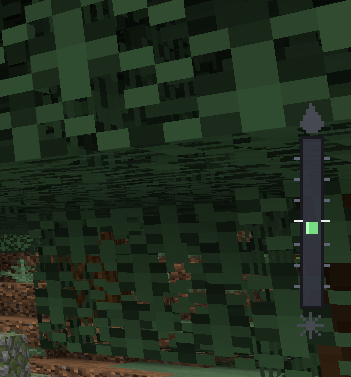
The add-on includes a custom temperature bar that helps you monitor your condition while exploring.
Choose one of three display modes:
-
Auto: Displays the temperature HUD when your body temperature reaches a configured threshold.
-
Always: Keeps the temperature HUD visible.
-
Off: Hides the temperature HUD.
To cycle between these modes, hold the Thermometer, sneak, and use it. You can use the same item normally to view your detailed temperature report.
How to Craft the Thermometer
Use a Crafting Table and arrange the ingredients vertically:
-
Top: Glass Pane
-
Middle: Redstone
-
Bottom: Iron Ingot
This recipe produces one Thermometer.
Installation
-
Download and import the
.mcaddonfile into Minecraft Bedrock Edition. -
Open your world settings.
-
Activate both the Body Temperature Behavior Pack and Resource Pack.
-
Enter the world and craft a Thermometer to inspect your temperature and change your HUD mode.
Both packs are required for the intended experience, including the custom graphical temperature bar.
Compatibility
-
Game: Minecraft Bedrock Edition
-
Minimum version specified in the manifest: 1.26.0
-
Required script module:
@minecraft/server2.3.0 -
Pack components: Behavior Pack and Resource Pack
Make sure your Minecraft version supports the required script module and that both packs are enabled in the world.
Credits
Created by PigManPluss.
BodyTemperature Team