SWORDSTORM - Floating Swords
- By
Control powerful floating swords! Summon up to 8 custom 3D magic swords that fly around you, find nearby enemies, and attack them with elemental powers. Works in Survival and Multiplayer without needing experimental settings!
Pi7_GIF_CMP.gif
capture_261122_151751.png
capture_261122_151710.png
capture_261122_151601.png
capture_261122_151545.png
Description
SWORDSTORM – Command an Army of Floating Swords!
SWORDSTORM transforms the way you fight in Minecraft Bedrock Edition by introducing magical, autonomous floating swords that protect you and eliminate nearby hostile mobs!
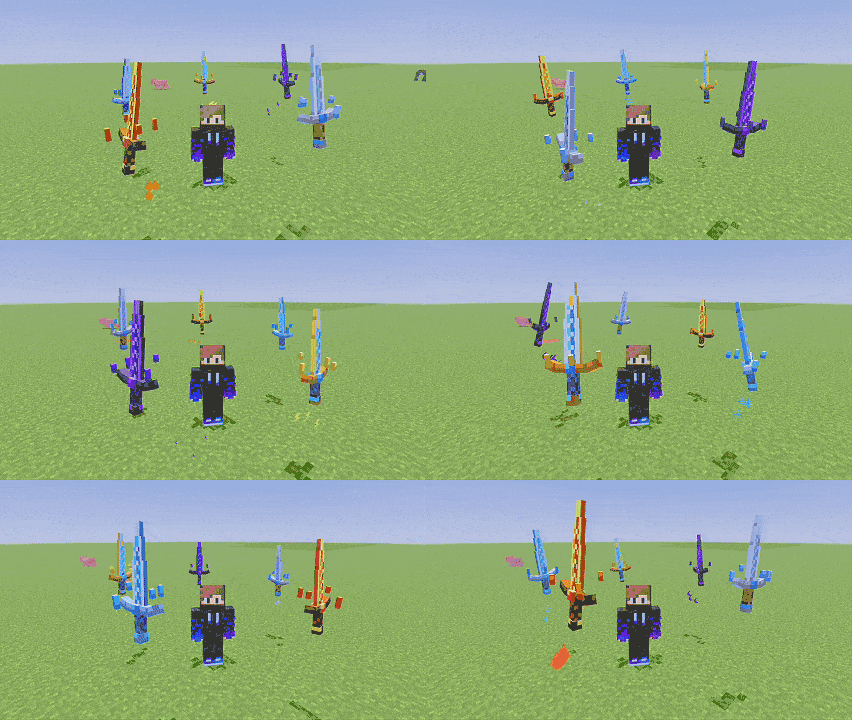
Summon beautifully crafted custom 3D enchanted blades that smoothly orbit around your character, intelligently detect hostile enemies, launch powerful sword strikes, and return to their formation when the attack is complete.
With 5 unique elemental swords, intelligent combat AI, upgradeable sword capacity, custom visual effects, and a dedicated management system, SWORDSTORM turns you into a master of magical sword combat!
Designed for Survival Mode and Multiplayer, this addon uses stable Script APIs and requires no Experimental Toggles or Beta APIs.
Key Features:-
1. Five Unique Custom 3D Floating Swords
Unlock and summon five magical swords, each featuring:
• Custom 3D sword geometry and pixel-art textures.
• Smooth orbital movement around the player.
• Unique elemental particles and visual effects.
• Custom attack animations and combat behavior.
• Distinct damage values and special abilities.
2. Intelligent Auto-Targeting Combat System
Your floating swords act as autonomous combat companions!
• Automatically detect nearby hostile mobs.
• Independently select and attack different targets.
• Split their formation to attack multiple enemies simultaneously.
• Perform smooth, tip-first sword strikes.
• Automatically return to their orbital formation after attacking.
• Award combat XP and mob drops to their owner.
3. Advanced Friendly-Fire Protection
Your swords are designed to protect you, not attack everything around you!
They never intentionally target:
• Their owner.
• Other players.
• Villagers.
• Tamed pets.
• Iron Golems and Snow Golems.
4. Upgradeable Sword Capacity (1–8 Swords)
Start your journey with one floating sword and gradually expand your magical formation!
• Starting Capacity: 1 sword.
• Maximum Capacity: 8 active swords.
• Use Sword Capacity Crystals to permanently unlock additional slots.
• Create powerful combinations using different elemental swords.
5. Sword Recall & Management System
Take complete control of your floating sword collection with the Sword Recall Sigil.
Instant Recall:
Use the sigil to immediately recall all active swords back into your orbit.
Sword Management Menu:
Sneak + Use the sigil to open a dedicated in-game interface where you can:
• View all unlocked swords.
• Equip or unequip individual swords.
• Manage your active sword slots.
• Check your current sword capacity.
• Dismiss your active swords.
6. Multiplayer & Persistent Player Data
SWORDSTORM includes an independent player-data system designed for multiplayer adventures.
• Each player maintains their own unlocked swords.
• Equipped sword loadouts are saved independently.
• Sword capacity upgrades are permanently tracked.
• Player progress survives deaths and relogging.
• Dimension travel between the Overworld, Nether, and End is supported.
• Duplicate and unwanted ghost sword entities are prevented through persistent data management.
All 5 Magical Floating Swords
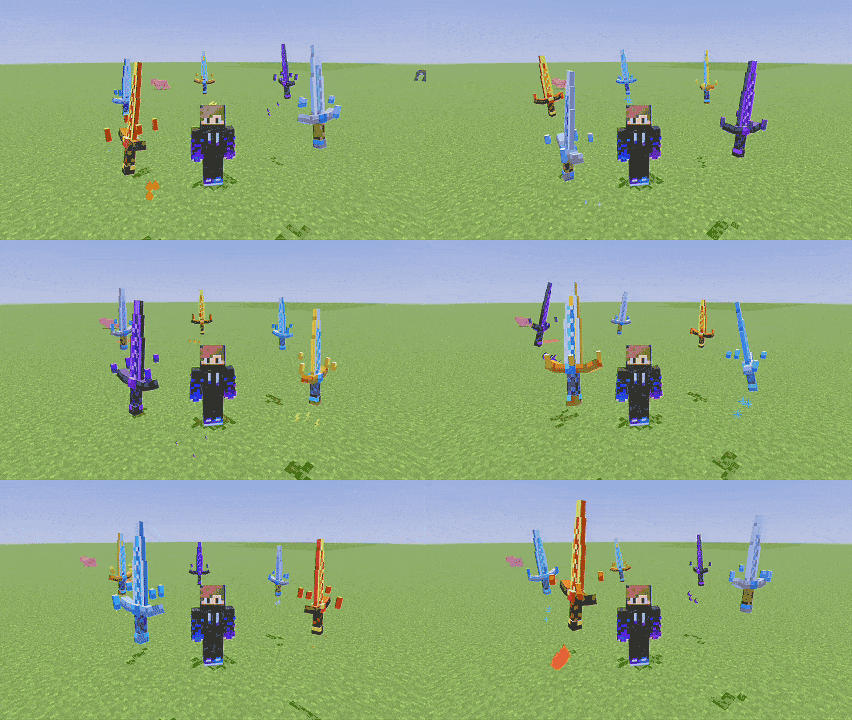
Every sword has its own combat characteristics, elemental effects, and visual identity.
1. Normal Floating Sword
Damage: 5 | Cooldown: 1.2 seconds
• Balanced steel attacks.
• Fast attack and return speed.
• Smooth floating orbital movement.
• Unlocked automatically when starting the addon.
2. Flame Floating Sword
Damage: 6 | Cooldown: 1.3 seconds
• Ignites hostile enemies for 4 seconds.
• Produces blazing ember trails.
• Features custom fire impact particles.
• Perfect for aggressive combat.
3. Frost Floating Sword
Damage: 5.5 | Cooldown: 1.25 seconds
• Applies Slowness III for 3.5 seconds.
• Releases icy snowflake particles.
• Creates custom ice-shattering impact effects.
• Excellent for slowing down dangerous enemies.
4. Lightning Floating Sword
Damage: 7 | Cooldown: 1.7 seconds
• Calls down a lightning strike against hostile targets.
• Produces powerful electrical impact effects.
• Includes lightning and fire protection for the owner, nearby players, pets, and golems.
• Automatically cleans up stray fire blocks created by its lightning effects.
5. Shadow Floating Sword
Damage: 6.5 | Cooldown: 1.2 seconds
• Performs high-speed dark attacks.
• Applies Weakness II for 4 seconds.
• Inflicts Blindness for 4 seconds.
• Creates unique void crescent particles.
• Designed for fast and disruptive combat.
🎮 How to Play & Controls
When you enter a world for the first time, you automatically receive a Starter Kit containing:
• 1× Normal Floating Sword
• 1× Sword Recall Sigil
Summon & Unlock Swords
Hold a Sword Relic and press Use (Right-Click on PC / Long-Press on supported touch controls) to unlock the sword and add it to your active orbit, provided you have an available slot.
Instant Sword Recall
Hold the Sword Recall Sigil and press Use to immediately bring all active floating swords back into your orbit.
Open Sword Management Menu
Sneak + Use the Sword Recall Sigil to access the management interface.
From here, equip unlocked swords, remove individual swords, view your capacity, or dismiss your active formation.
Increase Sword Capacity
Hold a Sword Capacity Crystal and press Use to permanently unlock one additional sword slot.
Each crystal increases your maximum capacity by +1, up to a maximum of 8 swords.
Survival Crafting Recipes
All items can be crafted using a standard 3×3 Survival Crafting Table.
Normal Floating Sword
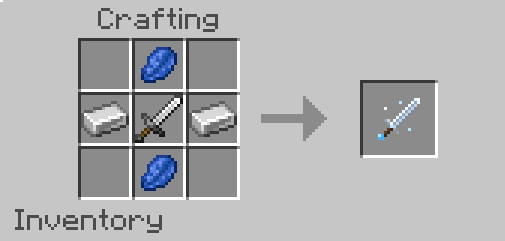
• Center: 1× Iron Sword
• Left & Right: 2× Iron Ingot
• Top & Bottom: 2× Lapis Lazuli
Flame Floating Sword
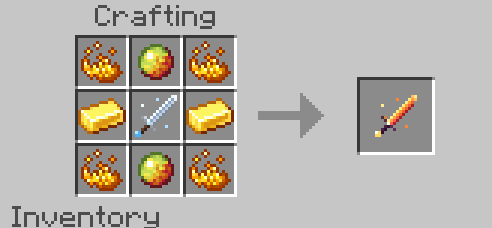
• Center: 1× Normal Floating Sword
• Left & Right: 2× Gold Ingot
• Top & Bottom: 2× Magma Cream
• Four Corners: 4× Blaze Powder
Frost Floating Sword
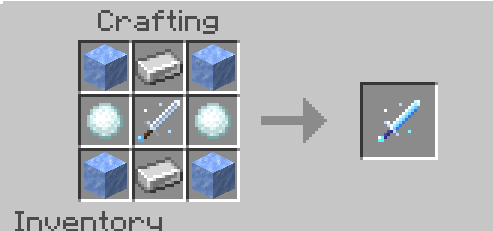
• Center: 1× Normal Floating Sword
• Left & Right: 2× Snowball
• Top & Bottom: 2× Iron Ingot
• Four Corners: 4× Packed Ice
Lightning Floating Sword
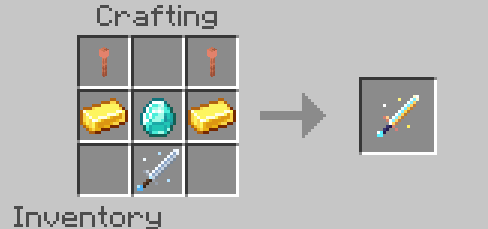
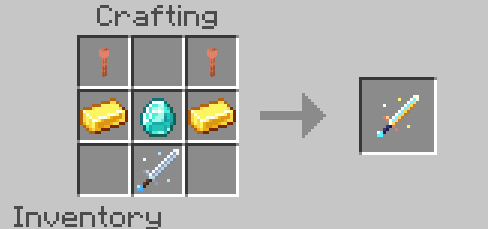
• Top-Left & Top-Right: 2× Lightning Rod
• Middle-Left & Middle-Right: 2× Gold Ingot
• Center: 1× Diamond
• Bottom-Center: 1× Normal Floating Sword
Shadow Floating Sword
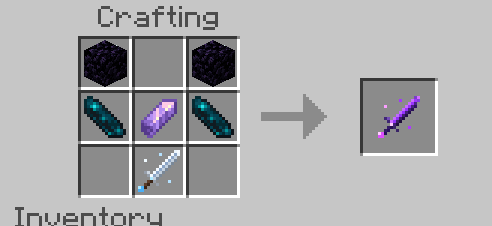
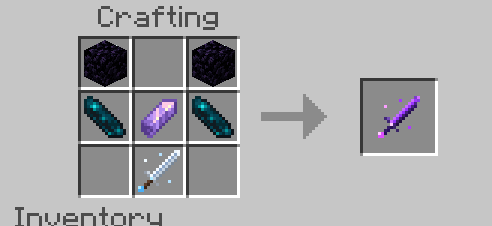
• Top-Left & Top-Right: 2× Obsidian
• Middle-Left & Middle-Right: 2× Echo Shard
• Center: 1× Amethyst Shard
• Bottom-Center: 1× Normal Floating Sword
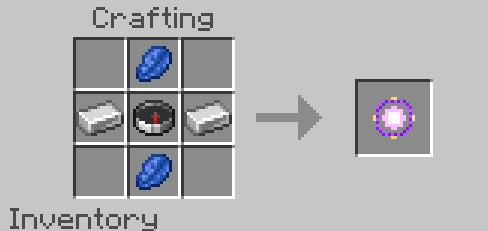
Sword Recall Sigil
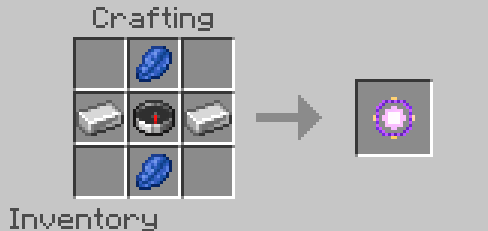
• Center: 1× Compass
• Left & Right: 2× Iron Ingot
• Top & Bottom: 2× Lapis Lazuli
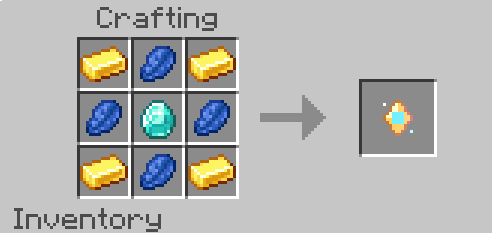
Sword Capacity Crystal
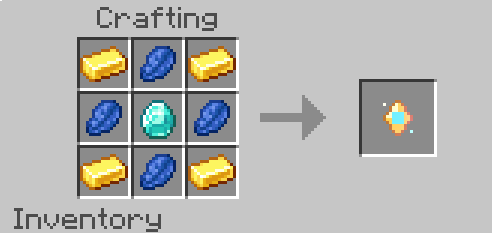
• Center: 1× Diamond
• Top, Bottom, Left & Right: 4× Lapis Lazuli
• Four Corners: 4× Gold Ingot
Survival Recipe Book Support: All crafting recipes are automatically unlocked in the Survival Recipe Book after collecting their required key ingredients.
Installation & Compatibility
| Information | Details |
|---|---|
| Minecraft Edition | Bedrock Edition |
| Minimum Version | 1.21.30+ |
| Supported Platforms | Windows, Android, iOS |
| Consoles | Supported through compatible Realms setups |
| Game Modes | Survival & Multiplayer |
| Experimental Toggles | Not Required |
| Beta APIs | Not Required |
| Behavior Pack | SWORDSTORM v1.0 [BP] |
| Resource Pack | SWORDSTORM v1.0 [RP] |
How to Install
-
Download the
.mcaddonfile. -
Open the downloaded file to import both SWORDSTORM v1.0 [BP] and SWORDSTORM v1.0 [RP] into Minecraft.
-
Open your world settings.
-
Activate SWORDSTORM v1.0 [BP] under Behavior Packs.
-
Activate SWORDSTORM v1.0 [RP] under Resource Packs.
-
Enter your world, receive your Starter Kit, and summon your magical blades!
Planned Future Updates
SWORDSTORM has even more exciting features planned for future releases!
• New Elemental Swords: Venom and Fusion blades.
• Selectable Combat Modes: Defense, Attack, and Orbit modes.
• Sword Upgrade System: Three upgrade levels for each sword.
• Ultimate Abilities: Powerful Sword Rain and Ultimate Storm attacks.
❤️ Support & Feedback
Thank you for checking out SWORDSTORM!
Your feedback, suggestions, and bug reports are always welcome. If you enjoy the addon, consider sharing it with your friends and supporting future development.
Summon your blades. Command the storm. Dominate the battlefield!
📌 Notes & Permissions
• If you feature this addon on YouTube or any other social media platform, please give proper credit to the original creator and include a link to the official CurseForge project page.
• You are not allowed to modify, redistribute, or reupload this addon on any other website or platform without my explicit permission.
Please respect the creator's work and support the original project. Thank you!
SWORDSTORM - Floating Swords Team