Dragon Buddy
- By
Tame, level up, and customize 6 adorable elemental tiny dragon companions that fly beside you, defend you in combat, heal you, and grow stronger throughout your Survival adventure!
Gemini_Generated_Image_kgkmilkgkmilkgkm_1_optimized_500.png
Description
DRAGON BUDDY – Tiny Elemental Dragon Companions
Discover, tame, and raise your own tiny elemental dragons in Minecraft Bedrock Edition!
Bring your Survival adventures to life with Dragon Buddy, an exciting companion addon featuring 6 unique elemental dragons, each with custom 3D models, smooth flying animations, exclusive combat abilities, custom sound effects, and adorable companion behaviors.
These aren't ordinary pets! Your dragons can fight alongside you, protect you from hostile mobs, heal you, gain experience, level up, and become stronger as you explore the world together.
With an interactive pet menu, extensive customization options, and a complete 5-level progression system, every dragon can become your perfect adventure companion.
Key Features:-
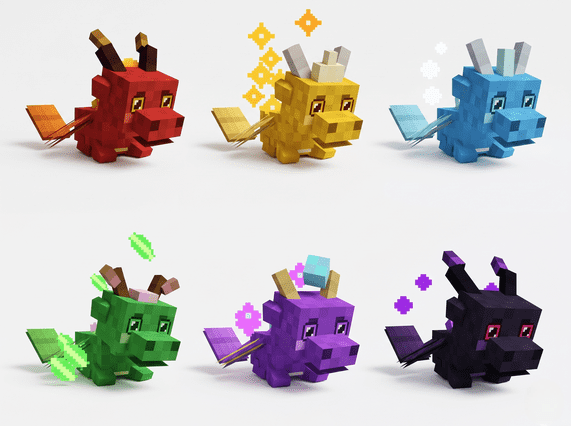
- 6 Unique Elemental Dragons: Discover Fire, Ice, Nature, Shadow, Magic, and the rare Golden Dragon. Each features a completely different custom 3D appearance, including unique horns, wings, crests, tails, and glowing eyes.
- Intelligent Flying AI: Dragons smoothly hover near your shoulder, follow you through different biomes, avoid interfering with your movement, and automatically teleport when you travel too far away.
- Advanced Companion Combat: Your dragons identify nearby hostile mobs and defend you during battles without accidentally attacking their owner, other players, villagers, iron golems, or tamed pets.
- Interactive Dragon Menu: Manage your companion through an in-game interface. View its current health, level, XP, and attack power, switch behavior modes, and access customization options.
- 5-Level Progression System: Earn XP through combat or Dragon Treats. Each level increases your dragon's health, attack strength, and combat speed while unlocking additional elemental upgrades.
- Extensive Customization: Choose from 12 dragon skins, 8 glowing eye colors, and 7 cosmetic particle auras. You can also give your dragon a custom name.
- Unique Elemental Attacks: Every dragon uses its own custom projectiles, particle effects, and synthesized sound effects to deliver a distinctive combat experience.
Meet the 6 Elemental Dragons
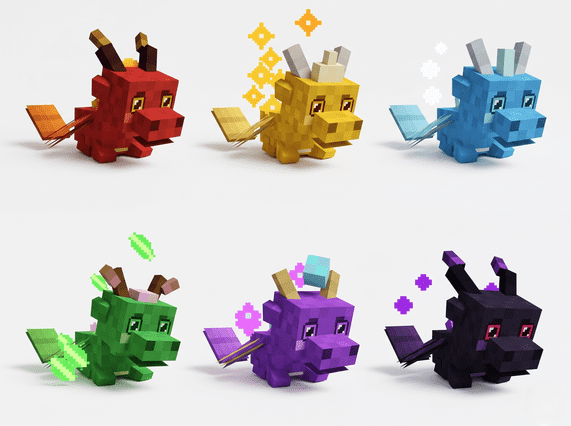
Every dragon has its own appearance, personality, and special elemental abilities.
| Dragon | Appearance | Special Abilities |
|---|---|---|
| 🔥 Fire Dragon | Red scales, flame-shaped horns, jagged spikes, and a spade-shaped tail. | Launches Dragon Fireballs that ignite enemies. At Level 3, its attacks can splash-ignite nearby hostile mobs. Naturally immune to fire. |
| ❄️ Ice Dragon | Blue scales, crystal crown horns, and a forked frost tail. | Fires Frost Shards that slow enemies with Slowness II/III. At Level 4, attacks also apply Weakness. |
| 🌿 Nature Dragon | Green scales, branching antlers, blossom crown, and a leaf-shaped tail. | Periodically heals its injured owner with Regeneration and attacks enemies using poisonous Thorn Seeds. |
| 🌑 Shadow Dragon | Black scales, crescent-shaped void horns, and a scythe-like tail. | Launches powerful Void Orbs that deal heavy damage and apply Wither effects. |
| 🔮 Magic Dragon | Purple scales, mystical horns, and a floating arcane crystal halo. | Fires fast, armor-piercing Arcane Bolts. At Level 3, attacks can chain damage to up to 2 nearby hostile mobs. |
| 👑 Golden Dragon | Golden scales, royal twin crown, elegant wing plumes, and a sunburst tail. | Uses powerful Solar Flares that inflict Weakness and knockback. At Levels 4–5, it grants its owner an Absorption shield during combat. Naturally immune to fire. |
How to Find, Tame & Hatch Dragons
1. Find Wild Dragons
Wild tiny dragons naturally spawn throughout suitable Overworld and Nether biomes.
Keep exploring to discover different elemental variants. You may even encounter a rare Golden Dragon or a wild dragon with a special rare skin!
To tame a wild dragon, simply feed it one of these items:
- Dragon Treat (Recommended)
- Cooked Beef
- Cooked Porkchop
- Cooked Salmon
- Cooked Chicken
- Cooked Mutton
- Sweet Berries
- Blaze Powder
- Amethyst Shard
- Gold Ingot
2. Craft Dragon Treats
Dragon Treats are the perfect food for your companions!
Recipe (Produces 4 Dragon Treats):
- 1 Cooked Beef + 1 Apple
Alternative Recipe:
- 1 Cooked Salmon + 1 Sweet Berries
Dragon Treat Benefits:
- Restores 12 HP.
- Grants 10 XP.
- Helps your dragon level up faster.
3. Craft & Hatch Elemental Dragon Eggs
You can craft all six elemental dragon eggs directly in Survival. Their recipes unlock automatically in your Survival Recipe Book.
| Dragon Egg | Crafting Ingredients |
|---|---|
| 🔥 Fire Dragon Egg | 1 Egg + 3 Blaze Powder + 1 Coal |
| ❄️ Ice Dragon Egg | 1 Egg + 2 Packed Ice + 2 Snowballs |
| 🌿 Nature Dragon Egg | 1 Egg + 1 Moss Block + 2 Oak Saplings + 1 Bone Meal |
| 🌑 Shadow Dragon Egg | 1 Egg + 2 Obsidian + 2 Ender Pearls |
| 🔮 Magic Dragon Egg | 1 Egg + 2 Amethyst Shards + 2 Lapis Lazuli |
| 👑 Golden Dragon Egg | 1 Egg + 6 Gold Ingots + 1 Golden Apple + 1 Diamond |
How to Hatch: Hold a Dragon Egg and interact with it to hatch your very own dragon. Newly hatched dragons automatically bond with you!
Controls & Interactive Dragon Menu
Managing your dragon is simple and intuitive.
Feeding & Healing
Interact with your dragon while holding compatible food to restore its health.
Supported food includes:
- Dragon Treat
- Cooked Meats
- Golden Apple
- Apple
- Sweet Berries
Opening the Dragon Menu
Interact with your dragon using an empty hand, or use Sneak + Interact while holding an item.
The interactive menu provides the following options:
1. Follow Me
Your dragon flies beside you and protects you from nearby hostile mobs.
2. Stay Here
Your dragon lands on the ground and curls up in an adorable resting pose.
3. Attack Nearby Enemies
Commands your dragon to hunt hostile mobs within a 16-block radius.
4. Change Behaviour
Choose between different companion behaviors:
- Guard / Assist
- Aggressive Hunter
- Passive Companion
- Rest
- Support / Healing Aura
5. Customize Dragon
Personalize your companion with:
- 12 Different Skins
- 8 Glowing Eye Colors
- 7 Cosmetic Particle Auras
- Custom Dragon Names
Available Skins:
6 Default Elemental Skins, Sakura Blossom, Molten Obsidian, Frost Mint, and 3 rare visual variations: Celestial Starlight, Prismatic Crystal, and Albino Pearl.
6. Feed & Heal
Quickly feed your dragon using compatible food directly from your inventory.
Dragon XP & Leveling System
Your companion becomes stronger as it gains experience. Dragons earn XP by fighting alongside you or consuming Dragon Treats.
There are 5 progression levels, each providing improved combat performance and survivability.
| Level | XP Required | Max Health | Attack Power | Attack Cooldown |
|---|---|---|---|---|
| Level 1 | 0 XP | 24 HP | 1.00× | 1.00× |
| Level 2 | 50 XP | 32 HP | 1.25× | 0.92× |
| Level 3 | 140 XP | 42 HP | 1.55× | 0.85× |
| Level 4 | 280 XP | 54 HP | 1.85× | 0.78× |
| Level 5 (MAX) | 500 XP | 70 HP | 2.25× | 0.70× |
Leveling Benefits:
- Increased maximum health.
- Stronger elemental attacks.
- Faster attack cooldowns.
- Additional elemental upgrades.
- Improved combat performance.
Train your tiny companion and turn it into a powerful elemental dragon!
📥 Installation Guide
-
Download the DragonBuddy.mcaddon file.
-
Open the downloaded file to import it into Minecraft Bedrock Edition.
-
Create a new world or edit an existing one.
-
Navigate to the Behavior Packs and Resource Packs sections.
-
Activate both Dragon Buddy Behavior Pack and Dragon Buddy Resources Pack.
-
Enter your world and start discovering your new dragon companions!
No Experimental Features Required!
❤️ Explore, Tame & Grow Together!
Whether you want a fiery companion, a mysterious shadow dragon, a healing nature dragon, or a legendary Golden Dragon, Dragon Buddy brings a whole new level of adventure to Minecraft Bedrock Survival.
Find your perfect dragon, customize its appearance, train it through battles, and build an unforgettable bond!
Your adventure deserves a dragon companion. 🐉
📌 Notes & Permissions
- If you feature this addon on YouTube or any other social media platform, please give proper credit to the original creator and include a link to the official CurseForge project page.
- You are not allowed to modify, redistribute, or reupload this addon on any other website or platform without my explicit permission.
Please respect the creator's work and support the original project. Thank you!
Dragon Buddy Team