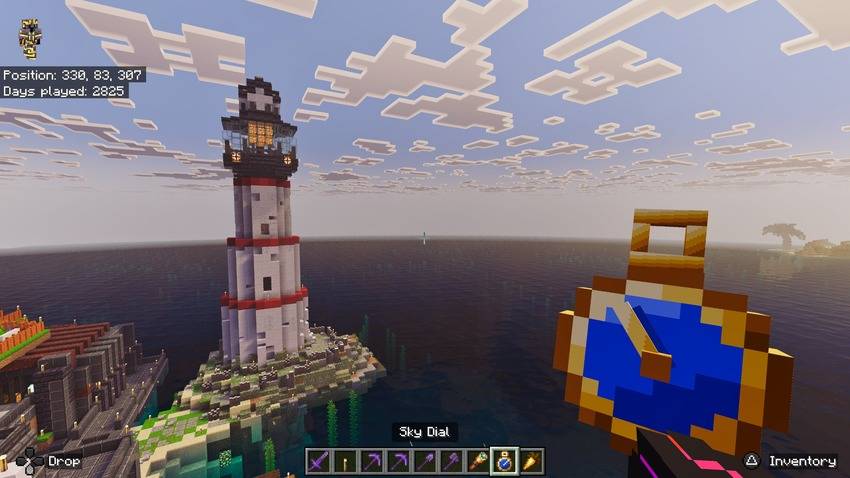
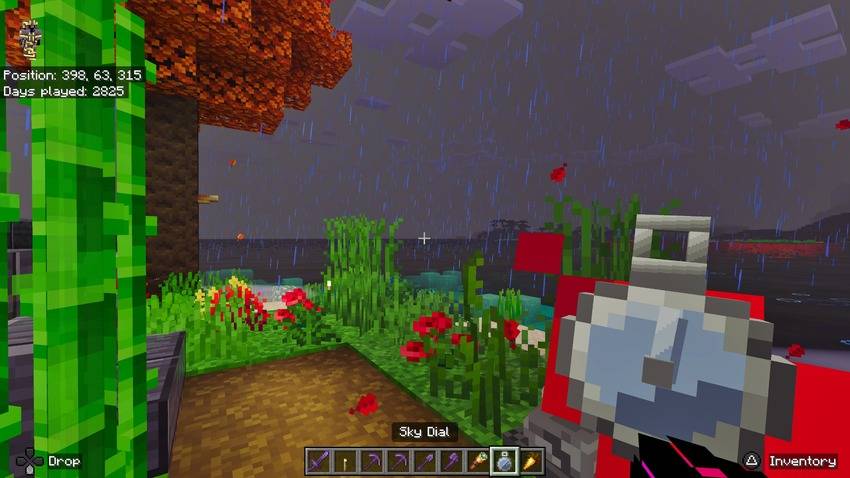
Hold the sky in your hand. Roll the sun and moon to any hour, control the weather, and collect 35 dial styles. All without using cheats, and achievements stay enabled.
The Sky Dial is a hand-crafted, customizable tool that rolls the sun and moon to any hour and changes the weather, with no commands or cheats, so your achievements and trophies stay on. Pick a time and the weather, press Confirm, and watch the sun sweep overhead as the sky rolls to your selection. With 35 unlockable banners and dials and plenty of hidden secrets, both the dial and the sky are yours to make your own.
What it does
- Eye on the sky — Pick a time and the weather, press Confirm, and watch the sky roll there. No commands, no cheats, achievements stay on.
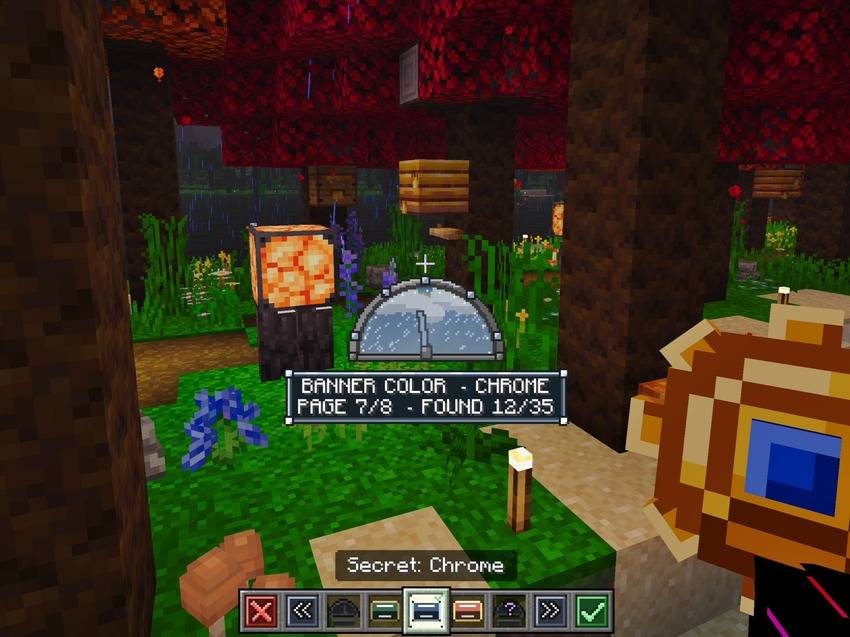
- Make it yours — 35 dial styles to collect. Unlock them by playing, like picking up a diamond for the Diamond dial, or find hidden ones with the right combination on the dial.
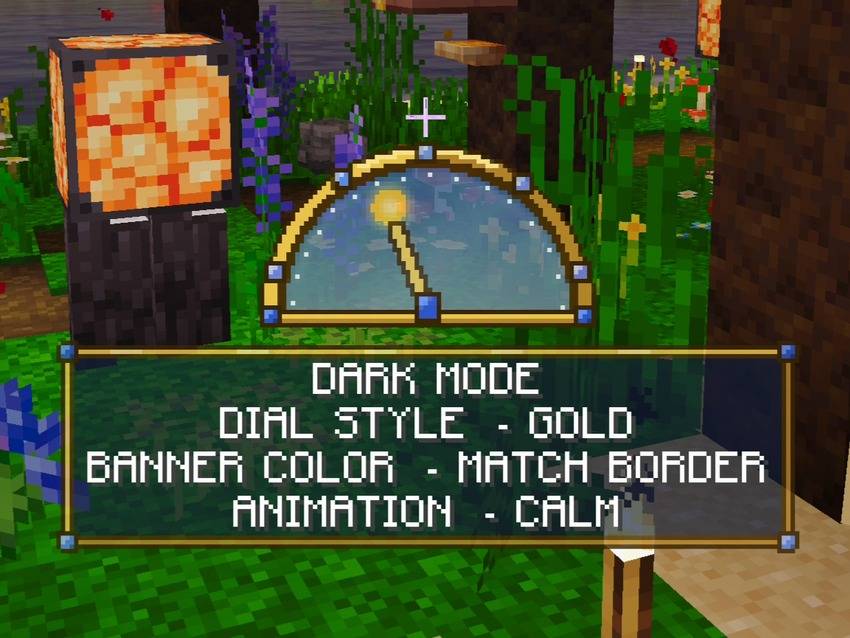
- Your style everywhere — Fully customizable: your style shows on the on-screen dial, its banner, icon, buttons and the 3D dial in your hand. Add a Light or Dark mode and pick your Banner Color for 1,260 combinations.
- 8 animation styles — Choose how your dial opens and closes.
- Secrets in the sky — Secret styles, a secret animation and a secret fireworks show. Roll the sky to the right selection and see what you uncover!
- Fully modeled and animated — A golden dial with a sweeping needle, a moon showing the phase ahead, and its own sound for every stop.
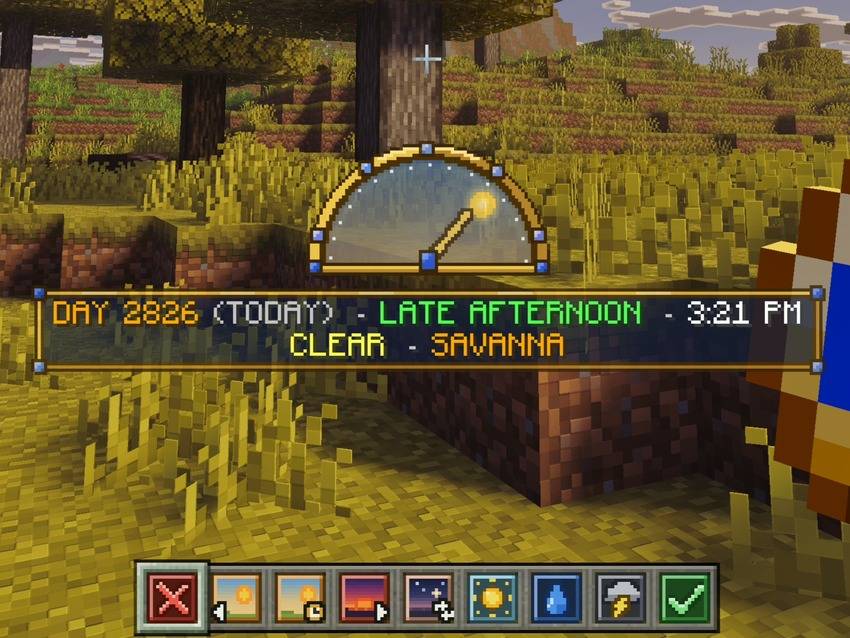
- Nine buttons, one dial — Your hotbar becomes the dial's controls, and your items come back the moment it closes.
- Eight stops — Sunrise, Morning, Noon, Afternoon, Sunset, Dusk, Midnight and Dawn, up to a week either way.
- Weather that keeps up — The dial always knows the real weather, even after a storm or a command.
- A sky worth celebrating — Special-day fireworks at Midnight every 7, 30, 100 or 365 days.
- Better together with Sky Cube — Pair it with Sky Cube by Mister Bread and roll glowing block suns and moons across the sky.
- Built for friends and Realms — Everyone picks their own style, one player rolls at a time, and operators can adjust numerous settings to fit your world.
- Works with your packs — Pretty much any shader or texture pack. Actions & Stuff adds held poses, but no other add-on is needed.
How to use it
- Craft it: clock in the middle, gold ingots on the four sides, lapis in the corners. It shows up in your recipe book once you have a clock.
- Use the dial. It pops up on screen and your hotbar turns into its buttons. Your items come back when you close it.
- Pick a time and the weather, then press Confirm.
- Crouch and use the dial to open the settings, giving access to a full suite of customizable banners, animations, and some other hidden features!
| Slot |
Button |
What it does |
| 1 |
Cancel |
Close without changing anything |
| 2 |
Roll Back |
Go to the previous stop |
| 3 |
Present |
Go back to the current time |
| 4 |
Roll Forward |
Go to the next stop |
| 5 |
Flip |
Jump to the opposite side of the clock |
| 6 |
Clear |
Clear weather |
| 7 |
Rain |
Rain |
| 8 |
Thunder |
Thunderstorm |
| 9 |
Confirm |
Roll the sky to what you picked |
Settings
Your Dial (just for you)
- Volume: turn the dial's sounds up or down, just for you
- Banner: show or hide the banner under the dial
- Banner Style: Detailed shows the most, Clean shows less, and Bare shows no details at all
- Clock: 12-hour or 24-hour time on the banner, or Auto to match your language and region
- Stats: your Sky Dial history: skies rolled, days traveled, storms summoned, fireworks launched and secrets found, plus your favorite time, weather, animation, dial style and banner color
Visuals & Resets (just for you)
- Dark Mode: switch the banner between Light and Dark. Dark also dims the sky inside the dial
- Dial Style: pick any style you've found. The dial in your hand shows each one as you scroll
- Banner Color: color your banner to match your dial, or any other style you've found
- Animation: choose how your dial opens and closes. Picking one plays it so you can see it
- Stats Reset: press twice to zero out your stats. Your secrets and unlocked styles stay
- Revert to Default: press twice to put all your settings back the way they started
World (operators change it, everyone can look)
- Who Can Use It: everyone, or operators only (the default on new worlds), with an optional 1, 2 or 5 minute wait between rolls. Operators skip the wait
- Roll Speed: how fast the sky rolls after you Confirm: Slow, Normal or Fast
- Weather Lasts: how long new weather sticks around: Natural, 10 minutes, 1 hour, or Locked
- Who Hears It: the dial's sounds play for everyone nearby, or just you
- Special-Day Fireworks: a Midnight show every 7, 30, 100 or 365 days, or off
- Unlocks: earn dial styles by playing, or unlock everything for the whole world
Getting around
- Cancel (first slot) closes without saving, Next Page moves on, and Confirm (last slot) saves. A quick double crouch works like Cancel
Screenshots
(add screenshots in the site's editor)
Plays nice
✔ Achievements stay on
✔ Works with Vibrant Visuals
✔ No experimental toggles or Beta APIs needed
✔ Works on Realms
✔ Works perfectly with other Mister Bread mods. Works with pretty much any shader or texture pack, and with custom Actions & Stuff hooks/models(not required)
✔ 19 languages
✔ Tested on PlayStation 5 and mobile (PC testing underway)
Add-on (behavior + resource pack) for Minecraft Bedrock 1.26.40 and up.
Install
- Download the file and open it. Minecraft imports both packs.
- In your world's settings, activate Mister Bread's Sky Dial BP under Behavior Packs (the matching resource pack is added with it).
- On a Realm, add both packs in the Realm's settings.
A short note in chat confirms each update.
Known issues
- The dial's buttons show in your inventory while it's open. Bedrock doesn't let add-ons block the inventory screen. Your own items are safe and come back when the dial closes.
- Weather changed with a command takes a moment to show on the dial's banner and weather buttons.
- Some translations may have errors. The 19 languages were translated with AI help, so a few lines may read oddly. If you spot one, email misterbread316@gmail.com and I'll fix it.
What's new in 1.3
FAQ
Does it turn off achievements or trophies?
Never. No cheats and no commands, so they stay on.
My hotbar is stuck or items are missing.
Type /skydial:restore to get them back.
What about the Nether and the End?
They have no sun to turn, but the dial has a few surprises waiting for anyone who tries.
Spot a translation that sounds off?
Let me know and I'll fix it.
More from Mister Bread
- FPS Optimizer by Mister Bread
- Sky Cube by Mister Bread
- Vanilla Armor+ by Mister Bread
Bugs or ideas: misterbread316@gmail.com
Please don't reupload this pack. Link here instead. © 2026 Mister Bread. All rights reserved.
Baked from scratch by Mister Bread.