Order Market (DonutSMP-Style)
- By
Bring Donutsmp-style player-driven economy to your Minecraft Bedrock server! Post buy orders, hold funds safely, let players fulfill orders via delivery chests, and claim your items anytime—all integrated with a clean, chest-based UI.
Order Market(DonutSMP-Style)
Bring Donutsmp-style player-driven economy to your Minecraft Bedrock server!
Post buy orders, hold funds safely, let players fulfill orders via delivery chests, and claim your items anytime—all integrated with a clean, chest-based UI.
📖 Overview
The Order Market System introduces a robust, player-to-player marketplace where money is held safely in escrow while sellers deliver requested items. Features include live interactive chests, smart walk-away mechanics, automated expirations, and strict item-validation safety filters!
🎮 Player Guide
1. Opening the Market
- Type
/order | /ordersto open the main Market Menu.
2. Market Menu & Navigation
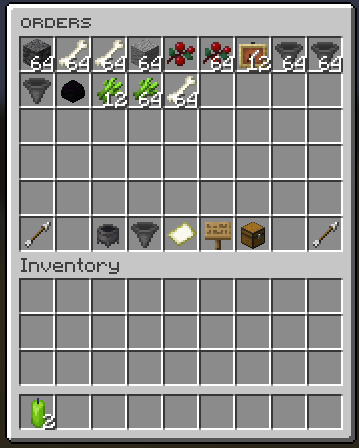
The Orders Screen features 54 chest slots designed for quick browsing:
- Slots 0–44: Active open buy orders.
- Slot 45: ⬅️ Previous Page
- Slot 47: 🔀 Sort Order (A–Z / Z–A / Highest Price / Lowest Price)
- Slot 48: 🔍 Category Filter (All, Blocks, Tools, Food, Combat, Potions, Books, Ingredients, Utilities)
- Slot 49: 🔄 Refresh Page
- Slot 50: 🔎 Search Orders
- Slot 51: 📦 Your Orders
- Slot 53: ➡️ Next Page
3. Fulfilling an Order (Sellers)
- Select an open order from the menu.
- An invisible Delivery Chest will spawn near you—right-click it to open.
- Delivery Chest Controls:
- Slots 0–44: Place the items you want to deliver.
- Slot 45: View Order Info.
- Slot 49: ❌ Close / Cancel (Returns placed items).
- Slot 53: ✅ Deliver (Fulfills the order and pays you instantly!).
- Item Matching: Non-matching or excess items are returned to your inventory immediately.
- Walk-Away Feature: Walking 1 block away after placing matching items automatically completes the delivery! Walking 2.2 blocks away without placing items safely cancels the session.
4. Creating & Managing Orders (Buyers)
Creating an Order
- Open Your Orders (Slot 51) and click Create Order (Slot 26).
- Specify the Item, Amount, and Price Per Item.
- Confirm your order—the total cost will be deducted and held safely in escrow.
Managing Orders & Claiming Items
- Open Your Orders (Slot 51) to view active orders (Slots 0–25).
- Click an order to open management options:
- Slot 11: 🚫 Cancel Order (Refunds any undelivered item balance).
- Slot 13: 📜 View Order Details.
- Slot 15: 📥 Claim Delivery (Spawns a Claim Chest).
Claiming Items
- Open your Claim Chest to transfer items into your inventory.
- Slot 52 (Dropper Button): Spawns items in the direction you are looking!
- Slots 45 / 53: Paginate through large claim lists (45 items per page).
🛡️ Item Validation Rules
To prevent marketplace exploits, items delivered must strictly match the order criteria:
- Standard Items: Must have full durability, no custom names, and no enchantments.
- Enchanted Books: Must match exact enchantment type(s) and level(s).
- Potions & Tipped Arrows: Must match exact bottle type and applied status effect(s).
⏱️ Order Lifespan & Expiration
- Active Orders: Remain open for 7 days. Unfulfilled portions are automatically refunded when expired.
- Claimable Items: Delivered items stay in your claim storage for 90 days. Unclaimed items are permanently deleted after 90 days.
🔒 Built-in Security & Stability
- Escrow Protection: Currency is held securely in escrow upon order creation and refunded immediately if canceled or expired.
- Live Merging: If a seller fulfills an order while the buyer has their Claim Chest open, the items merge in real time without duplication risk.
- Crash & Disconnect Handling:
- If a seller crashes/disconnects during delivery, items are safely stashed and returned upon their next login.
- Hopper interactions are completely blocked on temporary chest entities.
- Anti-Cheat Sweeps: UI control buttons are periodically stripped from inventories (including off-hand slots) to prevent item glitched copies.
⚙️ Admin Commands & Configuration
| Command | Usage |
|---|---|
/order or /orders |
Opens the main market UI directly |
/pay |
Standard economy transfers |
/admin |
Admin economy override commands |
/config |
Marketplace configuration & settings |
🌟 Support Creator
If you enjoy using this addon, please consider leaving a ⭐ Star / Endorse on CurseForge to help the project grow!
💬 Join the Community: Have feedback, questions, or need help troubleshooting? Join our Discord Server!
Order Market (DonutSMP-Style) Team