DonutSMP Scoreboard , Home,Team System
- By
home system, a full Team system with split team chat, DonutSMP-style Scoreboard HUD Sidebar [Also Supports Blurry's Java PVP]
Home & Team System with Scoreboard HUD (BP)
A complete Bedrock Behavior Pack combining a pure Chest-UI /home system, a full Team system with split team chat, a DonutSMP-style Scoreboard HUD Sidebar, and deep Cross-Addon Economy & Keyall Integrations.
You Can Make It Like This --
🌟 Overview & Systems
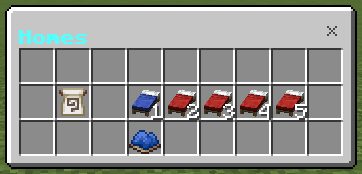
1. Home System (/home)
- 27-Slot Pure Chest UI:
- Slots 12-16: Player beds (Homes 1-5). Blue = saved (click to teleport), Red = available (click to set), Gray = locked by rank/limits.
- Slot 10: Team Home banner (click to teleport or set).
- Sub-buttons under each bed to edit, move to current position, rename, or delete.
- Rank Home Limits: Configure home allowances per tag (e.g.
vip:5,default:2). - Safety & Cooldowns: Customizable teleport warmup delay (cancelled on movement/damage), cooldown timer, and optional coin cost. Admins bypass warmups and costs.
- Admin Features (
/home config> Admin Button):- Teleport to, move, or delete homes of any player (online or offline).
- Inspect recent teleport logs (last 150 events).
- Reset player homes or clear active teleport cooldowns.
2. Team & Clan System (/team)
- Team UI & Management: Create, join, leave, list, and view info. Leaders can invite, kick, promote, rename, set/clear team homes, or disband.
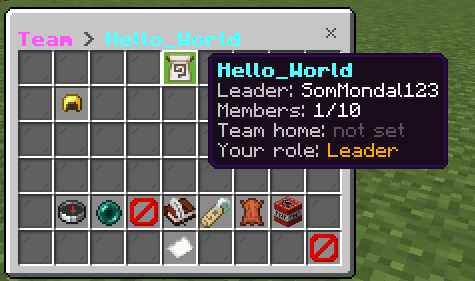
*Split Team Chat:
* !message sends to [TEAM] [Player] message (only teammates see it).
- Standard messages go to
[Global] [Player] message(with a friendly reminder of team chat if enabled). - Configurable prefix symbol and format.

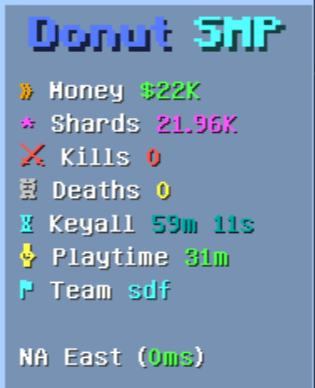
3. Scoreboard HUD Sidebar (Home_Sidebar_RP)
- Dynamic Donut-style sidebar rendered via title protocol (
hm_sb|). - Real-time statistics:
- Kills & Deaths: Tracked via
stat_killsandstat_deaths. - Playtime: Tracked in minutes via
stat_playtime. - Ping: Live player latency via
Player.getPing(). - Balance & Shards: Live synchronisation with Shop & Sell (
money_system.js) and Shards (shard_wallet.js). - Keyall Timer: Countdown to the next server-wide key distribution.
- Kills & Deaths: Tracked via
4. Keyall Reward System (Crates Integration)
- Every hour (or configured interval), all online players receive a virtual crate key.
- Scoreboard Config (
/hm:config scoreboard):- Slot 16 (Keyall Key):
- If Crates is missing: Displays
"§cInstall Crates First §7Tap to get CurseForge link". - If no crates are created: Displays
"§eCreate A Crate First". - If crates exist: Shows the currently selected key and cycles through all registered crate types.
- Slot 30 (Notification Toggle - Button 2.2):
- Turns the completion broadcast on/off (defaults to OFF).
- Donut Essential Verification: Cannot be enabled unless the Donut Essential Plugin is detected in the world. Clicking without it outputs the CurseForge download link.
- Slot 31 (Notification Message - Button 2.1):
- Customizes the broadcast string (default:
"{key} Claimed Try /warp To Use It").{key}is dynamically replaced with the crate's display name.
📜 Commands (Namespace hm)
| Command | Permission | Description |
|---|---|---|
/home |
Everyone | Opens the 27-slot Home Chest UI |
/home 1..5 |
Everyone | Teleport directly to home slot 1-5 |
/home name |
Everyone | Teleport directly to a named home |
/home team |
Everyone | Teleport to the team home |
/homes |
Everyone | List all saved homes in chat |
/sethome [name] [slot] |
Everyone | Save a home at current position (team = team home) |
/delhome name|slot |
Everyone | Delete a saved home |
/team |
Everyone | Opens the Team Chest UI |
/team create|join|leave|info|list |
Everyone | Direct team command shortcuts |
/team kick|promote player |
Leader | Manage team members |
/team disband confirm |
Leader | Disband the team |
/teamadmin action |
Admin | Administrative team management |
/hm:config [section] |
Admin | Open Config Hub or section (money, home, scoreboard) |
⚙️ Config Hub Sections (/hm:config [section])
/hm:config home: Teleport warmup delay, cooldowns, monetary cost, max home limits, rank rules, and admin features./hm:config scoreboard: Sidebar title, visible fields (kills, ping, shards, balance), keyall interval, Keyall reward key selector (Slot 16), notification toggle (Slot 30), and message editor (Slot 31)./hm:config money: Shared economy settings, currency name, symbol, starting balance, and leaderboard options.
📦 Requirements & Installation
- Install
Home&Team_BPin your world'sbehavior_packsfolder. - Install the Chest UI Resource Pack and Home_Sidebar_RP in
resource_packs. - Enable Beta APIs in world settings.
- Grant yourself admin access:
/tag @s add admin.
📜 Credits & License Creator: SomMondal123 Chest UI Made By: Herobrine643928 & LeGend077 License: All Rights Reserved. 🌟 Support Creator If you enjoy using this addon, please consider leaving a ⭐ Star / Endorse on CurseForge to help the project grow!
💬 Join the Community: Have feedback, questions, or need help troubleshooting? Join our Discord Server!
DonutSMP Scoreboard , Home,Team System Team