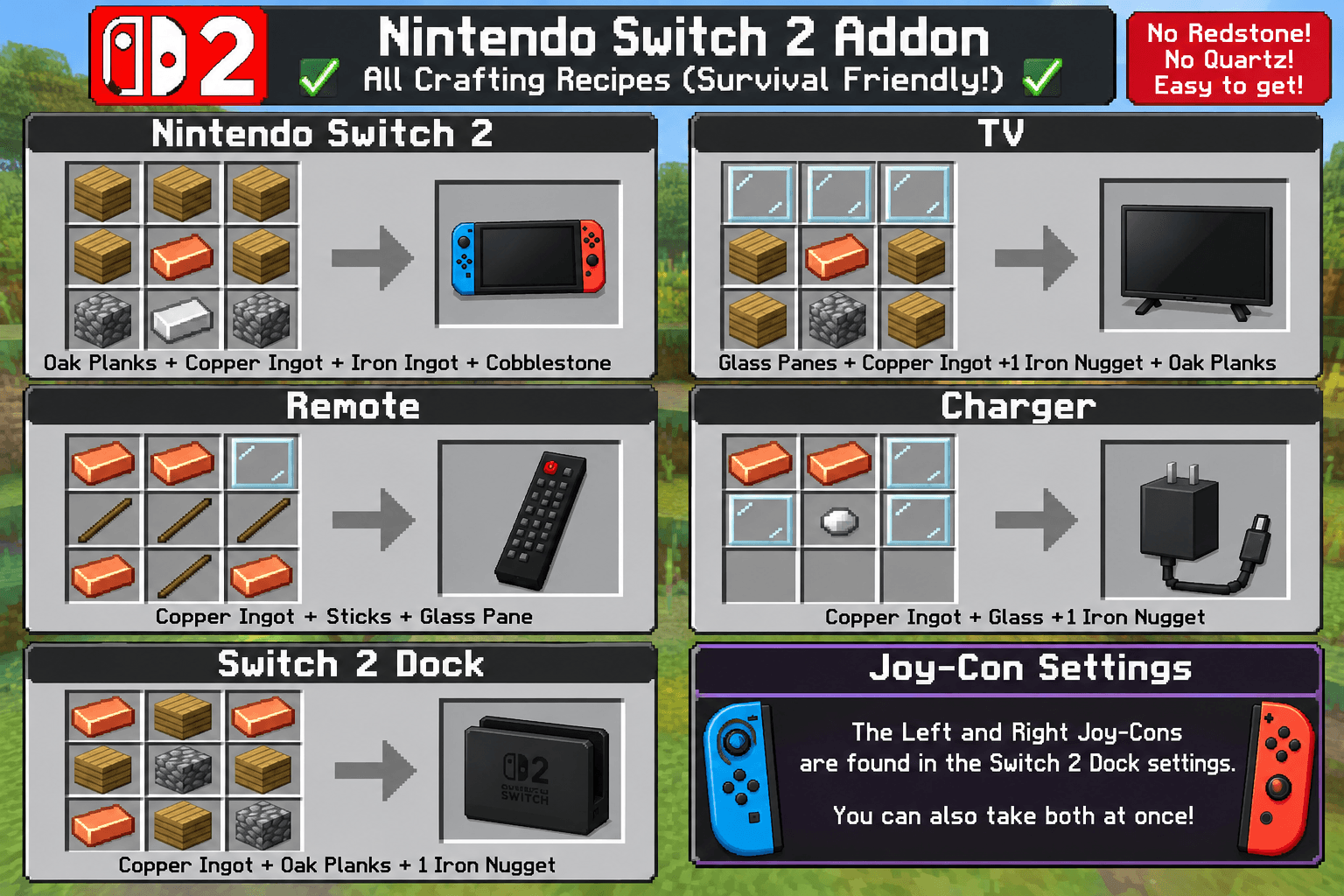
Minecraft Nintendo Switch 2 Crafting Guide.png
Description
Adds the Nintendo swich 2 with different games to play here is the list
Pre-installed games include:
Switch 2
- Mario Kart World
- Zelda: Tears of the Kingdom 2
- Pokémon Legends Z-A
- Super Smash Bros. Ultimate 2
- Animal Crossing: New Horizons Plus
- Metroid Prime
Switch 1 (already on the system)
-
- Zelda: Breath of the Wild
- Zelda: Tears of the Kingdom
- Super Mario Odyssey
- Mario Kart 8 Deluxe
- Super Smash Bros. Ultimate
- Animal Crossing: New Horizons
- Pokémon Legends: Arceus
- Splatoon 3
- Super Mario Bros. Wonder
- Metroid Dread
- Kirby and the Forgotten Land
- Luigi’s Mansion 3
- Fire Emblem: Three Houses
- Xenoblade Chronicles 3
- Duolingo (A+++++ edition)
- and also
-
Minecraft Bedrock Edition!
The idea is to let you craft a Switch 2, use its Joy-Cons, connect it to a TV through a dock, and interact with its menu.
It's still a work in progress like invisable icons and stuff but I'm still working on it so just go in the creative menu to get these items
1. Main Nintendo Switch 2
Nintendo Switch 2
- Main handheld console.
- Can be held as an item.
- Can use the Joy-Cons.
- Can be placed into the dock.
- Has its own inventory icon.
2. Left and Right Joy- cons
Left Joy-Con
Blue
Right Joy-Con
Red
These are special because you don't craft them separately.
They are obtained through Switch 2 Dock Settings.
The settings should let you:
- Take the Left Joy-Con.
- Take the Right Joy-Con.
- Take both Joy-Cons.
- Put the Joy-Cons back.
3. Nintendo Switch 2 Dock
Dock
- Holds the Switch 2.
- Connects to a nearby TV.
- Opens Dock Settings.
- Provides access to TV Mode.
The dock is an important part of the addon because it connects the handheld console to the tv
TV
- Can be placed in your Minecraft world.
- Can connect to the dock.
- Can be turned on.
- Can open the simulated TV menu.
The planned connection process:
- Place the TV.
- Place the Switch 2 Dock nearby.
- Put the Switch 2 into the dock.
- Attach both Joy-Cons.
- Turn on the TV.
- Open TV Mode.
The menu is simulated on your Minecraft screen, not physically transferred onto the TV block.
TV Remote
- Used as a TV accessory.
- Intended to control TV interactions.
- Can be held by the player.
6. Charger
Charger
- Switch 2 charging accessory.
- Can be held as an item.
- Intended to be part of the console setup.
7. All crafting recipes
Early Survival materials
These are the latest agreed recipes.
Item
Materials
Switch 2
Oak Planks, Copper, Iron Ingot
TV
Glass Panes, Copper, Oak Planks, Iron Nugget
Remote
Copper, Sticks, Glass Pane
Charger
Copper, Glass, Iron Nugget
Dock
Copper, Oak Planks, Iron NuggeT
- Main handheld console.
Nintendo 2! Team