Network Chest-LVRKmc
- By
One shared, unlimited storage network for Bedrock. Place Network Chests anywhere, deposit items, then search, browse and withdraw from any of them. Lock chests, trust friends, and use hoppers.
Description
Network Chest
-----One shared, unlimited storage network for Minecraft Bedrock.-----
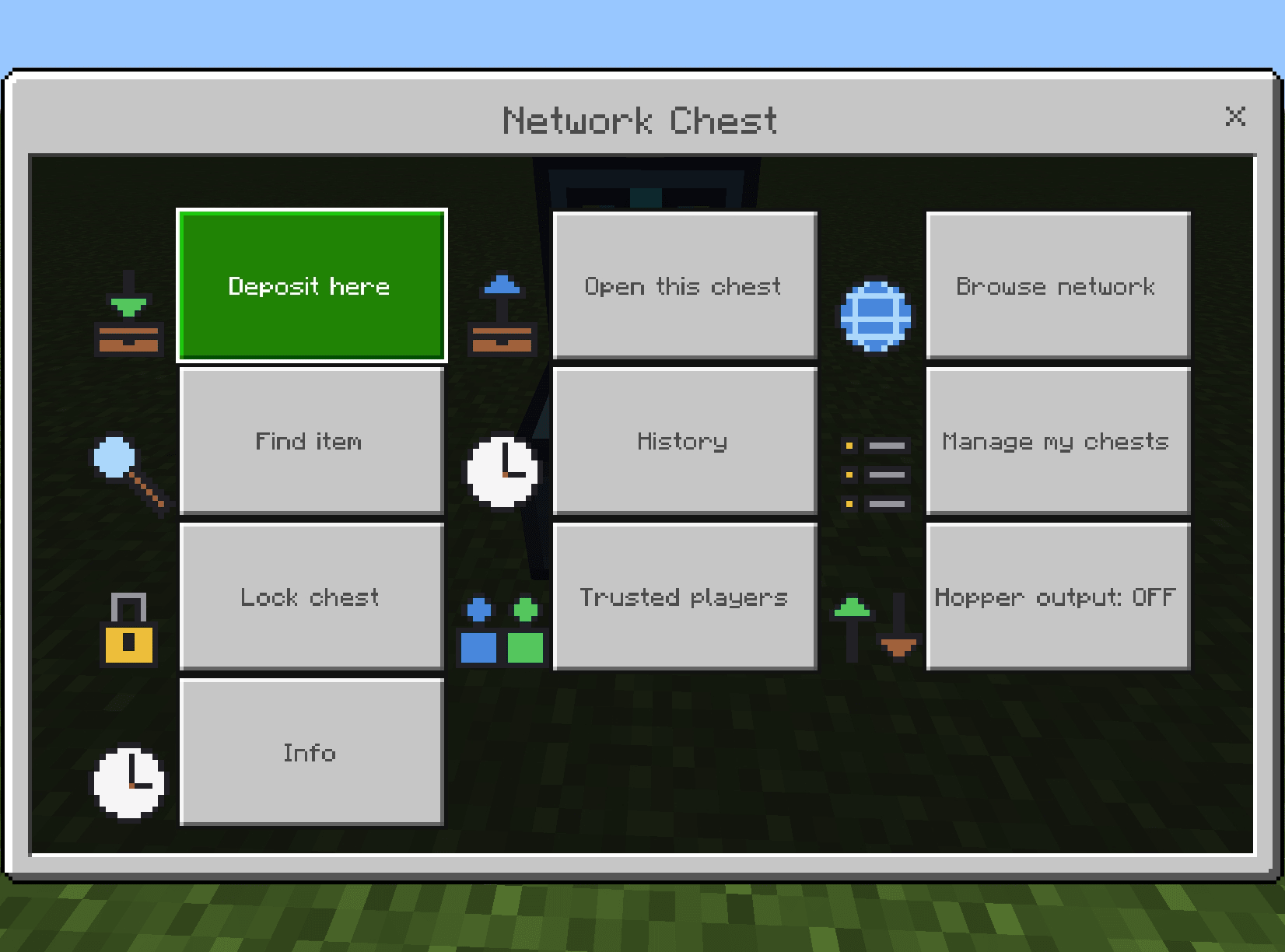
Craft a Network Chest, place it anywhere and deposit your items. Everything you store goes into one big network, and you can search, browse and withdraw from any Network Chest in your world. No more running back to your storage room.
Features
- Unlimited shared storage. Every Network Chest is a door into the same network.
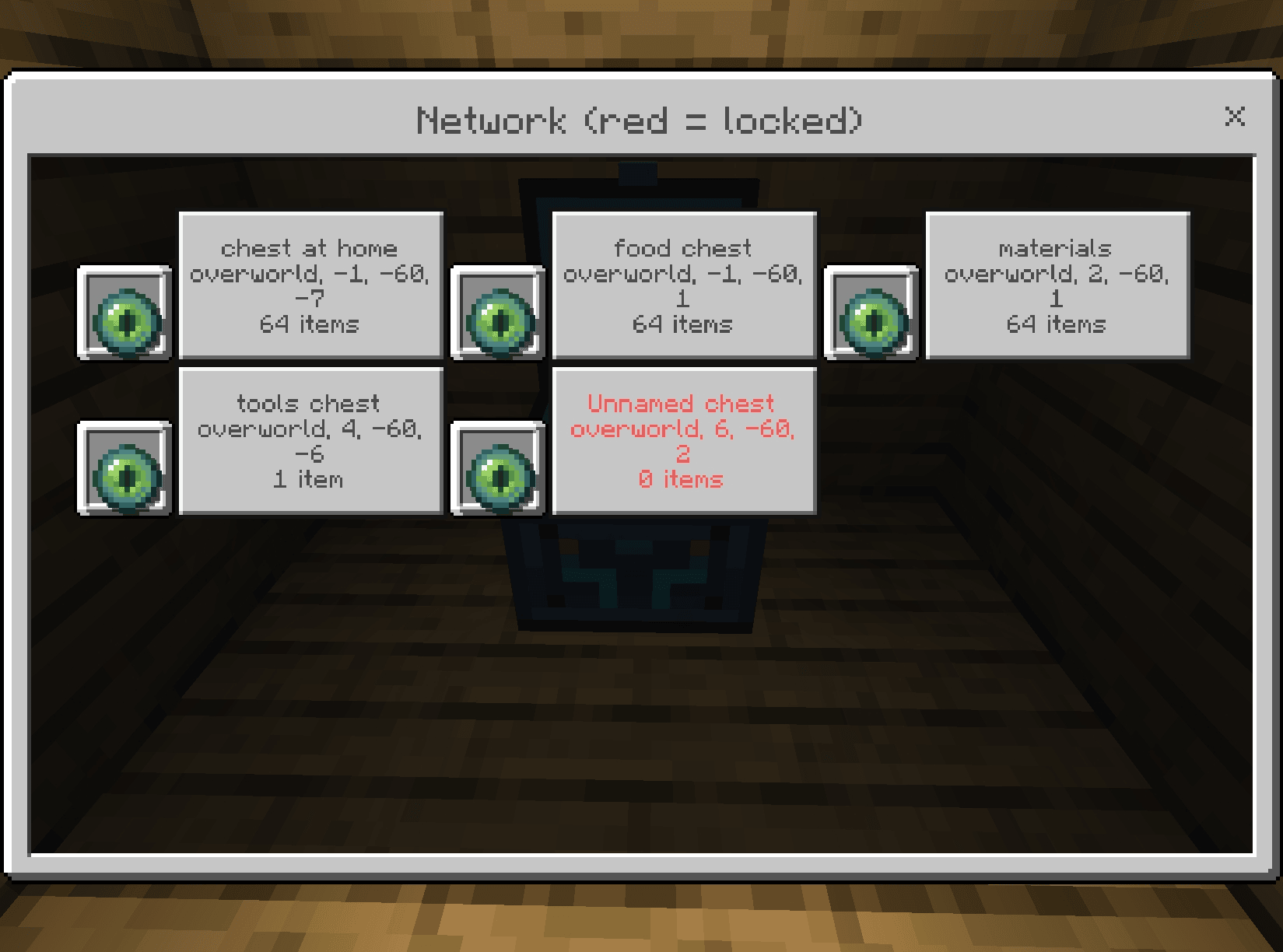
- Browse the whole network. See every chest, with its name, location and item count.
- Find item. Search every chest at once by item name.
- Search, sort and categories in every list, plus favorites that pin your most-used items to the top.
- Deposit options. Deposit everything, deposit everything except your hotbar, or Quick-Stack (only item types the chest already holds).
- History log of recent deposits and withdrawals for each chest.
- Lock and trust. Lock a chest so only you and the friends you trust can open it.
- Hopper support. Hoppers pointing into the chest deposit automatically. Turn on hopper output (with an optional item filter) to push items into a hopper below the chest.
- Rename any chest by tapping it with a renamed Name Tag, or from the menu.
- Manage my chests. Rename, move contents between chests, or remove empty ones.
- Built-in guidebook. Every player gets a Network Storage Guide book the first time they join a world.
- Multiplayer safe. Locks are checked again at the moment you withdraw or deposit.
Crafting
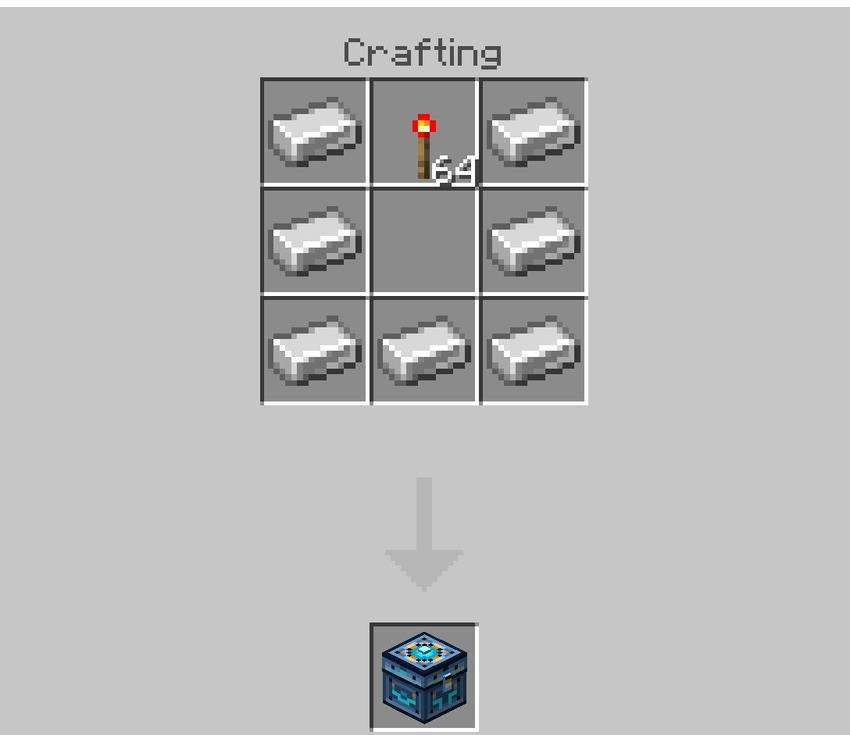
Iron Ingots in a ring (7) with a Redstone Torch on top in the middle:
Quick start
1. Craft and place a Network Chest.
2. Tap (right-click) it to open the menu. Sneak and tap to place blocks against it instead.
3. Choose Deposit here, pick an item, then choose how many to store.
4. Open any other Network Chest later and use Browse network or Find item to take items back out.
Not recommended: depositing these in one click
Most items are safe to store with Deposit everything or Quick-Stack. A few kinds of items look identical in the list once stored, so you can't tell them apart later. Deposit these one by one and use the note field to label each one:
- - - - Item type | Why one by one - - - -
Shulker boxes | Every box looks the same in the list. The contents shown are only a snapshot taken at the time you deposit it. |
Bundles | Same as shulker boxes. Contents are a snapshot. |
Banners | Different patterns look alike. A note like "blue banner with creeper" saves a lot of guessing. |
Shields | Different banner patterns look alike. |
Maps (filled) | Maps of different places look alike. |
Written and writable books | Add a note with the title or purpose. |
Fireworks | Different flights and effects look alike. |
Tipped arrows | Add a note if you keep several effects. |
Goat horns | Different calls look alike. |
Suspicious stew and ominous bottles | Different effects and levels look alike. |
Decorated pots | Different sherd patterns look alike. |
Lodestone compasses | Different linked lodestones look alike. |
Crossbows | Different loaded ammo and enchantments look alike. |
Beds | Colors are kept, and the note is a handy extra label. |
How: open Deposit here, tap the single item, and type a short note when asked (for example "red shulker: redstone parts"). You can leave the note blank.
Good to know
- Tools, weapons, armor and any enchanted, named or lore items are stored one at a time with their details (enchantments, durability), so you can tell them apart.
- Hoppers only deposit plain, stackable items. Special items above are skipped by hoppers on purpose.
- Plain stackable items (blocks, ores, food, materials and so on) are safe for one-click deposits.
Installation
1. Download the `.mcaddon` file and open it. Minecraft imports both packs.
2. Create a world (or edit one) and add both packs: Network Chest (Behavior) and Network Chest (Resources).
3. Enable the options Minecraft asks for, then play.
Notes
- Works in multiplayer. Anyone with access to a world's Network Chests shares the same network, unless a chest is locked.
- Keeps achievement on.
- Please report problems and bugs you encountered through comment section.
Network Chest-LVRKmc Team