Mob Detector
- By
Detect nearby mobs within 48 blocks with a customizable HUD showing their distance, direction, and height difference.
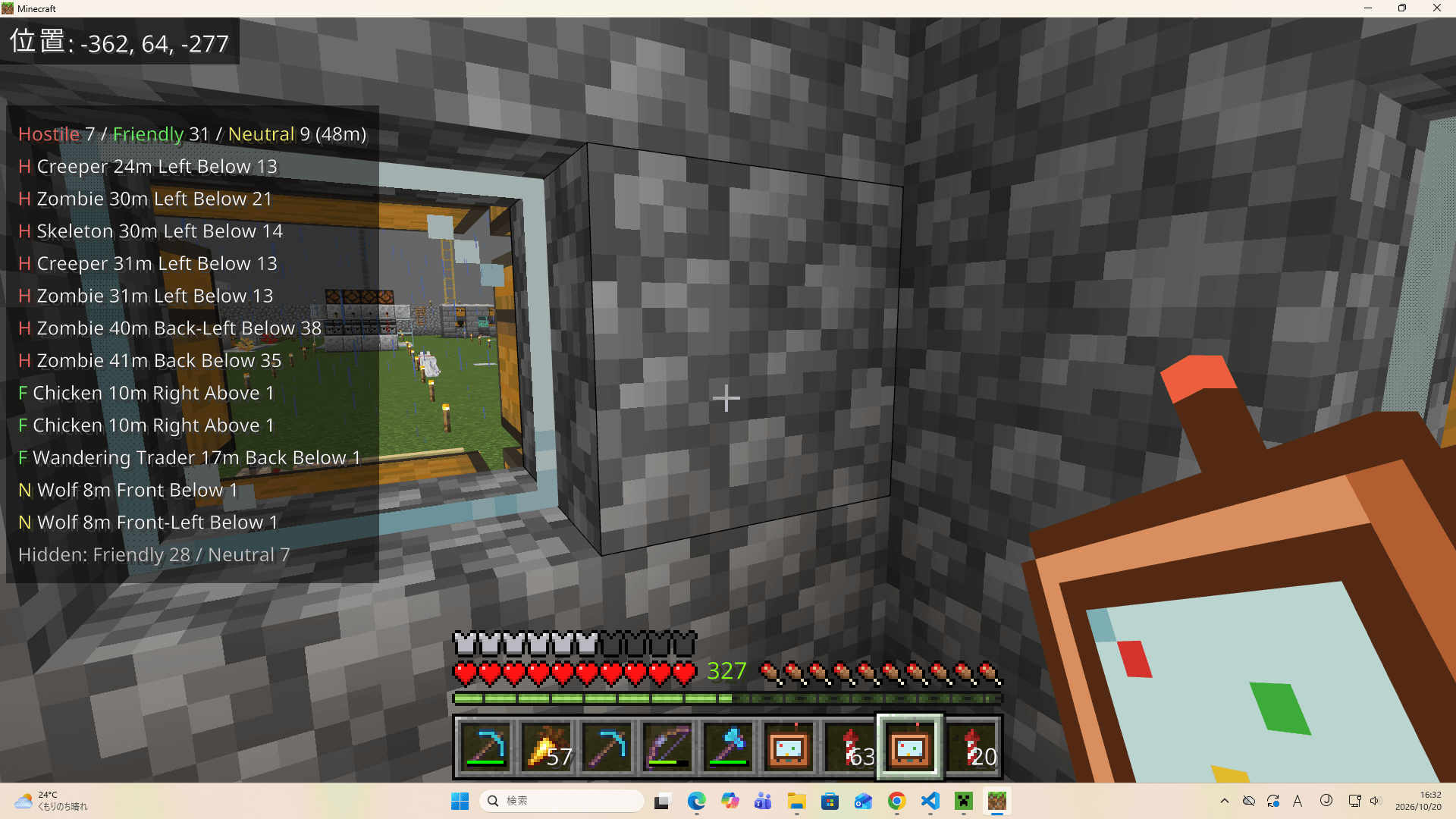
The Mob Detector HUD displays nearby hostile, friendly, and neutral mobs within 48 blocks. It shows each mob's name, distance, relative direction, and height difference. When many mobs are nearby, additional entries are summarized as hidden counts.
Description
Mob Detector
Detect nearby mobs without opening a map or minimap!
Mob Detector is a Minecraft Bedrock Edition add-on that detects nearby mobs within 48 blocks and displays useful information on an on-screen HUD.
It shows each mob's type, distance, direction, and height difference, helping you explore caves, locate animals, and check for nearby hostile mobs.
Features
- 48-block detection range around the player.
- Three mob categories: Hostile (red), Friendly (green), and Neutral (yellow).
- Detailed HUD: Shows mob names, distances, relative directions, and height differences.
- Customizable settings: Enable or disable the detector and individual mob categories.
- Inventory-based detection: Keep the detector anywhere in your inventory, including the hotbar. You do not need to hold it.
- Saved settings: Your preferences are retained when leaving and rejoining a world.
- Language support: Japanese and English.
- Automatic guide distribution: Receive a guide when entering a world for the first time, provided inventory space is available.
Crafting Recipes
Mob Detector (Crafting Table)
Arrange 8 Copper Ingots around 1 Glass block.
Copper | Copper | Copper
Copper | Glass  | Copper
Copper | Copper | Copper
Mob Detector Guide (Crafting Table)
Combine 1 Paper and 1 Wooden Plank of any wood type in any arrangement.
How to Use
- Craft a Mob Detector.
- Keep it anywhere in your inventory.
- Nearby mobs will automatically appear on the HUD.
- Hold the detector and use it to open the settings screen.
- Choose which mob categories to display and save your settings.
Important Notes
- Only mobs in loaded chunks can be detected.
- Players, dropped items, and projectiles are not displayed.
- Mobs added by other add-ons are not supported.
- The HUD has limited space. When many mobs are nearby, some entries are summarized as hidden counts.
- The add-on is primarily intended for single-player use. Multiplayer behavior and performance are not guaranteed.
- Other add-ons that modify the on-screen title area may conflict with the HUD.
- While the detector HUD is active, normal on-screen titles may be hidden.
- Features were tested on Minecraft Bedrock for Windows. Other platforms and configurations have not been fully verified.
日本語説明 — モブ探知機
地図やミニマップを開かずに、周囲のモブを探知!
Mob Detector(モブ探知機)は、プレイヤーから48ブロック以内にいるモブを探知し、画面上のHUDに情報を表示するMinecraft統合版向けアドオンです。
モブの種類、距離、方向、高低差を確認でき、洞窟探索、動物探し、周辺の敵対モブの確認などに役立ちます。
主な機能
- 探知範囲48ブロック
- 3種類のモブ分類: 敵対(赤)・友好(緑)・中立(黄)
- 詳細なHUD表示: モブの名前・距離・相対方向・高低差
- ON/OFF設定: 探知機本体と各モブ分類を個別に切り替え可能
- インベントリ内で動作: 探知機を手に持たなくても探知できます
- 設定保存: ワールド退出後も設定を保持
- 日本語・英語に対応
- 説明書の自動配布: 初回入場時にインベントリに空きがあれば配布
クラフトレシピ
モブ探知機(作業台)
銅インゴット8個とガラス1個を使用します。
銅 | 銅     | 銅
銅 | ガラス | 銅
銅 | 銅     | 銅
モブ探知機の説明書(作業台)
紙1枚と、種類を問わない木材(板材)1個を組み合わせます。配置は自由です。
使い方
- 作業台でモブ探知機を作成します。
- インベントリの中に入れておきます。
- 周囲のモブがHUDに自動表示されます。
- 探知機を手に持って使用すると設定画面が開きます。
- 表示したいモブの種類を選び、設定を保存します。
注意事項
- 読み込まれているチャンク内のモブのみ探知できます。
- プレイヤー、ドロップアイテム、飛び道具などは表示されません。
- 他のアドオンで追加されたモブには対応していません。
- モブが多い場合、表示しきれない個体は省略数としてまとめられます。
- 主にシングルプレイ向けです。マルチプレイでの動作や性能は保証していません。
- タイトル表示領域を変更する他のアドオンと競合する場合があります。
- HUD表示中は通常のタイトル表示が隠れる場合があります。
- Windows版Minecraft統合版で動作確認しています。その他の環境については十分な検証ができていません。
Mob Detector Team