Loot & Xp Booster (2 in 1)
- By
Adds a Booster menu with six Loot tiers up to 32x and seven XP tiers up to 64x. Suits players who want faster farming without any custom items.
1000433919.jpg
Description
2-in-1 Loot & XP Booster
by ALNStudios
Rename a Book to Booster, then set Loot up to 32x and XP up to 64x with two sliders and an on/off switch.
Adds a Booster menu with a Loot slider up to 32x, an XP slider up to 64x and an on/off switch.
Bedrock: 1.26+
Experimental: No
Achievements: Likely achievement-friendly
About
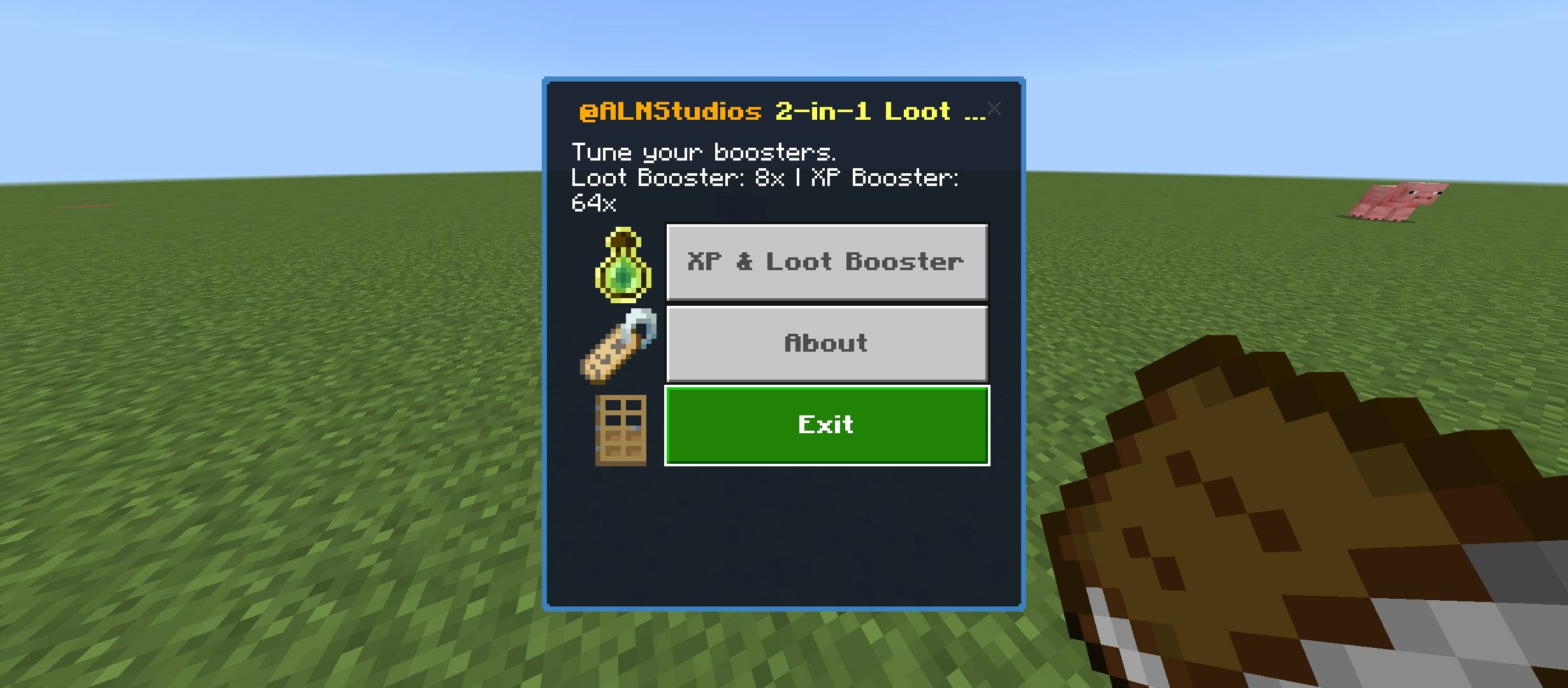
You rename a Book to Booster on an anvil and right-click with it. A menu opens with three buttons: XP & Loot Booster, About and Exit.
Showcase
Booster Toggled On

Booster Toggled Off

Screenshots

MAIN MENU

TOGGLED OFF

TOGGLED ON

XP & LOOT MENU
What You Get
Renamed Book Control Panel
Rename a Book to "Booster" on an anvil, then right-click with it to open the Booster menu.
Good To Know: Each player keeps their own settings, which are saved between sessions.
Loot Drop Booster
Drag the Loot slider across six levels, 1x, 2x, 4x, 8x, 16x and 32x, for ores, crops and other Fortune-style blocks you break and for mobs you kill.
Good To Know: Each drop rolls a random bonus up to the level you pick. It works like a Fortune and Looting bonus, but with its own random roll. Ores, ancient debris, gilded blackstone, amethyst clusters, glowstone, sea lanterns, melons, nether wart, sweet berries, wheat, carrots, potatoes, beetroot and mob loot are multiplied, so normal blocks such as dirt, stone and wood drop as usual, and unstackable items such as tools are left alone. Mining with Silk Touch drops the block once and is never multiplied. Fortune still works, and the booster multiplies on top of it.
XP Gain Booster
Drag the XP slider across seven levels, from 1x up to 64x, and nearby XP orbs are multiplied by that exact amount.
Good To Know: XP orbs within 8 blocks of you are collected instantly instead of drifting toward you.
About Screen
The About button shows the creator, the add-on version, a short note on both packs, the CurseForge and MCPEDL profiles and an unofficial-product notice.
Redesigned UI
A small Resource Pack named Redesigned UI gives the Booster menus the ALNStudios look, with a dark panel, a blue border, a gold title and icon buttons.
Good To Know: Enable the Resource Pack together with the Behavior Pack.
Get Started
1 | Rename a Book to Booster on an anvil. |
2 | Hold it and right-click, then choose XP & Loot Booster. |
3 | Drag the Loot and XP sliders, switch Boosters on or off, press Apply and check the Action Bar for your values. |
Common Questions
Does the multiplier apply to other players?
No. Each player chooses their own Loot and XP multipliers.
Can I turn it off?
Yes. Open XP & Loot Booster, switch Boosters Off and press Apply. Your levels are kept.
Install
1 | Download the file from this page and open it with Minecraft. |
2 | Create or edit a world and turn on the new pack(s) in its settings. |
3 | Play. No Experimental toggles needed. |
Support

CurseForge | MCPEDL | Ko-fi
By ALNStudios
Permissions and credits
- Rights: All rights reserved for ALNStudios.
- Content creators: You may feature this creation in videos and streams with credit to ALNStudios.
- Redistribution: Do not re-upload this pack or provide direct monetized download bypasses. Link to this page.
- Unofficial community creation. Not an official Minecraft product and not approved by or associated with Mojang or Microsoft.
Minecraft Bedrock add-on, 2-in-1 Loot & XP Booster Bedrock mod, loot multiplier, XP multiplier, renamed book menu, Minecraft PE survival, MCPEDL add-on, CurseForge Bedrock, ALNStudios.
Loot & Xp Booster (2 in 1) Team