MCPEDL.png
Description
Lily’s Floating Texts
Lily’s Floating Texts is a Minecraft Bedrock add-on that lets you create, edit, move, delete, and manage floating texts directly in-game with a simple UI.
(for developers and map makers a /scriptevent function is provided to create, delete, edit floating texts)
It is made for creators, map makers, server owners, and anyone who wants clean floating labels, live scoreboards, counters, stats, leaderboards, or animated text without needing armor stands or complicated command setups.
Showcase Video :
https://youtu.be/2h7k_C1H2cY
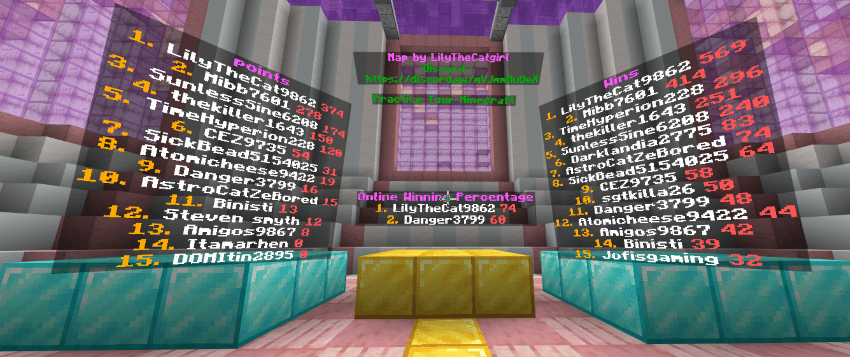
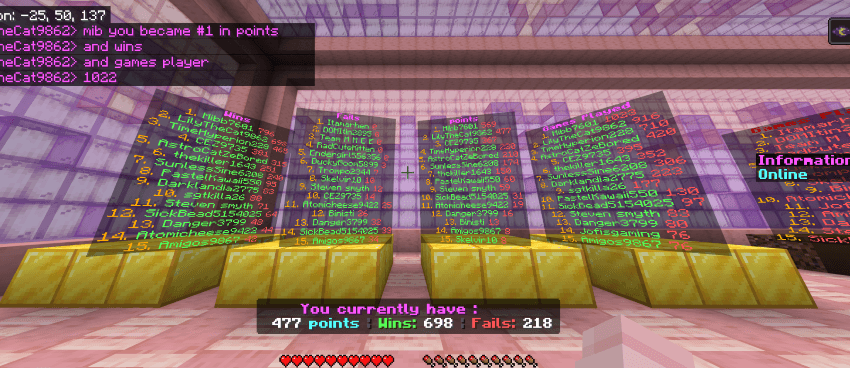
Exemple map ideas :
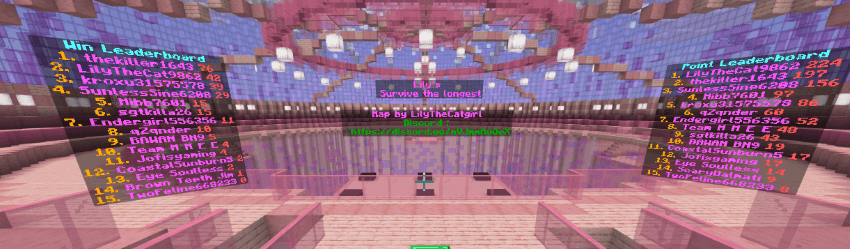
Features :
Create simple floating texts in-game :
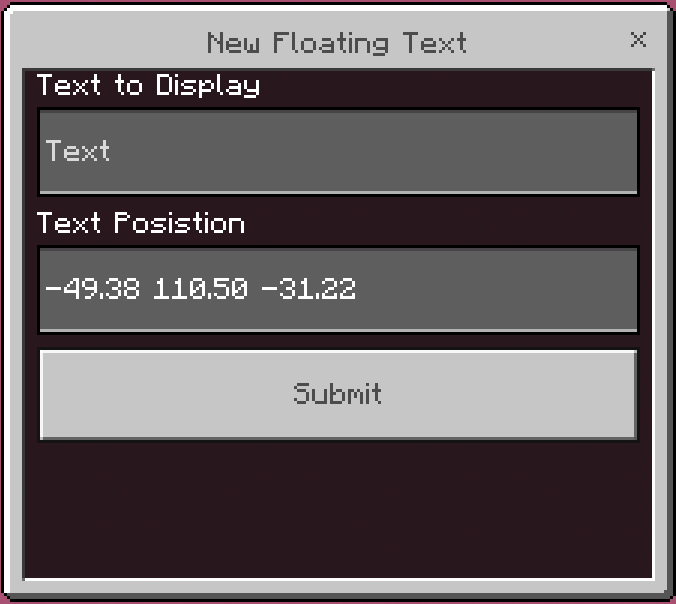
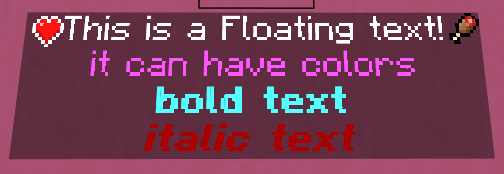
Create live floating scoreboard leaderboards :
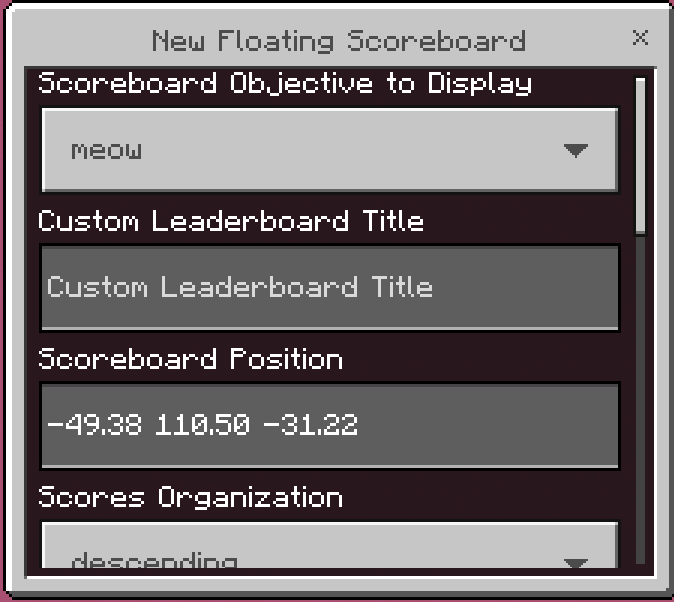
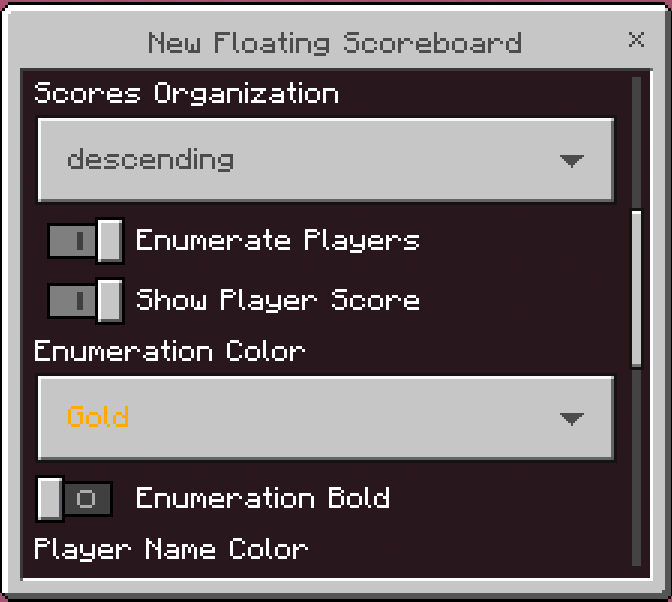
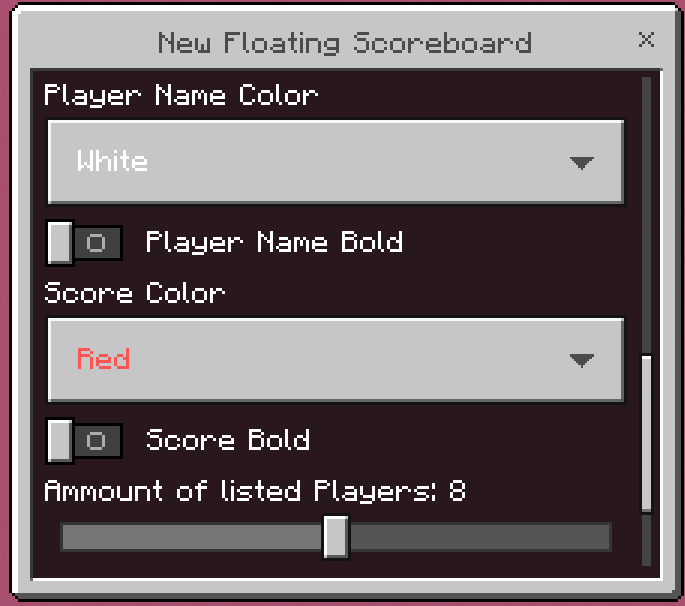
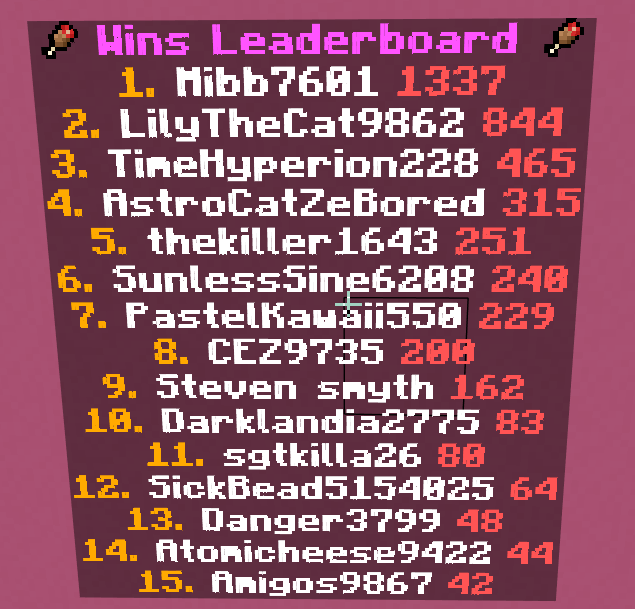
You can customize the scoreboard objective, custom title, player amount, sorting order, online-only players, score visibility, enumeration numbers, colors, and bold formatting.
Create Scoreboard + Text displays with placeholders :
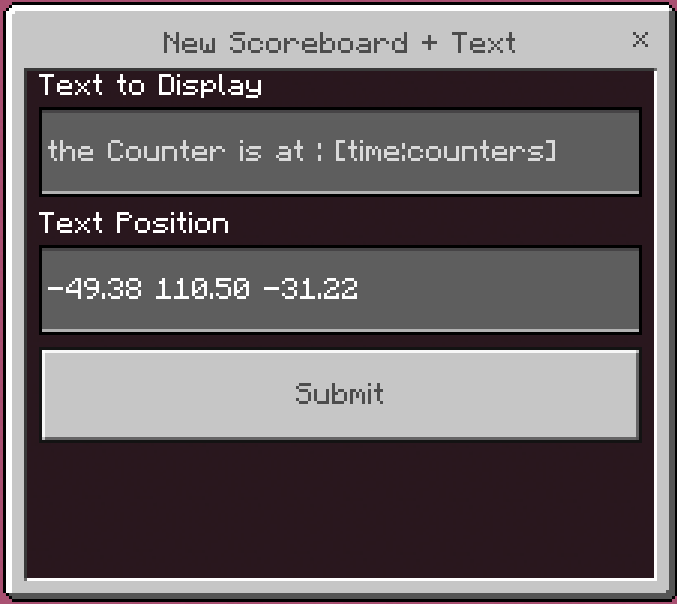

Lets you write normal text mixed with live scoreboard placeholders. (all the [] placeholders are listed near the bottom of the page)
(in this exemple image the text on the bottom changes to a random question when the game starts)
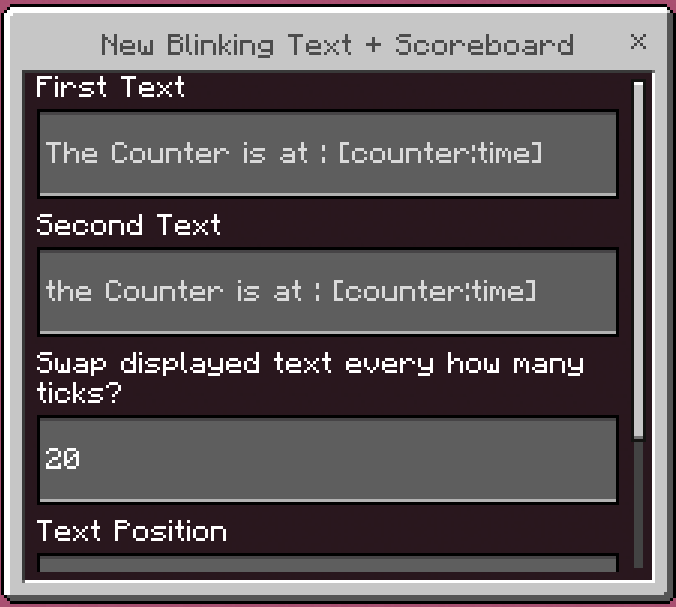
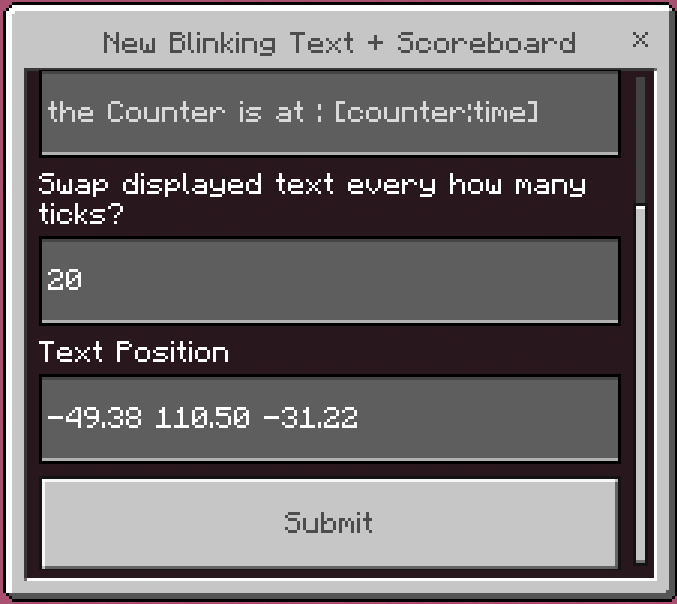
Create blinking Scoreboard + Text displays that swap between two messages :

Edit loaded floating texts from the UI
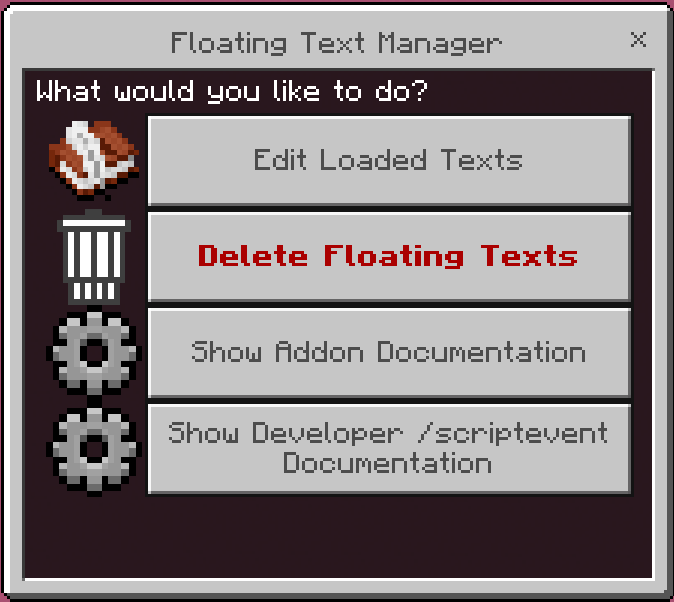
Move floating texts to your current position
Delete floating texts safely from the UI
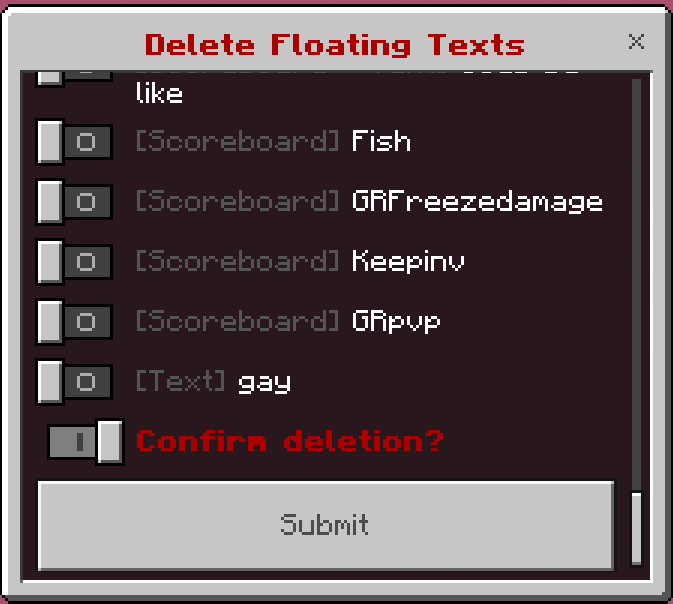
Floating texts are protected from /kill and should respawn unless deleted through the UI
the add-on also Supports :
Multiline text using \n
Minecraft formatting codes like §a, §l, §c, and more
Works without a resource pack
Showing player names even when offline
Minecraft in game emojies
Useing the menu to click on a scoreboard to edit it
scoreboards will respawn if the mod is removed by accident then added back to the world
ALL Scoreboard + Text placeholders :
[player_or_fake_player:objective] -> Shows the score of one player or fake player in the chosen objective.[best.player:objective] -> Shows the highest score from all visible scoreboard participants.
[worst.player:objective] -> Shows the lowest score from all visible scoreboard participants.
[best.realplayer:objective] -> Shows the highest score from real players only.
[worst.realplayer:objective] -> Shows the lowest score from real players only.
[best.fakeplayer:objective] -> Shows the highest score from fake players only.
[worst.fakeplayer:objective] -> Shows the lowest score from fake players only.
[best.onlineplayer:objective] -> Shows the highest score from online players only.
[worst.onlineplayer:objective] -> Shows the lowest score from online players only.
[best.offlineplayer:objective] -> Shows the highest score from offline players only.
[worst.offlineplayer:objective] -> Shows the lowest score from offline players only.[best.player.name:objective] -> Shows the name of the participant with the highest score.
[worst.player.name:objective] -> Shows the name of the participant with the lowest score.
[best.realplayer.name:objective] -> Shows the real player name with the highest score.
[worst.realplayer.name:objective] -> Shows the real player name with the lowest score.
[best.fakeplayer.name:objective] -> Shows the fake player name with the highest score.
[worst.fakeplayer.name:objective] -> Shows the fake player name with the lowest score.
[best.onlineplayer.name:objective] -> Shows the online player name with the highest score.
[worst.onlineplayer.name:objective] -> Shows the online player name with the lowest score.
[best.offlineplayer.name:objective] -> Shows the offline player name with the highest score.
[worst.offlineplayer.name:objective] -> Shows the offline player name with the lowest score.[list.player:objective] -> Lists all visible scoreboard participant names.
[list.realplayer:objective] -> Lists real player names only.
[list.fakeplayer:objective] -> Lists fake player names only.
[list.onlineplayer:objective] -> Lists online player names only.
[list.offlineplayer:objective] -> Lists offline player names only.
[sum.player:objective] -> Adds all visible participant scores together.
[sum.realplayer:objective] -> Adds all real player scores together.
[sum.fakeplayer:objective] -> Adds all fake player scores together.
[sum.onlineplayer:objective] -> Adds all online player scores together.
[sum.offlineplayer:objective] -> Adds all offline player scores together.
[average.player:objective] -> Shows the average score from all visible participants.
[average.realplayer:objective] -> Shows the average score from real players only.
[average.fakeplayer:objective] -> Shows the average score from fake players only.
[average.onlineplayer:objective] -> Shows the average score from online players only.
[average.offlineplayer:objective] -> Shows the average score from offline players only.
[median.player:objective] -> Shows the middle score after sorting all visible participant scores.
[median.realplayer:objective] -> Shows the middle score from real players only.
[median.fakeplayer:objective] -> Shows the middle score from fake players only.
[median.onlineplayer:objective] -> Shows the middle score from online players only.
[median.offlineplayer:objective] -> Shows the middle score from offline players only.
[range.player:objective] -> Shows the difference between the highest and lowest visible score.
[range.realplayer:objective] -> Shows the difference between the highest and lowest real player score.
[range.fakeplayer:objective] -> Shows the difference between the highest and lowest fake player score.
[range.onlineplayer:objective] -> Shows the difference between the highest and lowest online player score.
[range.offlineplayer:objective] -> Shows the difference between the highest and lowest offline player score.
[count.player:objective] -> Shows how many visible participants have a score in the objective.
[count.realplayer:objective] -> Shows how many real players have a score in the objective.
[count.fakeplayer:objective] -> Shows how many fake players have a score in the objective.
[count.onlineplayer:objective] -> Shows how many online players have a score in the objective.
[count.offlineplayer:objective] -> Shows how many offline players have a score in the objective.
[top.1.player:objective] -> Shows the top 1 participant with their score.
[top.3.player:objective] -> Shows the top 3 participants with their scores.
[top.3.realplayer:objective] -> Shows the top 3 real players with their scores.
[top.3.fakeplayer:objective] -> Shows the top 3 fake players with their scores.
[top.3.onlineplayer:objective] -> Shows the top 3 online players with their scores.
[top.3.offlineplayer:objective] -> Shows the top 3 offline players with their scores.
[top.3.player.name:objective] -> Shows the top 3 participant names only.
[top.3.realplayer.name:objective] -> Shows the top 3 real player names only.
[top.3.fakeplayer.name:objective] -> Shows the top 3 fake player names only.
[top.3.onlineplayer.name:objective] -> Shows the top 3 online player names only.
[top.3.offlineplayer.name:objective] -> Shows the top 3 offline player names only.
[top.3.player.names:objective] -> Same as .name. Shows the top 3 participant names only.
[top.3.realplayer.names:objective] -> Same as .name. Shows the top 3 real player names only.
[top.3.fakeplayer.names:objective] -> Same as .name. Shows the top 3 fake player names only.
[top.3.onlineplayer.names:objective] -> Same as .name. Shows the top 3 online player names only.
[top.3.offlineplayer.names:objective] -> Same as .name. Shows the top 3 offline player names only.
[bottom.1.player:objective] -> Shows the bottom 1 participant with their score.
[bottom.3.player:objective] -> Shows the bottom 3 participants with their scores.
[bottom.3.realplayer:objective] -> Shows the bottom 3 real players with their scores.
[bottom.3.fakeplayer:objective] -> Shows the bottom 3 fake players with their scores.
[bottom.3.onlineplayer:objective] -> Shows the bottom 3 online players with their scores.
[bottom.3.offlineplayer:objective] -> Shows the bottom 3 offline players with their scores.
[bottom.3.player.name:objective] -> Shows the bottom 3 participant names only.
[bottom.3.realplayer.name:objective] -> Shows the bottom 3 real player names only.
[bottom.3.fakeplayer.name:objective] -> Shows the bottom 3 fake player names only.
[bottom.3.onlineplayer.name:objective] -> Shows the bottom 3 online player names only.
[bottom.3.offlineplayer.name:objective] -> Shows the bottom 3 offline player names only.
[bottom.3.player.names:objective] -> Same as .name. Shows the bottom 3 participant names only.
[bottom.3.realplayer.names:objective] -> Same as .name. Shows the bottom 3 real player names only.
[bottom.3.fakeplayer.names:objective] -> Same as .name. Shows the bottom 3 fake player names only.
[bottom.3.onlineplayer.names:objective] -> Same as .name. Shows the bottom 3 online player names only.
[bottom.3.offlineplayer.names:objective] -> Same as .name. Shows the bottom 3 offline player names only.
Note: For top and bottom placeholders, the number can be changed. Examples: [top.5.player:objective], [top.10.realplayer.names:objective], [bottom.5.onlineplayer:objective], [bottom.10.offlineplayer.names:objective]
Developer /scriptevent Documentation :
This scriptevent "API" allows you to create, edit, move, and delete floating texts without opening the UI.
Important Rules
Only floating texts created with /scriptevent can be edited or deleted with /scriptevent.
Floating texts created from the normal UI are protected from /scriptevent delete and edit commands.
Every script-created floating text receives:
The internal tag lilytext_scriptevent
Your custom tag; Your custom tag also works with the normal Minecraft /tag command.
If multiple script-created texts have the same custom tag, editing or deleting that tag affects all of them.
Basic Format /scriptevent lilytext:<action> <custom_tag> <json_data>
Example: /scriptevent lilytext lobby_text {"text":"Welcome!","x":"~","y":"~","z":"~"}
The custom tag cannot contain spaces, The JSON data must use double quotes around keys and text values. Correct: {"text":"Hello"} Incorrect: {text:"Hello"}
Position Data Most spawn and edit commands support:
x, y, z, dimension Examples: {"x":"~","y":"~","z":"~"} {"x":0,"y":70,"z":0} {"x":0,"y":70,"z":0,"dimension":"overworld"}
Supported dimension values:
overworld,nether,the_end
If position data is missing, the text uses the command source position when possible.
New Lines Use \n inside JSON text to create new lines.
Example: /scriptevent lilytext info {"text":"Line 1\nLine 2","x":"~","y":"~","z":"~"}
Spawn Normal Floating Text
Creates a normal static floating text.
Command: /scriptevent lilytext <tag> <json>
Example: /scriptevent lilytext welcome {"text":"§dWelcome to Spawn!","x":"~","y":"~","z":"~"}
Edit: /scriptevent lilytext welcome {"text":"§aEdited welcome text!"}
Move: /scriptevent lilytext welcome {"x":"~","y":"~2","z":"~"}
Delete: /scriptevent lilytext welcome
Spawn Scoreboard + Text
Creates a floating text that supports live scoreboard placeholders.
Command: /scriptevent lilytext <tag> <json>
Example: /scriptevent lilytext points_text {"text":"§ePoints: §f[Steve]","x":"~","y":"~","z":"~"}
Example with advanced placeholders: /scriptevent lilytext stats {"text":"§bBest: §f[best.player.name]\n§aCows: §f[sum.player]","x":"~","y":"~","z":"~"}
Edit: /scriptevent lilytext stats {"text":"§dTop players:\n§f[top.5.player.names]"}
Delete: /scriptevent lilytext stats
Spawn Blinking Scoreboard + Text
Creates a floating text that swaps between two messages.
Command: /scriptevent lilytext <tag> <json>
Fields: text1 = first message, text2 = second message, ticks = how many ticks before swapping 20 ticks = 1 second.
Example: /scriptevent lilytext blink_stats {"text1":"§dPoints: [Steve]","text2":"§aCows: [Steve]","ticks":20,"x":"~","y":"~","z":"~"}
Edit both messages: /scriptevent lilytext blink_stats {"text1":"§bBest player: [best.player.name]","text2":"§eBest score: [best.player]","ticks":30}
Make it blink faster: /scriptevent lilytext blink_stats {"ticks":5}
Delete: /scriptevent lilytext blink_stats
Spawn Floating Scoreboard Leaderboard
Creates a live floating leaderboard from a scoreboard objective.
Command: /scriptevent lilytext <tag> <json>
Important field: objective = scoreboard objective id
Optional fields: title, maxPlayers, sortDescending, enumeratePlayers, onlyOnlinePlayers, showPlayerScore, enumerationColor, playerNameColor, scoreColor, enumerationBold, playerNameBold, scoreBold
Example: /scriptevent lilytext points_board {"objective":"points","title":"§d§lTop Points","maxPlayers":10,"sortDescending","x":"~","y":"~","z":"~"}
Edit title and max players: /scriptevent lilytext points_board {"title":"§b§lEdited Top Points","maxPlayers":5}
Hide scores: /scriptevent lilytext points_board {"showPlayerScore"}
Show scores again: /scriptevent lilytext points_board {"showPlayerScore"}
Only show online players: /scriptevent lilytext points_board {"onlyOnlinePlayers"}
Show all players again: /scriptevent lilytext points_board {"onlyOnlinePlayers"}
Delete: /scriptevent lilytext points_board
Floating Scoreboard Field Details, objective, The scoreboard objective id.
Example: "objective":"points"
title: Custom title shown above the leaderboard.
Example: "title":"§d§lTop Points", maxPlayers Maximum amount of listed players.
Example:"maxPlayers":10
sortDescending true means highest scores first.false means lowest scores first.
enumeratePlayers true shows numbering like 1., 2., 3. false hides numbering.
onlyOnlinePlayers true only shows online players. false can show all visible scoreboard participants.
showPlayerScore true shows the score number. false hides the score number.
enumerationColor Color code for the numbering.
Example: "enumerationColor":"§6"
playerNameColor Color code for player names.
Example: "playerNameColor":"§f"
scoreColor Color code for score numbers.
Example: "scoreColor":"§c"
enumerationBold Makes the numbering bold.
Example: "enumerationBold"
playerNameBold Makes player names bold.
Example: "playerNameBold"
scoreBold Makes score numbers bold.
Example: "scoreBold"
Duplicate Tags: You can create multiple script-created texts with the same custom tag.
Example: /scriptevent lilytext lobby_displays {"text":"Text 1","x":"~","y":"~","z":"~"}, /scriptevent lilytext lobby_displays {"text":"Points: [best.player]","x":"~2","y":"~","z":"~"}
Edit both: /scriptevent lilytext lobby_displays {"text":"Edited all matching text types!"}
Delete both: /scriptevent lilytext lobby_displays
Note: each text type only uses the fields that apply to it. For example, normal text and Scoreboard + Text use text, while floating scoreboard leaderboards usetitle and objective. Safety Notes
/scriptevent lilytext uses the safe delete system, so deleted texts should not respawn. /kill should not permanently delete floating texts.
Use the UI delete menu or /scriptevent lilytext <tag> to permanently remove floating texts. If a text says LOADING... forever, try moving it:
/scriptevent lilytext <tag> {"x":"~","y":"~","z":"~"}
Quick Test Commands Normal text: /scriptevent lilytext test_text {"text":"§dHello from ScriptEvent!","x":"~","y":"~","z":"~"}
Scoreboard + Text: /scriptevent lilytext test_score_text {"text":"§ePoints: §f[best.player]","x":"~","y":"~","z":"~"}
Blinking text: /scriptevent lilytext test_blink {"text1":"§dPoints: [best.player]","text2":"§aCows: [best.player]","ticks":20,"x":"~","y":"~","z":"~"}
Leaderboard: /scriptevent lilytext test_board {"objective":"points","title":"§d§lTop Points","maxPlayers":10,"sortDescending","x":"~","y":"~","z":"~"}
Cleanup: /scriptevent lilytext test_text /scriptevent lilytext test_score_text /scriptevent lilytext test_blink /scriptevent lilytext test_board
Credits :
Created by LilyTheCatgirl
(Minecraft name: LilyTheCat9862)
Discord for support and updates:
https://discord.gg/mVJmmAuQeX
The Lily's Floating Texts Team