This simple Add-On allows you to view other player's inventory, very useful in multiplayer.
Features
Intuitive User Interface
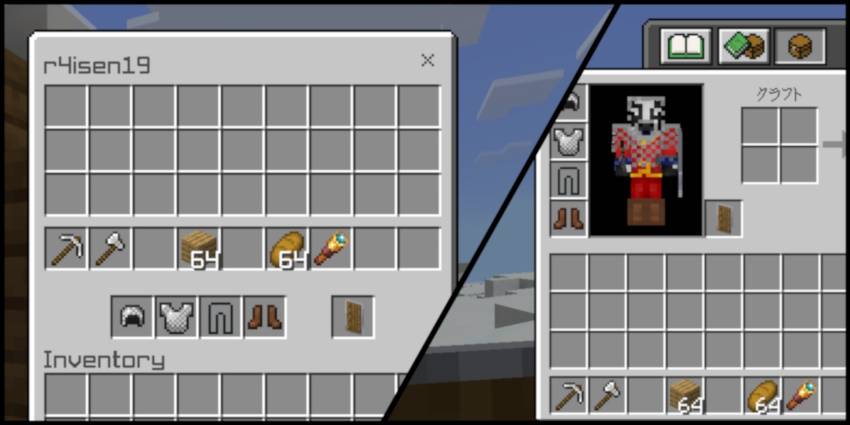
You can easily distinguish the parts of the player's inventory: the main inventory, the hotbar and the equipment such as armor and shield.
Real-Time Interaction
Your changes are immediately reflected on the other player's inventory once you re-arrange it from your view

…And More!
- Easy to use and install
- No experimental features required
- Does not use player.json
- Intuitive menu design
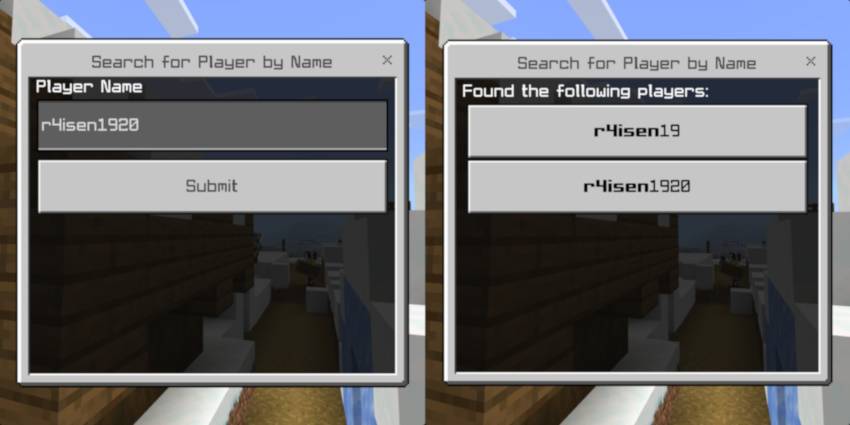
- Enhanced search functionality
- Support for custom items
- Can read custom item metadatas (custom names, enchantments, and more)
- Localization support (support for other languages)
How To Use
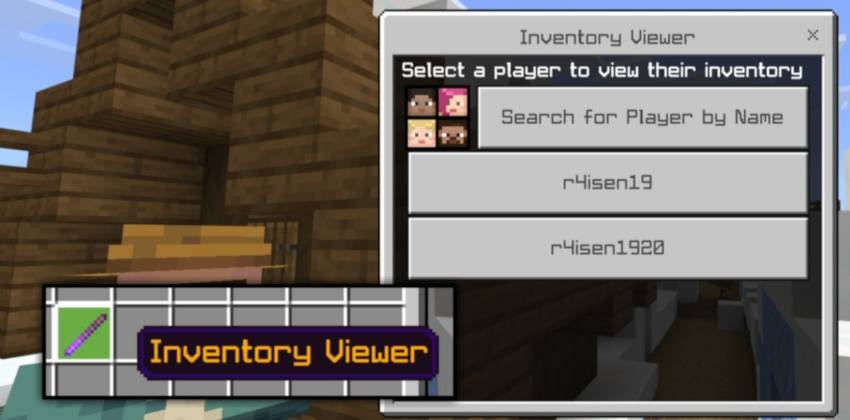
You need to be an operator and you need to give yourself the Inventory Viewer item to access the GUI. You can do this by using the /give command:
/give @s r4isen1920_invsee:inventory
Then, use the item.
Or, you can also use the following command:
/invsee [target: Player]
Then, the following UI should appear:
Installation Notes
For the best gameplay experience, please take note of these before attempting to download the pack:
- This Add-On works in multiplayer.
- For Aternos, please refer to instructions here.
- You need to have an active Realms subscription to use this in Realms. To install on Realms, please check on Minecraft's website.
- Or locally via Wi-Fi or LAN.
- This Add-On should work with other Add-Ons.
- This Add-On only supports Bedrock 1.26.40 or higher.
- This Add-On does NOT require any experiments enabled.
License & Usage
This Add-On is under MIT License. If you wish to attribute this work into your own, please refer to the license accordingly.
Copyright 2026 r4isen1920

Permission is hereby granted, free of charge, to any person obtaining a copy of this software and associated documentation files (the "Software"), to deal in the Software without restriction, including without limitation the rights to use, copy, modify, merge, publish, distribute, sublicense, and/or sell copies of the Software, and to permit persons to whom the Software is furnished to do so, subject to the following conditions:
The above copyright notice and this permission notice shall be included in all copies or substantial portions of the Software.
THE SOFTWARE IS PROVIDED "AS IS", WITHOUT WARRANTY OF ANY KIND, EXPRESS OR IMPLIED, INCLUDING BUT NOT LIMITED TO THE WARRANTIES OF MERCHANTABILITY, FITNESS FOR A PARTICULAR PURPOSE AND NONINFRINGEMENT. IN NO EVENT SHALL THE AUTHORS OR COPYRIGHT HOLDERS BE LIABLE FOR ANY CLAIM, DAMAGES OR OTHER LIABILITY, WHETHER IN AN ACTION OF CONTRACT, TORT OR OTHERWISE, ARISING FROM, OUT OF OR IN CONNECTION WITH THE SOFTWARE OR THE USE OR OTHER DEALINGS IN THE SOFTWARE.