Immersive Dimension Transitions
- By
A fresh take on Minecraft's dimension progression. No portals required.
thumbnail
Description
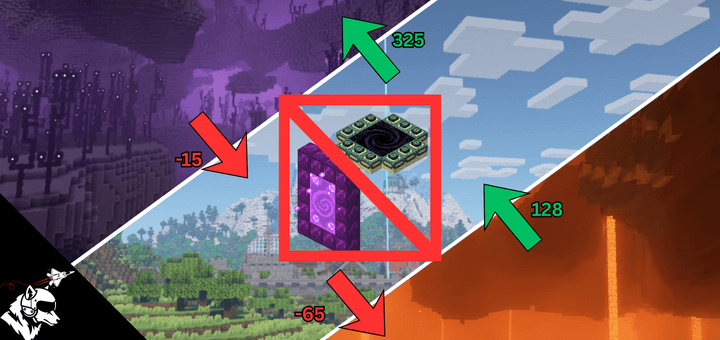
What if dimensions were physically stacked, and reaching them meant actually traveling there? Immersive Dimension Transitions replaces portal-based travel with a vertical, world-based progression system that makes dimensions feel physically connected.
The Overworld sits between them.
The Nether lies below.
The End waits above.
If you want to reach another dimension, you move there.
🔄 New Progression Overview
This addon changes how you approach survival and advancement:
1. Craft a Diamond Pickaxe to break the bedrock layer.
2. Fall below Y = -65 to enter the Nether.
3. Explore the Nether from just below the roof at Y = 125.
4. Collect Blaze Rods and brew custom Levitation Potions.
5. Ascend past the Overworld build limit.
6. Cross Y = 325 to enter the End.
Portals are no longer required. Preparation and positioning matter.
⚙️ Core Features ⚙️
Seamless Vertical Dimension Travel
Dimension transitions are triggered by height, not blocks.
| Transition | Trigger |
|------------------------|--------------------|
| Overworld → Nether | Fall below Y = -65 |
| Nether → Overworld | Rise above Y = 128 |
| Overworld → End | Ascend past Y = 325 |
| End → Overworld | Fall below Y = -15 |

Transition Warning Effects
As you approach dimension boundaries, visual cues signal the transition:
- Descending to Nether: Nether fog fades in below Y = -50
- Ascending from Nether: Overworld fog appears above Y = 125
- Ascending to End: Darkness effect begins at Y = 310
- Falling from End: Blindness masks the transition
Breakable Bedrock
Bedrock can now be broken with a Diamond Pickaxe or higher.
This is required to dig down and access the Nether from below.
Levitation Potions
A new brewing recipe allows you to craft Levitation Potions, required to reach the End's entry height of Y = 325.
| Recipe | Duration | Lift Height |
|--------------------------|------------------|---------------|
| Awkward Potion + Feather | 30 seconds | ~105 blocks |
Brew carefully and time your ascent — you'll need to be above the build limit to cross over.
Safety Block System
To prevent deaths caused by chunk loading or device performance, the addon spawns a 1×1 safety block on arrival:
- Entering the End: End Stone platform appears below you.
- Exiting the Nether: Bedrock floor prevents falling back down.
These blocks remain in the world as part of your arrival point.
Intelligent End Spawn Handling (End Clamping)
The End uses a coordinate-based system to prevent spawning players in empty void areas.
| Overworld Distance from (0, 0) | End Destination |
|-------------------------|---------------------|
| 0–250 blocks | Main End Island |
| 250–1200 blocks | Redirected to Main Island edge (prevents void spawn) |
| 1200+ blocks | Outer End Islands |

The End exists directly above the Overworld. Travel to coordinates near (0, 0) and ascend to reach the Main Island and face the Dragon. Those who ascend from distant lands (1200+ blocks) may find themselves among the Outer Islands.
Why does this exist?
The End has a "dead zone" between the Main Island (0-250 blocks) and the Outer Islands (1000+ blocks) where nothing generates — just empty void. Without clamping, players ascending from Overworld coordinates like (500, 500) would spawn in this void and fall to their death with nothing visible around them.
Want to disable it?
Some players may prefer raw coordinate mapping for creative builds that span dimensions, or for a more hardcore experience. You can disable End Clamping entirely in the configuration menu (see below).
🎛️ Full Customization 🎛️
Every aspect of this addon is fully customizable. Server owners and world hosts can fine-tune every transition height, toggle safety features, and adjust End clamping — all through an in-game menu.
To open the configuration menu, use:/scriptevent idt:config
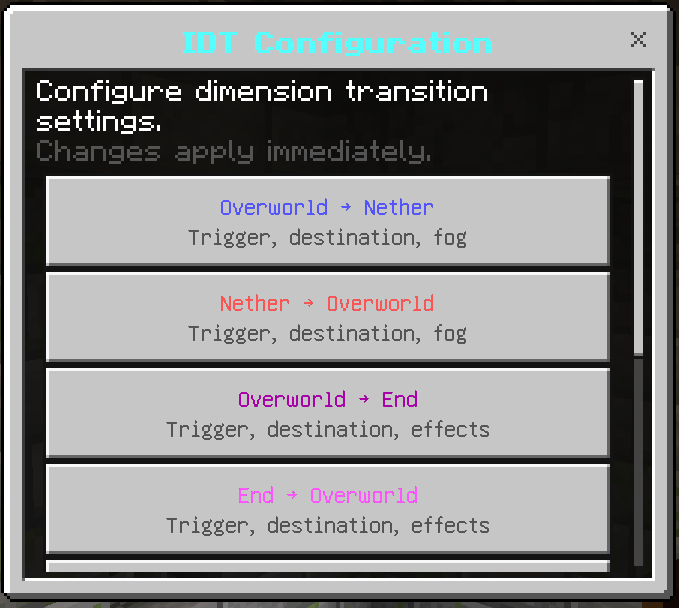
This opens an interactive UI with the following sections:
Overworld → Nether Settings
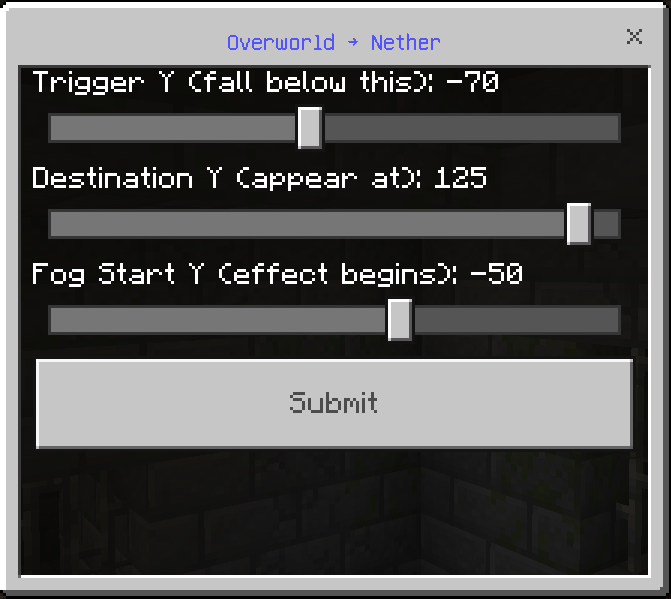
• Trigger Y: The height at which players transition to the Nether (default: -65)
• Destination Y: Where players appear in the Nether (default: 125)
• Fog Start Y: When Nether fog begins fading in (default: -50)
Use case: Set trigger to -80 for a longer void fall, or -64 for instant transition upon breaking bedrock.
Nether → Overworld Settings
• Trigger Y: The height at which players transition back to Overworld (default: 128)
• Destination Y: Where players appear in the Overworld (default: -63)
• Fog Start Y: When Overworld fog appears (default: 125)
Use case: Raise the trigger if you want players to build higher above the Nether roof before transitioning.
Overworld → End Settings
• Trigger Y: The height at which players transition to the End (default: 325)
• Destination Y: Where players appear in the End (default: 48)
• Effect Start Y: When darkness effect begins (default: 310)
Use case: Lower the trigger to 300 if you want the End accessible by jump boost potions instead of requiring levitation.
End → Overworld Settings
• Trigger Y: The height at which players transition back to Overworld (default: -15)
• Destination Y: Where players appear in the Overworld (default: 319)
• Effect Start Y: When blindness begins (default: 0)
Use case: Raise trigger to -5 for quicker transitions, or lower to -30 for longer void falls.
End Clamping Settings
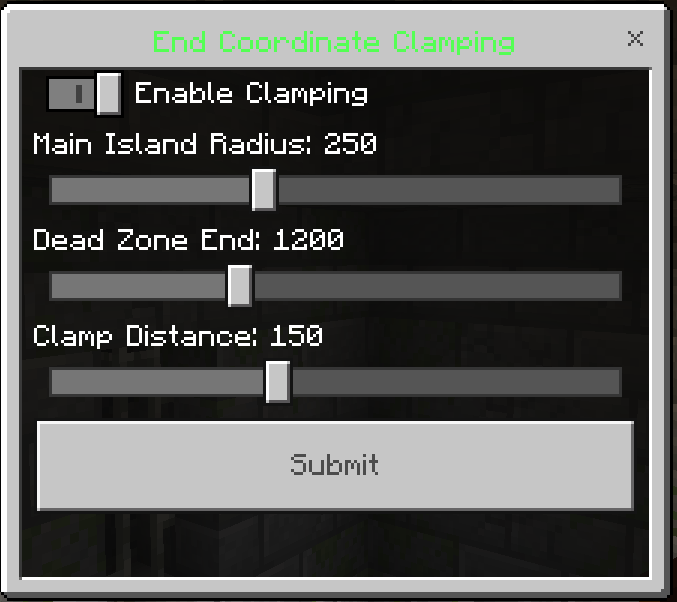
• Enable/Disable: Toggle coordinate clamping entirely
• Main Island Radius: Distance considered "main island zone" (default: 250)
• Dead Zone End: Where outer islands begin (default: 1200)
• Clamp Distance: Where players are redirected to when in dead zone (default: 150)
Use case: Disable clamping for hardcore mode or creative dimension-spanning builds. Adjust radius values if using custom End generation.
Safety Features
• End Stone Platform: Toggle the safety platform when entering the End
• Bedrock Floor: Toggle the bedrock block when exiting the Nether
Use case: Disable for hardcore/challenge runs where you want to risk spawning in dangerous locations.
Effects Toggle
• Fog Effects: Toggle Nether/Overworld fog transitions
• Transition Effects: Toggle darkness and blindness effects
Use case: Disable if conflicting with shader packs or if you prefer cleaner transitions.
Reset to Defaults
Restores all settings to their original values. Useful if you've experimented and want to start fresh.
📟 Commands
All commands use the /scriptevent system. Requires cheats enabled or operator permissions.
| Command | Description |
|--------------------------|--------------------------------------------------|
| /scriptevent idt:config | Opens the configuration menu |
| /scriptevent idt:status | Shows current world settings in chat |
| /scriptevent idt:help | Displays available commands |
/scriptevent idt:status
Displays your current configuration in chat, including:
• All transition trigger heights and destinations
• Whether End Clamping is enabled
• Current safety feature states
Useful for quickly checking settings without opening the full menu.
/scriptevent idt:help
Shows a quick reference of all available commands. Handy if you forget the command names.
❓ FAQ
Q: Do vanilla portals still work?
A: Yes. However, for the intended experience, use alongside a "No Portals" addon.
Q: Can I still fight the Ender Dragon normally?
A: Yes, the dragon fight is unchanged.
Q: What if I'm on a low-end device?
A: The addon includes safety blocks and smart spawn handling to prevent deaths during chunk loading.
Q: Does this work in multiplayer?
A: Yes, but currently untested. Feel free to report any bugs in the comments.
Q: Can I change the transition heights?
A: Yes! Use /scriptevent idt:config to customize every aspect of the addon, including all Y-levels, safety features, and End clamping behavior.
Q: Why am I spawning at the Main End Island when I ascended far from (0,0)?
A: This is the End Clamping feature preventing you from spawning in empty void. If you prefer raw coordinate mapping, you can disable End Clamping in the configuration menu.
Q: I disabled safety blocks and now I keep dying when transitioning. Help!
A: Re-enable safety blocks using /scriptevent idt:config → Safety Features. The blocks exist specifically to prevent deaths during chunk loading delays.
Q: Can regular players access the config menu?
A: Only players who can use /scriptevent (requires cheats enabled or operator status) can access the configuration.
🧩 Compatibility & Notes
Recommended: Use with "No Portal" addons for the intended progression. you can download it here: MCPEDL or CurseForge
- Script API: Requires Beta APIs enabled.
- Fog Effects: May conflict with heavy shader or visual addons.
📦 Installation 📦
- Download the .mcaddon file.
- Open with Minecraft to auto-import.
- Enable Beta APIs in world settings.
- Apply the Add-on to your world.
- (Optional) Use /scriptevent idt:config to customize settings.
- Start digging down.
💡 Tips for Server Owners 💡
• Configure settings before players join using /scriptevent idt:config
• Use /scriptevent idt:status to verify your configuration
• Consider disabling End Clamping for more freedom
• Lower Overworld → End trigger for easier End access, or raise it for more challenge
• Disable safety blocks for hardcore difficulty
The Immersive Dimension Transitions Team

Owner