Health Indicator & Killstreak Counter
- By
Enhance your Minecraft Bedrock PvP experience with Health Indicator & Killstreak! Display player health and track killstreaks in real time. Perfect for PvP servers, survival worlds and multiplayer battles!
Take your Minecraft Bedrock PvP experience to the next level with Health Indicator & Killstreak!
This addon combines a clean health display with a killstreak tracking system, making PvP battles more exciting and competitive.
Whether you’re playing with friends, fighting on a PvP server, or enjoying survival multiplayer, this addon helps you keep track of player health and kills.
Features
❤️ Health Indicator
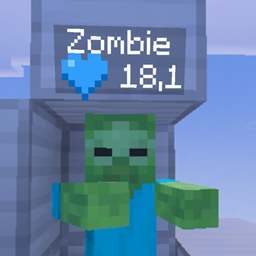
- Displays player health directly below their nametag.
- Shows health values for easier tracking during battles.
- Clean and simple display that fits Minecraft’s style.
- Helps players see how much health their opponents have left.
⚔️ Killstreak System
- Tracks consecutive player kills.
- Displays killstreak information alongside player health.
- Makes PvP battles more competitive.
- Great for multiplayer worlds and PvP challenges.
🎮 Minecraft Bedrock Support
- Designed for Minecraft Bedrock Edition.
- Suitable for multiplayer and survival worlds.
- Works with the standard Minecraft interface.
- No complicated setup required.
Installation
Step 1 – Download
Download the latest .mcaddon file from CurseForge.
Step 2 – Import
Open the downloaded file with Minecraft Bedrock Edition.
Wait until Minecraft finishes importing the addon.
Step 3 – Activate
- Open Minecraft.
- Create a new world or edit an existing world.
- Navigate to Behavior Packs.
- Activate the Health Indicator & Killstreak behavior pack.
- Navigate to Resource Packs.
- Activate the matching resource pack if it is not already enabled.
- Start your world.
Step 4 – Enjoy!
Join your world and start playing. The addon will display health and killstreak information during gameplay.
Perfect For
- PvP servers
- Survival multiplayer worlds
- Minecraft SMPs
- PvP challenges
- Playing with friends
- Competitive battles
Compatibility
Edition: Minecraft Bedrock Edition
Platforms: Windows, Android, iOS and other Bedrock-supported devices where addon imports are supported.
Game Mode: Survival and Multiplayer
Compatibility may vary depending on your Minecraft version, platform and other installed addons.
Important Notes
- Make sure the required packs are activated.
- Keep Minecraft updated to a compatible version.
- If the addon does not work correctly, check for conflicts with other addons that modify nametags or player displays.
Credits
Created by PTL, Julios
Thanks for downloading Health Indicator & Killstreak!
Enjoy your Minecraft PvP experience!
by PTL
Health Indicator & Killstreak Counter Team