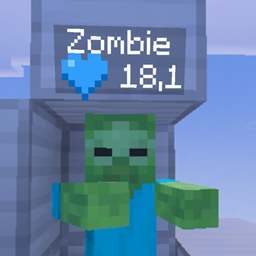
Minecraft Helden is a Minecraft Bedrock Edition addon inspired by the popular German YouTuber project Minecraft Helden!
Fight for survival, collect powerful hearts, hunt down your enemies, unlock special abilities and become the strongest player on your server!
Whether you’re playing with friends or creating your own Minecraft Helden project, this addon brings exciting PvP mechanics, unique items and customizable gameplay to your world.
⚔️ FEATURES
❤️ Custom Heart System
Your hearts are more than just health!
- Gain and lose hearts through PvP.
- Experience different heart systems.
- Customize your heart colors.
- Use special items to gain or remove hearts.
- Fight to become the strongest player!
Every heart matters. Every death has consequences!
🔗 Link Heart System
Experience a completely different way of playing!
The Link Heart system introduces special connections between players, making survival and PvP even more challenging.
Admins can manage player connections using the /set_linkheart command.
🎯 Headhunt & Bounty System
Hunt your target. Win the bounty. Claim your fourth heart!
The Headhunt system brings an exciting new challenge to Minecraft Helden!
- Reveal your assigned Headhunt target.
- Track down your opponent.
- Eliminate your target to complete the bounty.
- Earn your fourth heart after successfully winning your Headhunt.
- Receive custom victory notifications.
- Admins can manually change player bounties!
NEW: Custom Headhunt Command!
/set_headhunt (player1) (player2)
This command allows administrators to assign two players as each other’s Headhunt targets.
Example:
/set_headhunt Steve Alex
Steve and Alex will now be assigned to each other as bounty targets!
Perfect for organizing PvP events, fixing target assignments or creating custom challenges.
💎 Custom Items
Discover powerful items from the Minecraft Helden experience!
- Soul Amulet – Gain an additional heart.
- Broken Soul Amulet – Remove one heart.
- Soul Stealer – A special item connected to the soul system.
- Crown – A unique item from Minecraft Helden.
Custom particles, sounds and notifications make these items even more exciting!
⚔️ Combat Log System
Prevent players from escaping during PvP!
Configure your own combat system with:
- Starting combat duration
- Additional combat time per hit
- Maximum combat duration
- Custom combat notifications
Players receive notifications when entering combat, and the remaining combat time is displayed during fights.
💀 Custom Death System
Experience special death mechanics inspired by Minecraft Helden!
- Custom death animations
- Personalized death messages
- Heart loss mechanics
- Configurable death bans
Every battle can change your adventure!
⚙️ Interactive Admin Panel
Manage your entire Minecraft Helden experience using:
/panel
The interactive panel makes configuration simple and accessible.
Choose your language:
Select your Minecraft Helden mode:
- Helden 1 – Classic
- Helden 2 – Link Heart
- Helden 3 – Headhunt
Configure gameplay settings such as:
- Armor Lock
- Item limits
- Combat Log settings
- Gameplay rules
- Reveal Headhunt
- Additional server settings
Your configuration is saved so you can access your settings more easily next time!
🌍 German & English Support
Minecraft Helden supports both German and English.
Choose your preferred language during setup and enjoy a localized admin panel.
🎮 AVAILABLE COMMANDS
|
Command
|
Description
|
|
/panel
|
Open the Minecraft Helden admin panel
|
|
/heart_colour
|
Customize your heart color
|
|
/set_hearts
|
Set a player’s hearts
|
|
/set_linkheart
|
Manage Link Heart connections
|
|
/set_headhunt
|
Change two players’ Headhunt targets
|
|
/duel
|
Challenge another player to a duel
|
|
/death_ban
|
Manage player death bans
|
Some commands require administrator permissions.
📥 HOW TO INSTALL
Step 1 – Download
Download the latest Minecraft Helden .mcaddon file.
Step 2 – Import
Open the downloaded file with Minecraft Bedrock Edition.
Wait until the import is completed successfully.
Step 3 – Create or Edit a World
Create a new Minecraft world or open the settings of an existing world.
Step 4 – Activate the Addon
Go to your world’s Add-Ons settings and activate both:
- Minecraft Helden Behavior Pack
- Minecraft Helden Resource Pack
Make sure both packs are enabled.
Step 5 – Start Minecraft Helden
Enter your world and wait for the addon to initialize.
Step 6 – Configure Your World
Open the Minecraft chat and enter:
/panel
Choose your language, select your Minecraft Helden mode and configure your settings.
Step 7 – Start Playing!
Invite your friends, fight for hearts, complete bounties and become the ultimate Minecraft Helden champion!
Note: Administrator permissions and a compatible Minecraft Bedrock version may be required for certain features.
🏆 CREATE YOUR OWN MINECRAFT HELDEN PROJECT
Minecraft Helden is designed for multiplayer survival, competitive PvP and YouTuber-inspired Minecraft projects.
Create alliances, challenge enemies, compete for hearts and experience unforgettable battles!
Whether you prefer Classic, Link Heart or Headhunt, every mode offers a different way to experience Minecraft.
Three modes. Unique mechanics. Endless possibilities.
💙 ABOUT THE PROJECT
Minecraft Helden is a fan-made Minecraft Bedrock addon inspired by the popular Minecraft Helden YouTuber project.
It aims to bring the excitement of the original project to Bedrock players with customizable mechanics, interactive settings and unique PvP gameplay.
This addon is not officially affiliated with the original YouTuber project.
👑 CREDITS & SPECIAL THANKS
Minecraft Helden – Developed and customized by PTL 💙
Special thanks and credits to JuliosStefen for the original work used in this addon:
- 💀 Death animations
- ❤️ Hearts and heart mechanics
- 💎 Item textures
- 📍 Heart and item locations/positioning
Full credit for these original elements belongs to JuliosStefen.
Thank you for the incredible work and inspiration!
Minecraft Helden – Inspired by the YouTuber project. Made with 💙 by PTL.