GTA WAYPOINT lets you save your favourite places as waypoints and teleport between them with a cinematic character switch, just like in GTA 5. Place a waystone, give it a name, and it becomes a destination. Tap any waystone or use the Waystone Staff, pick where you want to go, and watch the camera lift out of your body, rise high above the world, fly across to the other waystone and drop you right beside it.
Dimension Travel
Waystones work in the Overworld, the Nether and the End. Place one in any dimension and teleport to it from anywhere.
How To Use
1. Craft a Waystone
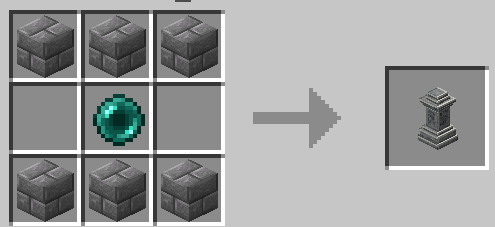
Open a crafting table. There are two ways to make a waystone:
Top row: 3 Stone Bricks. Middle row: 1 Ender Pearl in the centre. Bottom row: 3 Stone Bricks.
8 Stone Bricks around 1 Ender Pearl in the centre.
2. Place and Name It
A waystone is two blocks tall, so it needs two blocks of empty space. Place it, then tap it and give it a name.
Turn on Private Waystone if you want to keep it for yourself. Only you can see and use a private waystone. Public waystones can be used by everyone.
3. Travel
Tap any waystone to open its menu. You will see every other waystone you can travel to. Pick one and you will be teleported next to it.
4. Waystone Staff
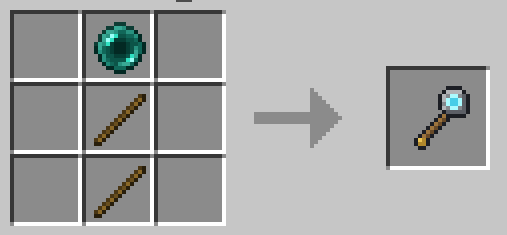
Craft a Waystone Staff with 1 Ender Pearl on top of 2 Sticks in one column. Use it anywhere to open the list of waystones without walking to one.
5. Settings
Open Settings from the waystone menu or the staff menu.
Teleport Sounds: choose GTA or MINECRAFT style sounds.
Portal Sound: turn the portal sound on or off in MINECRAFT style.
6. Rename or Remove
The waystone menu has Rename This Waystone and Remove This Waystone. Breaking the waystone also removes it and gives the item back.
Commands
/voxen:waystones - see every waystone you can travel to
/voxen:waystone_block - get a Waystone
/voxen:waystone_staff - get a Waystone Staff
A world can hold up to 64 waystones.
Credits
This add-on is inspired by the Java Edition mod Grand Teleport (GTP). Its camera transition and GTA style sounds are based on that mod and used under its MIT license.
Offhand Torch lets you equip torches, lanterns, and light sources in your offhand slot with a simple right click or screen hold. Dynamic lighting, main hand stays free. Built for Bedrock limitations.
This pack enhances Minecraft with clean and clear visuals, balanced lighting, natural colors, and reduced fog. It removes unnecessary effects to deliver a smooth, fresh, and visually appealing experience.
Fill any hole instantly! Throw the Hole Filler ball into creeper craters, ravines or any gap and it fills up automatically. Small and Big variants included.

Get more and better loot from everything! Loot Boost improves all drops across the game — mobs drop more, chests reward better. No more underwhelming loot. Achievement friendly!
Offhand Torch lets you equip torches, lanterns, and light sources in your offhand slot with a simple right click or screen hold. Dynamic lighting, main hand stays free. Built for Bedrock limitations.
This pack enhances Minecraft with clean and clear visuals, balanced lighting, natural colors, and reduced fog. It removes unnecessary effects to deliver a smooth, fresh, and visually appealing experience.
Fill any hole instantly! Throw the Hole Filler ball into creeper craters, ravines or any gap and it fills up automatically. Small and Big variants included.
Get more and better loot from everything! Loot Boost improves all drops across the game — mobs drop more, chests reward better. No more underwhelming loot. Achievement friendly!