Gloamguise: False Facades
- By
Minecraft Bedrock Add-On • v2.1.5 • ONYX MERIDIAN INTERACTIVE STUDIO • 10 items • 290+ blocks
Gloamguise: False Facades
Walk through solid-looking walls. Watch a spy hole open in your hand. Split a door into two different materials. Disappear into grass. Open a vault two rooms away with a torch that looks exactly like a vanilla torch — and sends no redstone signal at all.
Bedrock 1.26.40+ • 0 experimental toggles • Survival, Realms & servers • EN + RU
Published by Onyx Meridian Interactive Studio • designed and coded by WowDot
◆ Five-channel camouflage
A decoy copies texture faces, log/basalt axis, biome tint, block sounds and real light level — not just a flat picture.
◆ One-way spy hole
Solid from the corridor, clear from inside, and it animates in your hand when you toggle the mode.
◆ Engineering honesty
Works in Creative and Survival, breaks with the right tool, respects the single-drop rule, and leaves no orphaned half-blocks behind.
| Specification | Value |
|---|---|
| Version | v2.1.5 |
| Game | Minecraft: Bedrock Edition 1.26.40 and newer |
| Pack type | Behaviour Pack + Resource Pack (one .mcaddon) |
| Contents | 10 items • 290+ camouflage skins • 411 structural states |
| Experiments | None required |
| Languages | English, Russian (all tooltips, subtitles and messages) |
| Platforms | Windows, Android, iOS, Xbox, PlayStation, Switch, Realms, dedicated servers |
| Multiplayer | Host needs the pack • clients receive it automatically on a server |
| Script API | @minecraft/server 2.9.0 • no network calls, no telemetry |
| Licence | All rights reserved • studio licence v3.0 (see the last section) |
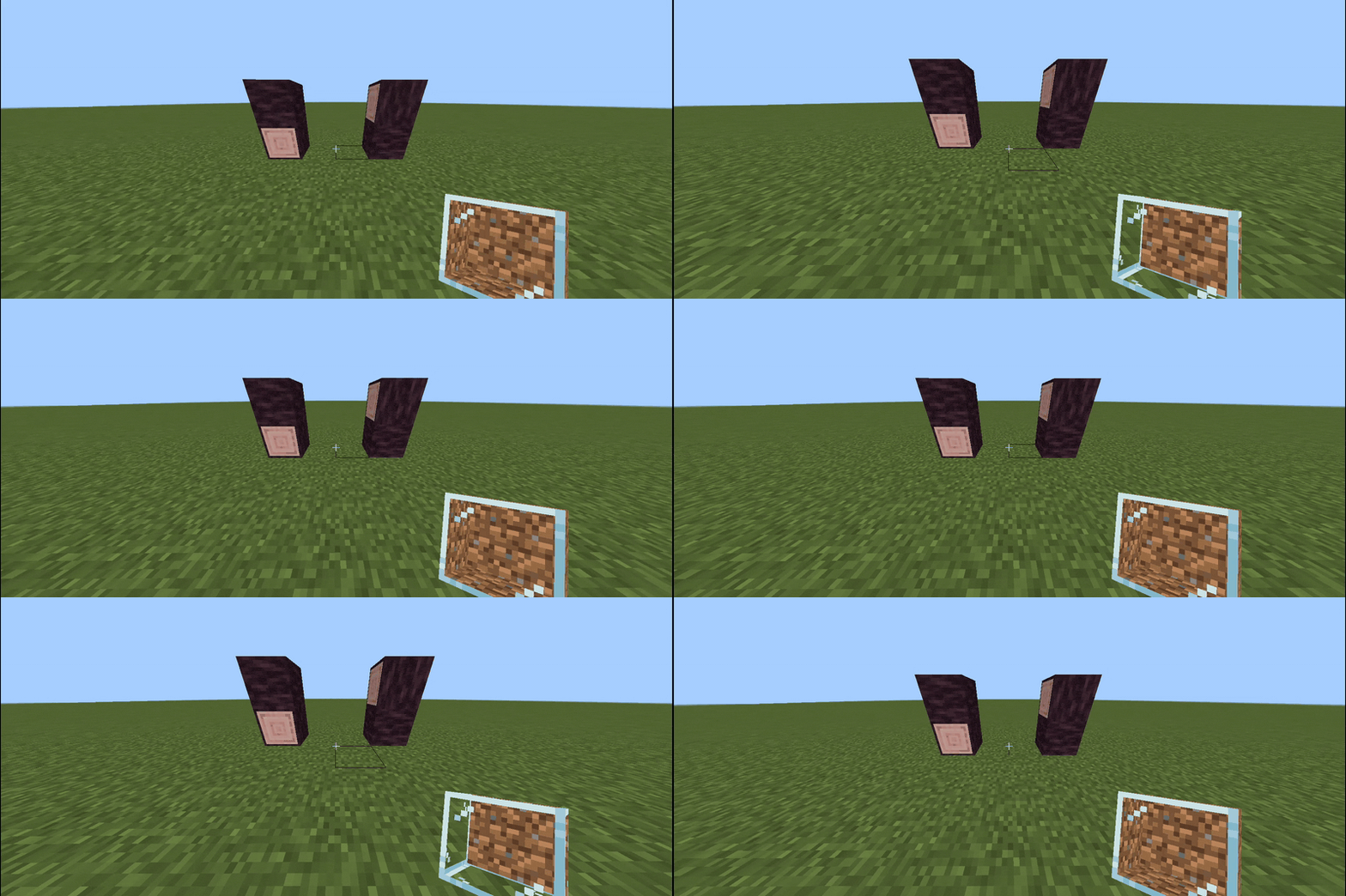
▸ LIVE GIF Spy glass, live in hand: Shift slides it from 1 to 5 glass faces
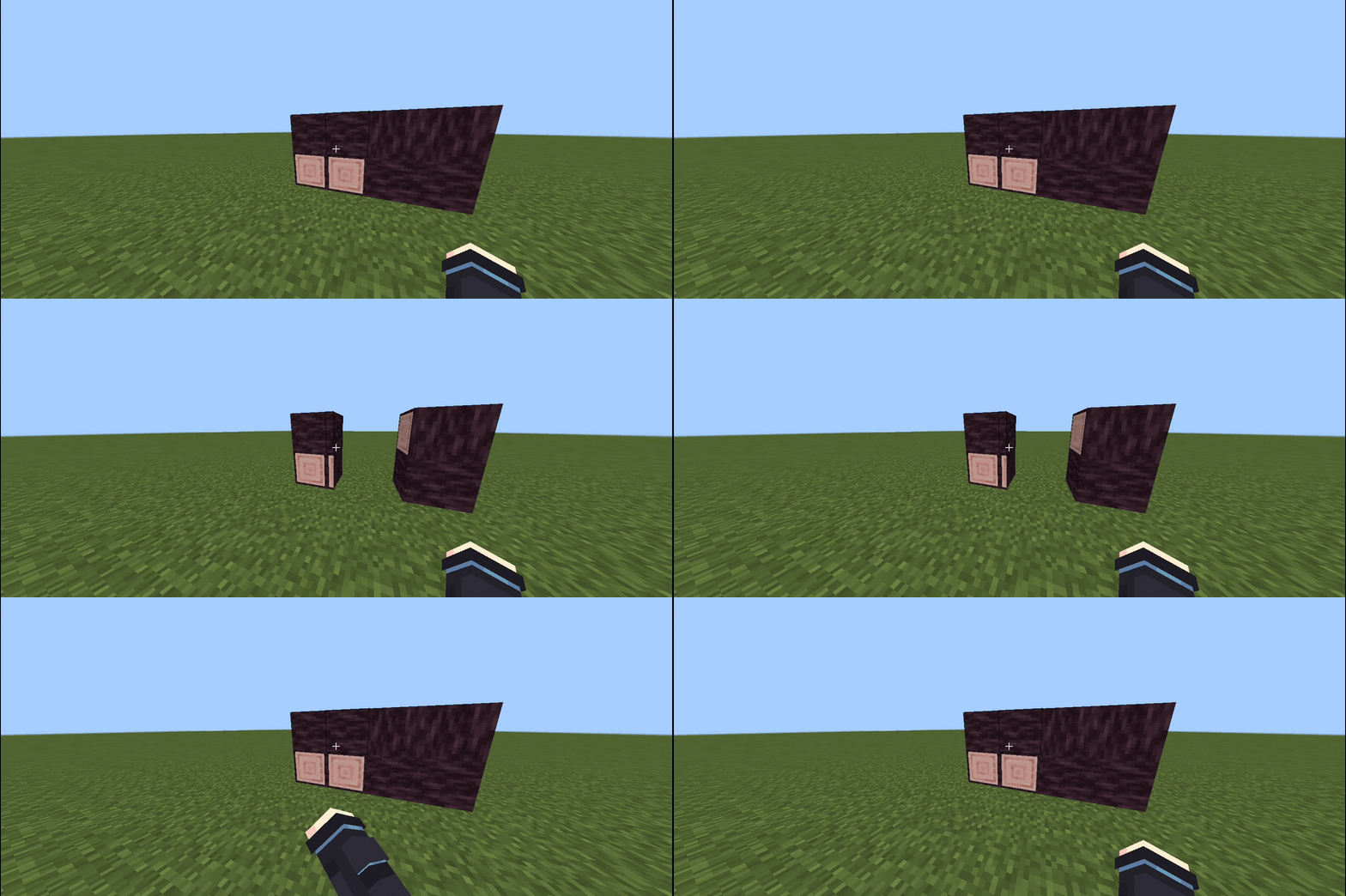
▸ LIVE GIF Double decoy doors opening together, seams aligned
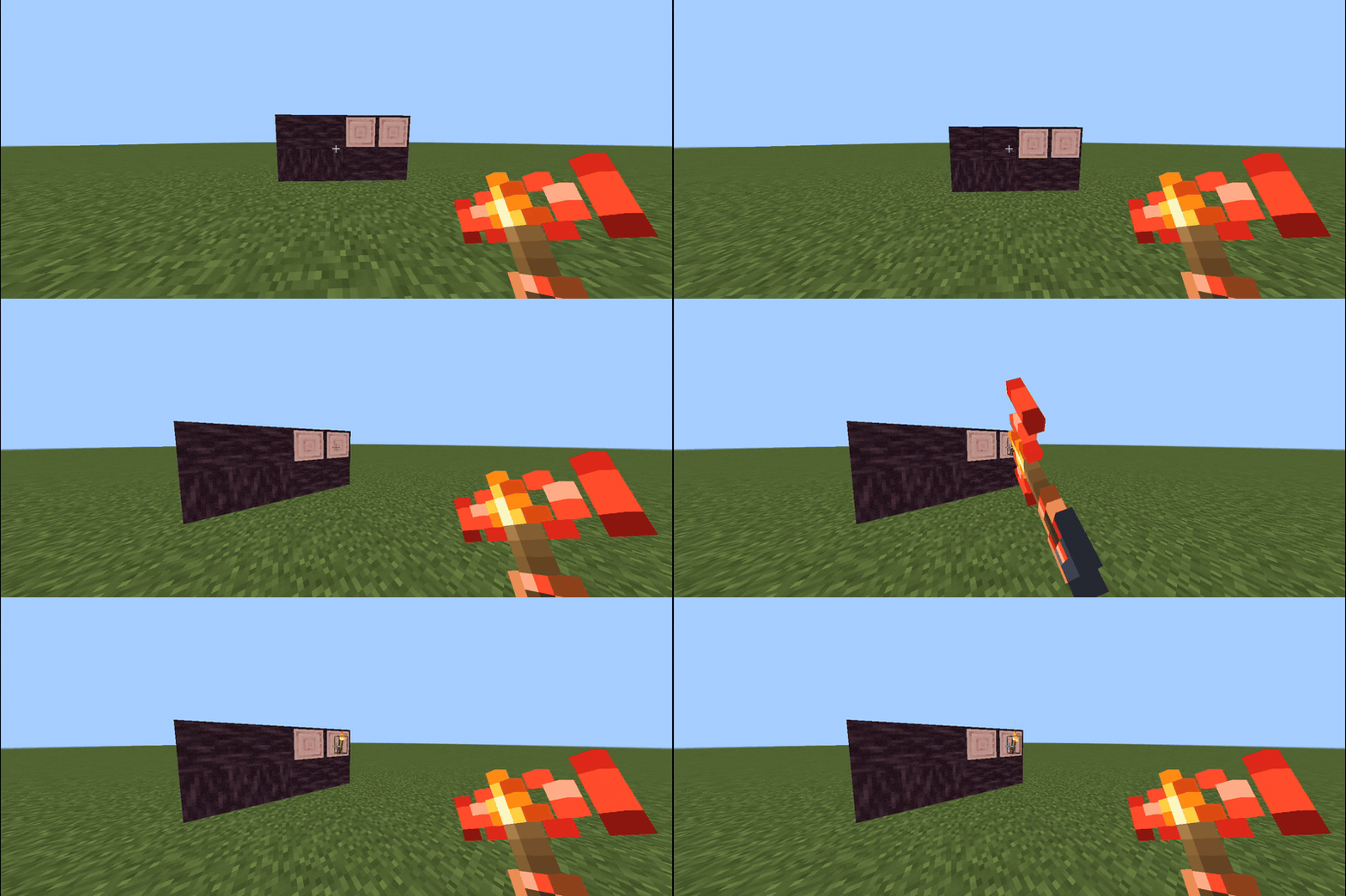
▸ LIVE GIF Bind a torch to a door, place it far away, open the door from there
Contents
01 Start in sixty seconds
02 What is inside
03 The camouflage engine
04 Decoy Block
05 Decoy Spy Glass
06 Decoy Doors
07 Decoy Trapdoors
08 Torch Levers
09 All ten recipes
10 Survival, performance and safety
11 Installation and first aid
12 Compatibility
13 What it genuinely cannot do
14 Questions people actually ask
15 Changelog
16 Licence and usage rights
01 Start in sixty seconds
01 Craft the gateway
Nine-slot recipe: planks in the corners, glass on the edges, one redstone in the middle → 4× Decoy Block. Everything else is built from it.
02 Place it on a face
Tap any side of a wall, floor or ceiling. The new block immediately copies what you tapped — including log direction and grass tint.
03 Walk through it
No collision, no light leak. Your base is behind a wall that looks completely solid and cannot be seen from outside.
04 Add a door and a remote
Craft a decoy door or trapdoor, then a remote torch lever. Hold the torch, Shift + tap the door to link it, and place the torch anywhere.
Everything below is optional detail. If you only read one thing, read the four steps above — that is the whole pack in miniature.
02 What is inside
Decoy Blockgg:super_block
A pass-through ghost wall. Copies five properties of the block you tap.
Decoy Spy Glassgg:super_glass
One-way window, solid outside, clear inside, 1 ↔ 5 glass faces.
Decoy Doorgg:super_door
Two halves, two disguises, hand or redstone, pairs up automatically.
Decoy Trapdoorgg:super_trapdoor
Top or bottom mount, invisible frame, swings toward the player.
Redstone variantsgg:super_door_rs / gg:super_trapdoor_rs
Hand-locked. Only redstone power or a linked torch opens them.
Torch leversgg:torch_lever / gg:*_remote
Look 100% vanilla. Wired ones output power 15, wireless ones 0.
03 The camouflage engine
Most disguise add-ons swap one texture. Gloamguise rebuilds the whole appearance of the neighbouring block across five independent channels, so a fake wall survives close inspection:
◆ Faces
Top, bottom and all four sides of multi-face blocks: grass, podzol, mycelium, nylium.
◆ Orientation
Bark, cut and pillar direction is preserved on every log, basalt, deepslate, hay and bamboo block.
◆ Biome tint
Nineteen grass palettes sampled from the world, so the entrance matches the meadow it stands in.
◆ Sound & light
Footsteps and break sounds stay stone-or-wood, and glowing blocks keep light level 3, 10 or 15.
| Channel | What is copied | Why it matters |
|---|---|---|
| Textures | Every visible face, including the bottom you cannot see | No seams on a mixed-material wall |
| Axis | X / Y / Z grain of logs, basalt, purpur | A rotated log keeps the bark direction |
| Biome | Grass colour resolved from the current biome | The entrance melts into any landscape |
| Sound | Step and break sounds of the original block | Stone still sounds like stone |
| Light | Light emission of the copied block | A disguised lamp really lights the room |
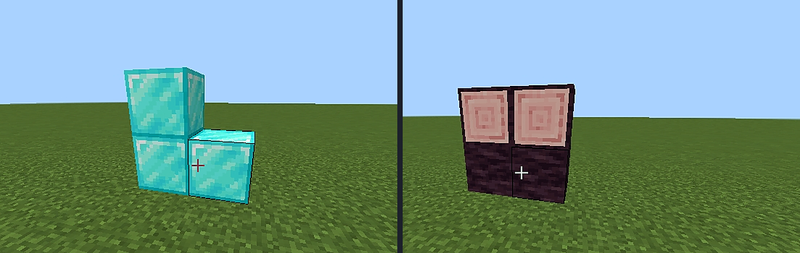
A decoy wall next to real blocks, including directional log grain (X / Y / Z) that matches exactly
◆ The chain trick. Place a new decoy directly onto an existing one and it inherits the already-resolved camouflage instantly — you can build a fake tunnel from a single real block of stone.
04 Decoy Block — the wall you can walk through
gg:super_block
Tap any face of any block to place it. The new block takes the neighbour's appearance and becomes a ghost: no collision box and light dampening 0, so nothing shows from outside and nothing blocks your movement.
- Placement: click any face — corners, ceilings and floors all work.
- Mining: by hand or pickaxe about 15 seconds; any axe 0.15–0.90 seconds.
- Protection: explosion resistance 3, immovable by pistons, no loot in Creative.
05 Decoy Spy Glass — a window that only works one way
gg:super_glass
Solid from the corridor, transparent from the room behind it. One block thick, and the side faces follow a mode you switch directly in your hand.
| Mode | How to select | Glass faces | Disguised faces | Best for |
|---|---|---|---|---|
| Standard | just hold it | 1 front | 5 (back + 4 sides) | Corridor edges are visible |
| Wide angle | hold Sneak | 5 front + 4 sides | 1 back only | Sides buried inside a wall |
The same glass can be mounted on the floor or ceiling; the sector you are looking through becomes the clear one.
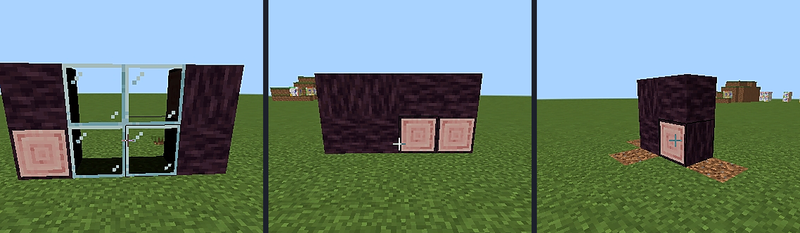
From the inside: clear glass. From the outside: an unbroken log wall
06 Decoy Doors — two halves, two disguises
gg:super_door • gg:super_door_rs (redstone or wireless only)
Each half of the door resolves its camouflage independently, in four steps:
- look at the wall on the hinge side at that half’s height;
- if that is empty, look at the opposite side;
- if the upper half finds nothing, it copies the lower half;
- if there is no wall at all, both halves copy the floor block — which is how you get a diamond bottom and an emerald top in the same door.
Depth (near or far edge) and hinge side are chosen by where you click; holding Sneak inverts the depth. Two doors placed side by side pair up and swing together.
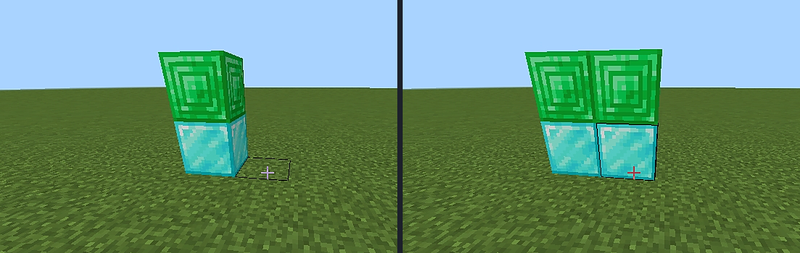
Independent halves — diamond at the bottom, emerald at the top, single and double
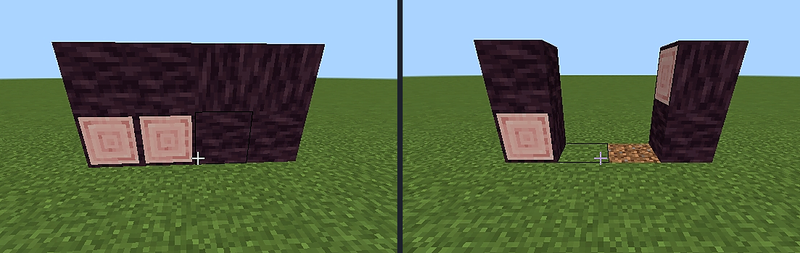
Log grain preserved in both states — the decoy is indistinguishable from the frame
| Variant | By hand | Redstone | Linked torch |
|---|---|---|---|
gg:super_door |
✓ | ✓ power > 0 | ✓ |
gg:super_door_rs |
✗ locked | ✓ | ✓ |
07 Decoy Trapdoors — hatches that vanish into the ground
gg:super_trapdoor • gg:super_trapdoor_rs
Mounts on the top or the bottom of the block space like a vanilla trapdoor, swings toward whoever opens it, and copies the frame around it — including grass, so a grass hatch is genuinely invisible until it opens.
| Variant | By hand | Redstone | Linked torch |
|---|---|---|---|
gg:super_trapdoor |
✓ | ✓ | ✓ |
gg:super_trapdoor_rs |
✗ locked | ✓ | ✓ |
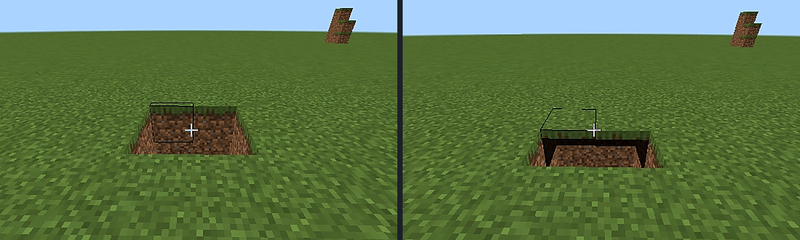
Closed grass hatch and the same hatch opened — no visible frame in either state
08 Torch Levers — the switch that is not a switch
▸ Wiredgg:torch_lever • gg:soul_torch_lever
A normal lever wearing a torch costume. Outputs power 15 into dust, pistons, lamps and redstone doors.
▸ Wirelessgg:torch_lever_remote • gg:soul_torch_lever_remote
Outputs nothing. Link it to one door and it opens that door through walls, from any distance, without a wire in sight.
Four gestures.
| Gesture | Where | Result |
|---|---|---|
| Shift + tap | any decoy door or trapdoor | stores the link in the torch you are holding — place it anywhere |
| Shift + tap | an already placed wireless torch (holding a torch) | copies its link, so you can build a second remote for the same door |
| Shift + tap, empty hand | an already placed wireless torch | removes the link and frees the torch |
| Tap | a linked torch | opens or closes its door through walls — including a paired double door |
Every action answers with a coloured message, a chat line and a short chime, so you always know whether the link took. A redstone-only door explains itself when you tap it empty-handed.
09 All ten recipes
The screenshots are enlarged, but a picture cannot tell you which plank or where the decoy sits. Every card therefore repeats the grid in words — left to right, top to bottom, one label per slot. Colour follows the ingredient: Any planks Glass Iron ingot Redstone dust Decoy Block Torch Soul torch Lever Copper ingot
The pictures were captured on a Russian-locale client, so the crafting-table header in each screenshot is localised. The written grid underneath is the English reference; the recipe is identical in every language.
01 Decoy Block
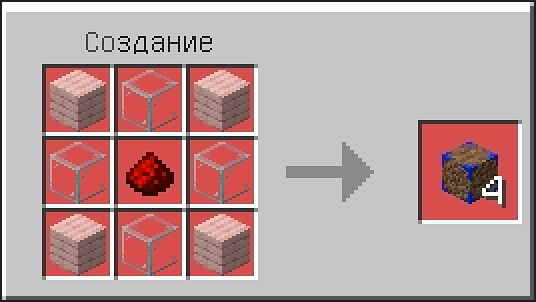
| #1 | #2 | #3 | |
|---|---|---|---|
| 1 | Any planks | Glass | Any planks |
| 2 | Glass | Redstone dust | Glass |
| 3 | Any planks | Glass | Any planks |
Result: Decoy Block ×4
The gateway item — every other craft in this page starts here.
02 Decoy Spy Glass
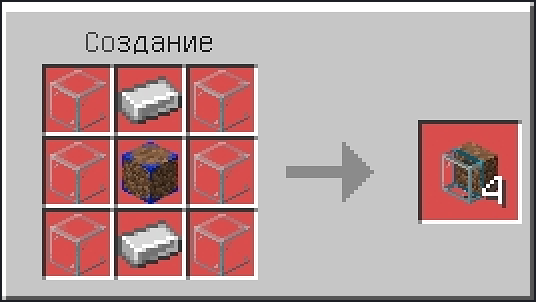
| #1 | #2 | #3 | |
|---|---|---|---|
| 1 | Glass | Iron ingot | Glass |
| 2 | Glass | Decoy Block | Glass |
| 3 | Glass | Iron ingot | Glass |
Result: Decoy Spy Glass ×4
One block of spy glass per glass corner — cheap enough to line a whole corridor.
03 Decoy Door
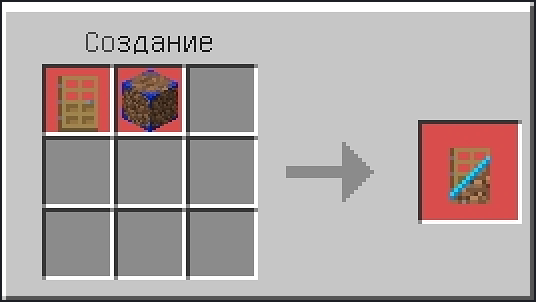
| #1 | #2 | #3 | |
|---|---|---|---|
| 1 | Any planks | Any planks | — |
| 2 | Any planks | Any planks | Decoy Block |
| 3 | Any planks | Any planks | — |
Result: Decoy Door ×2
Shapeless alternative: wooden door + Decoy Block → 1 Decoy Door.
Yields a pair, so a double door costs one craft.
04 Redstone Decoy Door
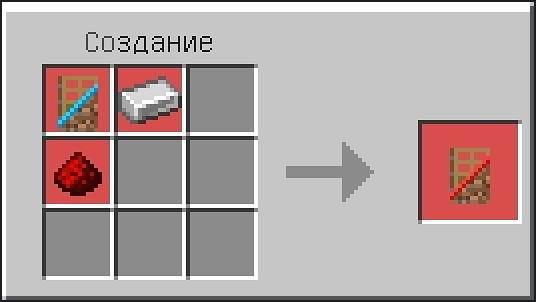
Decoy Door + Iron ingot + Redstone dust
shapeless — any arrangement
Result: Redstone Decoy Door ×1
Hand-locked: redstone power or a linked remote torch only.
05 Decoy Trapdoor
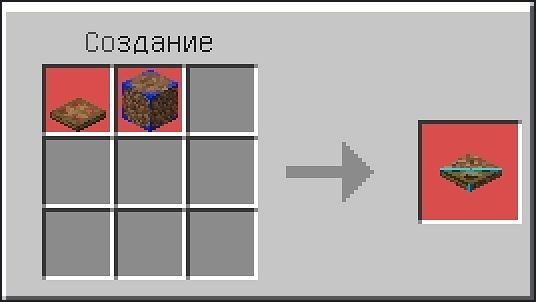
| #1 | #2 | #3 | |
|---|---|---|---|
| 1 | — | Decoy Block | — |
| 2 | Any planks | Any planks | Any planks |
| 3 | Any planks | Any planks | Any planks |
Result: Decoy Trapdoor ×2
Shapeless alternative: wooden trapdoor + Decoy Block → 1 Decoy Trapdoor.
Hatch pairs come two at a time.
06 Redstone Decoy Trapdoor
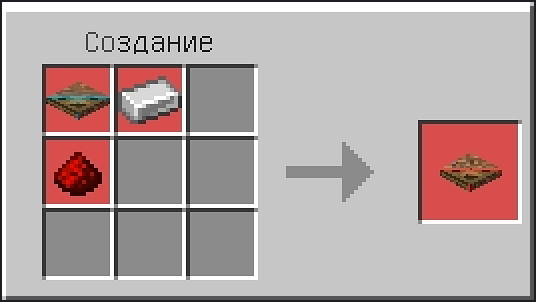
Decoy Trapdoor + Iron ingot + Redstone dust
shapeless — any arrangement
Result: Redstone Decoy Trapdoor ×1
Locked hatch — nobody opens it by accident.
07 Torch Lever
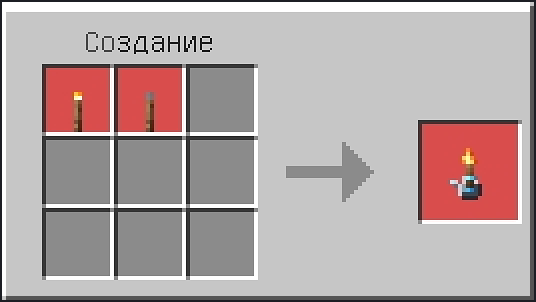
Torch + Lever
shapeless — any arrangement
Result: Torch Lever ×1
Wired version: power 15, behaves exactly like a vanilla lever.
08 Soul Torch Lever
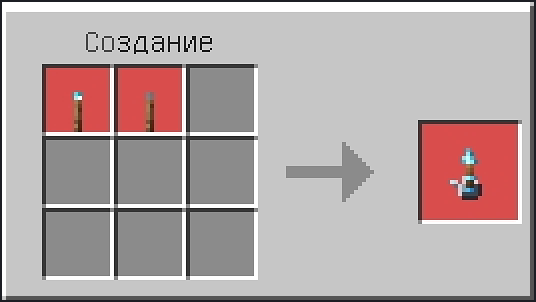
Soul torch + Lever
shapeless — any arrangement
Result: Soul Torch Lever ×1
Same power 15 with the cold blue light of soul fire.
09 Remote Torch Lever
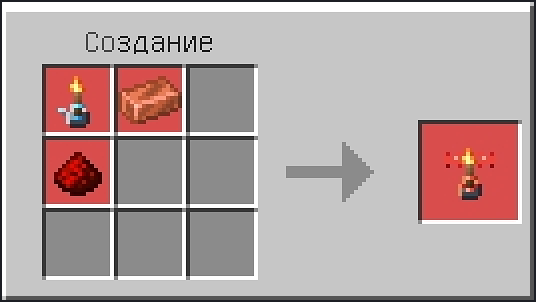
Torch Lever + Copper ingot + Redstone dust
shapeless — any arrangement
Result: Remote Torch Lever ×1
Zero redstone output. This is the one that opens a vault from another room.
10 Remote Soul Torch Lever
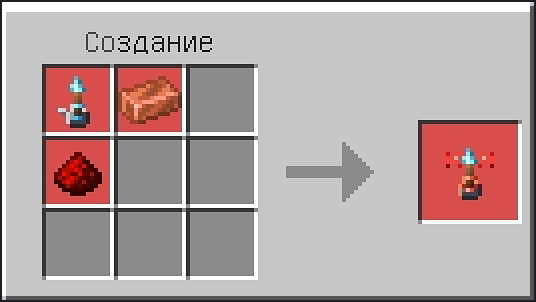
Soul Torch Lever + Copper ingot + Redstone dust
shapeless — any arrangement
Result: Remote Soul Torch Lever ×1
Wireless with soul light — the remote you can actually find in the dark.
Recipes 03 and 05 also accept a shapeless fallback — any wooden door or trapdoor plus a Decoy Block. Recipes 04, 06, 07, 08, 09 and 10 are shapeless to begin with, so the items can sit in any arrangement; those four torch recipes are the only ones with no fixed grid to show.
Short on space? The whole tree collapses to two crafts: Decoy Block once, then Decoy Door or Trapdoor twice, then add iron and redstone for the locked versions. Torches are a lever plus the torch you already have, and the remote adds copper and redstone.
10 Survival, performance and safety
| Property | Value | Note |
|---|---|---|
| Break by hand, pickaxe or shovel | 10 s (feels like ~15 s) |
Deliberate: no punching a hole by accident |
| Break by any axe | 1.2 speed → 0.15–0.90 s |
Fast, clean removal |
| Door drops | exactly one item, from the lower half | Three handlers cannot duplicate it |
| Orphan halves | removed on the next block update | No floating half doors |
| Explosion resistance | 3 (torches 0) |
Vanilla-like behaviour |
| Light dampening | 0 on ghost blocks |
No light leaks through a fake wall |
| Pistons | cannot move decoys | By design — use a remote torch for moving contraptions |
| Scripted work | only event-driven; the torch registry scans within 64 blocks of a player every 10 ticks | Negligible tick cost |
| Saved data | torch links and door IDs in world dynamic properties, sharded | Survives reloads and pack updates |
Block IDs and permutation states
gg:super_block, gg:super_glass (+ face, mode, orient), gg:super_door, gg:super_door_rs, gg:super_trapdoor, gg:super_trapdoor_rs, gg:torch_lever, gg:torch_lever_remote, gg:soul_torch_lever, gg:soul_torch_lever_remote. States: gg:s0, gg:s1, gg:s2 (skin index, base 8), gg:axis, gg:face, gg:mode, gg:orient, gg:open, gg:variant. Recipes use the standard crafting_table tag; no custom station.
11 Installation and first aid
One file, both packs. The .mcaddon contains the behaviour pack and the resource pack; the game imports them together.
| Platform | What to do |
|---|---|
| Windows / Android / iOS | Open the downloaded .mcaddon — Minecraft imports both packs automatically |
| Xbox / PlayStation / Switch | Import on a phone or PC, then transfer the world; or add the packs through a Realm |
| Existing world | World settings → Behaviour Packs and Resource Packs → activate both |
| Realms / dedicated server | Place the packs in behavior_packs and resource_packs, then reference them in world_behavior_packs.json and world_resource_packs.json |
Updating: delete the old packs, import the new .mcaddon, restart the world. Torch links and door IDs migrate automatically from world dynamic properties, so nothing needs to be re-bound.
The pack does not appear in the list
Check that both packs are activated — the behaviour pack alone shows nothing, and the resource pack alone shows untextured blocks. If the pack list is filtered, switch the filter from “Add-Ons” to “All”. On a server, the manifests must carry the same pack versions as the files on disk.
Blocks are pink or untextured
The resource pack is not active, or another texture pack overrides gg_super_block. Move Gloamguise above the conflicting pack in the resource pack list.
Doors open twice or not at all
Do not mix gg:super_door with gg:super_door_rs in the same frame — the lock state differs. Break the mismatched half and replace it with the same variant.
12 Compatibility
| Item | Status | Details |
|---|---|---|
| Minecraft Bedrock | 1.26.40 – current | No beta APIs, no experiments |
| Script API | @minecraft/server 2.9.0 |
Bundled dependency, no separate install |
| Multiplayer | Supported | Host or server installs the pack; clients get blocks and subtitles |
| Realms | Supported | Upload both packs to the Realm slot |
| Other add-ons | Compatible | Own gg: namespace, no vanilla block is replaced |
| Texture packs | Mostly | Packs that retexture stone or wood will change the copied look as well — that is expected |
| Worlds with older versions | Upgradeable | Remove v2.0.x packs first, then import the current file |
Note that the camouflage copies whatever your resource packs show for the neighbouring block, so the disguise always matches your own visual style.
13 What it genuinely cannot do
Honest limitations, so nothing surprises you mid-build:
- Ghost blocks are not solid. Mobs and players walk through them; use a decoy door for anything that must stop a zombie.
- Decoys are immovable. Pistons cannot push them, because the copied appearance would be lost in flight.
- Camouflage is sampled at placement. If you replace the neighbouring wall later, break and re-place the decoy to refresh it.
- Spy glass is one-directional. The outside face is always solid, by design.
- Only supported blocks are copied. The pack knows more than 290 blocks; something exotic may fall back to the default decoy texture.
14 Questions people actually ask
Do I need experimental toggles?
No. The pack runs on stable 1.26.40+ with the bundled Script API 2.9.0.
Can I use it on a public server?
Yes. The server needs the pack; players do not have to install anything themselves.
Will it break my existing world?
No blocks are replaced and no vanilla files are overwritten. Removing the pack leaves vanilla blocks behind, so back up before you uninstall if you built with decoys.
How do I link a torch again after breaking it?
Break and replace: the link is stored with the torch position. You can also Shift + tap a linked torch while holding a fresh torch to copy its link.
Why does a door not open by hand?
You are using the _rs variant, which is deliberately hand-locked. Power it with redstone or link a remote torch.
Can two people share one door?
Yes. Every player can link their own torch to the same door; all linked torches stay in sync.
Does the pack phone home?
No telemetry, no analytics, no network requests. All state lives in your world's dynamic properties.
Is it compatible with Java Edition?
No. This is a Bedrock add-on; porting is not permitted by the licence either.
Can I include it in my modpack or server pack?
Not without written permission — see the licence section below.
Do you take commissions?
Yes. Write to the contact address with the scope and the deadline.
15 Changelog
| Version | Highlights |
|---|---|
| v2.1.5 | Studio release: the project now ships under the Onyx Meridian studio licence v3.0. The previous project licence is kept alive and migrated, not replaced silently — see the licence section. |
| v2.1.4 | Doors no longer drop in Creative; the torch-binding message is no longer a raw white key; one door = one drop; a half-destroyed door stays usable; orphaned upper halves are cleaned up; link copy and link removal gestures; coloured hover subtitles in both languages. |
| v2.1.3 | Trapdoor held-item offset fixed, single-drop guard, every image and GIF under 850 px. |
| v2.1.2 | Redstone and wireless families split, locked _rs variants, nineteen biome grass tints. |
| v2.1.0 – 2.1.1 | Bedrock port, 290+ camouflage skins, spy-glass modes, split-half doors, wireless binding. |
16 Licence and usage rights
Gloamguise: False Facades is published by Onyx Meridian Interactive Studio under the OM Studio EULA v3.0. All rights reserved. The complete text ships inside the .mcaddon as LICENSE.txt (English authoritative, Russian official translation).
✓ You may
- play it in single-player, on Realms and on servers;
- record, stream and review it, including monetised videos;
- link to the official project page;
- edit the files privately on your own devices;
- keep one personal backup copy.
✗ You may not
- re-upload, mirror or bundle it anywhere, free or paid;
- put it behind a paywall, shortener or bot gate;
- port it, extract assets or code, or publish a fork;
- translate it for release or rename the pack;
- use it for AI training or remove any credit or marker.
Migrating from the old project licence. Versions up to 2.1.4 shipped a project-level licence. It has not been withdrawn: the studio licence supersedes it going forward, keeps every old restriction (the stricter rule wins), leaves videos, servers and private edits made under it lawful, and never forgives redistribution that was already prohibited. Where the old and new texts differ, the mapping table in section 14.6 of the licence shows exactly what moved where.
Commercial licence, modpack inclusion, commissions and any other permission: write to yarik.internet@atomicmail.io. A reply is required — a comment, a like or a private message is never a licence.
Built and maintained by
Onyx Meridian Interactive Studio
An independent studio building gameplay systems, not one-off packs. Gloamguise is its first release.
Contact • yarik.internet@atomicmail.io • CurseForge comments
Minecraft is a trademark of Mojang Studios. This project is not affiliated with, endorsed by or sponsored by Mojang Studios or Microsoft. © 2026 WowDot. All rights reserved.
Gloamguise: False Facades Team