![DonutSMP Spawner [Plug-in] logo](https://media.forgecdn.net/avatars/thumbnails/2129/803/64/64/639279392527994404.png)
DonutSMP Spawner [Plug-in]
- By
Recreates virtual stacked spawner mechanics Inspired from [ DonutSMP ] , an interactive 54-slot chest collection GUI, and zero mob lag.
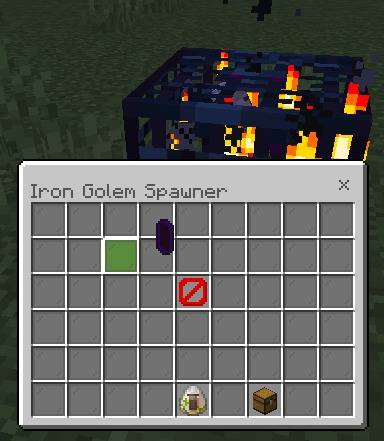
empty_spawner.jpeg
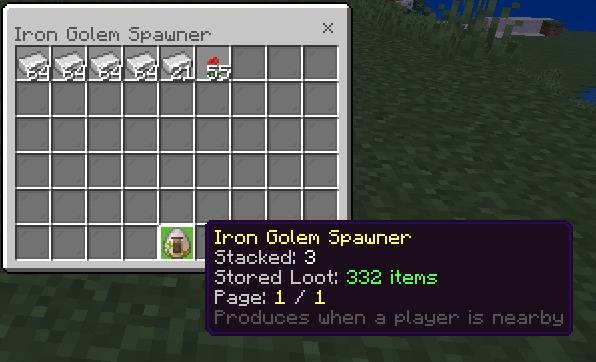
spawner_with Item.jpeg
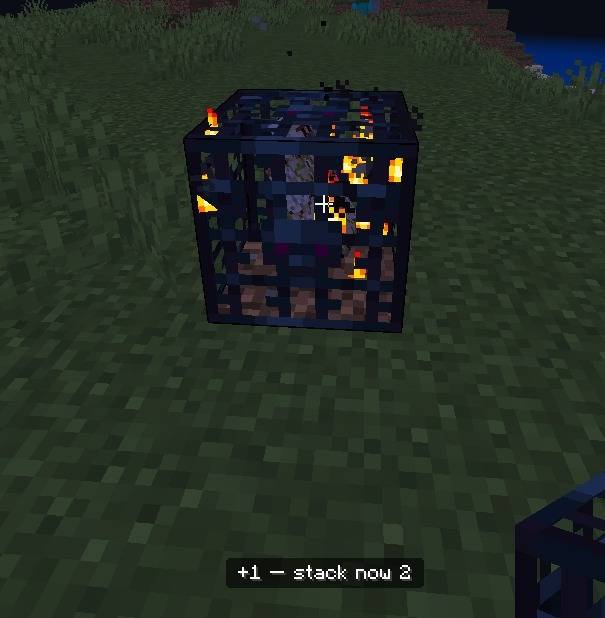
Stacking Spawners.jpeg
Description
🍩 DonutSMP Spawner System [Bedrock Edition]
Bring the signature spawner economy mechanics of DonutSMP directly to your Minecraft Bedrock server or realm! This addon introduces high-efficiency virtual stacked spawners coupled with an intuitive 54-slot chest collection GUI, preventing entity lag completely while delivering pure automation.
Announcement: 🚨 I need your feedback for the next Spawner System update!
Hey everyone! Thanks for using the DonutSMP Spawner System. I’m planning the next update and want to know how you prefer to play.
Should this addon support only Shop-bought spawners, or should it also support naturally generated Dungeon spawners?
Let me know what you want to see:
Option A: Only Spawners bought from a Shop/Economy system.
Option B: Only naturally generated Spawners from Dungeons.
Option C: Support BOTH Shop and Dungeon spawners (maybe with a toggle).
Reply in the comments [or click this link to vote https://discord.gg/Z8ZjDf9X3e and let me know!
⚡ Key Highlights
- Virtual Drop Production: No physical mob entities spawn into the world. Drops accumulate directly inside the spawner’s virtual storage buffer, keeping server tick rates pinned at 20 TPS.
- Smart Stacking & Unstacking: Stack dozens or hundreds of spawners into a single block. Break them one by one or batch-remove stacks with sneak actions.
- 54-Slot Chest UI: Open an interactive double-chest interface to inspect current stack stats, switch loot pages, or click "Claim All".
- Anti-Grief Ownership: Only the player who placed the spawner can add to the stack.
- Over 30+ Supported Mobs: Full support for passive mobs, hostile mobs, Nether/End mobs, and 1.21 additions like the Breeze and Bogged.
⚠️ Administrator Setup (CRITICAL — READ FIRST)
Before players can use any spawner type on the server, an administrator must configure each mob spawner type once in the world.
Why is this required?
Minecraft Bedrock does not allow script addons to generate raw spawner block NBT (the spinning mob inside the cage and native spawn parameters) out of thin air. Instead, this system uses an automatic in-world structure caching engine.
When an Admin configures a spawner with a spawn egg, the system captures that spawner's vanilla data (mystructure:spawner_<mob>) and saves it permanently to the world save.
IMPORTANT:
Admins MUST configure that spawner type before distributing or using!givespawner!
If an admin runs!givespawner <player> <count> <mob>for a mob type that has never been configured in the world, the spawner will be missing its vanilla spinning mob animation, flame particles, and native spawn data.
How Admins Configure Spawner Types (One-Time Setup):
- Give yourself a blank spawner by typing in chat:
!givespawner @s 1 - Place the spawner down on the ground.
- Take the Spawn Egg for the mob you want to enable (e.g., Cow Spawn Egg, Blaze Spawn Egg, Iron Golem Spawn Egg).
- Right-click the spawner with the spawn egg.
- You will see a confirmation message in chat:
✔ Spawner configured for <Mob Name>. - The system has now cached this mob spawner type in the world! You can now mine it with Silk Touch, put it into distribution, or hand it out using commands.
- Repeat this simple 1-minute step once for any mob types you plan to offer on your server.
🛠️ Admin Commands & Player Distribution
Only players with Operator (OP) status or the admin tag can configure spawners with eggs or use spawner commands.
Give Spawner Command:
!givespawner <player|@s> [count] [mob]
Examples:
!givespawner @s 1— Gives 1 blank spawner for admin configuration.!givespawner Steve 5 cow— Gives Steve 5 Cow Spawners (only works properly if Cow was already configured by an admin!)!givespawner @s 16 iron_golem— Gives 16 Iron Golem Spawners.!givespawner @s 64 blaze— Gives 64 Blaze Spawners.
🏪 How Players Get Spawners (Shop Integration)
This addon does not distribute spawners to players automatically. To integrate this into your server's economy, you must set up a server shop (such as an NPC shop, command block shop, or a UI economy addon). Have your shop system execute the !givespawner <player> <count> <mob> command whenever a player successfully purchases a spawner.
Shop System: https://www.curseforge.com/minecraft-bedrock/addons/shop-sell/preview
WARNING:
Regular players cannot use spawn eggs on spawners. Attempting to do so will display:
⚠ Only an admin can configure or change a spawner's mob type.
⚙️ Advanced Configuration (spawner_config.js)
Server owners can customize how spawners behave by editing the spawner_config.js file located inside the Behavior Pack's scripts folder.
- Cooked Drops: By default, passive mobs drop raw food. If you want mobs like cows, pigs, and chickens to automatically produce cooked food, open
spawner_config.jsand change the setting:- Default:
export const COOKED_DROPS = false; - Change to:
export const COOKED_DROPS = true;
- Default:
🎮 Player Guide: How to Use
1. Placing Spawners
- Place your configured spawner anywhere in your base or farm.
- As soon as it is placed, you become the owner of that spawner block.
- A single spawner starts at 1x Stack.
- It will begin producing resources whenever a player is nearby and vanilla spawn conditions (light level, clear space) are met.
- Zero Mob Lag: You will not see loose mobs running around lagging your base. Mobs are virtually converted directly into items inside the spawner storage!
2. Opening Spawner Storage
To collect drops from your spawner:
- Make sure your main hand is completely empty (bare hand).
- Right-click the placed spawner.
- The 54-Slot Double Chest Collection Menu will open.
Inside the Collection Menu:
- Loot Grid (Slots 0 – 44): Shows your stored items in stacks of up to 64.
- Previous / Next Page (Slots 45 & 53): Navigate through multiple pages if your spawner has a large variety of drops.
- Spawner Info (Slot 49): Displays the mob type, current stack size, and total stored items.
- Claim All (Slot 51): Click the chest icon to instantly collect all stored items into your inventory.
- Single Stack Collection: Click any specific item stack in the menu to withdraw only that stack.
Full Inventory Protection:
If your inventory has no free space, the "Claim All" button will turn into a barrier icon and warn you:⚠ Your Inventory is Currently Full. Clear space in your inventory to claim your loot!
3. Stacking Spawners (DonutSMP Style)
Upgrade production without cluttering your base by stacking spawners:
- Add +1 to Stack: Hold a matching spawner in your hand and Right-Click your placed spawner.
- Dump All (Batch Stack): Sneak + Right-Click your placed spawner while holding matching spawners to instantly dump your entire held stack into the spawner!
- The action bar displays:
+X — stack now Y. - Anti-Griefing Security: Only the player who placed the spawner can add spawners to the stack. Other players cannot hijack or interact with your stack.
4. Mining & Moving Spawners
To pick up or move your spawner:
- Requirement: You MUST use a pickaxe enchanted with Silk Touch (Iron, Gold, Diamond, or Netherite).
- Single Un-stack: Normal break removes 1 spawner from the stack and drops it as an item. The remaining stack stays placed and continues working!
- Fast Un-stack (Batch): Sneak + Break removes up to 64 spawners at once from the stack.
- Breaking the Last Spawner: Breaking when 1 spawner is left removes the block completely.
CAUTION:
Always claim your loot before mining!
Breaking or un-stacking a spawner will purge any uncollected items currently stored in its buffer. Open the storage with a bare hand and click "Claim All" first!!
📋 Complete Supported Mob Types & Drops
Every spawner includes full item lore indicating exactly what drops it generates:
| Mob Type | Drops Produced |
|---|---|
| Cow | Raw Beef, Leather (Drops Steak if COOKED_DROPS is true) |
| Pig | Raw Porkchop, Saddle (Drops Cooked Porkchop if COOKED_DROPS is true) |
| Sheep | Raw Mutton, White Wool (Drops Cooked Mutton if COOKED_DROPS is true) |
| Chicken | Raw Chicken, Feather, Egg (Drops Cooked Chicken if COOKED_DROPS is true) |
| Iron Golem | Iron Ingot, Poppy |
| Zombie | Rotten Flesh, Iron Ingot, Carrot, Potato |
| Skeleton | Bone, Arrow, Bow |
| Creeper | Gunpowder |
| Spider | String, Spider Eye |
| Cave Spider | String, Spider Eye |
| Blaze | Blaze Rod |
| Enderman | Ender Pearl |
| Slime | Slimeball |
| Magma Cube | Magma Cream |
| Witch | Glowstone Dust, Redstone, Spider Eye, Sugar, Gunpowder |
| Wither Skeleton | Bone, Coal, Wither Skeleton Skull |
| Drowned | Rotten Flesh, Copper Ingot, Nautilus Shell, Trident |
| Husk | Rotten Flesh, Iron Ingot |
| Stray | Bone, Arrow |
| Bogged | Bone, Arrow, Tipped Arrow |
| Guardian | Prismarine Shard, Prismarine Crystals, Raw Fish |
| Elder Guardian | Prismarine Shard, Prismarine Crystals, Wet Sponge |
| Piglin | Gold Nugget, Ender Pearl |
| Piglin Brute | Gold Ingot |
| Zombified Piglin | Rotten Flesh, Gold Nugget, Gold Ingot |
| Hoglin | Raw Porkchop, Leather |
| Ghast | Ghast Tear, Gunpowder |
| Evoker | Emerald, Totem of Undying |
| Breeze | Breeze Rod |
| Shulker | Shulker Shell |
| Phantom | Phantom Membrane |
| Silverfish | Gunpowder, Bottle o' Enchanting |
❓ Frequently Asked Questions (FAQ)
Q: Why is my placed spawner not showing a spinning mob or flame particles?
A: The admin of the server has not configured that mob type in the world yet. Ask an admin to place a spawner and right-click it with the corresponding spawn egg once to cache its structure.
Q: Can regular players use spawn eggs to change what a spawner produces?
A: No. Only server Admins and OPs have permission to configure or change spawner mob types. Players can only place, stack, mine, trade, and collect from existing configured spawners.
Q: Can someone else steal or break my spawner?
A: Players can only stack into their own spawners. If someone mines an unprotected spawner using Silk Touch, they will receive the spawner item, but any loot inside the buffer is instantly destroyed to prevent stealing uncollected items. Use your server's land claim system to protect your base blocks!
Q: How do I open the spawner menu if I'm holding a block or tool?
A: Switch to an empty slot on your hotbar. Right-clicking with any item in hand (other than a matching spawner to stack) is ignored so you don't accidentally open the menu while building or holding weapons.
⚙️ Installation & World Settings
- Download and activate both the Behavior Pack (
BP) and Resource Pack (RP) on your world, realm, or BDS server. - Under World Settings > Experiments, toggle on:
- Beta APIs (Required for
@minecraft/serverV->Beta and@minecraft/server-uiV->Beta script engine execution).
- Beta APIs (Required for
- Ensure server administrators have OP permissions or run
/tag @s add adminto perform initial spawner caching.
📜 Credits & License
- Creator: SomMondal123
- License: All Rights Reserved.
DonutSMP Spawner [Plug-in] Team