Diving Helmet | Extended Underwater Breathing | Terraria Accessories
- By
Adds the Diving Helmet from Terraria: equip it in the Accessory Pouch to extend underwater breathing time to 90 seconds.

MCPEDL.png

Screen-1.jpeg

Screen-2.jpeg
Description
About
Diving Helmet adds a powerful Terraria-inspired underwater exploration accessory to Minecraft Bedrock.
Wear the Diving Helmet in your head armor slot or equip it through the Accessory Pouch to gain 75 seconds of reserve air before Minecraft's normal air bubbles begin to drain.
Features
- Adds the Diving Helmet accessory
- Extends total underwater breathing time from 15 to 90 seconds
- Shows the remaining reserve air in the status bar
- Works in the head armor slot or the Accessory Pouch
- Pouch use leaves your head armor slot free
- Does not need to stay in the hotbar
- Works together with the Breathing Reed for up to 180 seconds of total breathing time
- Adds no particles or distracting visual effects
How to use
Craft or obtain the Diving Helmet and wear it in your head armor slot. Alternatively, craft an Accessory Pouch, open its menu, and equip the helmet there to keep wearing your usual head armor. Enter the water and the reserve-air status bar will appear while the extra breathing time is active.
Open the Accessory Pouch with the pouch item or /accessories. For the optional reactive menu, use /accessories-ddui.
Crafting
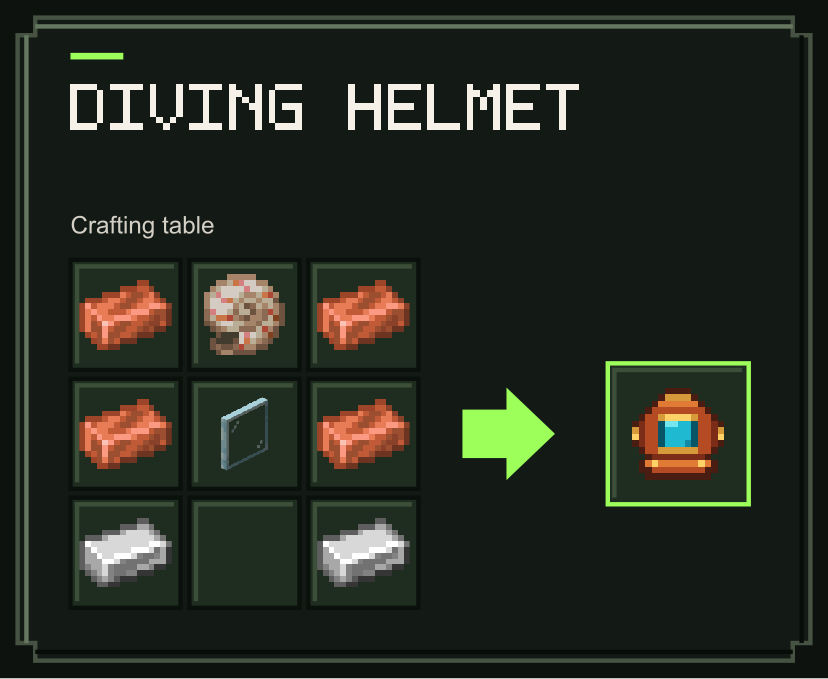
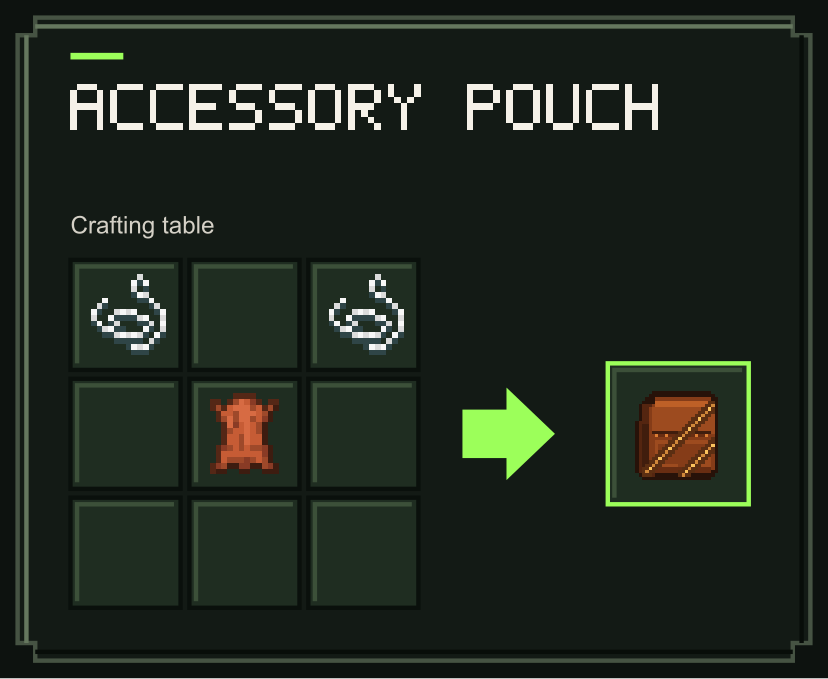
Recipes use the ingredients and quantities shown below. The Accessory Pouch recipe is included for equipping accessories.
Diving Helmet
Accessory Pouch
Notes
The add-on preserves Minecraft's normal air bubbles. Its reserve air is consumed first, followed by the standard 15 seconds of breathing time. Wearing a Diving Helmet and equipping another in the pouch does not stack their bonuses.
Requirements
- Minecraft Bedrock Edition 1.26.60 or newer
- Terraria Accessories Core (already built-in)

Diving Helmet | Extended Underwater Breathing | Terraria Accessories Team

Owner