Diamond's Form Builder
- By
An addon for Minecraft Bedrock to help make scripts server forms easily with little to no knowledge of scripting.
Diamond's Form Builder
What is it?
Diamond's Form Builder is an Addon that lets you create forms with ease. Lets you create different kinds of forms like Action Forms, Modal Forms, and Message Forms with different actions that it can perform. You can use and add it to your own pack.
How it works
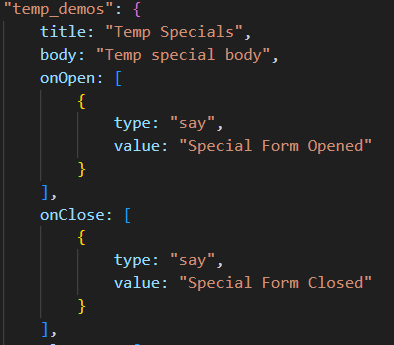
You can give the form a custom name like "temp_demos" so you can open them easily with certian methods like an item. Title is the title of the form, body is like a description(doesn't work with modal forms). onOpen will trigger the action(s) when the form is open and onClose will trigger whe the form is closed.
Next is an array of elements like buttons, headers, labels, dividers, and more!
Action Forms has Buttons, Headers, Labels, and Dividers
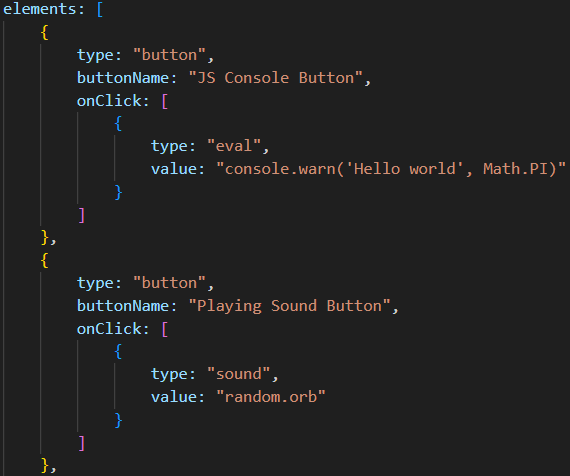
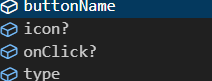
Type tells the form what element it is. Button name is the name of the button. onClick triggers the action(s) when that button is clicked.
The current actions for Action Forms and Message Forms are:
- Eval
- Form
- Sound
- Give
- Cmds
- Say
- Tellraw
- Cmd
- Add Tag
- Remove Tag
- Gamemode
- Teleport/TP
Modal Forms has Dividers, Headers, Labels, Dropdowns, Sliders, Toggles, Text Fields, Submit Button, & player. Type player makes a dropdown with all the players in that is world.
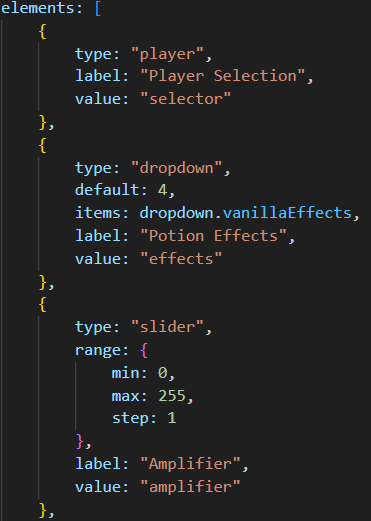
Now Modal Forms works differently. Each element has a property called value, which tells the form that this is what the element is for, and is redefined in the submit button. The image bellow shows you how it is redefined. Also, instead of the it being onClick, it is called onSubmit.
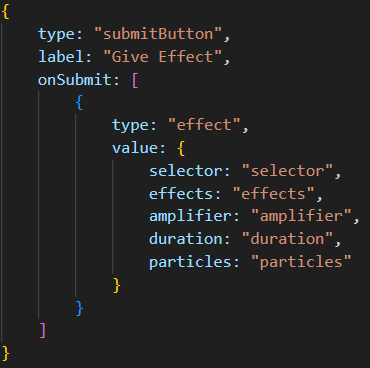
The current actions for Modal Forms are:
- Forms
- Give
- Add Tags
- Remove Tags
- Effect
- Scoreboard
- Message
- Confirm (Opens a message form as a confirmation form)
- Gamemode
- Teleport/TP
- Summon
All but the forms uses a selector field. The Selector can be a player from the dropdown with "selector", does the person who submitted the form with "self", or do all players in the world with "all", although I don't recommend doing that if it is all lot of people.
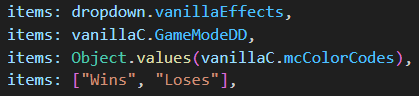
Dropdowns have multiple ways to do it, with the dropdown content file, the vanilla values, or even havin the list in the items array itself.
For Developers
This system is expandable if you want to expand with your own actions, but I would only recommend this if you have knowledge with making scripts. You can use the Config file an enable the Debug function if you want. Making an action for the Action/Message Forms is much easier to do than Modal Forms as they need more code to work.
This pack has 2 form files called form.js and modal.js that shows you all the different ways to use the forms. The file called index.js, the starting point, has 2 ways to open the forms, through the /scriptevent command and using an item. This also has a Typescript file under the 'def' folder, this is used in the form files to help with autocompletion and tells you what you need for what. If you create an new file and want this feature, just put this above the forms. You can delete it if you don't want that as it isn't required for the forms to function.

This is what it shows as an example for an Action Form.
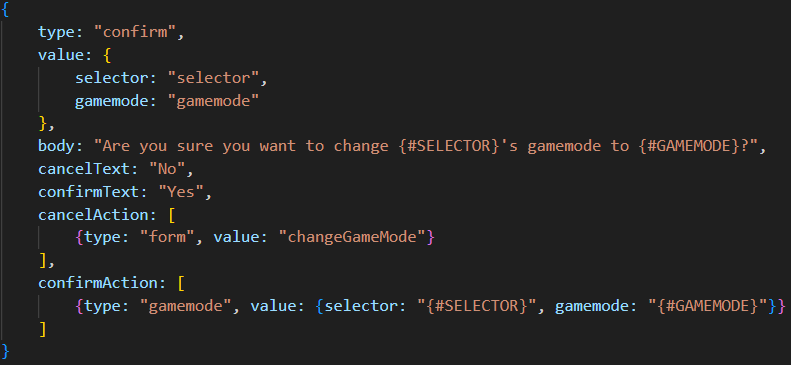
One more thing, the type called "confirm" is one of the most complicated one to use. It uses placeholders by doing {#ValueName}. The capitialisation doesn't matter, but I like using {#SELECTOR} but {#selector} will work as well. The confirm/cancel text is opitional and will default to Confirm/Cancel. The action works the same like normal, the placeholder is there transfer the main values to the action value.
The full documentation for this is on my site, DiamondProduction. It goes into depth on the values, types, elements, and actions.
The Diamond's Form Builder Team