Canopy
- By
Your all-in-one solution for technical information and quality of life tweaks, all customizable. A redstoner's best friend.

The best friend of all technical players.




This addon is the result of hundreds of hours of development. If you would like to show a token of appreciation for my work and support the future development of my addons, please consider buying me a coffee.

Canopy is a powerful addon for Minecraft Bedrock Edition that gives you greater insight and control over the game’s technical aspects.
Whether you're optimizing farms, gathering more in-depth game data, or just looking for tools to make survival more intuitive-without losing the vanilla feel-Canopy provides the solutions you need.
With Canopy, you gain access to new commands and gamerules designed to help you understand, refine, and optimize your world.
Key Features
- Live InfoDisplay – Get real-time stats on TPS, light levels, biome info, block/entity details, and more.
- Farm & Spawn Tracking – Optimize efficiency with hopper counters and precise spawn monitoring.
- Tick Speed Control – Slow down ticks to see what's going on in your builds.
- Modular & Expandable – Add functionality with community-built extensions.
- Simulated Players - Spawn and control simulated players.
- Built for Power and Performance – Designed to run effectively and efficiently.
- And much, much more!
Explore all the features in the Canopy Wiki!
Fan-Favorite Additions
InfoDisplay
The Canopy InfoDisplay is a HUD view that sits at the top right of your screen, giving you all kinds of useful information about your world in real time!
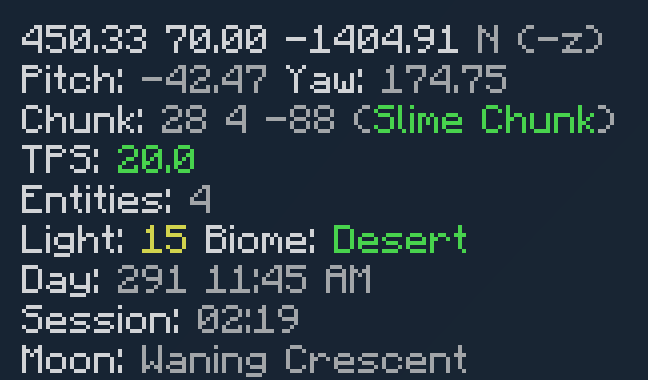
- coords - Shows the coordinates of the player truncated at 2 decimal places.
- cardinalFacing - Shows which direction the player is facing using N, S, E, W & the coordinate direction (ex. N (-z)).
- facing - Shows your facing yaw and pitch.
- chunkCoords - Shows the coordinates of the chunk you are in.
- slimeChunk - Shows whether the chunk you are standing in is a slime chunk.
- tps - Shows the server's current ticks per second (TPS).
- entities - Shows the number of entities in front of your player.
- light - Shows the light level of the block where your foot is.
- biome - Shows the biome you are currently in.
- worldDay - Shows the count of Minecraft days since the world began.
- timeOfDay - Shows the Minecraft day-cycle time as a 12-hour digital clock time.
- sessionTime - Shows the time since you joined.
- moonPhase - Shows the current phase of the moon.
- eventTrackers - Shows the counts of currently tracked events. (Tracking is controlled with ./trackevent.)
- hopperCounterCounts - Shows all active hopper counters in their respective colors.
- simulationMap - Shows a configurable map of simulated chunks -- nearby or far away.
- lookingAt - Shows the name of the block or entity you're currently looking at.
- signalStrength - Shows the signal strength of any block which has redstone power.
- peekInventory - Shows the inventory of the block or entity you're looking at. Can be particularly useful for debugging containers in spectator mode.
Featured Commands
Tick Command
Allows you to slow down and control the world's tick speed!
Camera Command
Allows you to switch to a survival-friendly spectator mode, or set up a tripod to view your work on-demand.
Hopper Counters
Hopper Counters are a great way to count items and test farm rates. There are 16 channels, each named after a Minecraft wool color (red, cyan, light_blue, etc.). To get set up with a hopper counter, just place a hopper that faces into a wool block. When you place down your first hopper counter, a timer which is used to calculate item rates starts. Note: A hopper counter will only be created when you place it down, not when the two blocks are connected in other ways (pistons, structure blocks, cloning, etc.). This can easily be accounted for by just breaking and replacing the wool or hopper after cloning or, as in the case with a piston, moving a hopper above the hopper connected to the wool block.
Featured Rules
Universal Chunk Loading
Minecarts load a 5x5 chunk area around them for ten seconds after they are spawned.
Flippin Arrows
Using an arrow on a block will flip, rotate, or open it. Additionally, keeping the arrow in your offhand while placing blocks will place them down in the opposite direction they would normally face.
TNT Duping
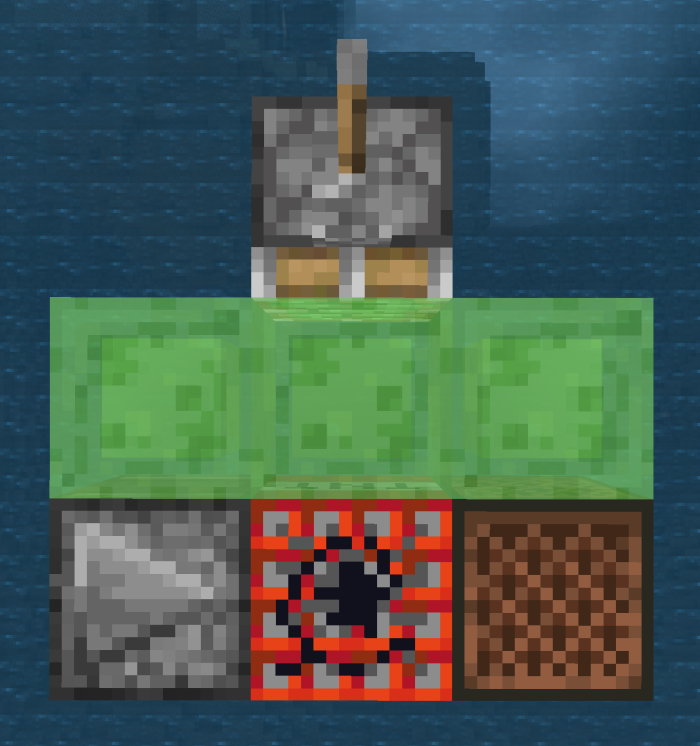
This rule enables TNT duping! To dupe a block of TNT, it must be moved by a piston, adjacent to a note block, then ignited. The TNT will drop with the normal priming momentum (unless changed by another rule) in the block below where it was ignited. To get a sense for it, try a setup similar to the image below.
Auto Item Pickup
This rule will automatically place any blocks you mine straight into your inventory. The Careful Break rule will do the same, but only when you're sneaking.
Low Durability Swap
When your tool hits 0 durability left, it will be swapped elsewhere in your inventory.
Refill Hand
Replenishes your hand with items from your inventory when you run out.
Player Sit
Allows players to sit down anywhere they like. Three quick sneaks will make you sit down on the floor.
Insta-mineable Deepslate & Endstone
Makes deepslate and endstone and their variants insta-mineable when using an efficiency 5 netherite pickaxe with haste 2.
And much, much more!
There are many, many more features, and you can learn about each of them on the Canopy Wiki: https://github.com/ForestOfLight/Canopy/wiki
Need Help?
Come join our Discord server! We'd love to help you out!
An Amelix Foundation Project

For more information about the Amelix Foundation and its projects, join the Amelix Foundation Discord server!
The Canopy Team


Owner