Mini Map
- By
A live mini map that shows the land around you, with trees, buildings, water, caves, and icons for the creatures nearby, plus a simple settings menu to make it your own.
Mini Map adds a small live map to your screen so you always know what is around you. It follows you as you walk, run, fly, or swim, and it draws the world from above in natural colors, so grass, sand, snow, water, forests, and stone all look the way they do in the game.
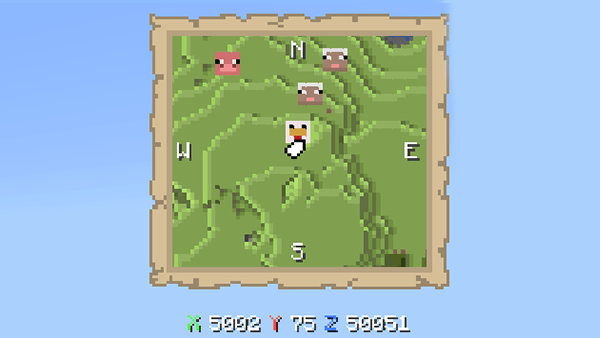
Hills and mountains get soft light and shadow, so you can tell high ground from low ground at a glance. Treetops, rooftops, and other tall builds show up at their real height, which makes forests, villages, and your own buildings easy to spot. Water is shown clearly, with deeper water looking darker.
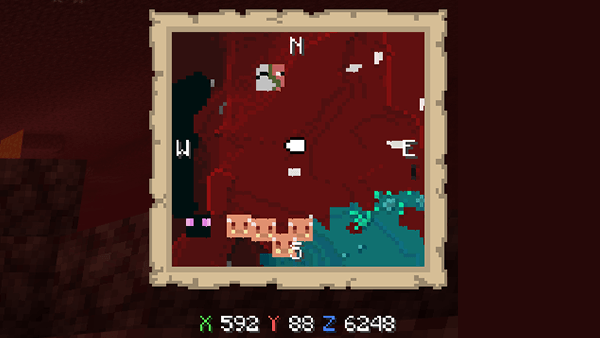
When you go underground, the map switches to a cave view that shows the tunnels and open spaces around you. It stays steady as you move up and down, so you can find your way through caves without getting lost.
Creatures near you appear on the map with their own small face icons, so you can tell a zombie from a cow before you see it. Any creature without its own icon shows up as a small square in its own color. Fish, rabbits, and camels are not shown, to keep the map clean. Your position is marked with a white arrow that turns to point the way you are facing, and the letters N, E, S, and W around the edge always show you which way is which.
The map loads the land around you a little at a time and remembers areas it has already drawn, so it stays quick and smooth while you play.
Settings
You can change how the map looks at any time by typing this command in the chat:
/minimap:settings
This opens a menu where you can choose a square or round map, place the map at the top or bottom of the right side of your screen, turn the map on or off, and show or hide the text information under the map. Your choices are saved for you, so they stay the same the next time you play. Every player can use this command, and cheats do not need to be turned on.
How to activate and use it
- Download the file and open it. The game will import both parts of the add-on on its own.
- Create a new world or edit an existing one, then go to Behavior Packs and turn on Mini Map.
- Make sure the Mini Map resource pack is turned on as well. It is usually added for you when you turn on the behavior pack.
- Join the world. The mini map will show up on your screen right away.
- Type /minimap:settings in the chat whenever you want to change the map shape, position, or what it shows.
- If you are updating from an older copy, remove the old packs from your world first, then turn on the new ones.
Mini Map Team

Owner