Better Beyond Borders
- By
Start inside a tiny 16 by 16 border and grow your world by finishing daily tasks and sleeping into a new day.
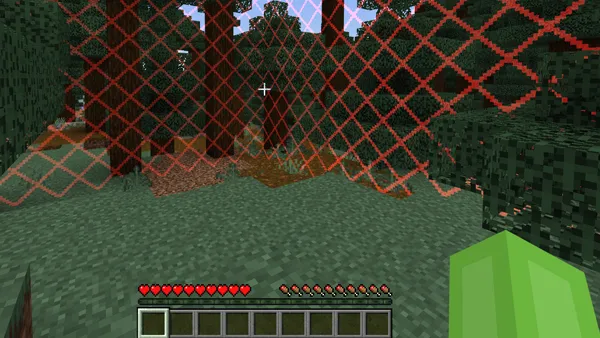
Beyond Borders turns the start of your world into a small, cozy challenge. When you join, the world is only 16 by 16 blocks wide, and a red wall keeps everyone inside. Every new day and every finished daily task pushes the border outward, so your world slowly opens up the more you play.

There is nothing to set up. The border is shared by everyone in the world and it is saved with the world, so it is still there when you come back. You do not need cheats or any special permission.
How the border grows
Every new day adds 2 blocks to each side of the border. You can also sleep through the night to bring the next day sooner. Every daily task you finish adds another 2 blocks to each side. If you finish all three tasks and the day changes, the border grows by 8 blocks on each side. The border stops growing at 10000 blocks wide.
Daily tasks
Each day the game gives the whole world three new tasks, and progress from every player counts together. Tasks include breaking dirt, grass, stone, sand, coal ore or logs, placing blocks, eating food, and hunting animals and monsters like zombies, skeletons, spiders, creepers, cows, pigs, sheep and chickens. The first days only use things you can find in a tiny world, and more kinds of tasks show up as the border gets bigger. Tasks you do not finish are replaced by new ones on the next day.
Your current task is always shown in the top left corner of the screen. It shows the task number, what to do, how far along you are, and the current size of the border. You only see one task at a time. When you finish it, you hear a sound, the panel says the task is complete, then it fades away and the next task slides in. After the last task of the day, the panel tells you to come back tomorrow. When the border grows from a task, a short line appears above your hotbar. When a new day starts, a big title shows the new size of the border.
The look of the border
A see through red wall with a moving diamond pattern appears along the edge of the border whenever you stand near it, so you always know where it ends. It fades in as you get close and fades out as you walk away, and it reaches from the bottom of the world to the sky. It is only a visual effect, so it never replaces or changes your terrain. When the border grows, the wall moves out to the new edge. If you get close to the wall, a red message above your hotbar tells you that you cannot pass the border. If you walk into the wall, you hear a sound and are gently moved back inside. You also cannot break or place blocks outside of it. The border works in the overworld. The nether and the end are not limited.
How to use
1. Join your world and look around inside your small starting area.
2. Look at the top left corner of the screen to see your current task. There are no commands to type.
3. Finish the task and the next one appears. Finish all three tasks together with your friends to make the border bigger.
4. Sleep through the night to start a new day and grow the border even more.
5. Stay inside the red wall. If you get close to it, you will see the message that you cannot pass the border.
Better Beyond Borders Team

Owner